
Why Example Video Scripts Are Your Secret Weapon in 2026
Here’s something that’ll make you rethink your content strategy: video content generates 1200% more shares than text and images combined. Yet 67% of marketers admit they struggle with scriptwriting.
The problem? Most creators burn 3-5 hours writing a single video script. Then they hit record, fumble through takes, and wonder why the engagement tanks. You’re not alone in this frustration.
What if you could skip the blank-page anxiety and jump straight to scripts that actually work? That’s exactly what you’re getting here—29 ready-to-copy example video scripts with complete dialogue, precise timing marks, and platform-specific formatting that converts.
Whether you’re creating 15-second Reels or 15-minute YouTube tutorials, you’ll walk away with downloadable templates for every video type. (And if you’re looking for even more options, check out our 17 Video Script Examples You Can Copy Today.)
The data’s clear: businesses using scripted video content see 66% more qualified leads per year. The correlation between solid scripts and viewer retention isn’t luck—it’s science. And you’re about to master it.
What Makes a Video Script Actually Work (Anatomy Breakdown)
A great video script isn’t just words on a page—it’s a blueprint that guides every second of your content.
Here’s what separates amateur scripts from professional ones:
The 7 Essential Elements
Every effective script contains: a hook (first 3-5 seconds that stops the scroll), a clear intro establishing what viewers will learn, a structured body delivering on that promise, smooth transitions between ideas, strategic calls-to-action, timing markers for editing, and visual cues that tell your editor exactly what to show.
Format Matters More Than You Think
Industry-standard scripts use a two-column format: video directions on the left, audio/narration on the right. Include scene headings, shot descriptions, and pacing breaks so your editor doesn’t have to guess. Scripts for voiceover differ dramatically from on-camera presentations—voiceover scripts can be denser, while on-camera needs natural pauses for your personality to shine.
The Magic Conversion Rate
Plan for 130-150 words per minute of spoken content. That’s your baseline. If you’re creating attention-grabbing YouTube content, write tighter—platforms reward faster pacing.
Common Mistakes That Kill Production
Missing timing markers forces your editor to guess. Unclear visual directions create unnecessary back-and-forth. No pacing breaks make your content feel rushed and exhausting. These formatting errors cost you time and money in post-production.
Platform-Specific Script Variations: Why One Size Never Fits All
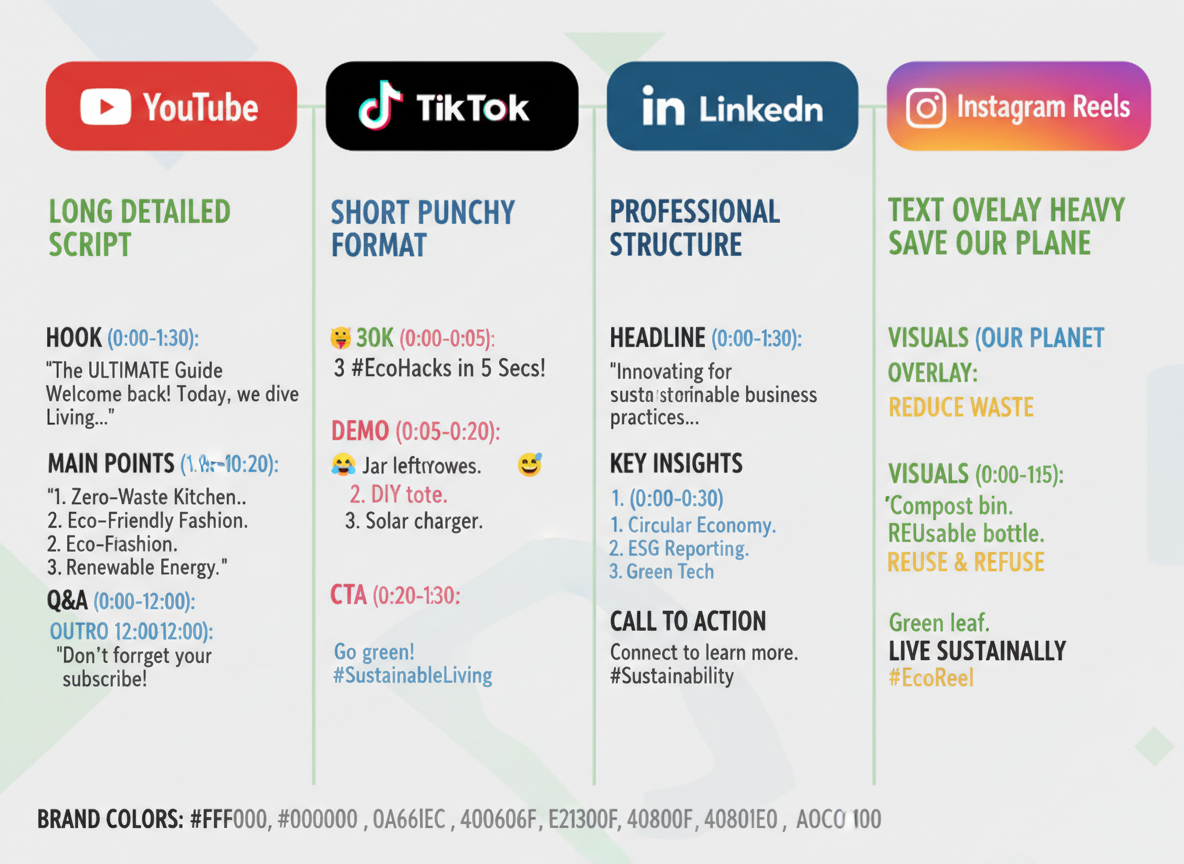
Here’s what kills most video marketing strategies: using the same script across every platform. Each channel has its own audience behavior, algorithm preferences, and viewing context.
YouTube long-form scripts (8-15 minutes) need detailed structure. You’ll want timestamps for key sections, chapter markers that boost SEO, and descriptions loaded with searchable phrases. Think of these as mini-documentaries where viewers expect depth and complete information.
Instagram Reels and TikTok scripts (15-60 seconds) flip the formula entirely. Your first three seconds make or break everything. Include specific cues for text overlays, note which trending audio you’re using, and remember—the hook isn’t just important, it’s everything. You need to stop the scroll immediately.
LinkedIn videos (1-3 minutes) require a professional tone without feeling stuffy. Lead with value, showcase your credentials naturally, and skip the entertainment-first approach. Your audience is scrolling during work hours, looking for insights they can actually use.
Facebook scripts should assume sound-off viewing. Write compelling captions that tell the story independently, and front-load your engagement hooks in the first frame.
YouTube Shorts versus TikTok? They look similar but aren’t twins. Shorts viewers tolerate slightly slower pacing, while TikTok demands rapid-fire cuts. CTA placement differs too—Shorts work better with mid-video prompts, while TikTok thrives on end-screen hooks.
Want more specific formatting for each platform? Check out our proven example video script templates covering all major channels.
15-Second Social Media Script Examples (Instagram Reels, TikTok, YouTube Shorts)
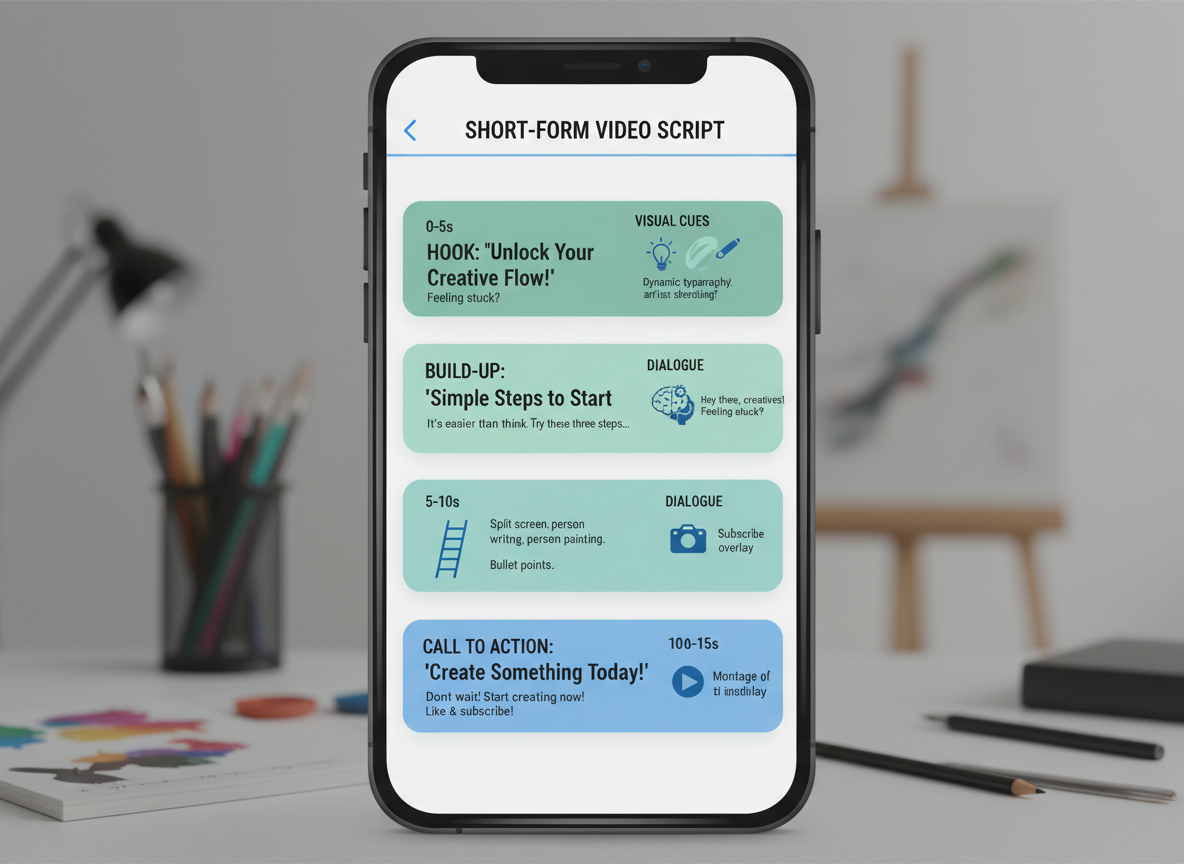
Example 1: Product Teaser Script
“Wait… you’ve been editing videos the hard way?” [Show frustrated face] “Not anymore.” [Quick product reveal] “Generate 60 videos in minutes.” [Show dashboard] “Link in bio.”
Word count: 18 | Timing: 12 seconds | Visual: Close-up to screen recording transition
Example 2: Quick Tip Format
“Here’s why your reels aren’t getting views.” [Pattern interrupt] “You’re posting at 3pm when your audience is offline.” [Show analytics] “Post at 7pm instead. Watch what happens.” [Results screenshot]
Word count: 24 | Timing: 14 seconds | Visual: Talking head to B-roll split
Example 3: Behind-the-Scenes
“Recording 47 videos today without saying a word.” [Show laptop setup] “AI voices, auto-captions, done.” [Fast-motion workflow] “This is actually insane.”
Word count: 17 | Timing: 13 seconds | Visual: POV workspace shots
Example 4: Trending Audio Challenge
“Showing my content creation process using [trending sound].” [Lip sync while demonstrating] “Try it and tag me!”
Word count: 14 | Timing: 15 seconds | Visual: Match audio beats to workflow clips
Example 5: Problem-Solution Micro-Content
“Stop.” [Hand gesture] “If you’re spending 4 hours per video, you’re doing it wrong.” [Shake head] “Automate it.” [Show tool] “You’re welcome.”
Word count: 18 | Timing: 11 seconds | Visual: Direct-to-camera with text overlays
30-60 Second Explainer Video Script Examples
Example 6: SaaS Product Explainer (45 seconds)
[0:00-0:08] [Upbeat music fade-in. Show frustrated person at desk with multiple tabs open]
Voiceover: “Spending hours managing your content calendar? There’s a better way.”
[0:09-0:25] [Screen recording: Product dashboard demo. Smooth transitions between features]
Voiceover: “ContentFlow lets you plan, create, and schedule all your content in one place. Drag-and-drop simplicity. AI-powered suggestions. Team collaboration that actually works.”
[0:26-0:38] [Split screen: Before/After comparison. Show time saved]
Voiceover: “What used to take five hours now takes thirty minutes. Over 12,000 marketers have already made the switch.”
[0:39-0:45] [CTA screen with button animation]
Voiceover: “Start your free 14-day trial today—no credit card required.”
—
Example 7: B2B Service Overview (60 seconds)
[0:00-0:12] [Professional office setting. Confident business owner]
Speaker on camera: “We partnered with 47 B2B companies last year. Every single one faced the same problem—lead generation that barely converted.”
[0:13-0:35] [Motion graphics showing process flow]
Voiceover: “Our three-step system identifies your ideal buyers, creates personalized outreach campaigns, and nurtures them until they’re ready to buy. No spam. No generic templates. Just results.”
[0:36-0:50] [Client testimonial clips, 3 seconds each. Show company logos]
Voiceover: “Companies like yours are seeing 340% ROI within six months.”
[0:51-0:60] [Return to speaker, direct eye contact]
Speaker: “Book a strategy call this week, and we’ll audit your current process—completely free.”
—
Example 8: App Feature Demo (50 seconds)
[0:00-0:07] [Screen recording starts. Finger tap animation on phone]
Voiceover: “Let me show you how FitTrack changes your entire workout routine.”
[0:08-0:20] [Screen recording: Navigate through app. Highlight touch points]
Voiceover: “Tap ‘Start Workout.’ Choose your goal. The app builds a custom plan instantly—exercises, sets, rest periods, everything.”
[0:21-0:35] [Screen recording: Progress tracking interface. Show graphs animating upward]
Voiceover: “Track your progress automatically. See your strength gains in real-time. Get personalized adjustments every week based on your performance.”
[0:36-0:43] [Screen recording: Social features. Show example posts]
Voiceover: “Share achievements with your crew. Stay motivated together.”
[0:44-0:50] [App icon with download button pulse effect]
Voiceover: “Download free. Premium features unlock everything for $4.99.”
—
Example 9: Animated Explainer (55 seconds)
SCENE 1 [0:00-0:10] [Minimalist animation: Character drowning in papers]
Text on screen: “Tax season shouldn’t feel like this”
Voiceover: “Every year, small business owners waste 80 hours on tax prep.”
SCENE 2 [0:11-0:30] [Animation: Papers transform into organized digital folders]
Voiceover: “TaxEase automates the entire process. Connect your bank accounts. We categorize every transaction automatically. Find deductions you didn’t even know existed.”
SCENE 3 [0:31-0:45] [Animation: Split screen showing traditional vs. TaxEase method]
Voiceover: “While others stress, you’ll file in minutes. IRS-approved accuracy. Maximum refunds guaranteed.”
SCENE 4 [0:46-0:55] [Character relaxing with laptop. Checkmark appears]
Text on screen: “TaxEase.com”
Voiceover: “Join 50,000 smart business owners. Try it free for 30 days.”
—
Example 10: Educational Concept (40 seconds)
[0:00-0:08] [Visual: Water flowing through different-sized pipes]
Voiceover: “Think of your website’s bandwidth like water pipes in your house.”
[0:09-0:20] [Animation: Show pipe sizes changing, water flow increasing]
Voiceover: “More visitors mean you need bigger pipes. If your pipes are too small, everything slows down—or stops completely.”
[0:21-0:32] [Visual: Traffic meter with color zones. Show needle moving]
Voiceover: “Most hosting plans give you a tiny pipe. One viral post? Your site crashes exactly when you need it most.”
[0:33-0:40] [Clean graphic: Product logo]
Voiceover: “That’s why ScaleHost gives you unlimited bandwidth from day one.”
1-3 Minute Product Launch & Demo Video Scripts
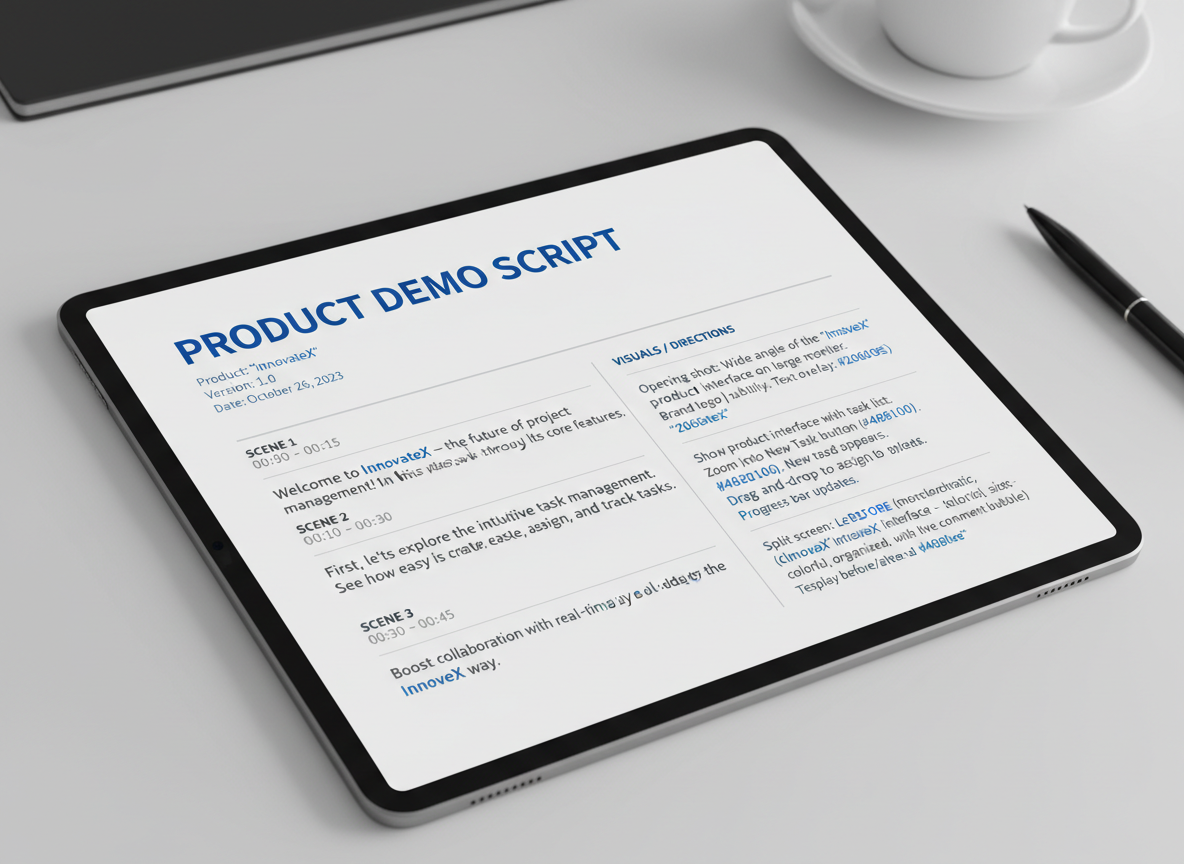
Example 11: Product Launch Announcement Script (2 Minutes)
[0:00-0:10] Hook
“We’ve been building something in secret for six months. Today, it changes everything.”
[0:10-0:30] Problem Setup
“Creating professional video content shouldn’t take 40 hours a week. You’re juggling scripts, editing, optimization—and still not getting the results you need.”
[0:30-1:15] Solution Reveal
“Introducing [Product Name]. Here’s what makes it different: [Feature 1] cuts your production time by 70%. [Feature 2] optimizes for every platform automatically. And [Feature 3]? It actually learns what your audience wants.”
[B-roll: Quick feature montage with dynamic transitions]
[1:15-1:45] Social Proof
“Beta testers doubled their video output in week one. Sarah from Portland published 12 videos last month—she used to manage three.”
[Graphic: Testimonial overlay with results]
[1:45-2:00] CTA
“Early access opens Friday at 9 AM. First 500 get lifetime pricing. Link below.”
Example 12: Feature Walkthrough with Chapters (2.5 Minutes)
[0:00-0:15] Introduction
“Let me show you exactly how this works. I’ll cover five features in under three minutes.”
[Graphic: Chapter menu overlay]
[0:15-0:45] Chapter 1: Dashboard Overview
“When you log in, everything’s right here. Projects on the left, recent activity center, analytics top right.”
[B-roll: Screen recording with cursor highlights]
[0:45-1:15] Chapter 2: Quick Start Template
“Click ‘New Project,’ choose a template. There are 89 options. I’m selecting this one because it’s perfect for product demos.”
[1:15-1:45] Chapter 3: Customization
“Change colors, fonts, timing—whatever you need. This preview updates in real-time.”
[1:45-2:10] Chapter 4: AI Enhancement
“Here’s where it gets interesting. Click ‘Optimize,’ and watch what happens to your script.”
[B-roll: Before/after split screen]
[2:10-2:30] Chapter 5: Export & Distribution
“One click exports to YouTube, Instagram, TikTok—formatted correctly for each platform. No manual resizing.”
Example 13: Before-and-After Transformation (90 Seconds)
[0:00-0:20] The Before
“This was Mike’s channel three months ago. Seven videos. 342 subscribers. Sporadic uploads because production took forever.”
[B-roll: Screenshot of old channel]
[0:20-0:50] The Shift
“He started using [solution] in January. Same person, same niche, completely different system. Now he produces four videos weekly using templates that actually work.”
[B-roll: New channel dashboard showing growth curve]
[0:50-1:15] The After
“Today? 47 videos published. 12,400 subscribers. Consistent posting schedule. And here’s the thing—he spends less time creating.”
[Graphic: Side-by-side metrics comparison]
[1:15-1:30] The Bridge
“You’re watching this because you want the same transformation. It’s doable. Start here.”
Example 14: Competitive Comparison (2 Minutes)
[0:00-0:15] Setup
“Everyone asks: ‘How’s this different from [Generic Alternative]?’ Fair question. Let’s compare side by side.”
[Graphic: Comparison table appears]
[0:15-0:45] Feature Comparison
“Both offer templates. But here’s the difference: theirs are static. Ours adapt based on your performance data. Both have editing tools—ours includes AI script optimization built in.”
[0:45-1:15] Price & Value
“Their pro plan: $97/month for 20 projects. Ours: $67/month, unlimited projects, plus you get our entire template library—that’s 300+ proven scripts.”
[B-roll: Calculator animation showing savings]
[1:15-1:45] Real Difference
“But honestly? The biggest gap is support. They offer email response in 48 hours. We have live chat, plus a community of 8,000 creators sharing what works.”
[1:45-2:00] Decision Point
“Choose what fits your workflow. If you want faster results with better support, you know where to go.”
Example 15: Limited-Time Offer with Urgency (1 Minute)
[0:00-0:10] Immediate Hook
“This pricing ends Sunday night. I’m not kidding—here’s why.”
[0:10-0:25] The Offer
“Lifetime access for $197. That’s it. No monthly fees, no hidden costs. Everything we build, you get forever.”
[Graphic: Price comparison with regular pricing crossed out]
[0:25-0:40] Why the Deadline
“We’re capping this at 1,000 lifetime accounts. We’ve sold 847. The server costs alone make this unsustainable long-term, but we wanted to reward early supporters.”
[0:40-0:50] Social Proof
“Jenny grabbed hers Tuesday. She’s already published six videos. Tom bought in Wednesday—he’s calling it his best investment this year.”
[B-roll: Quick testimonial clips]
[0:50-1:00] Final Push
“Timer below shows exactly how long you have. When it hits zero, this goes back to $67/month. Your choice.”
[Graphic: Countdown timer overlay]
Testimonial & Case Study Video Script Examples
Nothing sells like real results from real people. Let’s look at four proven testimonial formats that actually convert.
Example 16: Customer Success Story Interview Script (3 minutes)
Opening (15 seconds):
“Hi, I’m [Name] from [Company]. Six months ago, I was drowning in [specific problem].”
The Struggle (45 seconds):
- What was your biggest challenge before?
- What had you tried that didn’t work?
- How did this affect your business/life?
The Solution (60 seconds):
- What made you choose this product/service?
- Walk us through your experience.
- What surprised you most?
The Results (45 seconds):
- What changed after using it?
- Share specific numbers or metrics.
- What would you tell someone considering this?
Closing (15 seconds):
“Now I’m [specific result]. It completely transformed [outcome].”
Example 17: Case Study Narrative Format (2.5 minutes)
[ON-SCREEN: Company logo + Client name]“When [Client] came to us, they had a problem. [Describe situation with specific data].”
[SHOW: Graph/chart of before metrics]“Here’s what we did: [Solution framework].”
[B-ROLL: Process shots, team working]“Three months later? [Results with percentages].”
[SHOW: After metrics visualization]Example 18: Before-and-After Transformation (2 minutes)
Split-screen works beautifully here. Show the “before” state visually while your client describes their frustration. Then transition to “after” footage showcasing their success. Keep it tight, emotional, and data-backed.
Example 19: Mini-Testimonial Compilation (90 seconds)
String together 8-10 customers each delivering one punchy statement (8-10 seconds each). Fast cuts, upbeat music, end with your call-to-action.
Pre-Interview Questions That Guarantee Usable Soundbites:
Send these 24 hours before filming:
- “Complete this sentence: Before [product], I was struggling with…”
- “What’s the ONE word you’d use to describe your experience?”
- “If you were talking to your best friend about this, what would you say?”
Editing Notes:
Don’t worry about filler words during filming—you’ll clean them in post. Cut “um,” “uh,” and long pauses. Jump cuts look natural in testimonials. Keep authentic emotion, even if someone tears up or laughs awkwardly. That’s what makes it believable.
How-To & Tutorial Video Script Examples (5-15 Minutes)
Tutorial videos need structure that keeps viewers watching until the end. Here are five proven scripts that work:
Example 20: Step-by-Step Tutorial with Chapter Timestamps (8 minutes)
INTRO (0:00-0:30): “I’m going to show you exactly how to [specific outcome] in the next 8 minutes. I’ve broken this into four simple steps, and by the end, you’ll be able to do this yourself.”
CHAPTER 1 (0:30-2:30): First major step with detailed demonstration
RETENTION HOOK (2:30): “Wait—most people miss this crucial detail in step two…”
CHAPTER 2 (2:30-4:30): Second step with common mistakes to avoid
PROGRESS CHECK (4:30): “You’re halfway there. Let’s keep going…”
Example 21: Software Walkthrough with Screen Recording Directions (10 minutes)
Opens with the end result, then walks through: “Click File → Settings → Advanced. You’ll see three options here…”
Example 22: Recipe/Craft Tutorial with Overhead Shot Cues (6 minutes)
Includes camera directions: [OVERHEAD SHOT] “Add ingredients while camera shows workspace from above.”
Example 23: Educational Deep-Dive with Example Slides (12 minutes)
Similar structure to our blog writing templates, this format builds knowledge progressively with visual aids marking each concept.
Example 24: Troubleshooting Guide with Problem-Solution Chapters (7 minutes)
Addresses three common problems, each with clear solutions and timestamps for easy navigation.
Brand Story & About Us Video Scripts
Example 25: Founder Origin Story (3 minutes)
“I launched this company in my garage with $500 and a belief that [problem] didn’t have to be this hard. Three years ago, I was [relatable struggle]. That failure taught me [key lesson]. Today, we’ve helped over 10,000 customers transform their [outcome].”
Structure this with rising tension, a pivot moment, and resolution. Show vulnerability—audiences connect with imperfection.
Example 26: Company Mission & Values (2 minutes)
“We exist because [problem] affects millions. Our mission:
. Every product decision starts with one question: Does this serve our customer? We’re not just building software—we’re building freedom for entrepreneurs like you.”
Keep it punchy. One value per 20 seconds with real-world examples.
Example 27: Team Introduction Montage (90 seconds)
“Meet Sarah, our head of customer success who’s answered 47,000 support tickets… This is Marcus, who codes at 3am because he’s obsessed with speed…”
Quick cuts. 10-15 seconds per team member. Show personality, not corporate headshots.
Example 28: Brand Evolution Timeline (4 minutes)
“2020: One person, one laptop. 2022: First 1,000 customers. 2024: Expansion to 47 countries…”
Use archival footage, screenshots, and metrics. Visual proof builds credibility.
For personal branding elements, check out our Personal Brand Statement Generator: 7 Best Free Tools + Templates to Stand Out in 2026.
Pacing Notes: Layer soft piano during vulnerable moments. Build to uplifting strings for vision statements. Strategic silence creates emotional weight.
Social Media Ad & Promotional Video Scripts
Social media ads need to stop thumbs in their tracks. Here’s an example video script that follows the AIDA framework (Attention, Interest, Desire, Action):
Example 29: Facebook/Instagram Ad Script (30 seconds)
[Hook – First 3 seconds]
“Still spending hours editing videos?”
[Interest – Seconds 4-10]
“I was too, until I found a tool that cuts my video creation time by 80%. No complicated software, no expensive freelancers.”
[Desire – Seconds 11-23]
“Now I create professional videos in minutes, not hours. My engagement tripled, and I’m finally consistent with content.”
[Action – Seconds 24-30]
“Try it free for 14 days. Link in bio. No credit card needed.”
Platform Compliance Notes: Always include disclosures like #ad or “Sponsored” in captions. Keep text overlays minimal—Facebook penalizes ads with excessive text. Use captions since 85% of viewers watch without sound.
A/B Testing Tips: Test three hook variations against each other. Switch your CTA between “Learn More,” “Try Free,” and “Get Started” to see what converts best.
Budget-Conscious Production: You don’t need fancy equipment. Record on your phone with natural lighting near a window. Authenticity beats polish on social platforms.
Script Formatting Standards & Industry Conventions
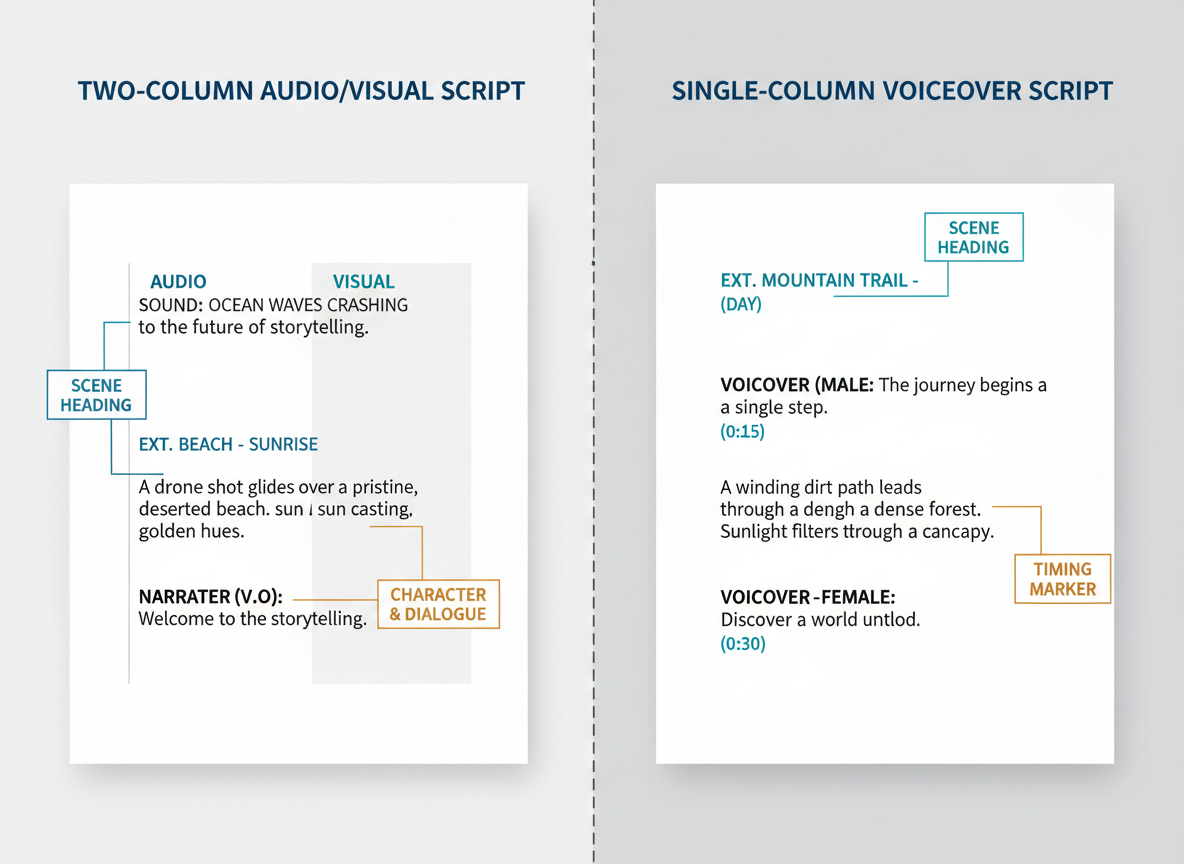
Here’s the truth: messy formatting kills your credibility before anyone reads a single line of dialogue.
The two-column format is your industry standard for most video productions. Audio and dialogue sit on the left, visual directions on the right. This lets your director, camera operator, and talent scan their respective responsibilities without hunting through paragraphs.
For voiceover-only content (explainer videos, tutorials), the single-column format works better. No need for complexity when there’s no on-camera talent.
Scene headings follow strict conventions: INT./EXT., LOCATION, TIME OF DAY (like “INT. COFFEE SHOP – MORNING”). It’s not pretentious—it’s practical.
When writing shot descriptions, be clear but humble. “Close-up on product label” works. “Dutch angle with dramatic rack focus while dolly tracking left” doesn’t. You’re guiding, not directing.
For timing markers, count roughly 150-160 words per finished minute for conversational delivery. Some writers prefer actual timecodes (00:45 – 01:12) when syncing to existing footage.
Version control saves headaches. Use file names like “ProductDemo_Script_v3_2026-01-15.docx” for collaborative workflows. Your future self will thank you.
Common Video Script Mistakes (Before & After Examples)
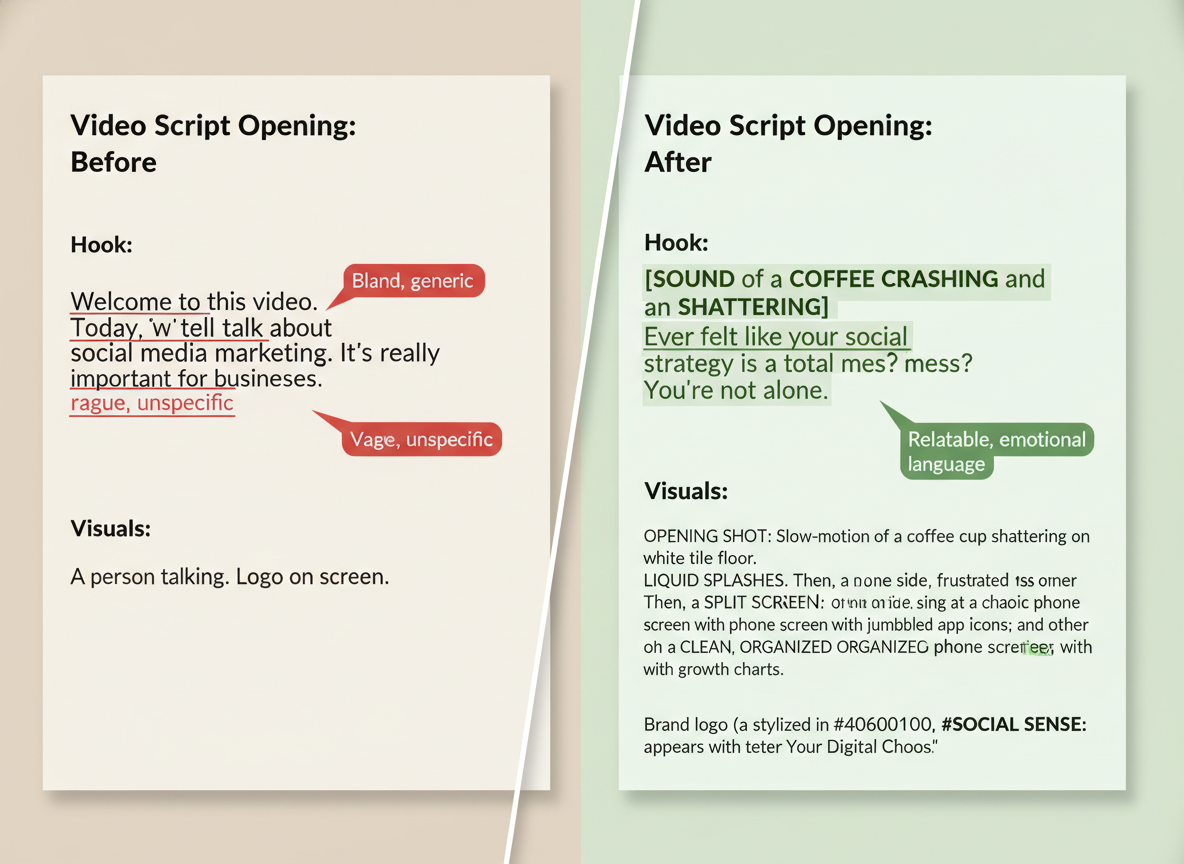
Mistake 1: Weak or Missing Hooks
Before: “Hi, I’m going to talk about email marketing today.”
After: “You’re losing 82% of potential sales in the first 3 seconds—here’s why.”
Mistake 2: Writing for Reading Instead of Speaking
Before: “It is imperative that one considers the ramifications of suboptimal content distribution methodologies.”
After: “Bad content planning? You’re wasting hours creating stuff nobody sees.”
Mistake 3: Missing Visual Directions
Before: “Then we’ll show the benefits.”
After: “[ON-SCREEN: 3 bullet points animate in] You’ll save time, money, and headaches.”
Mistake 4: Ignoring Platform-Specific Requirements
Before (Generic): “Welcome back to my channel. Today I’m discussing…”
After (TikTok-Optimized): “[JUMP CUT] Stop scrolling. This 15-second tip just saved me $847.”
Mistake 5: No Clear CTA or Multiple Conflicting CTAs
Before: “Like, subscribe, visit our website, download our guide, and follow us on Instagram.”
After: “Download your free script templates at testingcg.com—link below.”
Mistake 6: Incorrect Pacing and Timing Estimates
Here’s the reality: your first draft probably runs 30% too long. Most creators read scripts faster than they’ll actually speak them. Add pauses, visual breaks, and natural speech patterns—suddenly your “60-second” script hits 90 seconds. Always read aloud with a timer before finalizing.
Video Script Timing & Pacing Guidelines by Video Length
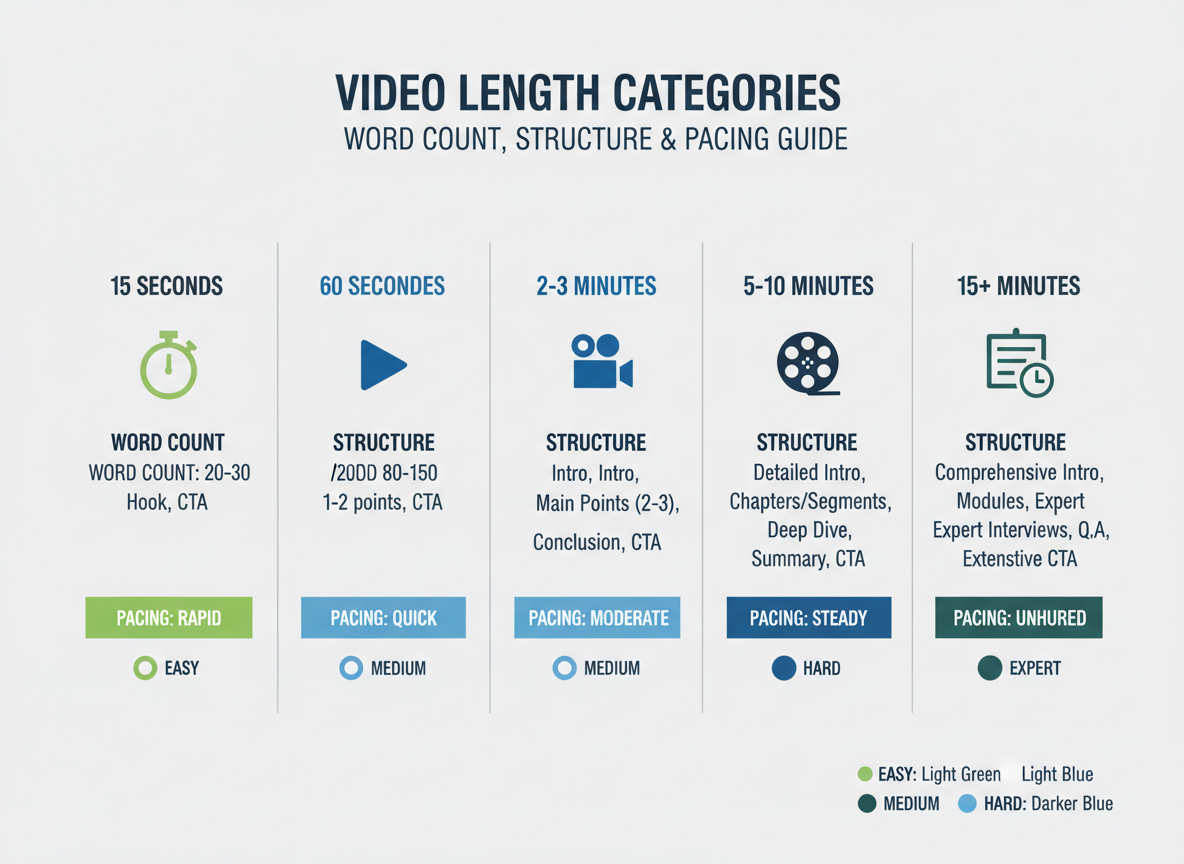
Getting your timing right makes the difference between viewers who stick around and those who bounce in seconds.
15-30 second scripts work best at 38-75 words. You’ve got time for one concept—that’s it. Skip the introduction and jump straight to your point. Think product teasers or quick tips.
60 second scripts need 130-150 words structured around a simple problem-solution format. Present the issue, offer your solution, and end with one clear call-to-action. No fluff, no tangents.
2-3 minute scripts should land between 260-450 words. Use a classic introduction-body-conclusion structure, but here’s the trick: drop a retention hook every 45 seconds. Tease what’s coming next or ask a provocative question.
5-10 minute scripts require 650-1500 words with chapter-style segments. Break up longer content with pattern interrupts—B-roll footage, graphics, or tone shifts—every 90-120 seconds to maintain attention.
15+ minute scripts need multiple segments with recap points and engagement questions sprinkled throughout. Your audience needs mental checkpoints.
Your speaking pace matters too. Educational content typically flows at 130 words per minute. Conversational pieces hit 150 wpm. Energetic, promotional content can push 170 wpm without feeling rushed.
Best Video Scriptwriting Tools & Software in 2026 (Free & Paid)
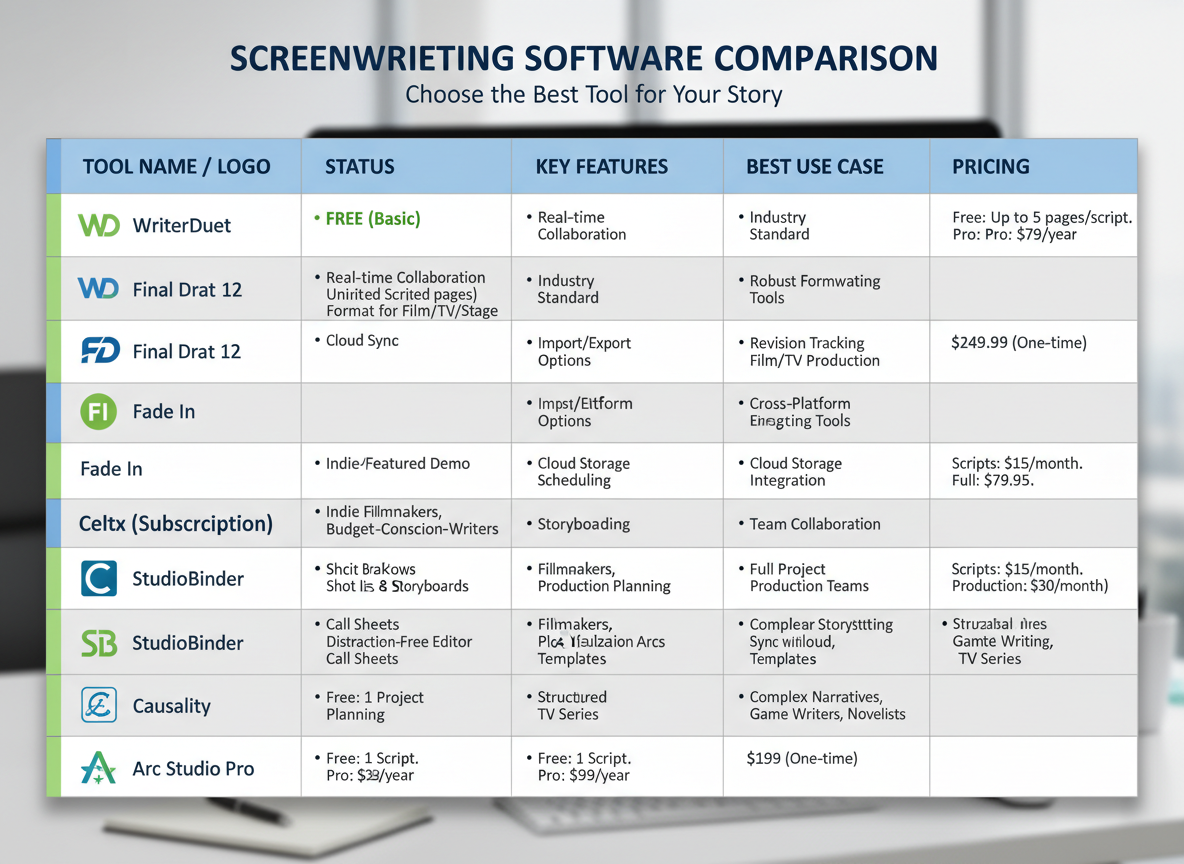
The right tools can cut your scriptwriting time in half. Let’s break down what actually works.
AI-Powered Script Generators
ChatGPT and Claude have become scriptwriting staples, both offering free tiers that handle basic video scripts surprisingly well. For heavier lifting, Jasper ($49-$125/month) specializes in marketing copy and video content—though its impressive $1.5B valuation came with premium pricing that doesn’t fit every budget.
Dedicated Scriptwriting Software
Professional tools like Celtx ($15/month) and StudioBinder (free-$29/month) offer collaboration features, scene breakdowns, and production planning. They’re overkill for social media scripts but perfect for longer-form content.
Free Alternatives That Actually Work
Google Docs with custom templates costs nothing and lets teams collaborate in real-time. Notion databases organize scripts by project, while Trello boards help visualize your content pipeline.
The Game-Changer for Repurposing
Testing CG flips the script entirely. Instead of writing from scratch, it converts existing videos into polished scripts in three clicks. You’re already creating content—why not repurpose it across platforms? It’s particularly powerful for maintaining brand voice across dozens of videos without burning hours on manual transcription.
Choose based on your volume: solo creators thrive with free tools, while teams producing 10+ videos monthly need dedicated software.
Video Script Review & Revision Process: The 3-Round Method
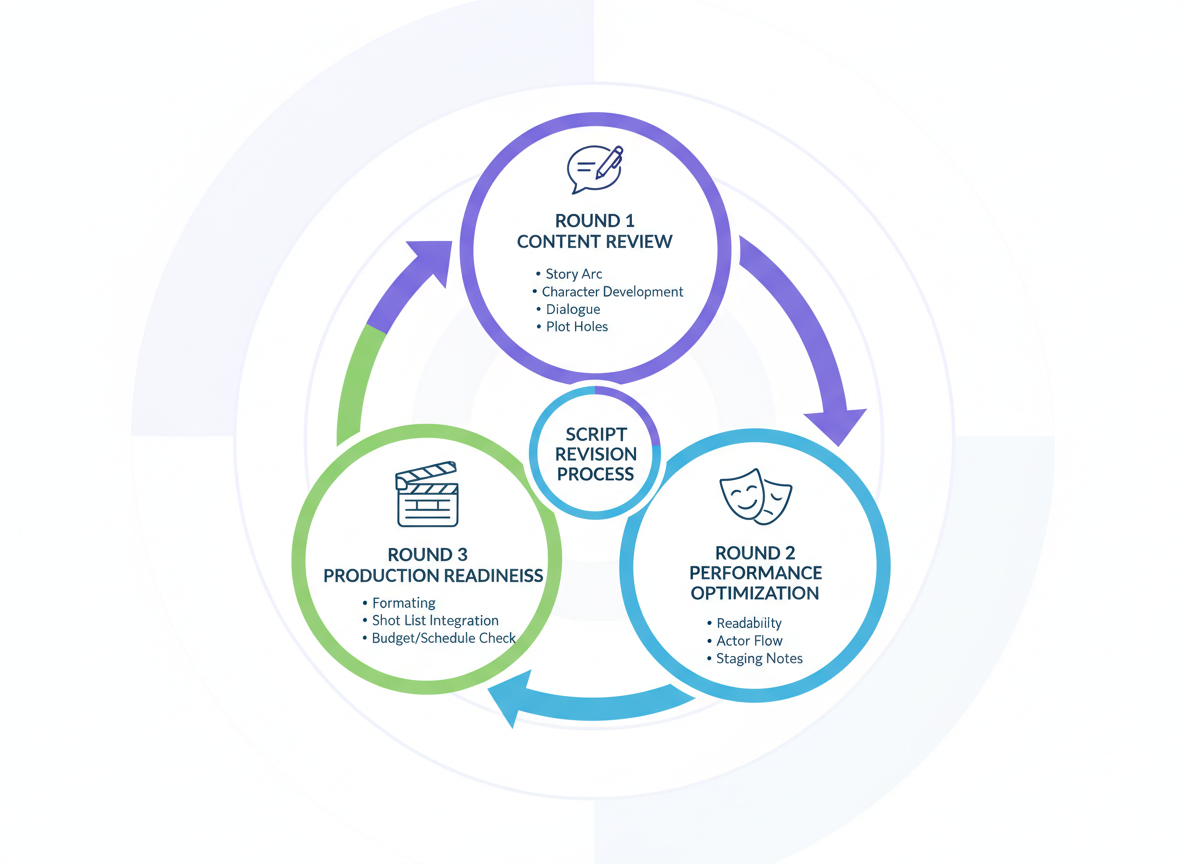
Here’s how we make every example video script bulletproof before hitting record.
Round 1: Content Review
Your first pass focuses on the message itself. Check messaging accuracy against your brief, verify brand alignment (does this sound like your company?), and fact-check every statistic. One wrong number can tank credibility fast.
Round 2: Performance Optimization
Now you’re hunting for engagement killers. Does your hook grab attention in three seconds? Is your CTA crystal clear? Where might viewers drop off? This round determines whether your script performs or just exists.
Round 3: Production Readiness
Time to get tactical. Read your script with a stopwatch—does it actually fit your target length? Can you realistically execute those visual ideas? We’ve seen gorgeous scripts die because nobody asked if they could actually film that “drone shot through a moving car.”
The Table Read Strategy
Speaking your script aloud catches about 80% of awkward phrasing, tongue-twisters, and unnatural transitions. If you stumble reading it, your talent will too.
Stakeholder Approval Checklist
Use a 15-question approval form covering objectives, brand compliance, and production feasibility. Set a 48-hour review window. This creates accountability without endless “just one more change” requests that derail timelines.
Dialogue Writing & Voiceover Best Practices
Your example video script needs to sound human, not like a corporate training video from 1997.
Start with contractions—”you’re,” “we’ll,” “don’t”—because that’s how people actually talk. Mix in sentence fragments for emphasis. Like this. See?
Cut the corporate jargon. Replace “utilize” with “use.” Swap “leverage” for “take advantage of.” Kill passive voice wherever it lurks.
Here’s where your script gets professional: add voiceover direction notes in brackets. Mark emphasis with [bold], indicate tone with [excited], [serious], or [empathetic], and note pacing with [pause 2 sec] or [speed up here].
For brand names and technical terms, include pronunciation guides: “Testing CG [Testing See-Gee]” or “API [A-P-I, not ‘appy’].”
Use breath marks (/) and pause indicators (//) to help your voiceover artist deliver naturally. Nobody should run out of air mid-sentence.
Writing for multiple voices? Use clear character labels (NARRATOR:, CUSTOMER:, EXPERT:) and give each person a distinct speaking style. Your skeptical customer shouldn’t sound like your enthusiastic host.
Accessibility Considerations in Video Script Planning
Writing accessible scripts starts with how you structure your example video script from the beginning. Think about captions while you’re writing—use natural sentence breaks and clear punctuation that’ll make sense when viewers read along. Short, punchy sentences work better than long, winding ones.
Here’s where it gets interesting: you can bake audio descriptions right into your dialogue. Instead of saying “look at this,” try “notice the red graph showing a 47% increase.” You’re describing and directing attention simultaneously.
Text overlays need breathing room. If you’re planning to show statistics on screen, don’t have your speaker rattling off different numbers at the same time. Your viewers’ brains can’t process both.
Use inclusive language that reflects your diverse audience. Avoid idioms that don’t translate well, and be mindful of cultural references that might exclude international viewers.
Technical stuff matters too: ensure on-screen text has strong contrast ratios (aim for at least 4.5:1). Mark moments in your script where audio clarity is essential—no background music competing with key information.
Most platforms now offer auto-captioning, but they’re only as good as your audio quality. Write clean transcripts as you go.
Scriptwriting Workflow for Marketing Teams: Collaboration Framework
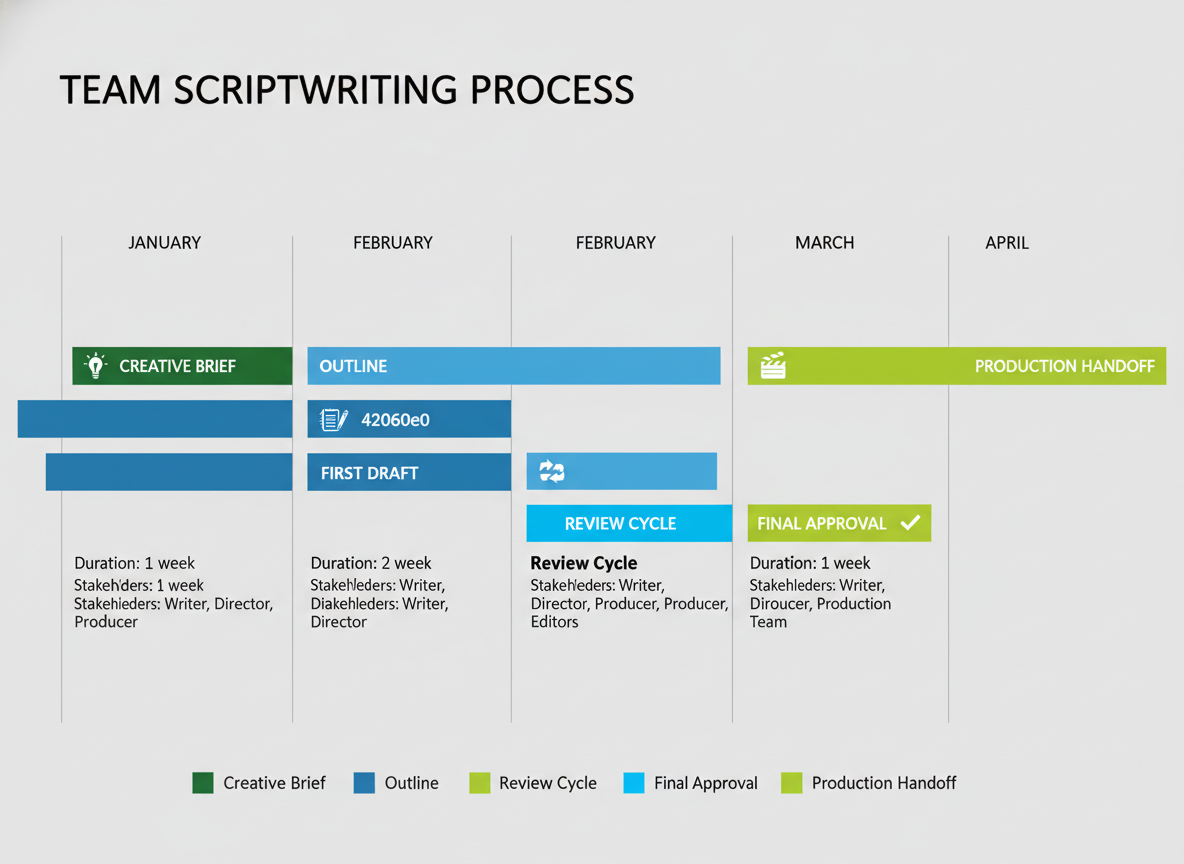
Here’s the workflow that actually works: start with a creative brief that nails your objectives, target audience, and key messages. From there, move to outline → first draft → review → final script → production handoff. Simple, right? Yet most teams skip steps and wonder why videos miss the mark.
Define roles clearly. One person writes, another reviews for brand voice, someone approves budget and messaging, and production handles execution. When everyone’s guessing their responsibilities, you’ll spend more time in Slack threads than actually creating content.
Your creative brief should answer: What’s the video’s goal? Who’s watching? What three things must they remember? What format and length?
Use async tools like Google Docs with version control and clear commenting protocols. Set realistic timelines—quality scripts typically need 3-7 days from concept to final version. Rush it, and you’ll rewrite later.
Testing CG eliminates these bottlenecks entirely. Instead of managing multiple reviewers across time zones and waiting days for approvals, you’ll generate production-ready scripts instantly. That’s not just faster—it’s how you scale content without scaling headcount.
Budget & Timeline Considerations for Video Production
Your example video script directly impacts your wallet and calendar. Here’s what actually matters.
Location changes kill budgets fast. Each new setting means transportation, permits, and setup time. A single-location explainer video might cost $500–$2,000, while a three-location product demo jumps to $5,000+. Stock footage cues in your script can save thousands—write “INSERT: Stock footage of busy coffee shop” instead of scheduling an actual shoot.
Talent requirements multiply expenses quickly. One on-camera host costs less than coordinating three actors. Many successful creators write scripts for voiceover-only formats, eliminating makeup artists, wardrobe, and talent fees entirely.
Timeline realities? Pre-production takes 3–7 days for script refinement and shot lists. Shooting ranges from a few hours to multiple days. Editing typically requires 5–10 hours per finished minute.
Smart scripts enable batch filming—shoot five videos in one session by keeping consistent setups. Modular segments let you repurpose content across platforms.
Here’s the real advantage: Testing CG’s automated publishing eliminates these per-video costs entirely. Your daily content appears without coordinating crews, renting equipment, or managing post-production schedules.
How to Adapt These Scripts for Your Brand (Customization Checklist)
These example video script templates give you structure, but your brand voice makes them memorable. Start by replacing generic language with your specific terminology—swap “customers” for “clients,” “members,” or whatever term your audience actually uses.
Match the tone to your personality. If you’re naturally funny, inject humor. If you’re technical, add depth. Your viewers connect with authenticity, not perfect copycat scripts.
Adjust complexity based on who’s watching. A B2B SaaS audience needs different language than fitness enthusiasts or stay-at-home parents exploring side hustles.
Platform matters too. What works on YouTube needs trimming for Instagram Reels. TikTok demands faster hooks. LinkedIn requires more professional positioning.
Customize your CTA to match real goals. “Subscribe” works for awareness, but “Book a call” or “Grab your discount” drives conversions when you’re ready to monetize.
Finally, review legal requirements. Financial services, health claims, and affiliate promotions each have disclosure rules. Add disclaimers where needed—boring but essential.
Just like crafting your social bio, your video scripts should reflect your unique positioning while following proven formulas.
Stop Wasting Hours on Scripts: Automate Your Video Content Creation
You’ve got 29 ready-to-use example video scripts right here. That’s powerful. You can grab any template and start creating today.
But let’s be honest—even with these templates, you’re still looking at 1-3 hours per video to customize scripts, record content, and publish. If you’re producing videos consistently, that adds up fast.
Here’s where things get interesting: what if you could set up an entire year of content in three minutes? That’s what Testing CG does. It automatically converts your videos into blogs, syndicates content across platforms, and publishes daily without you lifting a finger.
Content creators are scaling to 365 videos per year without writing a single script manually. They’re sleeping while their content engine runs on autopilot.
Here’s your next move: Download all 29 script templates, then try Testing CG free for 30 days. See how automation transforms your workflow.
Your competitors aren’t spending hours on scripts anymore. They’re automating, scaling, and dominating their niches while you’re still editing. Don’t let them lap you. The tools are here. The templates are ready. It’s time to automate and win.
Frequently Asked Questions (FAQ)
How long should a video script be for a 2-minute video?
You’ll need about 240-320 words for a standard 2-minute video. Most people speak at 120-160 words per minute, but this varies by style. Promotional videos typically run faster (150-160 wpm), while educational content works better at 130-140 wpm. Time yourself reading your script aloud—that’s the most accurate method.
What’s the difference between a script and a storyboard?
A script is the written dialogue and narration for your video. A storyboard is the visual blueprint showing what appears on screen for each scene. You need a script for every video. You only need a storyboard for complex productions with multiple shots, animations, or when coordinating with a video team.
Can I use these example scripts commercially?
Yes, you can adapt these templates for your business. Customize them to fit your brand, products, and message. Don’t copy them word-for-word and claim them as original work—make them yours through personalization.
What software do professional scriptwriters use?
Top choices include Google Docs (free, collaborative), Final Draft ($250, industry standard), Celtx (scriptwriting-specific), Notion (organizational powerhouse), and Arc Studio (modern, cloud-based). Most creators honestly just use Google Docs.
How do I write a script if I’m not a writer?
Start with templates—they provide the structure so you just fill in the blanks. AI tools can generate first drafts quickly, similar to how AI can write resignation letters and other professional content. Then edit that draft in your own voice. The PAS framework (Problem-Agitation-Solution) works for almost any video.
Should video scripts include visual directions?
Absolutely. Use a two-column format: dialogue on the right, visual directions on the left. This keeps your editor, animator, or filming team aligned with your vision and prevents costly reshoots or revisions.
How many revisions should a video script go through?
Plan for three rounds: 1) rough draft (get everything down), 2) structural edit (fix flow and messaging), 3) polish (tighten language and timing). More rounds usually mean you’re overthinking it.
What makes a good hook for a video script?
Pattern interrupts grab attention fast. Start with a surprising statistic (“87% of businesses waste $10,000 annually on this mistake”), a provocative question (“What if everything you know about video marketing is backwards?”), or a bold statement (“Your video script is killing your conversions”). Avoid slow build-ups—you’ve got 3 seconds max.
How do I time my script accurately?
Read it aloud at your natural speaking pace and record yourself. Add 10-15% buffer time for pauses, transitions, and b-roll. Platform matters too—TikTok scripts run faster than YouTube tutorials.
Can AI write my video scripts?
AI in 2026 creates solid first drafts and helps you overcome blank-page syndrome. It handles structure, generates hooks, and suggests CTAs. But it can’t capture your unique brand voice or industry expertise without heavy editing. Use AI as your assistant, not your replacement.
I am a full-time online marketer, for over a decade now. Helped over 100,000+ people & generated well over $12M in online sales.