

Introduction: Why Your Content Fails Without a Proper Content Brief
Here’s a truth that stings: 68% of content fails because writers don’t know what success looks like before they start typing.
Think about it. You’ve probably felt this pain yourself. You assign a piece to a writer (or start writing yourself), and what comes back is… wrong. It misses the mark. The tone’s off. The keywords aren’t there. Critical points got skipped entirely. So you send it back for revisions. And then more revisions. Days turn into weeks. Deadlines whoosh past. What should’ve taken three days drags into three weeks.
Worse? Even after all that back-and-forth, the content still doesn’t convert. It just sits there, invisible to search engines and uninteresting to readers.
The frustrating part isn’t the writer’s fault. They’re shooting arrows in the dark because you never gave them a target. Every revision cycle costs you money. Every delayed publish date hands your competitors another opportunity to outrank you. Every piece of underperforming content represents wasted investment.
But there’s a simple fix: content briefs.
A content brief is your blueprint for high-performing content. It’s the difference between guessing and knowing. Between mediocre articles that disappear and pieces that rank, engage, and convert. Top-performing blogs don’t happen by accident—they follow proven frameworks.
Here’s what you’ll master in this guide: what content briefs actually are, how to create them step-by-step, ready-to-use templates, and automation strategies that’ll save you hours.
Your competitors are already using content briefs to dominate search results. Every day you wait is another day they’re pulling ahead.
Let’s fix that.
What Is a Content Brief? (And Why It’s Your Secret Weapon)
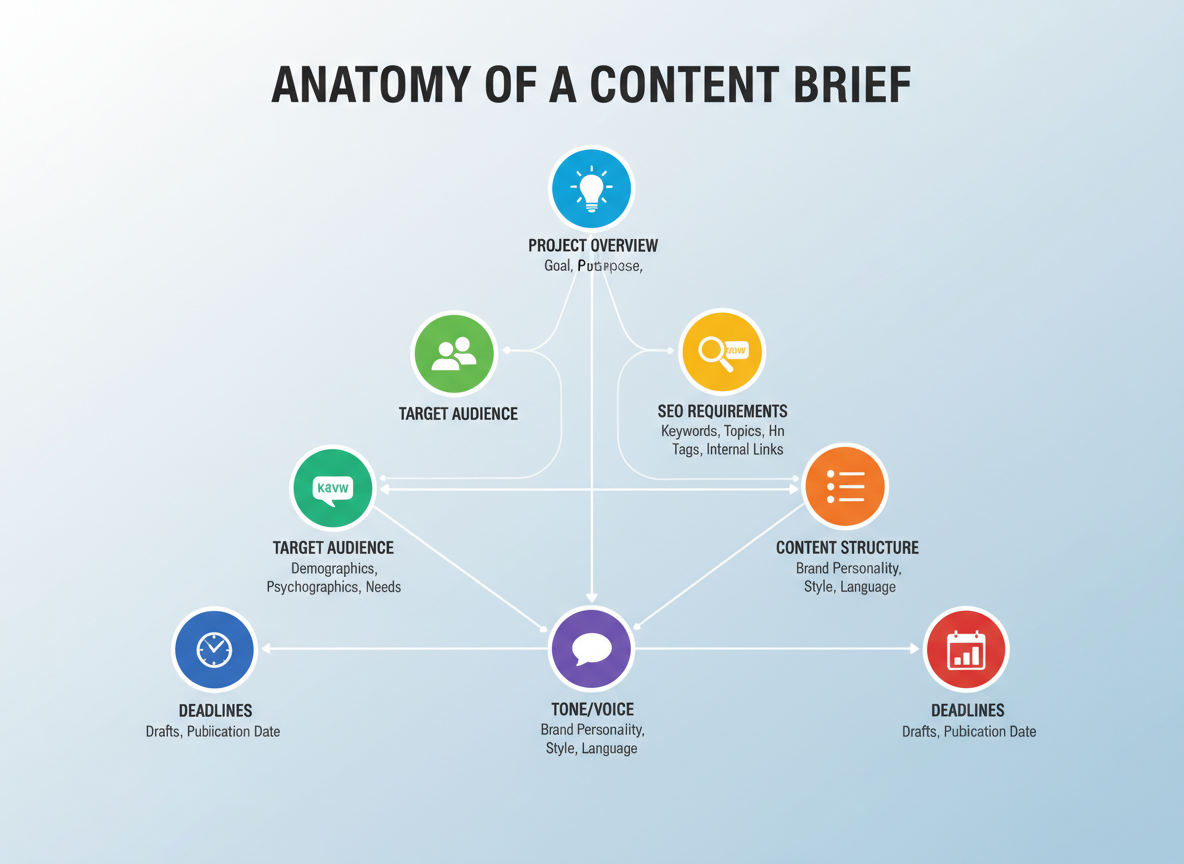
A content brief is a strategic document that outlines everything a writer needs to create high-performing content. Think of it as your content’s GPS—it maps out the objectives, target audience, keywords, tone, structure, and key messages before anyone writes a single word.
Here’s what separates winning content from mediocre posts: preparation. When you hand a writer a solid brief, you’re giving them clarity. No guessing what you want. No endless revisions. Just focused, on-target content that converts.
The numbers tell the story. Teams using content briefs reduce revision cycles by 47% and see a 3x increase in content ROI. That’s less time wasted on back-and-forth emails and more content that actually moves the needle.
How’s a content brief different from other documents?
A creative brief focuses on broader campaign goals and visual direction. A style guide covers brand voice and grammar rules. Your content brief sits in the sweet spot—it’s the tactical blueprint for individual pieces of content. You’ll reference your style guide while creating briefs, but they serve distinct purposes.
Do you really need a content brief every time?
Almost always, yes. Even if you’re writing the content yourself, a brief keeps you on track. It prevents scope creep and ensures you hit your SEO targets.
The rare exceptions? Quick social media posts or internal emails. But for blog posts, landing pages, video scripts, or anything customer-facing? A content brief pays for itself in time saved and results delivered.
Your brief becomes the single source of truth that aligns writers, editors, SEO specialists, and stakeholders. Without it, you’re gambling with your content budget. With it, you’re stacking the deck in your favor.
The 9 Essential Components of a High-Converting Content Brief
A content brief that converts doesn’t just tell writers what to write—it gives them the strategic foundation to create content that drives real business results. Here’s what every high-performing brief needs.
Component 1: Project Overview and Content Objectives
Start with clarity. What are you creating? A blog post, landing page, or video script? More importantly, why does this content exist? Your objectives might include driving organic traffic, generating leads, or establishing thought leadership. Be specific: “Increase email signups by 15%” beats “get more subscribers” every time.
Component 2: Target Audience Definition
Generic audience descriptions kill conversions. Instead, dig into demographics (age, location, job title), psychographics (values, interests), and pain points. Are you writing for burned-out freelancers struggling with client management or marketing managers trying to justify their budget? The difference matters.
Component 3: Primary and Secondary Keywords with Search Intent
List your target keywords, but don’t stop there. Explain the search intent behind each one. Someone searching “content brief” might want a definition, while “content brief template” signals they’re ready to implement. This context shapes everything from your headline to your call-to-action.
Component 4: Content Structure and Recommended Outline
Provide a skeleton with suggested H2 and H3 headings. This keeps writers on track and ensures you cover all strategic angles. Think of it like architectural blueprints—writers can still be creative, but they won’t miss load-bearing walls.
Component 5: Tone, Voice, and Brand Guidelines
Should this piece sound like a trusted advisor or an energetic coach? Include specific do’s and don’ts. Just like your personal brand statement defines how you position yourself, your content needs consistent voice guidelines.
Component 6: Differentiation Strategy
What angle makes your content stand out? Maybe you’ll include original research, a unique framework, or insider expertise others can’t replicate. Define what makes this piece worth reading instead of the dozens of alternatives already ranking.
Component 7: Visual Requirements
Specify what images, screenshots, videos, or infographics you need. Visuals aren’t decoration—they’re engagement drivers that can boost time on page by 94%.
Component 8: Success Metrics and KPIs
How will you measure success? Set concrete targets: 5,000 pageviews in month one, 2% conversion rate, or 50 social shares. Clear metrics keep everyone accountable.
Component 9: Deadlines and Approval Workflow
Who needs to review this content, when, and in what order? A clear timeline prevents bottlenecks and ensures timely publication.
Content Brief Templates for Every Use Case (Copy & Customize)
Let’s cut through the theory and get you working templates you can actually use today. I’ve built these specifically for different content types because—let’s be honest—a video script needs different inputs than a white paper.
Template 1: Blog Post Content Brief (SEO-Focused Long-Form)
Your bread-and-butter SEO content needs target keywords, search intent, H2/H3 structure, word count range (typically 1,500-3,000 words), competitor articles to outrank, internal linking opportunities, and CTA placement. Include sample titles, meta descriptions, and featured snippet opportunities. For SaaS companies, emphasize product integration points. B2B services should focus on pain points and ROI metrics.
Template 2: Video Content Brief (YouTube & Social Media)
Video briefs require hook timing (first 3 seconds matter), visual requirements, B-roll suggestions, on-screen text, transitions, and platform specs. Your brief should outline the script structure, audience retention tactics, and thumbnail concepts. If you’re creating YouTube content, check out proven YouTube Script Templates That Hook Viewers in 3 Seconds for additional guidance on scripting that converts.
Template 3: Social Media Content Brief (Platform-Specific Campaigns)
Platform matters here. Instagram needs visual-first direction and hashtag strategy. LinkedIn wants professional insights with data points. TikTok demands trend integration. Include posting schedule, caption formulas, engagement tactics, and brand voice examples.
Template 4: Email Campaign Content Brief (Sequences & Newsletters)
Outline your sequence structure, subject line variations (test at least three), preview text, personalization tokens, segmentation criteria, and conversion goals. Healthcare clients need compliance checkboxes. eCommerce briefs should include product placement and discount strategies.
Template 5: White Paper/Long-Form Content Brief (Thought Leadership)
These beasts need research citations, expert quotes, data visualization requirements, executive summary guidelines, and distribution strategy. B2B services thrive here—specify technical depth and decision-maker personas.
Template 6: Product Description Content Brief (eCommerce)
Focus on benefit-driven copy structure, SEO product keywords, technical specifications placement, social proof integration, and comparison table requirements. Include image caption guidelines and cross-sell opportunities.
Template 7: Agency-to-Freelancer Content Brief (External Collaboration)
This one’s your insurance policy. Add revision rounds, submission deadlines, brand voice samples, approval workflows, and communication protocols. The clearer you are upfront, the fewer headaches later.
Each template works best when you customize it. Start with the foundation, then layer in your industry-specific requirements.
Step-by-Step: How to Create a Content Brief in Under 15 Minutes
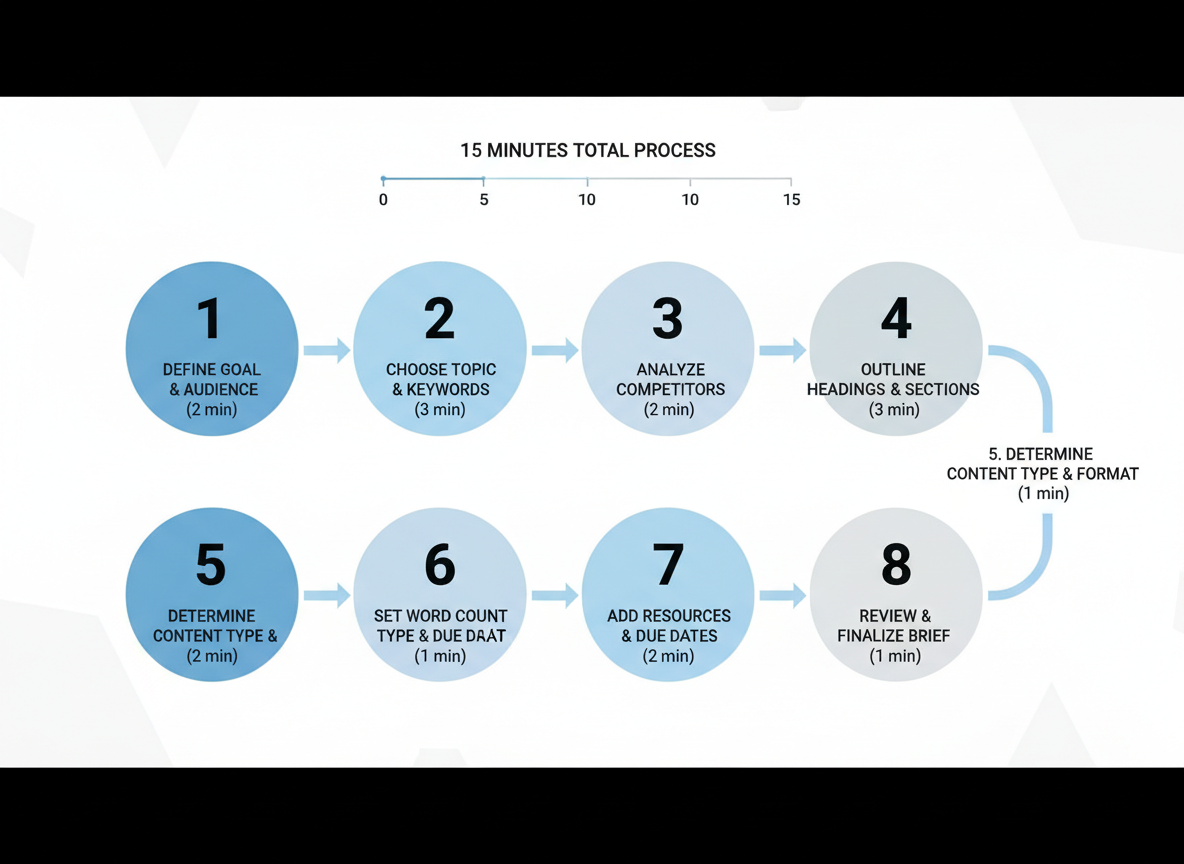
Creating a killer content brief doesn’t have to eat up your entire afternoon. Here’s your lightning-fast framework that still delivers everything your writer needs.
Step 1: Define Your Content Goal and Primary Conversion Objective
Start with the end in mind. What’s this piece supposed to do? Drive email signups? Generate affiliate clicks? Build brand awareness? Write it down in one clear sentence. “This blog post will convert readers into free trial users by demonstrating our platform’s speed advantages.”
Step 2: Research Your Target Keyword and Analyze Search Intent
Pop your keyword into Google and scan those first page results. Are people looking to buy (transactional), learn (informational), or compare options (commercial)? Your brief should match that intent perfectly, or you’ll watch your bounce rate skyrocket.
Step 3: Identify and Profile Your Target Audience with Empathy Mapping
Who’s reading this? Skip the boring demographics and think about their real problems. What keeps them up at 2 AM? What solutions have they already tried and failed with? This emotional insight transforms generic content into magnetic copy.
Step 4: Analyze Top 3-5 Pieces and Identify Content Gaps
Here’s where you find your angle. What are the current ranking articles missing? Maybe they’re light on examples, skip the technical details, or don’t address common objections. Your job is to fill those holes.
Step 5: Create Your Content Structure with Strategic H2/H3 Sections
Map out your headings now. This gives your writer a clear roadmap and ensures you’re hitting all the necessary points. Think of it like building the skeleton before adding the muscle.
Step 6: Define Tone, Voice, and Brand-Specific Requirements
Should this sound like a boardroom presentation or a coffee chat with a friend? Include specific examples of phrases to use (or avoid). If you’re working with tools like an AI Product Description Generator, specify whether you want that mentioned.
Step 7: Specify Visual Assets, Internal Links, and CTAs
List exactly what images, screenshots, or graphics you need. Drop those internal link targets here. Include your CTAs verbatim so there’s no guesswork.
Step 8: Set Success Metrics, Deadlines, and Review Process
Define what “done” looks like. Is it 1,500 words by Friday? Three backlinks within 60 days? Clear metrics prevent scope creep.
Pro Tips for Speed
Use a template (copy your last successful brief). Batch-create briefs on Monday mornings. Let AI tools handle competitor analysis and keyword research while you focus on strategy. Your 15 minutes starts now.
Content Brief Psychology: How Brief Quality Impacts Writer Performance
Here’s something most content managers don’t realize: your content brief is doing way more than organizing information. It’s either boosting your writer’s confidence or quietly sabotaging their work before they type a single word.
Research shows that clear, well-structured briefs increase writer confidence by 64% and significantly reduce task-related anxiety. Think about it—when you’re handed vague instructions, that gnawing uncertainty doesn’t just feel bad. It actively drains creative energy and slows everything down.
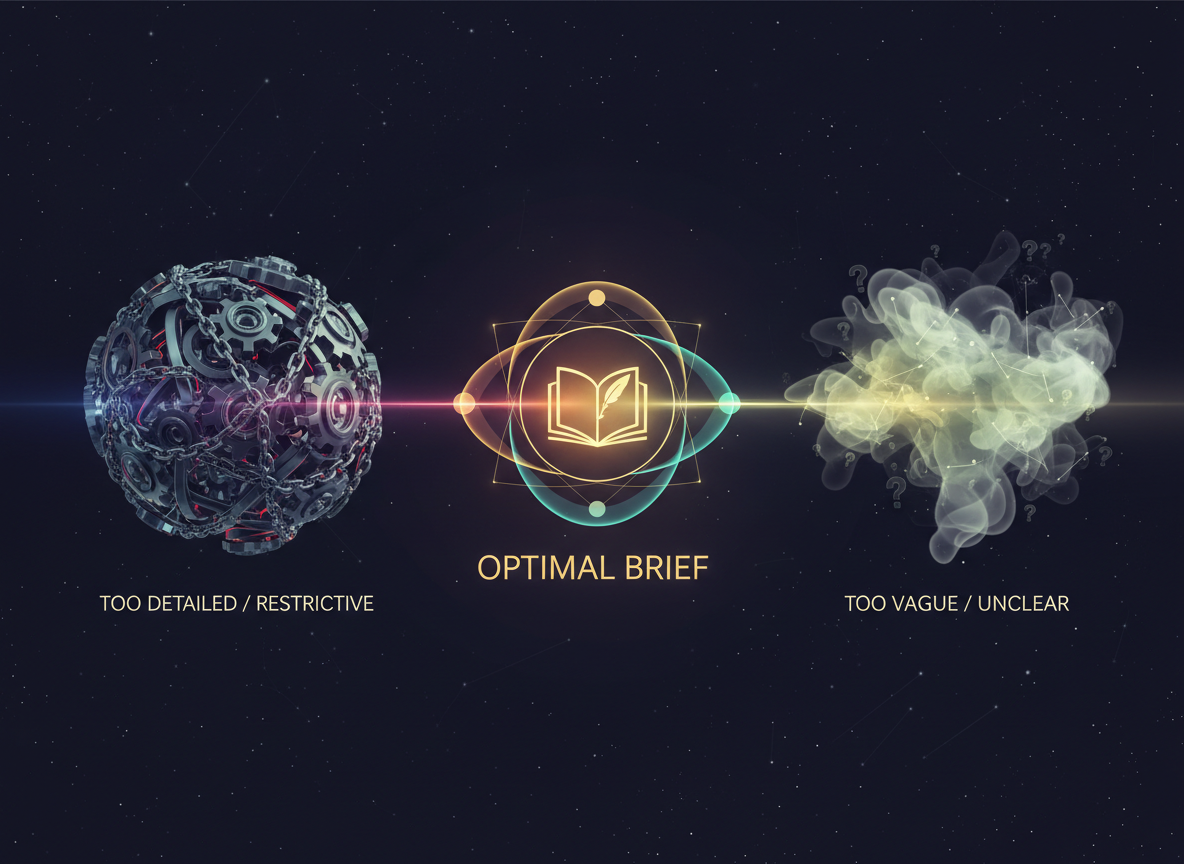
But there’s a catch. The “Goldilocks Principle” applies here: too much detail kills creativity, while too little creates confusion. I’ve seen 10-page briefs that micromanage every sentence angle. Writers treat them like paint-by-numbers exercises, producing technically correct but soulless content. On the flip side, two-sentence briefs leave writers paralyzed by options.
The sweet spot? It depends on who’s writing.
Junior writers need guardrails—clear structure, example headlines, specific tone guidance. They’re building confidence and learning your brand voice. Give them detail.
Senior content creators want freedom within boundaries. They’ll resent over-prescription but appreciate strategic context about business goals and audience pain points.
Subject matter experts need the least hand-holding but benefit from clarity about angle and audience level. Don’t tell a PhD how to explain their field—tell them who they’re explaining it to.
A mid-sized agency recently A/B tested their brief formats across 200 articles. Writers using “strategic context + creative freedom” briefs produced content that scored 31% higher in editor reviews compared to prescriptive, step-by-step briefs.
The motivation factor matters too. Briefs that explain the “why” behind content—the real problem it solves, the actual reader it helps—inspire better work than transactional task lists.
Want psychological safety? Invite questions. Add a note saying “This brief isn’t scripture—let’s discuss if you see a better angle.” Watch quality skyrocket.
In-House vs Agency vs Freelancer: Content Brief Strategies That Actually Work
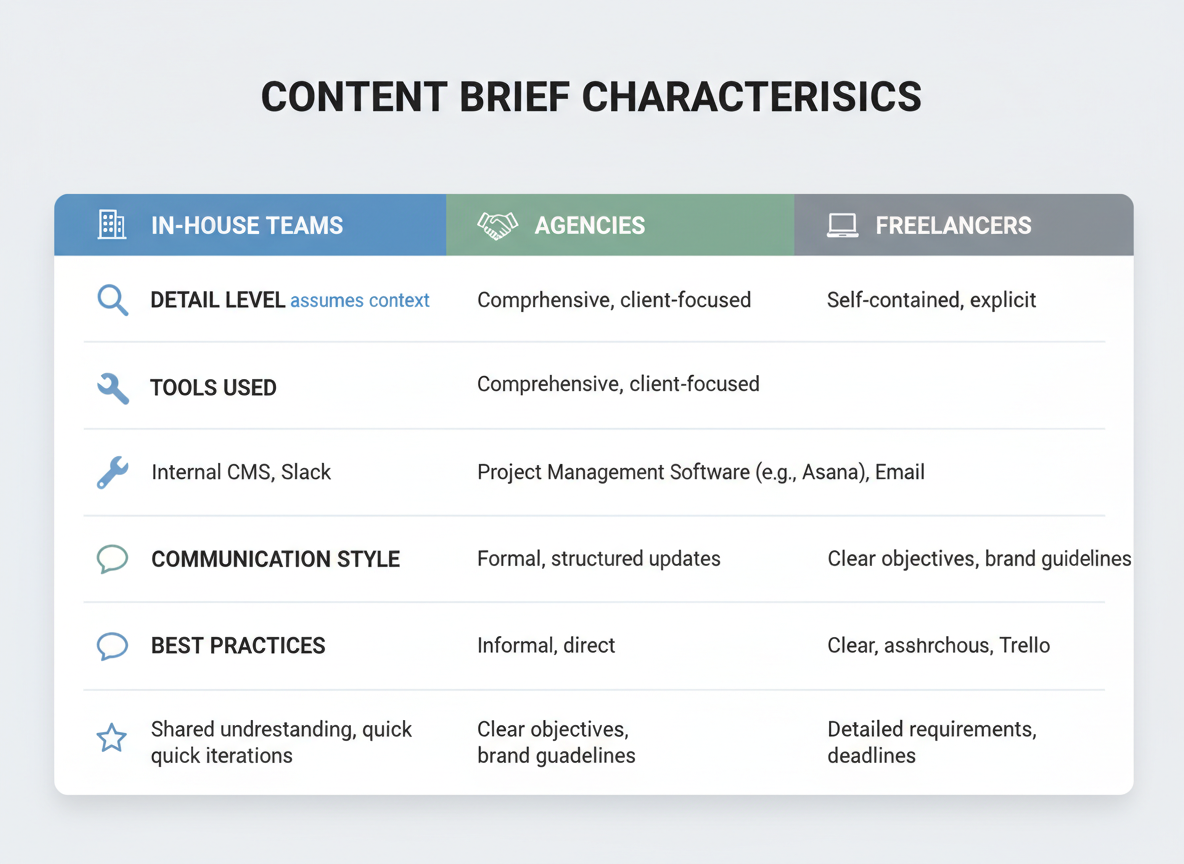
Your content brief needs to flex based on who’s writing. I’ve seen companies waste hours creating detailed 12-page briefs for in-house writers who already know the brand voice inside-out, while sending freelancers a two-sentence email and wondering why the content misses the mark.
Let’s break down what actually works.
In-House Team Briefs: Streamlined and Strategic
Your internal writers don’t need a brand history lesson every time. They’ve lived through your product launches and know exactly how you talk about features. Instead, focus your content briefs on campaign alignment, target keywords, and content objectives. A one-page brief referencing existing style guides and campaign docs works perfectly here.
The beauty? You can iterate quickly. A Slack message saying “Can we pivot the angle on that piece?” doesn’t require a formal brief update. Your team gets the nuance because they’re immersed in your world daily.
Agency Briefs: Balance is Everything
Working with an agency means you’re getting strategic partners, not just writers. Your content brief becomes a collaboration tool. Account directors need enough creative freedom to apply their expertise, but clear guardrails around brand requirements and business objectives.
Include your “must-haves” (brand voice, key messaging, compliance issues) but leave room for their strategic recommendations. Most successful agency relationships use platforms like Asana or Notion for ongoing brief management, with weekly syncs to refine direction.
Freelancer Briefs: Leave Nothing to Chance
Here’s where detail matters. Your freelancer might be juggling 15 clients this week. They need everything in one place: brand voice examples, competitor positioning, target audience pain points, keyword lists, and formatting preferences.
Think self-contained. If they can’t find the answer in your brief, you’ll get a question (adding days to turnaround) or they’ll guess wrong (costing you revision cycles).
| Factor | In-House | Agency | Freelancer |
|—|—|—|—|
| Detail Level | Medium | Medium-High | Very High |
| Communication | Daily/ongoing | Weekly check-ins | Minimal/async |
| Context Needed | Low | Medium | Maximum |
| Revision Expectation | Quick iterations | 1-2 structured rounds | Clearly defined upfront |
The time you invest upfront in comprehensive freelancer briefs pays dividends. You’ll spend 2-3 hours creating a solid brief template, but save 10+ hours you’d otherwise burn on clarifications and rewrites.
AI-Generated Content and Content Briefs: The New Rules for 2026
Your content brief isn’t just for human writers anymore. And that changes everything.
When you’re briefing AI tools, you need to think differently. Human writers read between the lines and make creative leaps. AI systems need crystal-clear instructions. Your brief becomes part instruction manual, part prompt engineering blueprint.
Here’s what actually works: Specify your brand voice with concrete examples, not vague descriptors. Instead of “write conversationally,” include sample sentences that capture your tone. Give AI the keywords, but also tell it how to use them—naturally integrated, not stuffed awkwardly into every paragraph.
The oversight section matters more than ever. Your brief should spell out exactly what human editors need to verify: statistics, expert quotes, product claims, and any content that could impact your reputation. You can’t assume AI will fact-check itself.
Testing CG users are seeing something remarkable. What used to take days—briefing, drafting, editing, formatting, publishing—now happens in hours. The platform’s automated publishing streamlines the entire pipeline, but you still need solid briefs upfront. Garbage brief equals garbage content, whether a human or AI writes it.
Your brief must include specific brand voice guardrails. If you’re using the same templates across multiple video platforms or blog posts, consistency becomes your biggest challenge. Document your non-negotiables: phrases you never use, perspectives to avoid, how you address your audience.
Don’t forget disclosure requirements. Your brief should specify where and how to mention AI assistance, if transparency is part of your brand values or required by your platform.
The sweet spot? A hybrid workflow where AI handles the heavy lifting while humans own strategy, final edits, and relationship-building. Your brief becomes the bridge between both worlds—specific enough for AI, strategic enough for humans to refine into something genuinely valuable.
Measuring Content Brief Effectiveness: The Metrics That Matter
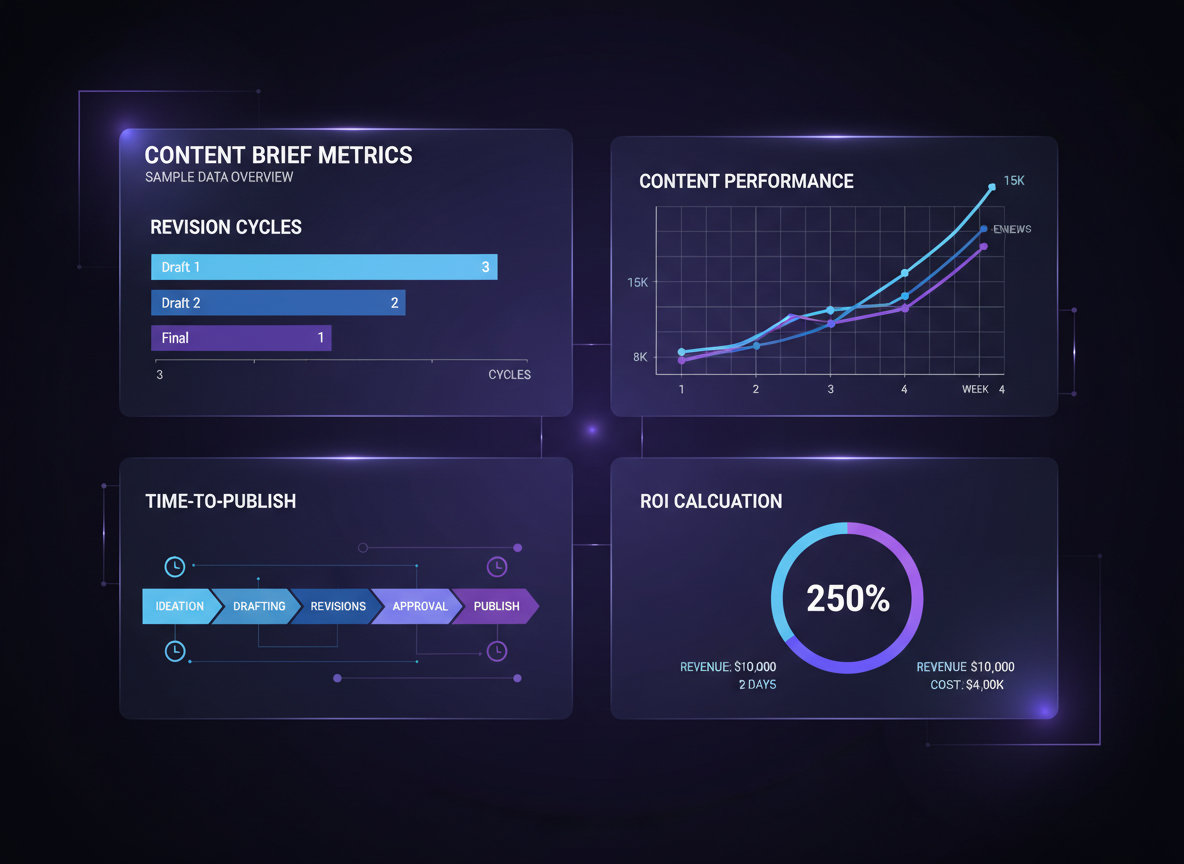
You’ve put effort into creating content briefs, but how do you know they’re actually working? Let’s talk numbers.
Input Metrics: The Foundation
Start tracking the time it takes to create each brief. If you’re spending 90 minutes on a brief but your writers still have five follow-up questions, something’s broken. Implement a completeness score—a simple 1-10 rating covering essential elements like target keywords, audience insights, and structural requirements. Ask your writers to rate brief clarity after each project. Their honest feedback reveals gaps you can’t see.
Process Metrics: The Reality Check
Count revision cycles. Quality briefs shouldn’t need three rounds of edits. Monitor time from brief to first draft—delays often signal confusion. Track writer questions per brief. More than two questions? Your brief wasn’t clear enough.
Output Metrics: What Actually Matters
Here’s where it gets interesting. Track content performance: traffic, engagement time, conversions. Compare pieces created with detailed briefs versus those without. The difference is usually dramatic. Monitor SEO rankings for target keywords. Measure time-to-publish from brief creation to live content.
Your Content Brief Scorecard
Create a 10-point evaluation framework covering clarity (2 points), completeness (2 points), actionability (2 points), SEO guidance (2 points), and strategic alignment (2 points). Review every brief against this standard.
Run correlation analysis quarterly. Compare brief quality scores against content ROI. You’ll likely find that briefs scoring 8+ generate 40-60% better results than those scoring below 6.
Building Your Feedback Loop
Survey your writers monthly. Ask: “What would’ve made this brief more helpful?” Their answers are gold. Conduct quarterly brief audits—review 10-15 briefs to spot patterns in what’s working and what isn’t.
Calculate ROI honestly. A 30-minute investment in a better brief saves hours in revisions and prevents underperforming content that wastes your entire production budget.
Multilingual and Multicultural Content Briefs: Global Content Strategy
Creating a content brief for a global audience isn’t about hitting “translate” and calling it done. You’re dealing with fundamentally different search behaviors, cultural values, and communication preferences across regions.
Here’s what most marketers miss: search intent shifts dramatically by geography. Americans might search “best running shoes,” while Germans prefer “running shoes test results,” and Japanese users look for brand-specific model numbers. Your content brief needs to account for these regional search patterns, not just translated keywords.
Direct keyword translation fails spectacularly in practice. “Content marketing” in English doesn’t match how Spanish speakers search for the same topic. They’re more likely to use “marketing de contenidos” or “estrategia de contenido,” but local research might reveal they actually search for something entirely different based on how the industry developed in that region.
Your writers need cultural context beyond language rules. A content brief for Asian markets should flag collectivist values versus Western individualism. What’s considered persuasive in New York—aggressive CTAs and urgency—can feel pushy in Tokyo. Humor that lands in London bombs in Mumbai.
Visual requirements deserve separate brief sections. Red signals prosperity in China but danger in Western markets. Hand gestures, personal space in imagery, even the age of people shown—these details matter.
Don’t forget compliance issues. GDPR affects how you discuss data in European content. Some countries restrict health claims or competitive comparisons. Your brief should flag these legal landmines.
Testing CG’s 100+ language support lets you deploy culturally-adapted content briefs at scale without managing separate systems. You’re building templates that respect linguistic families (Romance, Germanic, Asian) while maintaining brand consistency across markets.
Best Practices: What Top-Performing Content Briefs Have in Common
Here’s what separates content briefs that generate stellar work from those that fall flat.
Clarity beats brevity every time. Comprehensive briefs outperform minimal ones by a 3:1 margin. Writers aren’t mind readers—they need context, examples, and clear direction. That one-paragraph brief you whipped up in five minutes? It’ll cost you hours in revisions.
Visual hierarchy matters. Your content brief shouldn’t be a wall of text. Use headers, bullet points, and white space to make it scannable. Writers should find what they need in seconds, not scroll endlessly hunting for that critical detail buried in paragraph seven.
Show, don’t just tell. Include actual examples—links to reference articles, screenshots of formatting you love, snippets of the tone you’re after. When you write “conversational but authoritative,” what does that actually mean? Show them. Much like ads with body copy that convert, your brief needs to demonstrate the style you want, not just describe it.
Explain the why. Writers produce better work when they understand strategic goals. “Include a case study in section three” becomes more powerful when they know it’s there to overcome trust objections from skeptical readers.
Build in creative flexibility. Give writers strategic guardrails, not creative straitjackets. The best content briefs outline what needs to happen while leaving room for writers to inject their expertise and voice.
Create a single source of truth. Everything lives in one document. No hunting across email threads, Slack messages, or random Google Docs. Version control matters too—track changes systematically so everyone knows what’s current.
Think accessibility. Some writers learn visually, others need textual explanations, and many benefit from seeing examples. Include all three.
Common Content Brief Mistakes (And How to Avoid Them)
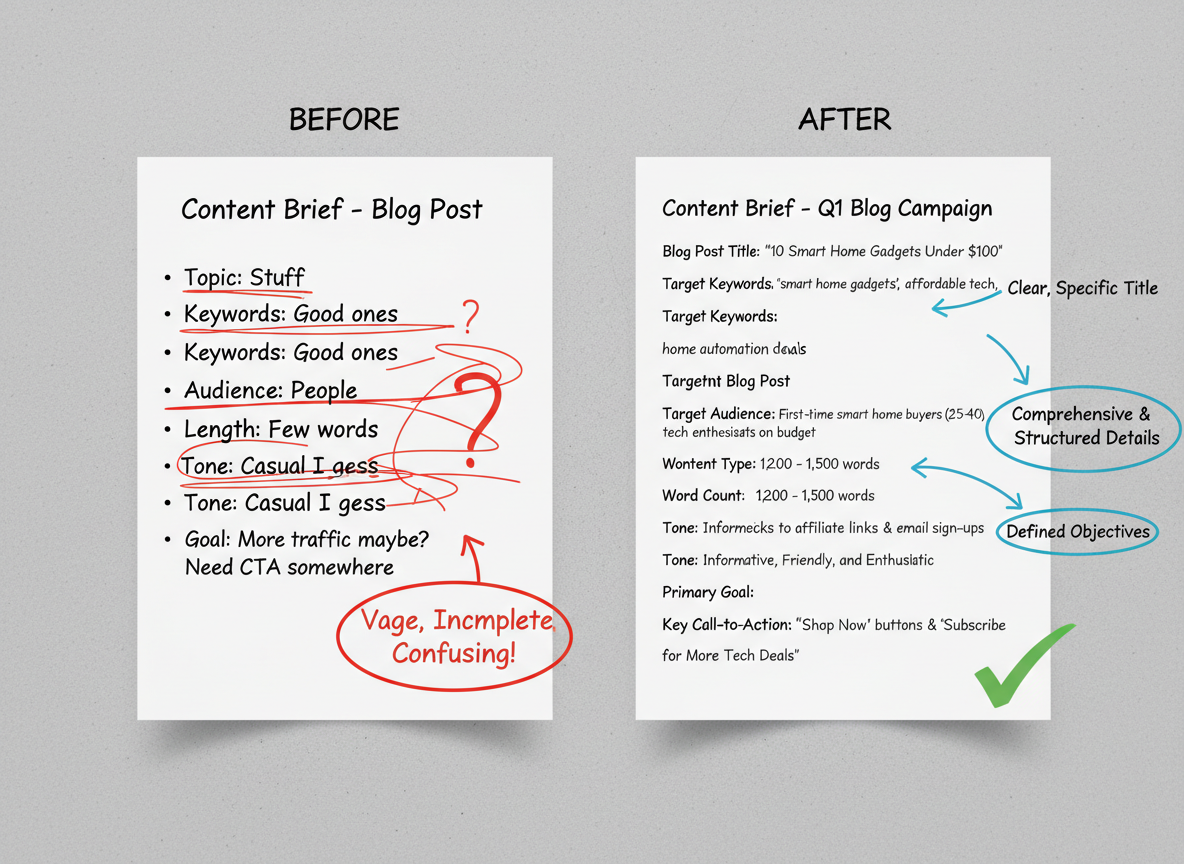
Even experienced marketers mess up their briefs. Here’s what we see most often—and how to fix it.
Mistake 1: Vague objectives plague most briefs. “Increase engagement” means nothing to your writer. Instead, specify: “Generate 50 qualified leads” or “Achieve 30% click-through rate to our demo page.” Your writer can’t hit a target they can’t see.
Mistake 2: Missing audience insights assumes writers magically understand your customers. They don’t. If you’re targeting SaaS founders struggling with churn, say that. Include their pain points, objections, and language they actually use. One client added a simple “customer vocabulary” section and saw their content resonance jump 60%.
Mistake 3: Keyword stuffing requirements kill readability faster than anything else. Demanding “use ‘content brief’ 47 times” creates robotic garbage that readers (and Google) hate. Focus on natural placement and semantic variations instead.
Mistake 4: Unrealistic word counts and deadlines create rushed, shallow content. A comprehensive 3,000-word guide needs more than two days. Quality takes time—budget accordingly.
Mistake 5: No competitor context means you’ll either duplicate what’s already ranking or miss obvious gaps. Include 3-5 competitor URLs with notes about what works and what doesn’t.
Mistake 6: Ignoring format requirements overlooks that 70% of readers scan on mobile devices. Specify you need short paragraphs, subheadings every 200 words, and bullet points where appropriate.
Mistake 7: Unclear success metrics create confusion about whether content performed. Define upfront: Are you tracking shares, conversions, rankings, or time-on-page?
Mistake 8: No revision process leads to endless feedback loops that drain everyone’s time. Outline exactly how many revision rounds you’ll provide and what feedback looks like.
Prevention checklist: Before sending your content brief, confirm you’ve included specific goals, audience details, competitor analysis, realistic timelines, format preferences, success metrics, and revision expectations. This five-minute review saves hours of headaches later.
Content Brief Troubleshooting: When Briefs Fail and How to Salvage Projects
Even the best content brief can go sideways. Here’s how to diagnose and fix what went wrong.
Scenario 1: Writer Delivers Content That Completely Misses the Mark
Ask yourself three diagnostic questions: Did they actually read the brief? Was your target audience definition clear enough? Did you provide examples of what “good” looks like?
I’ve seen writers submit fluffy lifestyle posts when the brief called for data-driven case studies. Usually, it’s a comprehension issue, not defiance.
Scenario 2: Multiple Revision Cycles With No Improvement
After the third revision that doesn’t hit the mark, you’ve got a writer-brief mismatch. Cut your losses. Create a revision brief with visual examples, competitor articles that nail the tone, and specific paragraph-by-paragraph directions. If that doesn’t work, reassign it.
Scenario 3: Brief Was Unclear and Questions Keep Coming
This is on you. Set up a 15-minute call to clarify everything at once, then document those answers in a quick clarification addendum. Attach it to the original brief so future writers won’t hit the same roadblocks.
Scenario 4: Scope Creep Beyond the Original Brief
The writer added 2,000 words and three new sections you didn’t request. Address it immediately: “Thanks for the extra effort, but let’s stick to the original scope. Here’s what needs trimming.”
Scenario 5: Writer Ignores Critical Requirements
They skipped your required keyword density, ignored formatting specs, or left out mandatory CTAs. Send a specific checklist: “These five elements are non-negotiable. Please revise by [date].”
When to Kill a Project
Abandon ship if the content would need a complete rewrite from scratch, the writer has ghosted after payment, or you’ve invested more in revisions than starting fresh would cost.
Learning From Failures
After every project gone wrong, document what happened. Was the brief too vague? Wrong writer selection? Unrealistic expectations? Build those lessons into your next content brief template.
Content Brief Approval Workflows for Teams and Organizations
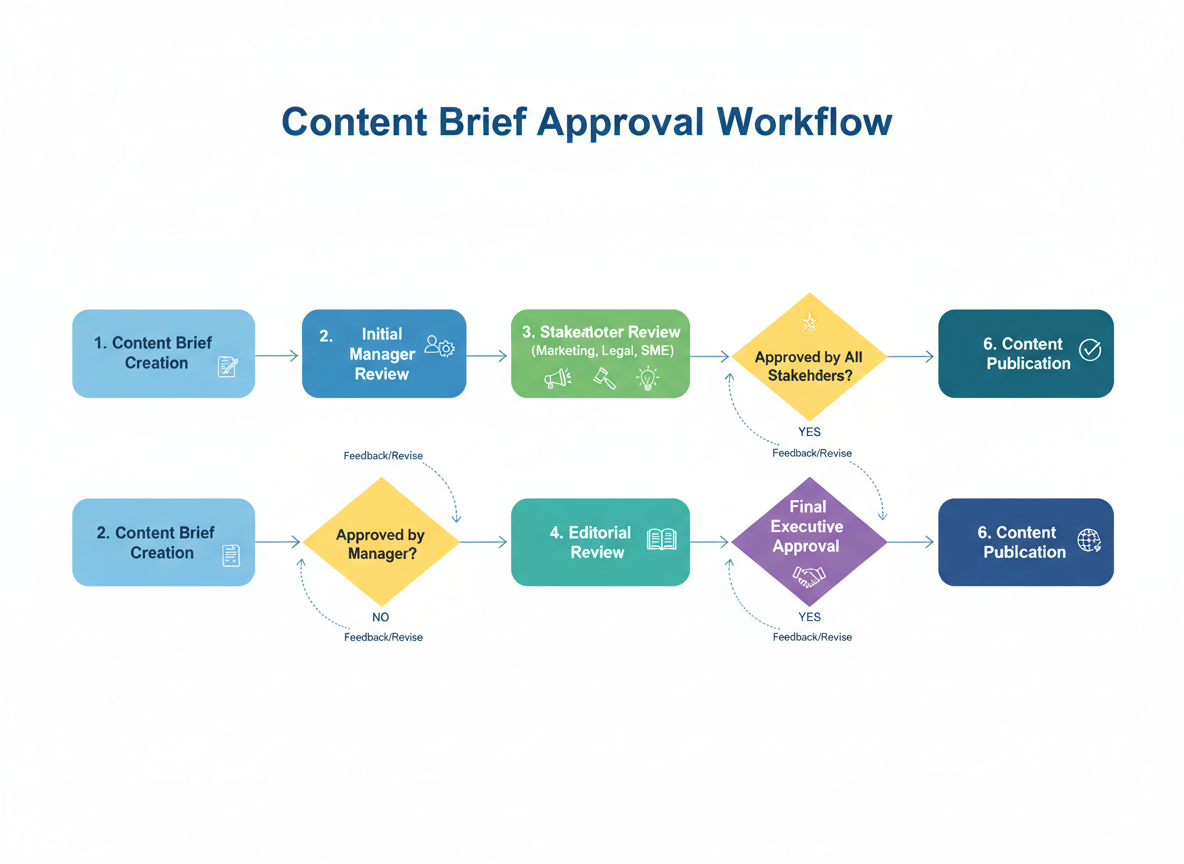
Getting approvals shouldn’t feel like pulling teeth. Yet here we are, watching content briefs sit in limbo while deadlines tick by.
Small team workflows work best when you keep things simple. A writer creates the brief, a strategist or editor reviews it, and the client or stakeholder gives final approval. That’s it. Three people, three stages, done in 24-48 hours. You’ll avoid endless revision cycles when you limit reviewers to people who actually make decisions.
Enterprise workflows get trickier with multiple departments weighing in. Your content brief might need sign-off from SEO, legal, product, and brand teams. The key? Parallel reviews instead of sequential ones. Send your brief to all stakeholders simultaneously, not one after another. Otherwise, you’re looking at weeks of back-and-forth.
Role-based permissions prevent chaos. Writers create and edit briefs. Editors approve content direction. Only team leads should archive or delete templates. When everyone can mess with everything, your brief template library becomes a dumping ground.
Set approval SLAs (service level agreements) for each stage. SEO review gets 24 hours. Legal gets 48. Brand compliance gets 24. Missing these deadlines? Escalate immediately.
Feedback consolidation saves your sanity. Assign one person to collect all reviewer comments and resolve conflicts before they reach the writer. Nothing tanks productivity faster than five people giving contradictory direction.
ContentGorilla streamlines these workflows with automated task assignments and deadline tracking. You can also use Asana for granular task management, Monday for visual pipeline boards, or Notion for collaborative brief editing.
Keep an audit trail of every change and decision. When someone asks why you pivoted strategy six months later, you’ll have receipts. For truly urgent content, establish emergency override procedures that let team leads greenlight briefs within hours.
Integrating Content Briefs with Your Project Management Stack
Your content brief shouldn’t live in isolation. When you connect it to your project management tools, you transform isolated documents into command centers that drive your entire production workflow.
Popular platforms like Asana, Trello, Monday.com, ClickUp, and Notion now support content brief templates that sync directly with your content calendar. This isn’t just about convenience—it’s about strategic alignment. You can see how each brief fits into your quarterly goals, identify content gaps, and adjust priorities in real-time.
The magic happens when you automate the handoffs. Instead of manually emailing briefs and chasing writers for updates, set up automated workflows that distribute briefs, trigger deadline reminders, and notify stakeholders when drafts move between stages. Your writers get their assignments automatically. Your editors receive alerts when pieces need review. Your manager sees exactly which bottlenecks are slowing production.
Version control becomes seamless when briefs stay connected to their drafts through every revision cycle. You’ll always know which brief version a published article came from—essential for content audits and performance analysis.
Testing CG takes this integration further by automating the entire brief-to-publish pipeline. Rather than juggling multiple tools and manual handoffs, you get a unified system where briefs automatically transform into completed content. The platform handles distribution, tracks progress across your team, and generates reporting dashboards showing completion rates, time-in-stage metrics, and exactly where bottlenecks occur.
For teams with custom workflows, API integrations let you connect Testing CG to your existing tech stack, creating a content production machine that runs with minimal oversight.
Content Brief Archives and Knowledge Management: Building Institutional Intelligence
Your content briefs aren’t disposable. They’re actually gold mines of insight that most teams completely waste.
Think about it: every content brief you’ve created contains decisions, research, and strategic thinking. When you toss those files into random folders and forget about them, you’re throwing away your company’s collective intelligence. That’s painful when your best writer quits or a new client asks, “Can you recreate what you did last year?”
Why archiving matters more than you think: Your brief collection becomes a living library that answers questions like “What content brief structure worked best for our SaaS clients?” or “Which keyword targeting approach generated the most conversions?” New team members can learn your standards in hours instead of weeks. You’ll stop reinventing the wheel every single time.
Organization makes or breaks your archive. Create a simple taxonomy: content type (blog post, case study, video script), industry vertical, campaign theme, and performance tier. Tag each brief with metadata like target keyword, content pillar, and writer assigned.
Here’s the secret sauce: annotate your archives with performance data. Mark which briefs led to your top-performing content. Add writer notes like “This keyword research approach saved 2 hours” or “Client wanted more examples—next time add 5 instead of 3.”
For tools, Notion works beautifully with its database views and tagging. Confluence handles team collaboration well. Even a well-organized Google Drive with consistent naming conventions (ClientName_ContentType_Date_Keyword) beats chaos.
Just remember: if you’re archiving client briefs, respect confidentiality. Strip sensitive information or use permission-based access. Your archive should protect trust while building knowledge.
Content Brief Evolution: Adapting Briefs Across the Content Lifecycle
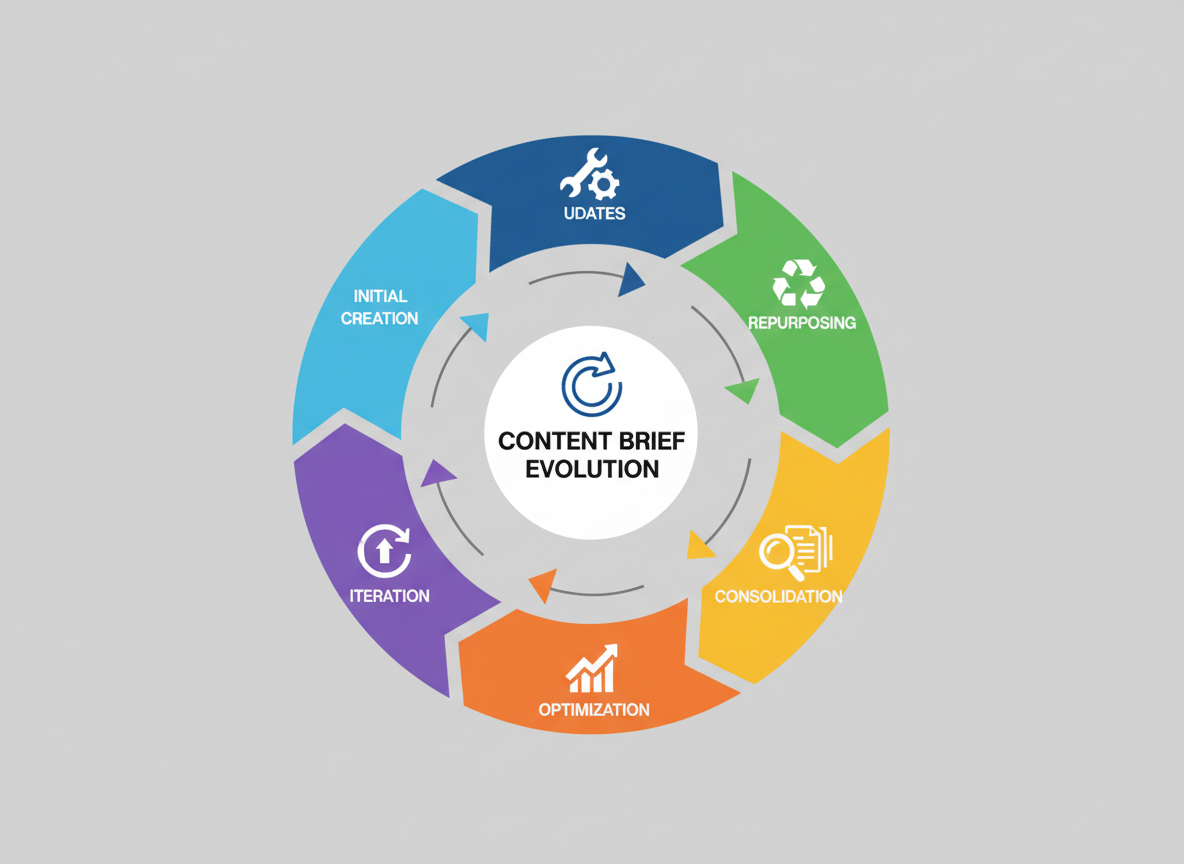
Your content doesn’t die after you hit publish. It evolves, transforms, and—when managed right—multiplies your ROI without starting from scratch.
Here’s how to adapt your content brief approach for every lifecycle stage:
Initial creation briefs need the full strategic context. You’re building from nothing, so include comprehensive SEO research, audience insights, competitive analysis, and detailed structural guidelines. Think of this as your foundation.
Update/refresh briefs focus differently. You’re not rewriting—you’re revitalizing. Your brief should highlight outdated statistics, new developments in the topic, gaps in current coverage, and sections that underperform. Include specific retention metrics showing where readers drop off.
Repurposing briefs transform format, not substance. When you’re converting that high-performing blog post into a video script (or vice versa), your brief emphasizes format-specific requirements. Testing CG’s video-to-blog conversion feature handles the heavy lifting here, automatically adapting video content into engaging written formats while preserving your core message.
Translation/localization briefs go beyond word-for-word conversion. They address cultural nuances, local search behaviors, region-specific examples, and regulatory differences. A healthcare article for US audiences needs different disclaimers than one for UK readers.
SEO optimization briefs rely on data. Pull Search Console metrics, identify keyword gaps, analyze competitor improvements, and pinpoint technical issues. Your brief should read like a surgical strike, not a complete overhaul.
Expansion briefs add depth where readers want more. User comments, FAQ sections, and “People Also Ask” data guide these additions.
Consolidation briefs solve cannibalization headaches. Identify overlapping content, determine the strongest base article, and map how to merge without losing ranking power.
Each lifecycle stage deserves its own brief template—because one size never fits all.
The Future of Content Briefs: Automation, AI, and What’s Next
The content brief you’re creating today won’t look anything like the ones you’ll use in 2027.
AI is already transforming how we approach briefs. Instead of manually researching keywords and competitors, you’ll soon feed your business goals into an AI system that generates comprehensive briefs in seconds. We’re talking full semantic keyword clusters, content structure recommendations, and competitor gap analysis—all automated.
Predictive analytics will suggest brief components based on your specific content goals. Want to drive newsletter signups? The AI will recommend different angles, CTAs, and content depths than if you’re targeting direct sales. It learns from millions of successful content pieces to guide your strategy.
Here’s where it gets exciting: dynamic briefs that update themselves. Imagine your content brief adjusting in real-time as search trends shift or when new competitors enter the conversation. Your writers always work from the most current data without you lifting a finger.
Voice-to-brief technology is already emerging. You’ll describe your content needs conversationally—like talking to a strategist—and watch as a detailed brief materializes.
Testing CG is pioneering this future through automated workflows that connect brief creation to content production seamlessly. Their platform integrates performance data so your briefs actually learn from what’s working across your content library.
But here’s the truth: human strategists aren’t going anywhere. AI handles the data crunching and pattern recognition, but you bring the unique positioning, brand voice, and strategic thinking that makes content truly connect.
Start preparing your team now. Learn how AI tools work, but focus on developing the strategic skills machines can’t replicate—creative angles, audience psychology, and brand storytelling. The future belongs to marketers who blend AI efficiency with human insight.
Conclusion: Transform Your Content Quality Starting Today
You’ve seen the transformation path: from scattered, inconsistent content chaos to strategic, high-performing assets that actually move the needle. The compound effect here is undeniable—better content briefs create better content, which delivers better results. It’s that simple.
Here’s your action plan: Download a template from this article. Create your first comprehensive content brief today. Then measure the difference in your next piece compared to your last “winged” article. You’ll see it immediately.
Let’s talk reality: spending 15 minutes on a proper content brief saves you hours in endless revisions, confused writers, and content that lands with a thud. That’s not theory—that’s what happens when you eliminate guesswork.
While your competitors scramble with vague instructions and hope for the best, you’re building a repeatable content machine. That’s your competitive advantage in 2026.
Think about this: every single day you publish content without proper briefs is money and opportunity walking out the door. Your budget deserves better.
Ready to eliminate brief bottlenecks entirely? Start with Testing CG’s automated content workflow and publish consistently without the manual headache.
Now I want to hear from you—what’s your biggest content brief challenge? Share your experience in the comments below.
Frequently Asked Questions About Content Briefs
How long should a content brief be?
Your content brief should be comprehensive enough to eliminate confusion—nothing more, nothing less. Typically, that’s 1-3 pages depending on content complexity. A straightforward blog post might need one page, while a comprehensive guide or video series could require three. The real test? If your writer asks three questions before starting, your brief wasn’t detailed enough.
Do I need a content brief for every piece of content?
Yes for strategic content that drives business results. Your pillar posts, conversion-focused landing pages, and authority-building pieces deserve full briefs. Social media posts and minor website updates? You can use simplified templates or skip the formal brief entirely. It’s about allocating your time where it matters most.
What’s the difference between a content brief and a creative brief?
Content briefs focus specifically on written or video content with clear SEO objectives and audience targeting. They’re tactical documents about this article or this video. Creative briefs cover broader campaign concepts—brand messaging, visual direction, multi-channel strategies. Think of it this way: a creative brief might outline a product launch campaign, while content briefs detail each individual asset within that campaign.
How do I get writers to actually follow the content brief?
Clear communication wins here. Start by explaining the why behind each requirement. When writers understand business objectives, they’re more likely to comply. Use a collaborative approach—invite questions upfront. Then set accountability measures: review first drafts against the brief and provide specific feedback when guidelines aren’t met. Writers who consistently ignore briefs probably aren’t the right fit.
Can AI tools write content briefs for me?
AI can definitely assist with research, competitor analysis, and structural outlines. But here’s where it falls short: understanding your specific business context, brand nuances, and strategic objectives. Use AI to accelerate the process, not replace your strategic thinking. The best content briefs blend AI efficiency with human insight.
How do I brief content when I don’t know SEO?
Start with keyword research tools (most are beginner-friendly), then focus heavily on audience needs and questions. What problems are you solving? Partner with SEO specialists when budget allows, or invest time learning basics. Honestly, understanding your audience well often matters more than perfect technical optimization.
What if the brief requirements conflict?
Always prioritize quality and value over arbitrary metrics. If hitting a 2,000-word count means adding fluff, ignore the count. Adjust constraints based on what serves your audience best. Your brief should guide creation, not handcuff it.
Should briefs include exact phrasing or just guidance?
Provide strategic guidance with room for creativity. Reserve exact phrasing only for critical brand terms, legal requirements, or specific CTAs. Writers need space to use their voice.
How does Testing CG simplify the content brief to publishing process?
Testing CG automates workflows from brief creation through AI-powered content generation to multi-platform publishing. You’re not juggling spreadsheets and multiple tools—everything flows through one system, cutting your production time significantly.

I am a full-time online marketer, for over a decade now. Helped over 100,000+ people & generated well over $12M in online sales.