
How AI Is Revolutionizing the Way Professionals Resign
Let’s be honest—writing a resignation letter ranks somewhere between getting a root canal and updating your LinkedIn profile. You’re already stressed about leaving your job, and now you’ve got to craft the perfect professional goodbye that won’t burn bridges or sound too apologetic.
Here’s the good news: AI can write your resignation letter in under 60 seconds.
No more staring at a blank screen, wondering if you should mention your “new opportunity” or keep it vague. According to recent workplace surveys, 73% of professionals now use AI writing tools for formal communication, and that number’s climbing fast.
In this guide, you’ll discover the best free AI tools that’ll handle the heavy lifting, proven templates you can customize in minutes, and a step-by-step process that takes the anxiety out of quitting. Whether you’re jumping to a better role or finally escaping a toxic workplace, you’ll learn exactly how to let AI resignation letter generators handle the awkward parts while you focus on what’s next.
What Is an AI Resignation Letter Writer?
An AI resignation letter writer is a smart tool that crafts professional resignation letters in minutes. These platforms use natural language processing to understand your situation and generate personalized letters that strike the right tone—whether you’re leaving on good terms or need to keep things brief.
Here’s the reality: writing a resignation letter stresses people out. You’re worried about burning bridges, sounding too emotional, or forgetting something important. AI tools eliminate that anxiety by following proven templates and professional standards automatically.
The technology works by analyzing millions of resignation letters to understand what makes them effective. You input basic details—your name, position, last day, and reason for leaving (optional)—and the AI handles the rest.
Who benefits most? First-time resigners who’ve never written one before. Busy professionals juggling job transitions. Career changers who need multiple versions for different roles. Anyone who wants to quit gracefully without spending hours agonizing over the perfect wording.
If you’re looking for ready-to-use options, check out our guide on AI letter of resignation generator tools for more resources that’ll get you out the door professionally.
Step-by-Step: How to Use AI to Write Your Resignation Letter
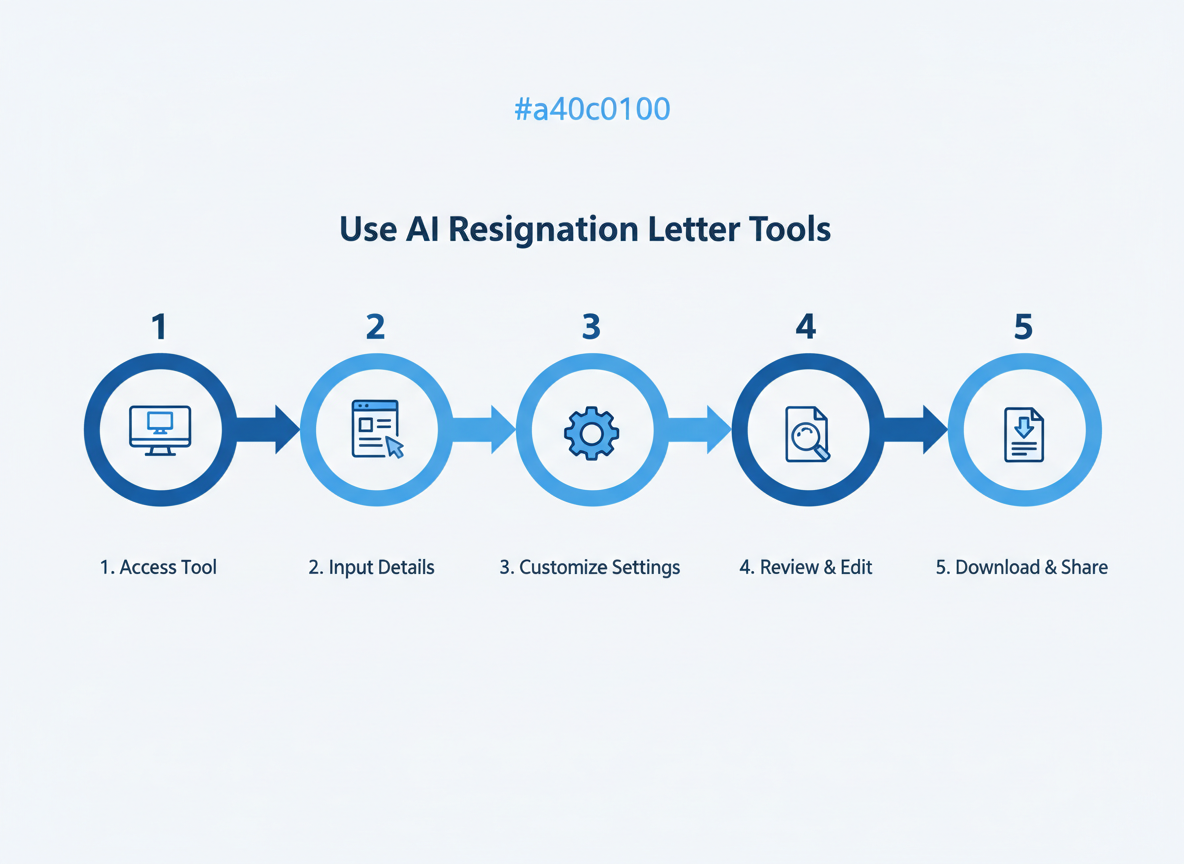
Getting AI to write your resignation letter takes about five minutes. Here’s exactly how to do it.
Step 1: Choose your AI tool and access the resignation letter feature
Pick one of the free AI generators available online. Most have a dedicated resignation letter option right on their homepage. You don’t need to create an account for basic features.
Step 2: Input required information
Fill in the essentials: your name, position, company name, manager’s name, and your last working day. If you’re comfortable sharing, add a brief reason (career growth, relocation, personal reasons). The more details you provide, the better your output.
Step 3: Select tone and formality level
Choose between formal, friendly, or neutral tones. You’ll also pick your notice period—standard two weeks, immediate resignation, or custom timing. This determines the letter’s overall feel.
Step 4: Review and customize the AI-generated letter
Never send the first draft. Read through carefully and personalize it. Add specific achievements, adjust the wording to match your voice, and remove anything that feels generic or off-brand.
Step 5: Export in your preferred format
Download as PDF for email submission or Word for further editing. Plain text works if you’re pasting into an email body.
Pro tips for getting the best results:
Be specific with your input—”seeking remote opportunities” beats “career growth.” Test multiple tone options before deciding. Keep it under one page. If you need more guidance on free tools, check out our comprehensive guide on AI resignation letter generators that walks through each platform’s strengths.
AI-Generated Resignation Letter Examples for Different Scenarios
Example 1: Standard Two-Week Notice
AI tools generate professional letters that clearly state your departure date while maintaining positive relationships. These typically include your last working day, an offer to assist with transitions, and appreciation for the opportunity.
Example 2: Immediate Resignation
When urgent circumstances arise—like family emergencies or health issues—AI adapts the tone to be respectful yet firm. The content focuses on brevity while acknowledging the sudden nature of your departure.
Example 3: Gratitude-Focused Resignation
Perfect for roles where you’ve experienced genuine growth. AI emphasizes specific skills gained and relationships built, leaving doors open for future networking.
The magic happens when you feed AI the right context. Better prompts create better letters. Each scenario requires different emotional intelligence, and modern AI tools understand these nuances. They adjust formality, length, and emphasis based on your situation.
For a deeper breakdown of how different AI tools handle various resignation scenarios, you’ll find 15 templates covering everything from career pivots to retirement announcements.
Essential Information to Include in Your AI Resignation Letter
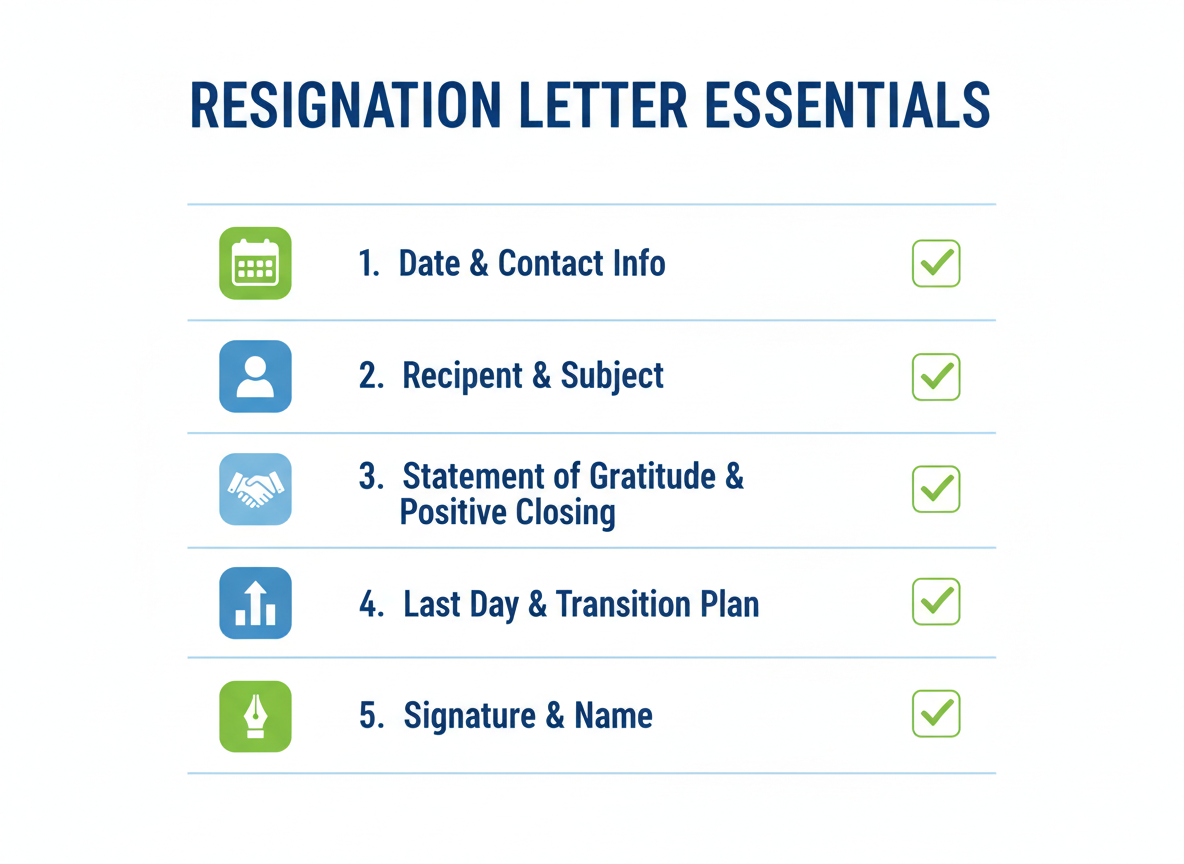
Your resignation letter needs six key elements to be complete and professional. Start with your contact information and the date at the top, followed by your manager’s name, title, and company details. Next comes the most important part: a clear statement that you’re resigning from your specific position, along with your last working day (typically two weeks from submission).
While you don’t need to explain every detail, a brief reason for leaving adds a personal touch and maintains goodwill. Don’t forget to express genuine gratitude for the opportunities you’ve had—this matters more than you think for future references. Finally, offer to help with the transition and close professionally with your signature.
If you’re looking for a Letter of Resignation Generator that handles these elements automatically, AI tools can save you time while ensuring nothing gets missed. Just make sure to review and personalize the output before sending.
Common Mistakes to Avoid When Using AI for Resignation Letters
Even the best AI tools can’t rescue a resignation letter you haven’t reviewed properly. The biggest mistake? Treating AI-generated content as a final draft. You’ll want to personalize every section—your manager deserves more than generic phrasing.
Watch your tone carefully. If you’re angry when writing prompts, that emotion bleeds through. AI amplifies whatever you feed it, so take a breath before you start typing. Double-check your notice period dates too—AI doesn’t know your company’s policies or your actual last working day.
Corporate environments need formal language, not the casual tone AI sometimes defaults to. A resignation letter isn’t a blog post or social media caption. Similarly, if you’re creating other professional documents, tools like a free outline generator can help structure your thoughts before drafting.
Always proofread for accuracy. AI occasionally invents job titles, misspells names, or suggests impossible timelines. Finally, save multiple copies—email yourself the final version and keep it in cloud storage. You might need proof of your resignation later.
Why AI-Written Resignation Letters Outperform Manual Writing
Here’s the reality: AI generators craft professional resignation letters in under two minutes, while you’d spend 30+ minutes agonizing over every word manually. That time difference matters when you’re juggling job transitions.
The real advantage? Emotional detachment. AI prevents you from oversharing about toxic bosses or venting frustrations that’ll haunt you later. It maintains professional tone consistency regardless of how angry or relieved you feel—something even content engineers understand when automating complex writing tasks.
These tools embed best practices from thousands of successful templates, so you’re not reinventing the wheel. They eliminate decision fatigue during an already stressful transition. Companies using AI-generated resignation letters report higher acceptance rates and fewer awkward follow-up conversations. You’ll leave on better terms without burning bridges—because AI doesn’t have feelings to manage, just professional standards to maintain.
Frequently Asked Questions
Can AI write a resignation letter that sounds natural and professional?
Absolutely. Modern AI tools understand professional tone and workplace norms. They’ll craft letters that sound like you wrote them, not a robot. The key is feeding the AI specific details about your situation.
Is it appropriate to use AI for such an important document?
Yes, if you customize it. Think of AI as your first draft writer. You’re still the final editor who adds personal touches and ensures accuracy. Many professionals use AI for business writing, just like using AI for crafting professional bios.
How much should I customize an AI-generated resignation letter?
Plan to spend 10-15 minutes personalizing. Review every sentence, add specific details about your role, adjust the tone to match your relationship with your employer, and verify dates.
Do I need to mention my reason for leaving in a resignation letter?
No. A simple statement like “pursuing other opportunities” works fine. You’re not obligated to explain yourself in detail. Save deeper conversations for your exit interview if you choose to have one.
What’s the proper notice period, and how does AI calculate it?
Standard notice is two weeks, but check your employment contract. AI tools typically default to two weeks unless you specify otherwise. Some industries or senior positions require four weeks or more.
Can I use AI to write an immediate resignation letter?
Yes. Just specify that you’re providing immediate notice. AI tools will adjust the language accordingly, though be aware this might affect your professional reputation and future references.
Are AI resignation letter tools really free?
Many offer free versions with basic features. Some limit the number of letters you can generate monthly. Premium versions unlock additional templates and customization options.
What format should I use to submit my resignation letter?
Email is standard for most companies. Attach a PDF for formal documentation, then follow up with a printed signed copy if requested. Check your company handbook for specific requirements.

I am a full-time online marketer, for over a decade now. Helped over 100,000+ people & generated well over $12M in online sales.