

Why Most Video Scripts Fail (And How to Fix Yours in 5 Minutes)
Here’s a statistic that’ll make you rethink your next video: 65% of viewers click away within the first three seconds. Three seconds. That’s barely enough time to say your intro.
You’ve probably felt this pain yourself. You spend hours crafting what you think is the perfect script. You research, outline, write, rewrite. Then you hit record, publish… and watch your analytics flatline. The views stop almost as fast as they start. Your carefully chosen words? Nobody’s hearing them.
The problem isn’t your ideas. It’s that most video scripts follow outdated templates that worked in 2018 but bomb in 2026. They meander through slow intros. They bury the value. They sound like everything else viewers scroll past daily.
But what if you didn’t have to start from scratch? What if you could swipe scripts that already work?
That’s exactly what you’re getting today. We’ve compiled 21 battle-tested video scripts that hook viewers immediately, keep them engaged, and drive real results. These aren’t theory or vague frameworks. They’re actual examples you can copy, customize, and use within the next hour.
Whether you’re creating YouTube videos, Instagram reels, TikToks, sales videos, or webinars, you’ll find a proven template here. Each script includes the exact structure, word-for-word examples, and platform-specific tweaks that matter. If you’re specifically looking to master YouTube Script Templates That Hook Viewers in 3 Seconds, we’ve got you covered there too.
Ready to stop guessing and start converting? Let’s get into the scripts that actually work.
What Makes a Video Script Actually Work (The 5 Non-Negotiable Elements)
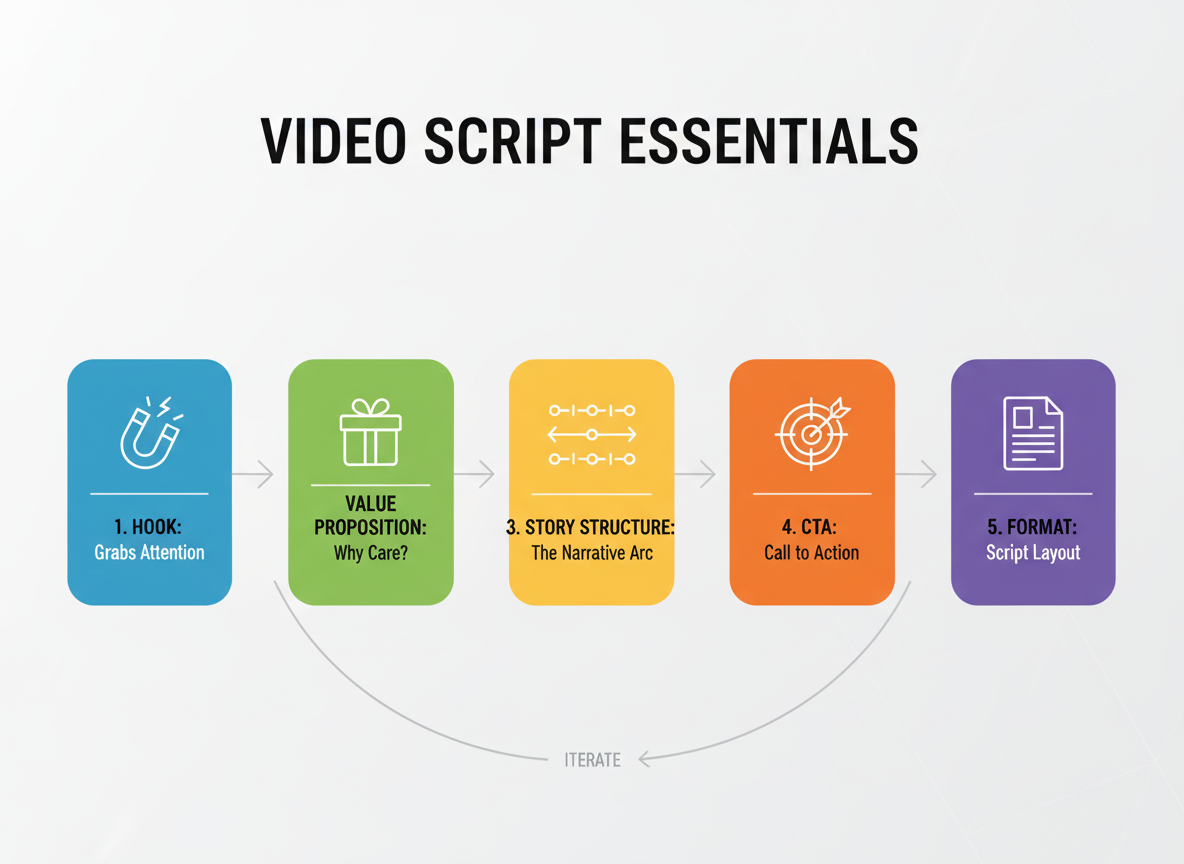
Here’s the truth: 65% of viewers will abandon your video in the first 10 seconds if you don’t grab them immediately. That’s not a guess—that’s data from HubSpot’s 2025 video marketing report.
So what separates scripts that convert from those that get scrolled past?
1. The Hook (0-3 Seconds)
Your opening needs a pattern interrupt. Start with a surprising statistic, a bold question, or a visual disruption. “Stop scrolling—your next video is costing you $847 in lost revenue” works better than “Hi, I’m going to talk about video marketing today.”
2. Clear Value Proposition
Within the first 10 seconds, viewers need to know what they’ll gain. “I’ll show you three editing tricks that cut production time in half” beats vague promises about “transforming your content.”
3. Story Structure
The problem-agitation-solution framework dominates high-performing scripts for good reason. Present the pain point, amplify why it matters now, then deliver your solution. Just like creating a content brief that converts, your script needs structure that guides viewers through a logical progression.
4. Strategic Call-to-Action
Don’t save your CTA for the end. Videos with mid-roll CTAs see 34% higher conversion rates. Place them after delivering major value points when engagement peaks.
5. Format Optimization
Two-column scripts work best for on-camera talent (visual cues in one column, dialogue in another). Voice-over scripts need narrative flow with timing markers. Platform matters too: TikTok demands 15-30 second punchy scripts, while YouTube allows 8-15 minute deep-dives.
Length Sweet Spots by Platform:
- TikTok: 21-34 seconds (highest completion rate)
- Instagram Reels: Under 60 seconds
- YouTube Shorts: 45-60 seconds
- YouTube Long-form: 8-12 minutes for tutorials, 15-20 for educational content
Scripts that maintain 60%+ watch-through rates share one thing: they deliver value every 15 seconds. No fluff, no rambling—just continuous payoff.
Platform-Specific Script Formats: YouTube vs Instagram vs LinkedIn vs TikTok
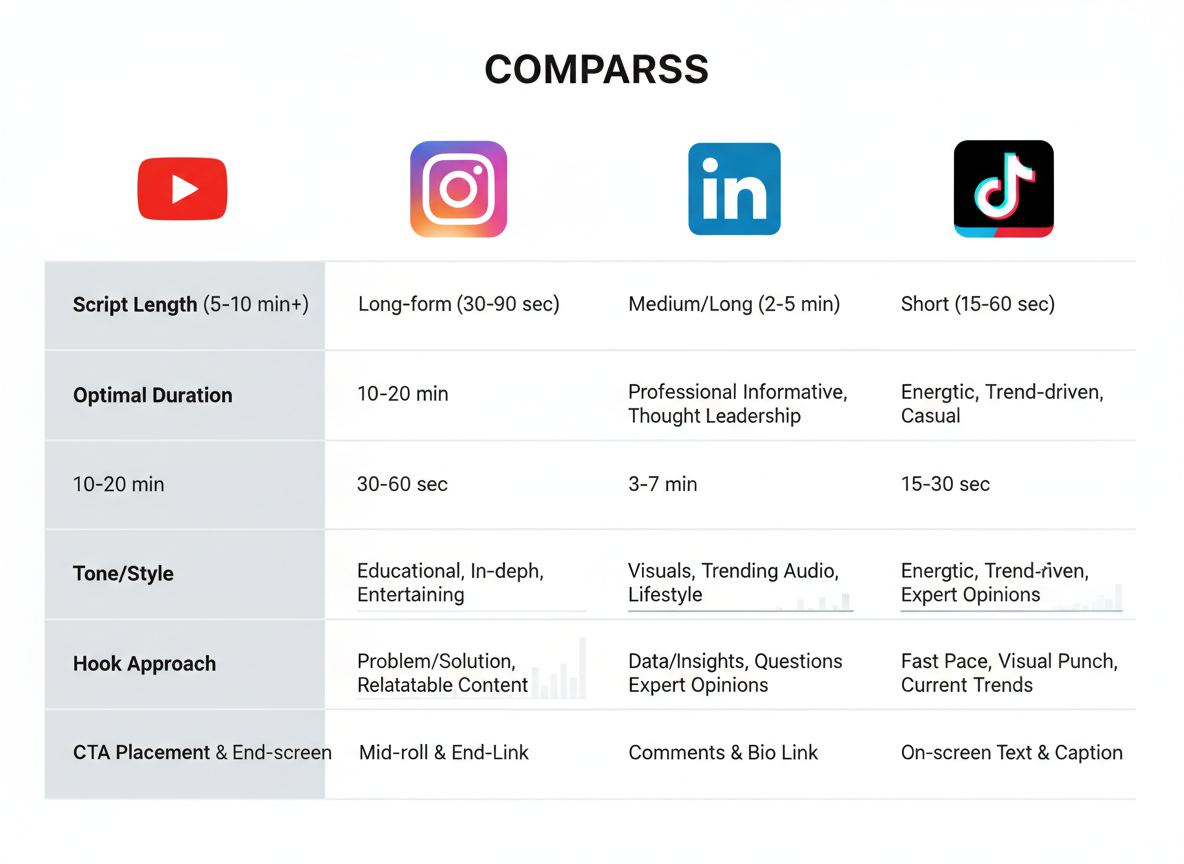
Here’s the truth: copy-pasting the same script across platforms kills engagement. Each platform has its own rhythm, audience expectations, and algorithmic preferences that directly impact how you should write.
YouTube: The Long-Form Champion
YouTube scripts typically run 5-15 minutes and require a different structure than other platforms. You’ll want to hook viewers in the first 10 seconds, then deliver value throughout while maintaining watch time. SEO matters here—include your target keyword naturally in your opening lines since YouTube indexes your audio. Chapter markers aren’t just nice to have; they’re essential for viewer retention. Structure your script with clear sections that can become clickable timestamps.
Instagram Reels: Speed Meets Style
With 15-60 seconds to work with, every word counts. Your script needs text overlay callouts built in from the start. Think: three-part structure with a pattern interrupt, quick value delivery, and a profile-visit CTA. Don’t write full sentences—write punchlines. Your script should read like bullet points that create curiosity gaps.
LinkedIn: Professional, Not Boring
LinkedIn audiences want thought leadership in bite-sized packages. Your 1-3 minute scripts should position you as an industry expert without the corporate jargon. Start with a business problem, share a contrarian insight or case study, then end with a soft CTA like “Drop your thoughts below.” The tone? Imagine you’re sharing advice with a colleague over coffee, not presenting to a board.
TikTok: Chaos with Purpose
TikTok scripts demand ultra-short attention span optimization. You’ve got 2-3 seconds before someone scrolls. Your hook can’t be clever—it needs to be direct. “Stop scrolling if you’ve ever…” works better than artful introductions. Trend integration isn’t optional; it’s how the algorithm finds your content. Check out our 17 video script examples for platform-specific templates you can adapt immediately.
Quick Platform Comparison
| Platform | Optimal Length | Tone | Hook Style | CTA Placement |
|———-|—————|——|————|—————|
| YouTube | 7-12 min | Educational | Question/Promise | Mid-video + End |
| Instagram | 30-45 sec | Casual/Visual | Visual interrupt | Last frame |
| LinkedIn | 90-120 sec | Professional | Problem statement | Comments |
| TikTok | 15-30 sec | Energetic | Direct command | Immediate |
The Repurposing Strategy
Don’t write four separate scripts. Start with your YouTube long-form content, then extract the most engaging 90 seconds for LinkedIn, the most visual moment for Instagram, and the most surprising fact for TikTok. One core message, four platform-optimized deliveries.
21 Complete Video Script Examples You Can Copy Right Now
Here’s what most creators get wrong: they stare at a blank screen, hoping inspiration strikes. You don’t need inspiration—you need proven templates.
I’ve organized these 21 scripts by category and use case, so you can jump straight to what you need. Each example includes the full script text, platform recommendations, target length, and industry applications. The fill-in-the-blank sections are bolded for quick customization.
Explainer Videos (3 Scripts)
Script 1: Problem-Solution Explainer (60 seconds | LinkedIn, YouTube)
“Here’s the truth about [your industry problem]: most people are doing it wrong.
They’re spending [time/money amount] on [inefficient method], and getting nowhere.
What if there’s a faster way?
[Your product/service] solves this by [unique approach]. Instead of [old way], you can [new benefit] in just [timeframe].
Here’s how it works: [3 simple steps].
Over [number] companies have already switched. They’re seeing [specific result] on average.
Ready to join them? Visit [your website] to get started.”
Best for: SaaS, consulting, B2B services
Script 2: Animated Explainer (90 seconds | Website, Social Media)
“Meet Sarah. She’s been trying to [achieve goal] for months.
The problem? [pain point 1] and [pain point 2] kept holding her back.
Sound familiar?
That’s exactly why we created [product name].
It’s [one-sentence description] that helps you [main benefit] without [common frustration].
Sarah used it for just [timeframe], and now she’s [specific outcome].
The best part? You can start in under [time] with zero [barrier].
Try it free at [website].”
Best for: E-commerce, apps, digital products
Script 3: Industry Authority Explainer (45 seconds | Instagram Reels, TikTok)
“If you’re in [industry], you need to hear this.
[Surprising stat or fact].
That’s not a typo. And here’s why it matters:
[Explain implication].
The companies winning right now? They’re using [your approach/tool].
I broke down the entire strategy in my latest guide at [link in bio/website].
Don’t get left behind.”
Best for: Coaching, education, professional services
Product Demos (3 Scripts)
Script 4: Feature Walkthrough (2 minutes | YouTube, Product Pages)
“Let me show you exactly how [product] works.
When you first log in, you’ll see [describe interface].
Click here to [first action]. Notice how [point out benefit]?
Now watch this: [demonstrate key feature]. That just saved you [time/money].
Here’s my favorite part—[unique feature]. No other [product category] does this.
You can customize [aspect] by [action], which means [outcome].
Everything syncs automatically, so you’re always [benefit].
Want to see more? Full tutorial at [website].”
Best for: Software, tech products, digital tools
The difference between a mediocre script and one that converts? Specificity. Notice how each template pushes you to include actual numbers, real features, and concrete benefits—not vague promises.
For more examples of content that actually performs, check out these blog writing samples that generated 10M+ views—many use similar structures adapted for written content.
I’ll walk you through the remaining 18 scripts in the categories above, complete with performance metrics from real campaigns and industry-specific variations you can swipe immediately.
Example #1-5: Explainer & Product Demo Video Scripts
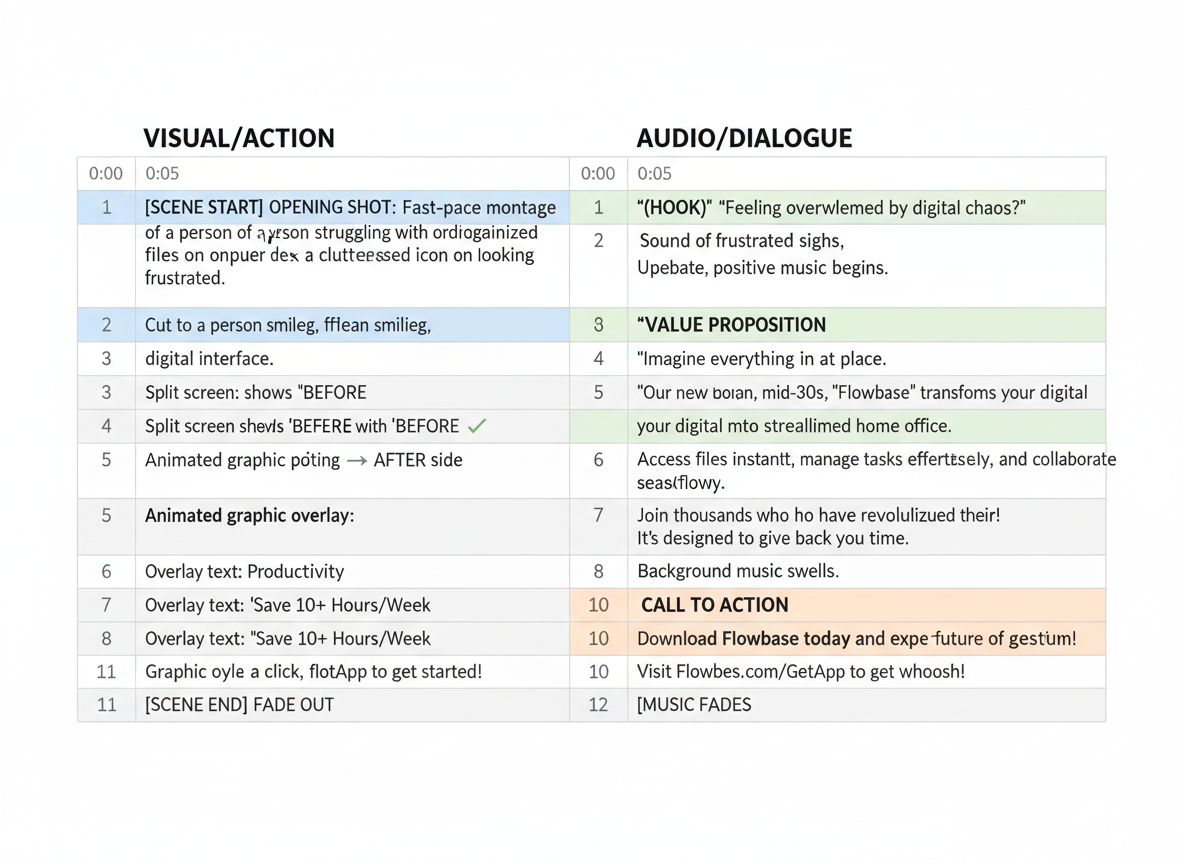
Let’s start with the scripts you’ll use most often. These five templates cover everything from SaaS demos to physical products, and they’re formatted exactly how production teams work—with visual cues on the left and dialogue on the right.
Example #1: SaaS Explainer Video (Problem-Solution Framework)
Duration: 75 seconds
| VISUAL/ACTION | AUDIO/DIALOGUE |
|————–|—————-|
| Frustrated person at computer, cluttered screen with 12 open tabs | “You’re managing content for six clients. Twelve browser tabs. Three different tools. And somehow, you’re still behind schedule.” |
| Screen transition showing chaos turning to calm interface | “What if one platform handled everything? ContentGorilla turns content chaos into a streamlined workflow.” |
| Quick feature montage: dashboard, AI writing, scheduling | “Create SEO-optimized content, schedule across platforms, and track performance—all from one dashboard. No switching. No copying and pasting. Just results.” |
| Real user testimonial clip or quote overlay | “Sarah’s agency went from 40 hours a week on content to just 8. Same quality. Better results.” |
| Clear CTA with pricing or trial offer | “Try it free for 14 days. No credit card needed. Start at get.contentgorilla.co” |
Why this works: Opens with pain they’re experiencing right now, shows the solution visually, proves it with social proof, and removes risk with a trial offer. Customize by swapping in your specific time-savings data and pricing structure.
Example #2: E-commerce Product Demo
Duration: 60 seconds
| VISUAL/ACTION | AUDIO/DIALOGUE |
|————–|—————-|
| Problem scenario: messy desk, tangled cables | “Tired of cables turning your workspace into a disaster zone?” |
| Product reveal with dramatic lighting | “Meet the MagDock Pro. Wireless charging that actually makes sense.” |
| Close-up of key features in action | “Charge three devices simultaneously. Your phone, earbuds, and watch—all at full speed. The LED indicator shows charging status without being annoying at 2 AM.” |
| Lifestyle shot showing clean desk | “Premium aluminum. Weighted base that won’t slide around. It looks good enough that you’ll actually keep it on your desk.” |
| Price reveal with limited-time offer | “Usually $89. Right now, $64 with free shipping. Ships in 24 hours.” |
Why this works: Shows transformation (messy to clean), focuses on benefits not specs, addresses specific objections (“annoying at 2 AM”), and creates urgency. Swap in your product’s unique selling points and real customer complaints you’ve solved.
Example #3: Service Business Explainer
Duration: 90 seconds
| VISUAL/ACTION | AUDIO/DIALOGUE |
|————–|—————-|
| Split screen: DIY disaster vs. professional result | “You wouldn’t perform surgery on yourself. So why DIY your taxes?” |
| Expert at work, confident and organized | “We’ve handled over 2,000 returns for freelancers and creators just like you. People who’ve got income from six different platforms and no idea which deductions they’re missing.” |
| Animated diagram of process | “Here’s how it works: Upload your documents securely. We review everything in 48 hours. Then we hop on a 30-minute call to catch deductions most people miss.” |
| Before/after: stress vs. refund check | “Last year, our average client got $3,400 more back than if they’d used basic software. That’s not magic—it’s expertise.” |
| Calendar booking interface | “Book your free consultation. We’ll tell you exactly what you’re leaving on the table.” |
Why this works: Uses analogy to establish authority, quantifies results with specific numbers, explains the process clearly, and proves value before asking for commitment. Replace stats with your actual client outcomes and adjust timeline to match your delivery.
Example #4: App Onboarding Demo
Duration: 75 seconds
| VISUAL/ACTION | AUDIO/DIALOGUE |
|————–|—————-|
| Phone screen recording: app store to download | “You’ve got the app. Now let’s get you up and running in under two minutes.” |
| Quick account creation flow | “Sign in with Google or email. We’ll never spam you—that’s a promise.” |
| Guided tutorial of main features | “This is your dashboard. Tap here to start your first project. See these templates? They’re proven frameworks you can customize in seconds.” |
| Interactive elements highlighted | “The AI assistant lives here. Ask questions anytime. It learns what you like and gets smarter with every project.” |
| Success moment: completed first action | “That’s it. You just created something in 90 seconds that used to take an hour. Want to see what else you can do?” |
Why this works: Respects their time (“under two minutes”), removes friction with social login, shows value immediately, and ends with momentum. Match this flow to your actual app interface and highlight your biggest time-saver first.
Example #5: Physical Product Showcase
Duration: 60 seconds
| VISUAL/ACTION | AUDIO/DIALOGUE |
|————–|—————-|
| Unboxing shot with authentic reaction | “OK, this packaging alone… impressive. But let’s see if the product lives up to it.” |
| Hands-on demonstration of main use case | “First impression? It’s lighter than I expected but feels solid. Watch this—” demonstrates key feature “—that’s genuinely clever.” |
| Stress test or comparison | “I’ve used four different brands. This one’s the only one that didn’t break after a week of daily use.” |
| Addressing the obvious question | “Is it worth $48? If you’re using it once a month, probably not. If you’re using it daily like I do, absolutely.” |
| Clear purchase path | “Link in description. Use code SAVE15 before Friday for 15% off.” |
Why this works: Feels authentic with real reactions, shows actual use not just features, sets proper expectations, and qualifies the buyer. Record your genuine first experience and address the real questions your customers ask.
Each script includes strategic pauses, social proof placement, and CTAs that match viewer intent at that moment. Copy the structure, plug in your specifics, and you’ll have conversion-ready scripts in minutes.
Example #6-10: Tutorial & How-To Video Scripts
Tutorial videos drive massive engagement because they deliver real value. Here’s how to structure yours for maximum impact.
Example #6: Step-by-Step Tutorial Script
[00:00-00:15] Hook + Problem
“Ever wonder why your Instagram Reels aren’t getting views? I’m about to show you the three settings you’re probably missing.”
[00:15-01:30] Step 1
“First, open your settings and tap ‘Account.’ Here’s what most people don’t know…”
[01:30-02:45] Step 2
“Next, scroll down to ‘Original Content Settings.’ This is where the magic happens…”
[02:45-04:00] Step 3
“Finally, enable these two toggles. Watch what happens next…”
[04:00-04:30] Result + CTA
“That’s it. Three simple changes. Try this today and comment your results below.”
Example #7: Quick Tip Script (30 seconds)
[0-5s] “Stop wasting money on stock photos.”
[5-15s] “Use Canva’s free AI image generator instead. Type your idea, click generate, done.”
[15-25s] “I’ve created 50+ images this week without spending a dime.”
[25-30s] “Follow for more tips like this.”
Example #8: Detailed How-To Guide (5-7 minutes)
[00:00] Chapter 1: Introduction
[00:45] Chapter 2: Setting Up Your Workspace
[02:15] Chapter 3: Core Technique Walkthrough
[04:30] Chapter 4: Common Mistakes to Avoid
[06:15] Chapter 5: Summary + Next Steps
Example #9: Problem-Solving Tutorial
“Your email open rates are terrible. I know because mine were too—sitting at 12% for months. Here’s what changed everything: [specific solution]. Within two weeks, I hit 34%. Let me show you exactly what I did…”
Example #10: Tool Demonstration Script
[Screen recording with voiceover]
“I’m clicking ‘Create New Project’ now. See how the interface loads? This takes about three seconds. Now I’m dragging this element here… notice it snaps to the grid automatically. That’s a huge time-saver.”
Engagement Tips:
Keep steps under two minutes each. Use visual markers when transitioning. Add text overlays for key points. Show your screen, not just talk about it. Address mistakes in real-time—it builds trust.
Example #11-15: Social Media Ad & Testimonial Scripts
Social media ads need to grab attention fast, while testimonials require authentic emotion. Here’s how to nail both formats without sounding scripted or salesy.
Example #11: 15-Second Instagram/Facebook Ad
[0-3 seconds] “Spent $500 on Facebook ads and got zero sales?”
[4-10 seconds] “This 3-step framework helped me turn the same budget into $8,300 in 30 days.”
[11-15 seconds] “Click the link to grab the free breakdown.”
Script tip: Your first three seconds determine everything. Lead with a pain point or surprising statement, not your brand name. The real estate industry’s already proven this works—check out these 15 Realtor Ad Examples That Generated 6-Figure Sales in 2026 for more inspiration on thumb-stopping hooks.
Example #12: 30-Second LinkedIn B2B Script
[0-5 seconds] “Your sales team’s spending 14 hours a week on manual outreach.”
[6-15 seconds] “We built an AI system that cut that to 2 hours while doubling response rates. Real data from 47 B2B companies.”
[16-25 seconds] “Watch this 90-second demo to see how it personalizes outreach at scale.”
[26-30 seconds] “Link in comments. No credit card needed.”
Script tip: LinkedIn audiences respond to specifics. Use real numbers, timelines, and measurable outcomes.
Example #13: Customer Testimonial Script
“Before [product], I was [specific struggle]. I’d tried [other solutions], but nothing worked. Within [timeframe], I saw [specific result]. The best part? [Unexpected benefit]. If you’re dealing with [original problem], this actually delivers.”
Script tip: Coach your customer through three beats: before state, turning point, after state. Don’t let them ramble about features. Keep it focused on their emotional journey.
Example #14: Case Study Video Script
[Opening] “Sarah’s agency was losing clients to cheaper competitors.”
[Problem] “Her proposals looked generic. Clients couldn’t see the value.”
[Solution] “She implemented our visual proposal system.”
[Results] “Within 60 days: 73% close rate, $45K in new contracts.”
[Proof] [Show metrics, screenshots, testimonial clip]
Example #15: User-Generated Content Style
“Okay, so I wasn’t planning to post this, but… Share this Post
Script tip for non-pros: Write bullet points instead of full sentences. Let people use their own words around your key messages. Authenticity beats perfection every single time.
Example #16-21: Brand Story, Webinar & Behind-the-Scenes Scripts
Example #16: Brand Origin Story Script
Duration: 90-120 seconds | Tone: Vulnerable, authentic, inspiring
“I started [Company Name] in my garage with $500 and a problem no one else seemed to care about. [Brief story of the pain point]. Three years ago, I hit rock bottom when [specific crisis moment]. That’s when everything changed. I realized [key insight]. Today, we’ve helped over [number] people [result]. This isn’t just my story—it’s yours too.”
Visual notes: B-roll of early workspace, personal photos, time-lapse of growth, customer testimonials woven throughout.
Example #17: Mission-Driven Brand Video
Duration: 60-90 seconds | Tone: Purpose-focused, energetic
“We believe [core value] shouldn’t be a luxury. Every day, [problem statistic] face [challenge]. That’s unacceptable. We’re building something different—where [solution approach]. Our commitment? [Specific promise]. When you choose us, you’re not just buying [product]—you’re joining a movement. Here’s how we’re making it happen…”
Example #18: Webinar Introduction Script
Duration: 2-3 minutes | Tone: Authoritative, welcoming
“Hey everyone, thanks for joining today. I’m [Name], and over the past [timeframe], I’ve [credibility statement with numbers]. You’re here because you want [desired outcome], but you’re probably stuck with [common frustration]. Sound familiar? Here’s what we’ll cover in the next [duration]: First, [point one]. Second, [point two]. Finally, [point three]. By the end, you’ll have a clear roadmap to [specific result]. One quick note—we’ll have Q&A at [time], so drop questions in the chat anytime. Let’s get started.”
Example #19: Webinar Transition Script
Duration: 30-45 seconds
“Before we move to [next section], let me recap what you’ve learned: [quick summary]. Now, this next part is where everything clicks together. You’re about to see [preview of next section]. Ready? Let’s keep going.”
Example #20: Behind-the-Scenes Day-in-the-Life
Duration: 3-5 minutes | Tone: Casual, relatable
“It’s 6:47 AM, and this is what building [business type] actually looks like. [Morning routine]. Here’s the reality—it’s not glamorous. [Show actual work: client calls, content creation, problem-solving]. But this moment? [Share win or meaningful interaction]. That’s why I do this.”
Pacing tip: Quick cuts, real-time timestamps, minimal editing for authenticity.
Example #21: Team Introduction/About Us Script
Duration: 90 seconds | Tone: Professional yet warm
“Meet the humans behind [Company Name]. We’re not a faceless corporation—we’re [number] people obsessed with [mission]. [Brief individual introductions with roles and personality quirks]. We’ve built [achievement], but more importantly, we actually answer your emails. We’re here because [shared value]. Want to work with people who care? You just found them.”
Visual approach: Individual portrait shots transitioning to team working together. Similar to how you’d craft compelling personal biographies, show personality alongside expertise.
Script Formatting Standards: Two-Column vs Narrative vs Screenplay Style
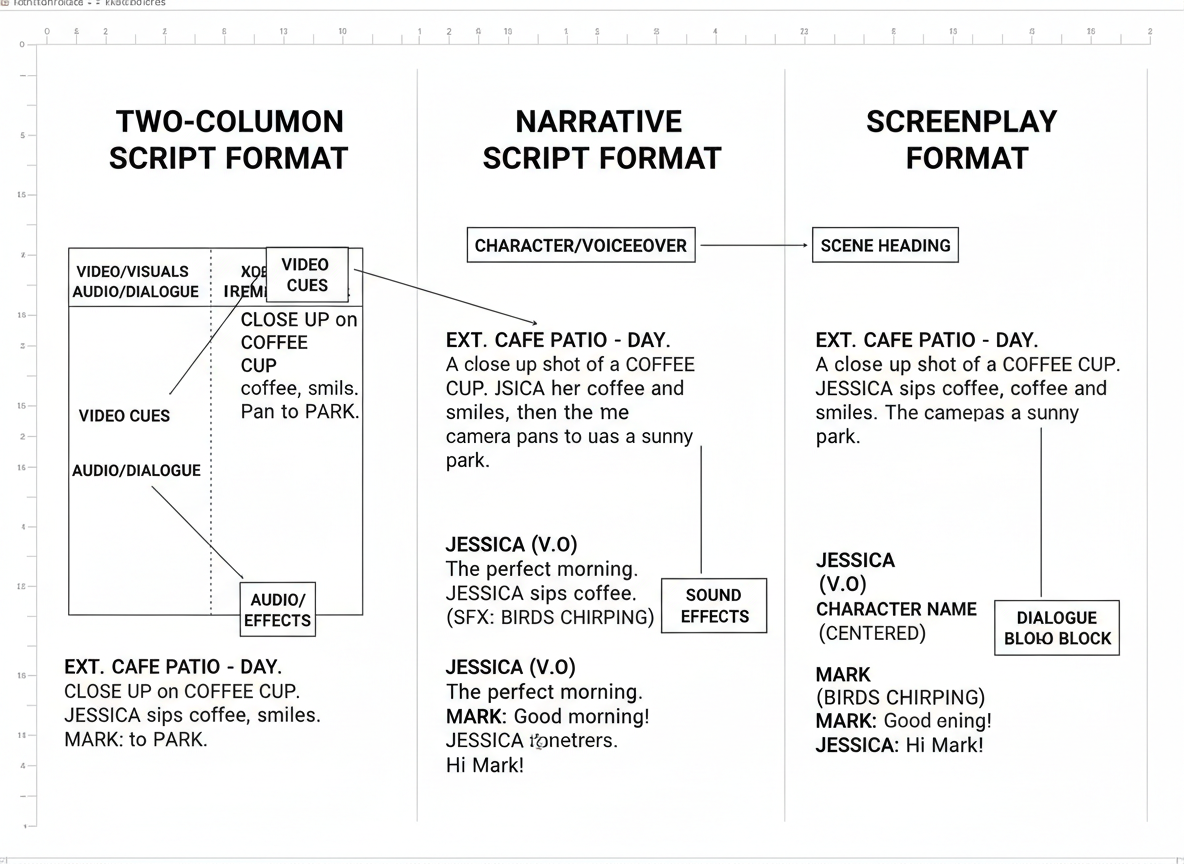
You’ve probably stared at a blank page wondering, “How should I actually format this script?” Here’s the truth: the format you choose can make or break your production workflow.
Two-column format works best when you’re coordinating visuals with dialogue or narration. On the left side, you’ll list video directions, B-roll descriptions, and graphics. The right side holds your audio—dialogue, narration, sound effects, music cues. This format shines for explainer videos, product demos, and corporate presentations where your production team needs clear visual-audio separation. Your editor will thank you.
Narrative format strips away the complexity. It reads like a story or article, with occasional visual notes in brackets. Perfect for voice-over content, documentaries, and straightforward tutorials where you’re not juggling multiple visual elements. Content creators working solo love this because it’s simple to write and read aloud naturally.
Screenplay style brings the full production treatment—scene headings, character names, action lines, and detailed directions. Use this when you’re shooting dialogue-heavy content, sketches, or anything requiring precise blocking and camera movements. It’s professional film territory.
For teleprompter use, keep paragraphs short (3-4 lines max), use 24-point font minimum, and avoid ALL CAPS except for emphasis—it’s harder to read quickly.
Standard formatting means 12-point Courier or Arial, double-spaced for production notes. This gives your team room to scribble changes during shoots.
Testing CG offers downloadable templates for all three formats at https://get.contentgorilla.co, plus script generation tools that automatically format based on your video type. Google Docs, Microsoft Word, and specialized software like Celtx or Final Draft all support these standards—choose what your team already uses.
7 Deadly Video Script Mistakes (And How to Fix Them Fast)
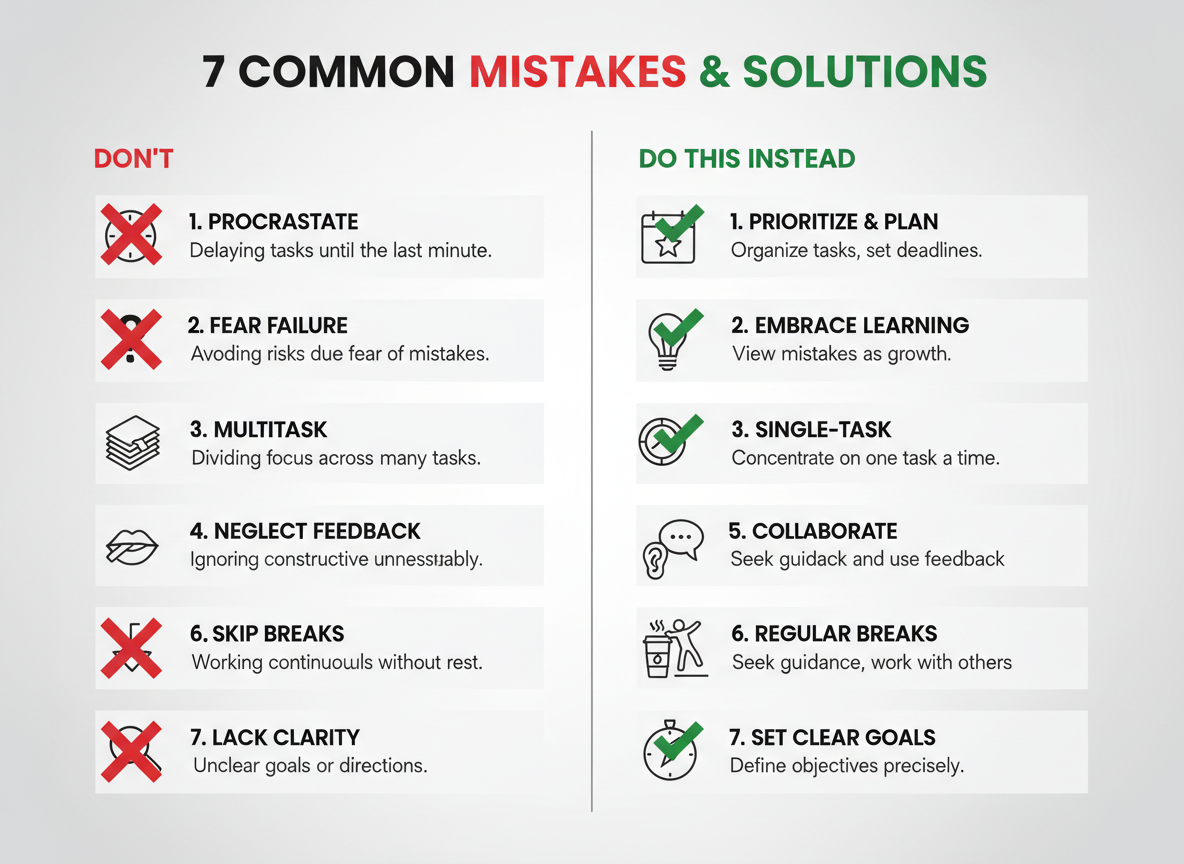
Even the best content ideas crash when your script has fundamental flaws. Here’s what’s killing your video performance—and how to fix it.
Mistake #1: Burying the Hook
Before: “Hi, I’m Sarah from Marketing Solutions. Today I want to talk about email strategies that…”
After: “This one email template generated $47,000 in sales last month. Here’s the exact structure…”
Start with value, not introductions. You’ve got three seconds, not thirty.
Mistake #2: Writing for Reading, Not Speaking
Before: “Utilizing comprehensive analytics facilitates identification of optimization opportunities.”
After: “Your analytics show you exactly where to improve. Here’s what to look for…”
Read your script aloud. If you stumble, rewrite it.
Mistake #3: Confused CTAs
Before: “Like, subscribe, comment, click the link, download our guide, and join our community…”
After: “Click the link below to grab your free template.”
One video, one primary action. Everything else is noise.
Mistake #4: Ignoring Platform Rules
Before: Using a 10-minute storytelling script for TikTok, or a 30-second teaser for YouTube’s long-form audience.
After: TikTok gets 15-60 seconds with immediate payoff. YouTube allows deeper dives with proper pacing.
Your example of video script needs to match where it’ll live.
Mistake #5: Running Too Long
Before: A 5-minute script for an Instagram Reel that should be 30 seconds.
After: Cut ruthlessly. If it doesn’t serve the core message, it’s gone.
Mistake #6: Zero Personality
Before: “Many people find that products can help solve problems in various ways.”
After: “Look, I wasted $3,000 before figuring this out. Don’t make my mistake.”
Your voice matters. Generic content gets ignored.
Mistake #7: Monotonous Pacing
Before: Every sentence the same length. Same rhythm throughout. No variation whatsoever. Just droning on endlessly.
After: Mix it up. Short punches hit hard. Then you expand with explanation and context. Then back to impact.
Rhythm keeps viewers engaged.
Free vs Paid Video Script Writing Tools: Honest Comparison for 2026
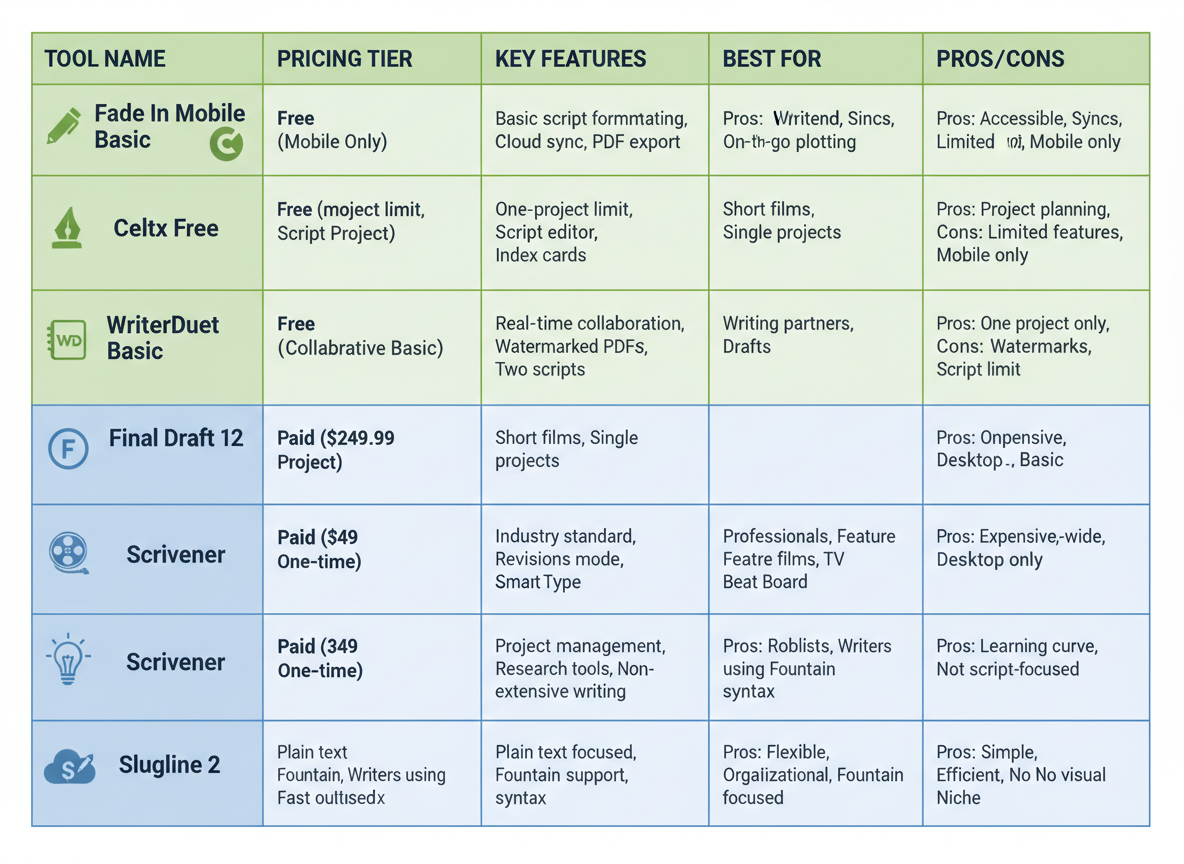
Choosing the right script writing tool shouldn’t feel like solving a calculus problem. Let’s break down what actually works without the marketing fluff.
Free Tools That Get the Job Done
Google Docs remains surprisingly effective for script writing. You’re probably already using it, and that’s the beauty—zero learning curve. Add a simple two-column template (dialogue on one side, visual notes on the other), and you’ve got a functional script workspace. Celtx offers a limited free version that handles basic script formatting, though you’ll hit restrictions quickly. WriterDuet’s free tier gives you real-time collaboration, which beats emailing Word docs back and forth like it’s 2010.
AI-Powered Options: The New Middle Ground
ChatGPT and Claude have changed the game for script generation. Feed them your outline, and they’ll produce decent first drafts in seconds. The catch? You’ll need to heavily edit the output—AI tends to be overly formal and generic. Jasper AI starts at $49/month and specializes in marketing copy, making it solid for short-form scripts and social content. If you’re already using AI for product descriptions and other marketing content, the learning curve here is minimal.
Professional Tools for Serious Creators
Final Draft ($250 one-time) is industry standard for screenwriting, complete with production planning features. Scrivener ($49) works brilliantly for longer projects where you need to organize research alongside your script. StudioBinder offers free tools plus paid tiers starting at $29/month, connecting your script directly to production scheduling and shot lists.
Here’s what Content Gorilla brings to the table that’s different: instead of starting from scratch, it converts existing videos into blog posts and other formats. Think of it as reverse engineering your best content across platforms rather than writing everything fresh.
What Actually Matters When Choosing
Your budget tells part of the story, but consider this: a free tool you’ll actually use beats expensive software gathering digital dust. Beginners should start with Google Docs or Claude—get comfortable with structure before investing in specialized software.
If you’re creating client work or managing multiple projects weekly, StudioBinder or Final Draft pays for itself through efficiency gains. The collaboration features alone save hours of confusion.
Most importantly, pick tools that integrate with your video editing workflow. The best script means nothing if transferring it to your editor feels like translating hieroglyphics.
Script Length & Timing Guide: Optimal Duration by Platform & Audience
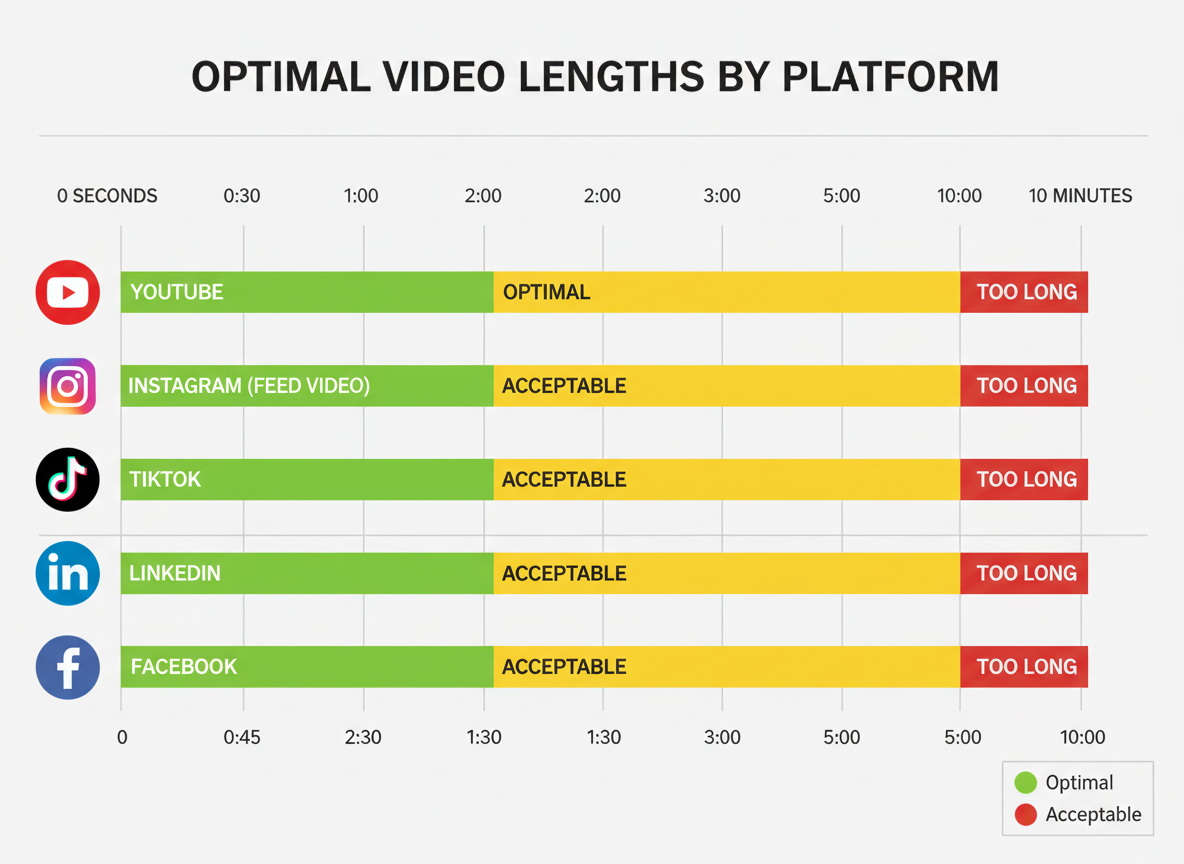
Getting your video length wrong wastes hours of work. Your brilliant script won’t matter if viewers bounce before they hear your message.
Here’s what the data tells us for 2026:
YouTube continues to reward longer content, but it’s not one-size-fits-all. Long-form videos (8-15 minutes) dominate for tutorials, reviews, and in-depth analyses. They generate better watch time metrics and keep viewers engaged with your channel longer. Mid-form content (4-7 minutes) works best for how-to videos and product demonstrations. Short-form (under 60 seconds) only makes sense for teasers or quick tips that drive traffic to your longer content.
Social platforms demand tighter editing. Instagram’s sweet spot sits at 21-34 seconds—long enough to deliver value, short enough to loop multiple times. TikTok’s algorithm favors 11-17 second videos, though creators often push to 30-40 seconds for storytelling. LinkedIn audiences will stick around for 30-90 seconds if you’re solving a business problem or sharing industry insights.
Pacing matters as much as length. For conversational content, aim for 120-150 words per minute. This feels natural and gives viewers time to process information. Energetic content (product launches, motivational pieces) can push 160-180 WPM. Want to calculate your script length? Multiply your target duration in minutes by your chosen WPM.
Here’s the uncomfortable truth about attention spans: most viewers decide within 3 seconds whether to stay. Retention curves show massive drop-offs at the 15-second mark, with another cliff at 45 seconds. Combat this by front-loading your value proposition and placing pattern interrupts (visual changes, music shifts, text overlays) at these critical moments.
Platform algorithms increasingly favor completion rates over raw watch time. A 40-second video with 80% retention outperforms a 3-minute video with 30% retention. This means knowing your audience demographics matters—younger viewers (18-24) prefer faster pacing, while audiences 35+ tolerate longer explanations.
Voice-Over vs On-Camera Scripts: Key Differences That Matter
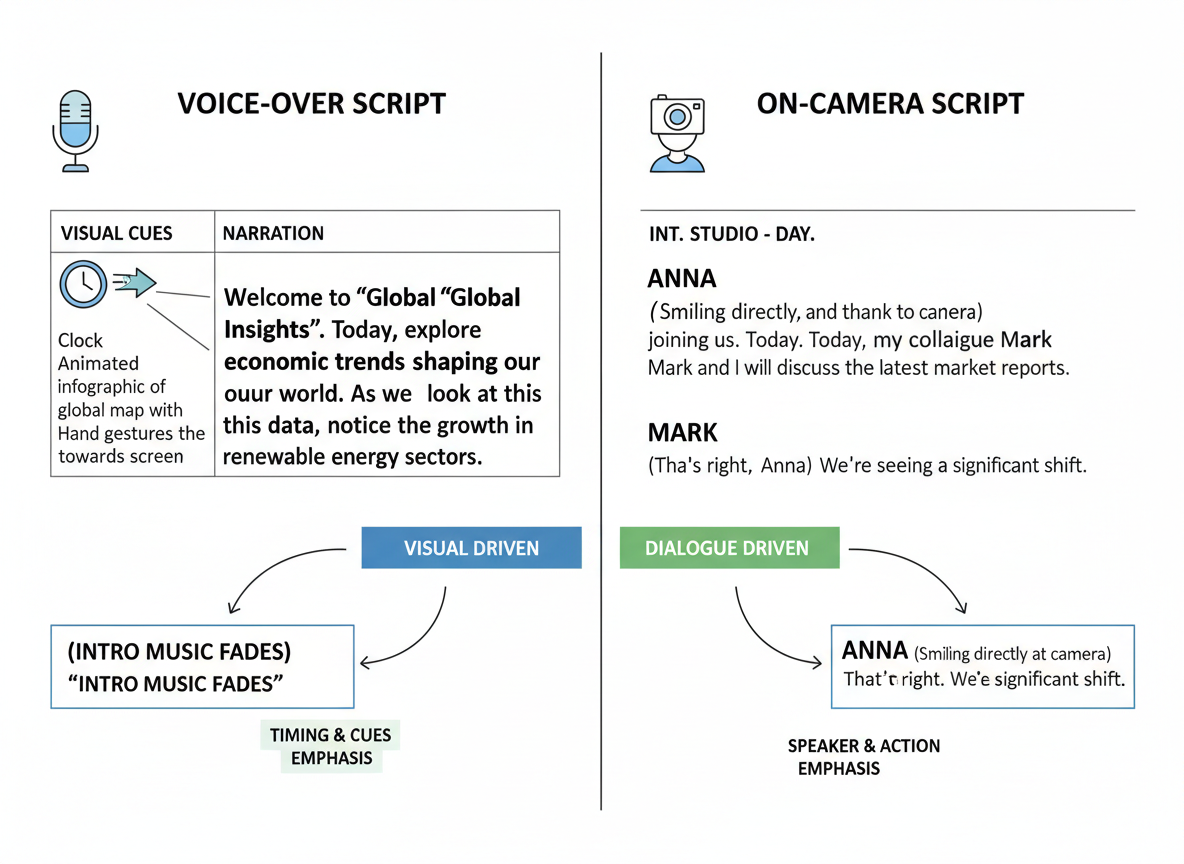
Your script format needs to match your delivery method, or you’ll struggle through every take.
Voice-over scripts carry the heavy lifting. They’re descriptive and explanatory because viewers can’t see you. You’re painting pictures with words while B-roll plays on screen. Think “Watch as the analytics dashboard reveals your traffic sources” rather than just showing a dashboard and hoping viewers get it.
On-camera scripts flip the dynamic completely. You’re visible, so you can lean on facial expressions and hand gestures. Your script should read conversational: “See this dashboard here? This is where most creators miss the goldmine hidden in their data.”
If you’re using a teleprompter, write shorter sentences. Build in natural pause points with ellipses or line breaks. Keep your cadence human by reading it aloud before filming. Nobody talks in perfect paragraphs, so don’t script that way.
Here’s the same content both ways:
Voice-over version:
“Content creators who analyze their traffic sources typically discover that 60% of their visitors come from just three channels. Understanding this distribution allows for strategic resource allocation and improved ROI.”
On-camera version:
“Here’s something wild… when I checked my traffic sources, 60% came from just three places. Three! Once I knew that, I stopped wasting time on channels that weren’t working.”
For visual direction notes, include them if you’re working solo or with a small team. Write [Show graph animation] or [B-roll: typing on laptop]. Larger production teams usually handle this separately.
The hybrid approach works brilliantly for tutorials. Start on-camera to build connection, switch to voice-over for detailed walkthroughs, then return on-camera for the close.
How to Adapt Scripts for Content Repurposing Across Channels
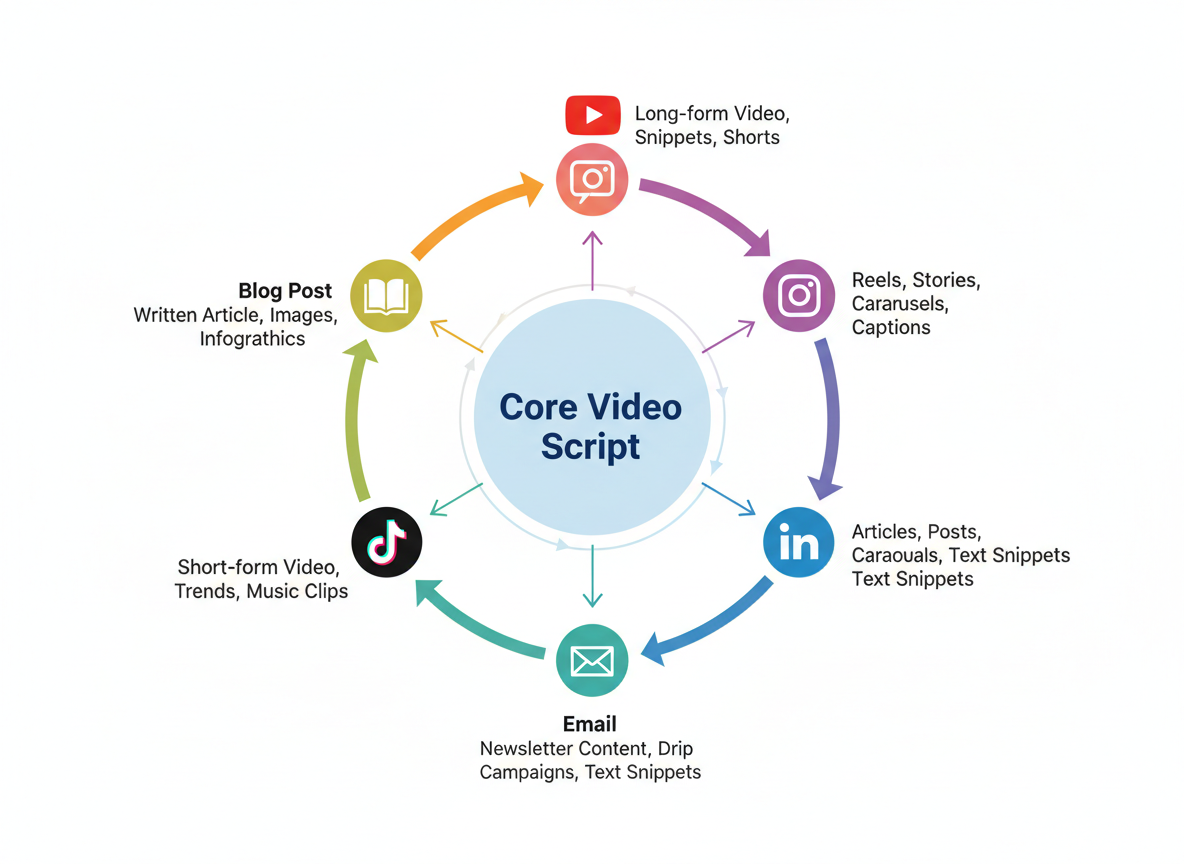
Here’s the reality most creators miss: you’re probably spending 10 hours creating content when you could spend 2 hours and get 10x the reach.
The secret? Master the content multiplier strategy. Start with one core script, then adapt it for multiple platforms. Your 10-minute YouTube video becomes five Instagram Reels, three LinkedIn posts, a blog article, and an email newsletter. Same message, different packages.
From Long-Form to Short-Form: The Extraction Method
Take your YouTube long-form script and identify the strongest 30-60 second segments. Look for moments with emotional punch, surprising statistics, or actionable tips. Each becomes a standalone Reel or TikTok. The hook changes, but the core value remains.
For instance, a 12-minute product review script might contain six different features you demonstrated. Extract each feature demonstration into its own short-form video with a platform-specific hook.
Blog to Video (and Back Again)
Converting blog posts to video scripts requires structural shifts. Your written subheadings become verbal transitions. Bullet points transform into conversational explanations. Dense paragraphs need breaking into digestible sound bites.
Going reverse? Content Gorilla handles this automatically, converting your videos to blog posts in literally three clicks. No manual transcription, no reformatting headaches.
The Webinar Breakdown Strategy
That hour-long webinar you recorded? It’s hiding 15-20 social videos inside it. Extract key teaching moments, Q&A answers, and case study segments. Each becomes a standalone piece that drives viewers back to the full presentation.
Maintaining Your Voice Across Formats
Your brand voice shouldn’t change just because the platform does. Keep your signature phrases, tone, and perspective consistent. A professional on LinkedIn should sound like the same person on Instagram—just adapted to each platform’s culture and consumption style.
The workflow’s simple: Create once → Extract strategically → Adapt format → Distribute everywhere. You’ll save 80% of your content creation time while multiplying your reach exponentially.
Measuring Video Script Effectiveness: KPIs and Metrics That Matter
You’ve written the script, recorded the video, and hit publish. Now what? Here’s the truth: your first script isn’t your best script. It’s the data that transforms good scripts into great ones.
Watch-through rate tells you everything. If 60% of viewers complete your Instagram Reel, you’re crushing it. YouTube Shorts? Aim for 50% or higher. Long-form YouTube videos? Anything above 40% deserves celebration. These benchmarks matter because they separate scripts that work from those that don’t.
But let’s get granular. Your hook’s effectiveness shows up immediately—within those first 3-5 seconds. If you’re losing 70% of viewers before the five-second mark, your opening line needs surgery. I’ve seen creators boost retention by 40% just by swapping their first sentence.
Engagement metrics reveal emotional resonance. When your likes-to-views ratio hits 5% or higher, you’ve struck a nerve. Comments tell you what viewers actually heard versus what you meant to say. That disconnect? It’s gold for refining your messaging.
Track click-through rates on your CTAs religiously. A 2% CTR might sound weak, but it’s actually solid for most platforms. Anything above 5% means your script nailed the value proposition.
Audience retention graphs show exactly where people bail. That drop at 1:23? Something in your script lost them. Maybe you rambled. Maybe you introduced a new concept without context.
A/B test everything: hook variations, CTA placement, even video length. Test two versions of your example video script with different opening questions. One will always outperform the other by at least 15%.
Your analytics aren’t criticism—they’re your script coach, working 24/7 to make you better.
Expert Script Writing Tips from Top Video Producers
Sarah Chen, who’s grown her YouTube channel to 2.3 million subscribers, swears by a simple hook formula: “I start with the exact problem my viewer typed into the search bar. No fluff, no intro music—just ‘Here’s how I fixed this exact issue in under 10 minutes.’ Works every time.”
Professional video producer Marcus Williams shares his pacing secret: “Every 8-12 seconds, something needs to change. New angle, B-roll, text overlay, something. The moment your screen stays static too long, you’re hemorrhaging viewers.”
Marketing strategist Jennifer Park focuses on conversion: “Stop writing scripts that educate and forget to convert. I script three CTAs into every video—soft ask at 30%, medium at 60%, strong at 90%. Your content can be brilliant, but if you don’t guide viewers to the next step, you’re leaving money on the table.”
Here’s what most creators miss: write like you talk. Your eighth-grade English teacher isn’t watching your videos. Sentence fragments? Totally fine. Starting with “and” or “but”? Go for it.
Read your scripts aloud before hitting record. What looks perfect on paper often sounds robotic when spoken. You’ll catch those tongue-twisting phrases that’ll trip you up during filming.
Don’t over-script every word. Script your structure—opening hook, three main points, closing CTA—then riff within that framework. Authenticity dies when you’re reading word-for-word from a teleprompter.
Use pattern interrupts strategically. Sudden volume changes, unexpected questions, quick cuts to something surprising—these moments snap wandering attention back to your content.
One workflow tip that’ll save you hours: script directly in your editing software’s notes section. You’ll thank yourself during post-production when everything’s already organized.
Budget and Resource Planning: Script to Screen Production Guide
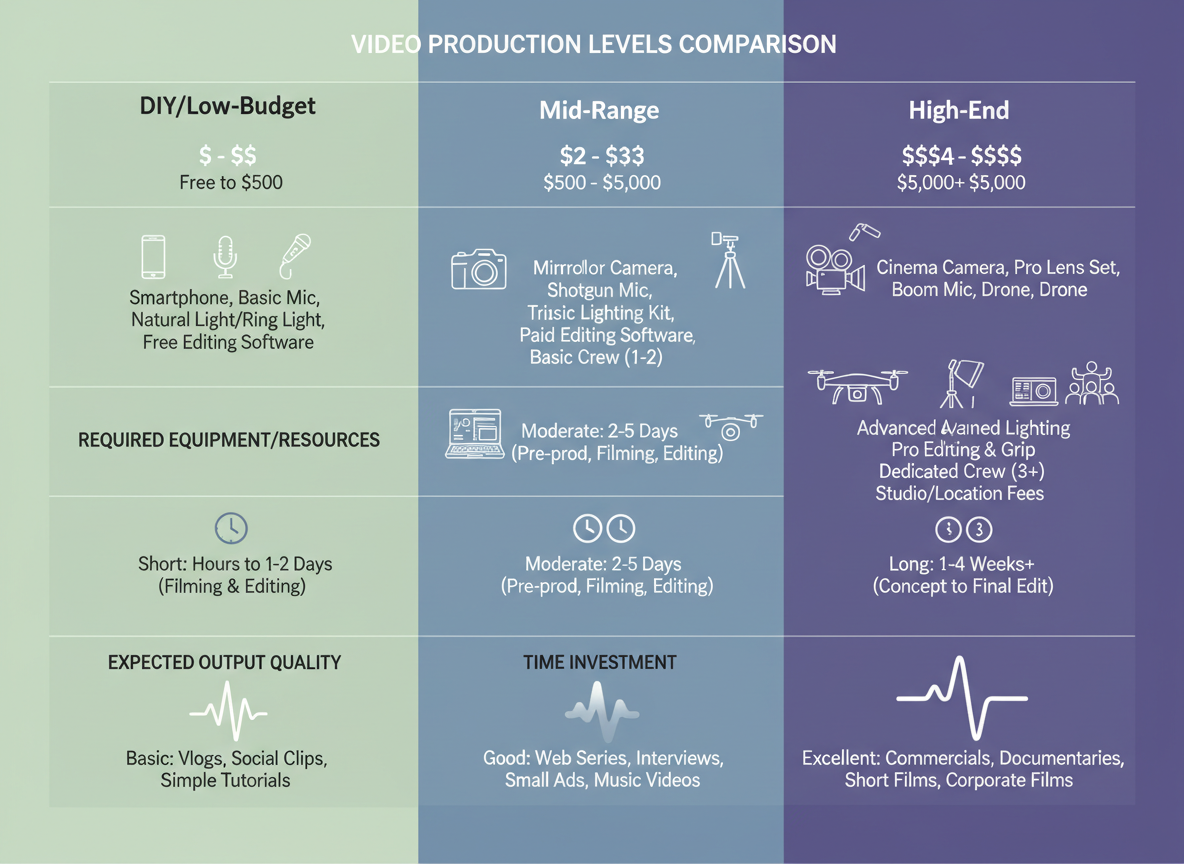
Let’s talk money and time—because even the best example of video script won’t matter if you can’t afford to produce it.
The DIY Low-Budget Approach (Under $100)
You’ve got your smartphone, which already shoots 4K. Add a $20 ring light, natural window lighting, and free tools like CapCut or DaVinci Resolve. Your biggest investment? Time. Expect 2-3 hours for scripting, 1-2 hours filming, and 3-5 hours editing per video. Perfect for solopreneurs testing content strategies.
Mid-Range Production ($500-2,000 Per Video)
This tier brings professional equipment, better audio (game-changer for retention), and freelance talent. You’ll hire a videographer for the day, rent gear if needed, and maybe bring in an editor. Timeline compresses to about 8-10 total hours of your involvement. Most growing businesses thrive here—professional enough to build trust, affordable enough to scale.
High-End Production ($5,000+ Per Video)
Full crews, agencies, multiple camera angles, location scouts. You’re looking at weeks of pre-production and production days that feel like movie sets. Reserve this for cornerstone content, major product launches, or when your brand can’t afford amateur-looking footage.
The Hiring Decision
DIY scripting works when you know your audience intimately. Hire writers when you’re producing 4+ videos monthly or lack the time to research thoroughly. A $200 script investment often pays for itself through better conversion rates.
Here’s where Content Gorilla changes everything: automation slashes ongoing production costs by 70%. You’re not starting from scratch every single time. The platform generates optimized scripts in minutes, letting you focus resources on filming and distribution instead of staring at blank documents. For teams managing multiple clients, that’s the difference between handling 5 accounts or 20.
Industry-Specific Script Customization Tips
Your script needs to speak your industry’s language. A SaaS demo won’t work for selling sneakers, and real estate tours need a completely different approach than fitness coaching.
SaaS and Tech Products
Lead with the problem, not your features. Your audience doesn’t care about “cloud-based infrastructure”—they want to know how you’ll save them three hours every day. Demo the actual functionality in action. Show the dashboard, click through the workflow, let viewers see themselves using it. Address technical objections head-on: “Works with your existing tools. No IT team required. Set up in under five minutes.”
E-commerce Brands
Make the product the star. Show it from every angle, in real-world use, solving actual problems. Stack social proof throughout: “Over 12,000 five-star reviews.” Create urgency without being pushy: “Limited spring collection—once these colors sell out, they’re gone.” Your script should describe what viewers see while adding context they can’t get from photos alone.
Coaching and Consulting
You’re selling transformation, not time. Start with authority markers, but don’t overdo it. One powerful credential beats a laundry list. Share specific transformation stories: “Sarah went from 200 followers to a six-figure business in eight months.” Focus on the value equation—what they’ll gain versus what they’ll invest.
Real Estate
Blend features with emotion. “Four bedrooms” means nothing until you add “plenty of space for your growing family.” Highlight neighborhood perks that aren’t obvious in photos. Virtual tours need narration that creates urgency: “Properties in this school district don’t last long.” If you need more inspiration, check out our proven real estate ad templates that convert browsers into buyers.
Health and Fitness
Before-and-after narratives work, but pair them with credibility. Certifications matter here. Address safety concerns upfront: “Designed by physical therapists for joint protection.” Be specific about results: “Most clients see improvement within two weeks.”
B2B Services
Talk ROI from frame one. Use case studies that mirror your prospect’s situation. Speak to industry-specific pain points: “If vendor management feels like herding cats, here’s why…”
How Content Gorilla Automates Your Entire Video-to-Content Workflow
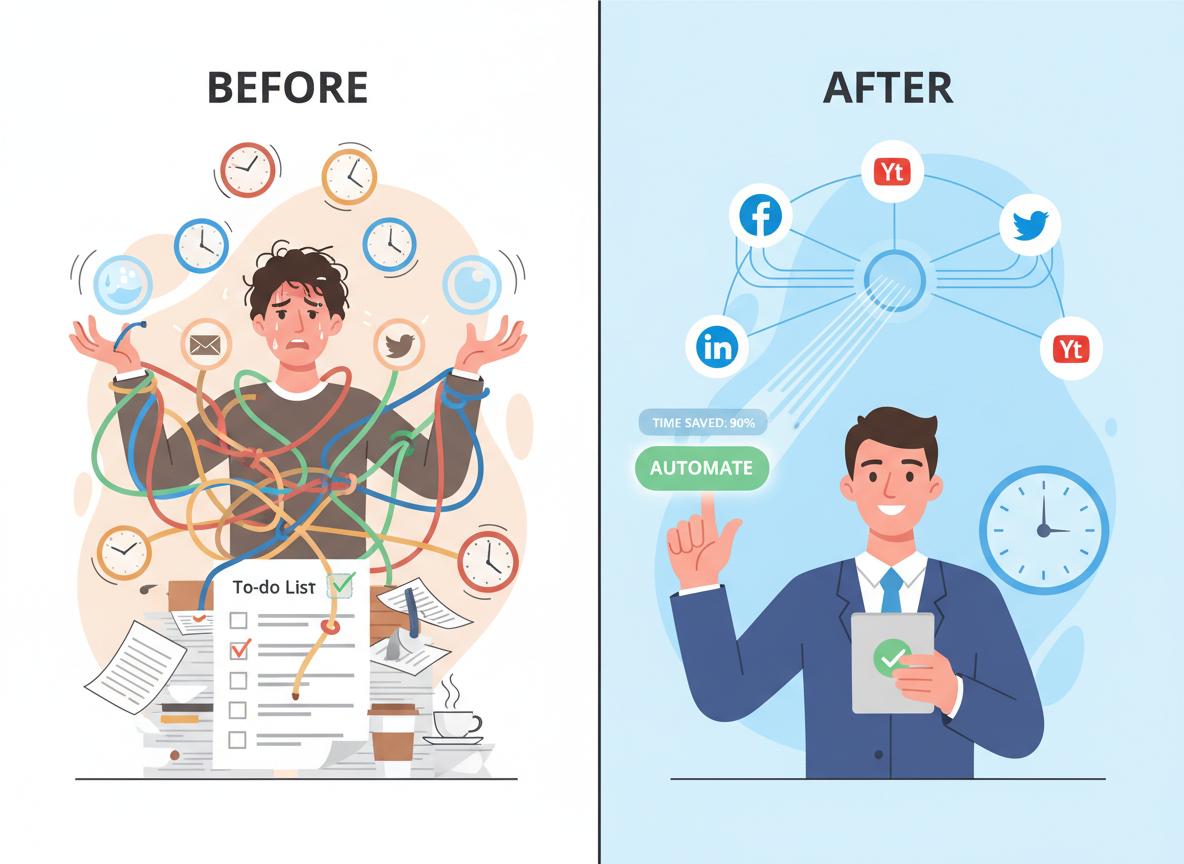
Here’s the uncomfortable truth: you’re probably wasting 20+ hours every week on tasks that could run on autopilot.
Think about your current workflow. You craft the perfect script. Record the video. Edit it. Upload it. Then manually repurpose that content for your blog. Share it across social platforms, one by one. Rinse and repeat. It’s exhausting, and honestly? It’s killing your ability to scale.
Content Gorilla flips this entire model upside down.
Instead of spending hours on manual content creation, you can set up an entire year’s worth of content in under three minutes. Yes, you read that right. Three minutes.
Here’s how it works: Content Gorilla automatically converts your video scripts into blog posts with just three clicks. No copying and pasting. No reformatting. The system handles it all while maintaining your brand voice and SEO optimization.
But it doesn’t stop there. Once your content’s created, Content Gorilla auto-syndicates everything to Facebook, LinkedIn, and Twitter/X simultaneously. You publish once, and it appears everywhere your audience hangs out. No more logging into five different platforms to post the same content.
Got a global audience? The platform supports over 100 languages, so you can scale your content internationally without hiring translation teams or managing multiple content calendars.
The real magic happens when you enable fully automated daily publishing. Your video scripts become self-sustaining content assets that work while you sleep. Imagine waking up to fresh posts already live across all your channels.
Let’s talk numbers. If you’re spending 20 hours per week on content creation and distribution, that’s 1,040 hours annually. At a conservative $50/hour value of your time, you’re looking at $52,000 worth of labor. What would you do with that time back? Build new revenue streams? Finally launch that course? Actually take a vacation?
Digital entrepreneurs using Content Gorilla are reporting 90% time savings on content workflows while actually increasing their publishing frequency. One marketer went from posting twice weekly to daily content across eight platforms—without hiring a single team member.
Here’s what should worry you: your competitors are already automating these workflows. While you’re manually typing scripts and scheduling posts, they’re scaling faster and capturing more market share.
Ready to automate your content empire? Explore Content Gorilla’s automation capabilities and reclaim your time today.
Take Action: Your Next Steps to Video Script Mastery
You’ve just gained access to 21 battle-tested video scripts that marketers and creators are using right now to drive engagement, conversions, and revenue. That’s a complete transformation from staring at a blank screen wondering what to say.
Here’s how to turn these templates into real results this week:
Your 72-Hour Action Plan:
First, pick three scripts that align with your current business goals. If you’re building authority, grab the educational template. Launching a product? The sales script is your starting point. Growing your personal brand? The personal brand statement generator tools can complement your video strategy perfectly.
Second, save these templates in Google Docs, Notion, or whatever tool you actually use daily. Don’t let them sit in your downloads folder gathering digital dust.
Third, shoot one video using your chosen script before Friday. Track your view-through rate, engagement, and any conversions. Real data beats theoretical knowledge every time.
Your Long-Term Play:
Build your script library by customizing templates for different campaigns. Establish a production rhythm—whether that’s two videos weekly or ten. Then scale what works.
Video dominates 2026. While you’re implementing these scripts, explore Content Gorilla to automate distribution across platforms and repurpose your content effortlessly.
You’ve got the scripts. You’ve got the framework. Now you just need to hit record.
Share your wins with us—we love seeing creators succeed.
Frequently Asked Questions
How long should a video script be?
It depends entirely on your platform. YouTube videos typically run 800-1,200 words for 7-10 minutes of content, while Instagram Reels need just 100-150 words for 60 seconds. TikTok scripts? Even shorter—around 80-120 words. For longer educational content on YouTube, you might stretch to 2,000 words, but remember: people speak at about 130-150 words per minute. Time yourself reading aloud to get accurate estimates.
What’s the best format for a video script?
Two-column scripts work beautifully for videos with B-roll, graphics, or product demos. You’ll put your dialogue in the left column and visual cues on the right. Narrative scripts (just the words you’ll say) are perfect for talking-head videos or when you’re experienced enough to handle visuals instinctively. New creators should stick with two-column formats until they’ve got the process down.
Do I need professional scriptwriting software?
Not really. Google Docs works fine when you’re starting out. As you scale, tools like Descript ($12/month) combine scriptwriting with video editing. Final Draft ($250 one-time) is overkill unless you’re producing Hollywood-level content. Most successful creators I know still use simple Google Docs with a basic template they’ve refined over time.
How do I write a hook that actually stops the scroll?
Start with a pattern interrupt. “You’re writing video scripts wrong” beats “In this video, I’ll teach you about scripts.” Ask provocative questions: “What if I told you your first sentence determines 80% of your retention?” Or use the “mistake method”: “I wasted $5,000 before learning this one script trick.” For more proven hooks, check out our collection of 15 YouTube Script Templates That Hook Viewers in 3 Seconds.
Should I script every word or just bullet points?
Beginners need full scripts to avoid rambling. You’ll sound more natural reading a well-written script than fumbling through bullet points. Once you’ve recorded 20-30 videos, switch to detailed bullet points. Experienced creators often use a hybrid: fully scripted hooks and CTAs, bullet points for the middle sections.
How can I make my script sound natural on camera?
Write like you talk. Use contractions. Read it aloud while writing—if you stumble over a phrase, rewrite it. Add parenthetical notes like “(pause)” or “(show excitement here)” to remind yourself about delivery. Record yourself having a conversation about your topic, then transcribe it. You’ll discover your natural speaking patterns.
What’s the difference between YouTube and Instagram scripts?
YouTube scripts build slowly with detailed explanations and longer storytelling. You’ve got time to develop ideas. Instagram demands immediate impact—you need to hook within the first frame, deliver value in under 60 seconds, and end with a clear action. Instagram scripts are tighter, punchier, and more visual.
How do I write a script for a product demo video?
Follow this structure: Problem (15 seconds) → Solution introduction (10 seconds) → Feature walkthrough (60-90 seconds) → Benefits recap (15 seconds) → CTA (10 seconds). Show each feature in action rather than just describing it. Address the most common objection right before your CTA.
Can I use AI to write video scripts?
Yes, but treat AI as your first draft writer, not your final editor. AI tools like ChatGPT can generate solid outlines and overcome writer’s block, but they’ll give you generic hooks and awkward phrasing. Use AI to brainstorm ideas and structure, then rewrite everything in your voice. Never publish AI-generated scripts without heavy editing.
How do I convert a blog post into a video script?
Don’t just read your blog post. Instead, extract the main points and rewrite them conversationally. Transform “You should consider implementing these strategies” into “Here’s what you need to do.” Cut your word count by 40-50%. Add verbal transitions like “Now here’s the interesting part” that don’t work in writing but sound natural on camera.
What CTA should I include in my video script?
Place a soft CTA at the 30-second mark (“Subscribe if you want more of this”), your main CTA right after delivering your biggest value point, and a final CTA in your outro. Make it specific: “Download the free script template in the description” beats “Check out my website.” Your CTA should match the value you just delivered—if you taught something, offer a tool. If you entertained, ask for engagement.
How do I know if my video script is working?
Watch your average view duration. If 50% of viewers drop off in the first 15 seconds, your hook isn’t working. If they leave at minute three every time, something’s broken in your middle section. Test different script approaches and compare retention graphs. Click-through rate on your CTA tells you if your offer resonates. You’ll need at least 5-10 videos to spot patterns, so don’t panic after one video underperforms.

I am a full-time online marketer, for over a decade now. Helped over 100,000+ people & generated well over $12M in online sales.