

Introduction: Why 92% of Video Marketers Say Scripts Are Their Secret Weapon
Here’s something that might surprise you: videos with scripts get 73% higher engagement than those without. Yet every content creator knows that familiar feeling—staring at a blank screen, cursor blinking, wondering how the hell to start.
You’ve got your camera ready. Your editing software’s open. But the script? That’s where everything grinds to a halt.
Here’s the good news: you don’t need to reinvent the wheel. The most successful video creators aren’t starting from scratch—they’re using proven templates that already work.
This guide hands you 17 complete, copy-paste video script examples you can use today. We’re covering everything from YouTube hooks that grab attention in 3 seconds to TikTok scripts, product demos, testimonials, and educational content. Whether you’re creating 15-second reels or 15-minute tutorials, we’ve got templates that fit.
Each script includes the exact structure, word-for-word examples, and platform-specific tweaks you need. No fluff, no theory—just templates you can download and customize in minutes.
Let’s turn that blank page into your next viral video.
What Makes a Video Script Actually Work (Anatomy Breakdown)
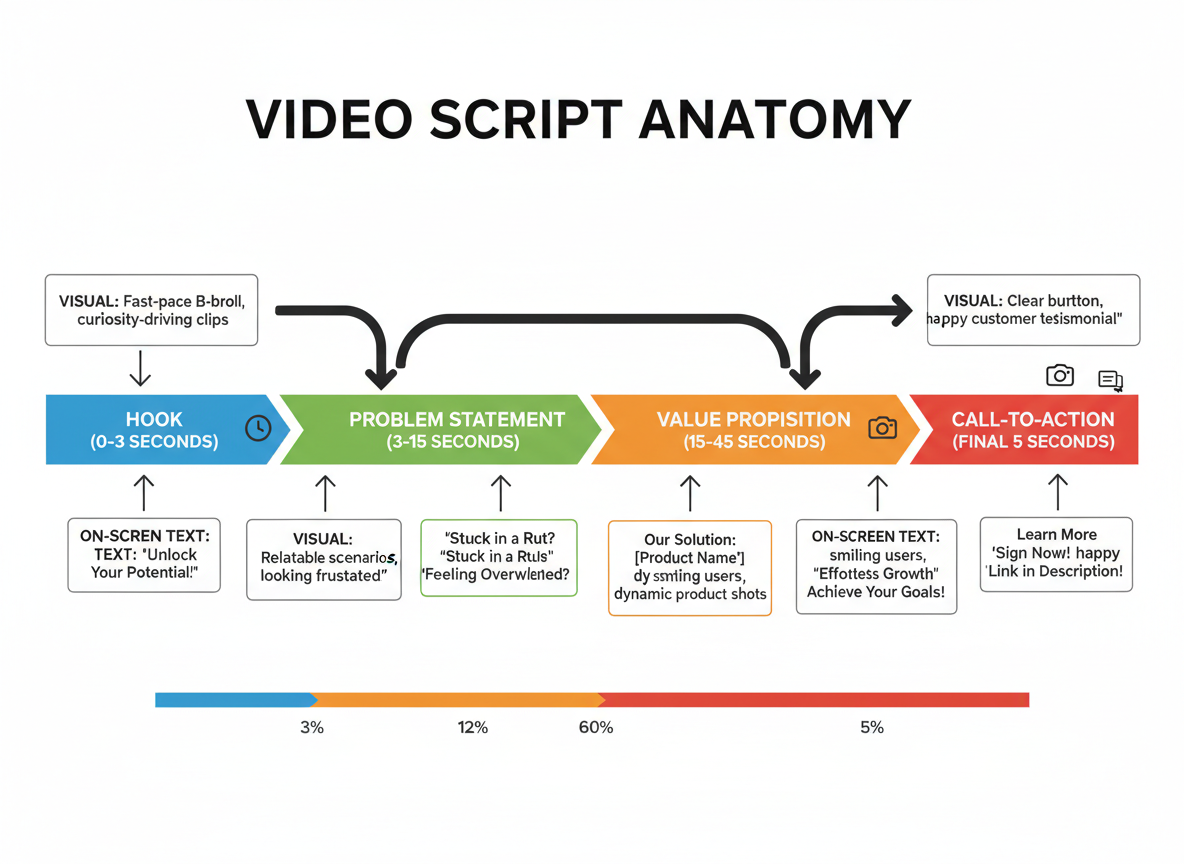
Here’s what separates scripts that convert from those that get skipped: structure.
Every effective video script contains five core components. Your hook (the first 3-5 seconds) stops the scroll—think bold statements, questions, or pattern interrupts. Next comes your problem statement, where you nail the pain point your audience is experiencing right now. Your solution or value proposition delivers the answer they’re searching for. The call-to-action tells viewers exactly what to do next. Finally, timing notes keep your pacing tight for each platform’s sweet spot.
But writing the words is only half the battle.
Professional scripts include formatting conventions that transform words into visuals. Use brackets for [ON-SCREEN TEXT], double-slash for //B-ROLL NOTES//, and camera angle indicators like CLOSE-UP or WIDE SHOT. Standard terminology matters too: VO means voiceover, SOT is sound on tape, and lower thirds are those name graphics at the bottom of the screen.
There’s a massive difference between teleprompter scripts (written word-for-word) and natural presentation scripts (bullet points with conversational cues). TikTok demands the latter. Corporate videos often need the former.
Timing markers aren’t optional—they’re survival tools. A 15-second Instagram Reel script looks nothing like a 10-minute YouTube tutorial.
The engagement killers? Reading robotically from a teleprompter, forgetting visual cues entirely, and hooks that whisper when they should scream. Your script needs to breathe on camera, not suffocate your personality.
Platform-Specific Video Script Examples (30-Second to 10-Minute Formats)
Let’s break down what actually works on each platform. You can’t just repurpose the same script everywhere and expect results.
YouTube Shorts (30-Second Product Demo)
Visual: Hold product up to camera
“This $12 gadget just saved me 4 hours this week.”
Quick demo showing problem
“I used to spend forever organizing cables. Look at this mess.”
Show solution in action
“Now? Everything’s labeled and stored in seconds.”
Final shot with clear result
“Link in bio. You’re welcome.”
Instagram Reels (45-Second Transformation)
Hook with before shot
“My apartment looked like a crime scene three days ago.”
Pan across messy space
“No joke. I couldn’t see my floor.”
Time-lapse transition
“Here’s what 20 minutes a day did…”
Reveal organized space
“Same space. Same furniture. Zero extra money spent.”
Call to action
“Follow for the system I used. It’s stupid simple.”
TikTok (60-Second Educational)
Pattern interrupt
“You’re editing videos wrong. Here’s why you’re bleeding viewers at the 8-second mark.”
Quick stat
“73% of people scroll past if you don’t hook them immediately.”
Three rapid tips
“One: Start mid-action. Two: Cut your intro. Three: Promise a payoff.”
Demonstration
“Watch how this works…”
Deliver on promise with example
End with engagement bait
“Which tip are you trying first? Comment below.”
Need more ways to hook viewers fast? Check out our 15 YouTube Script Templates That Hook Viewers in 3 Seconds for platform-specific formulas that work.
LinkedIn (90-Second Thought Leadership)
Professional setup
“I’ve analyzed 500+ B2B campaigns this quarter. Here’s what nobody’s talking about.”
Present insight
“Everyone’s obsessing over AI tools, but 68% are ignoring the data that actually predicts ROI.”
Share framework
“We track three metrics that matter: engagement depth, conversion lag time, and content half-life.”
Provide value
“Here’s the simple framework we use…”
Credibility boost
“This approach increased our client retention by 34% in six months.”
Soft CTA
“Want the full breakdown? I’m sharing it in my newsletter.”
YouTube Long-Form (10-Minute Tutorial)
Chapter 1 (0:00-0:30): Hook
“By the end of this video, you’ll know exactly how to edit a professional video in under 30 minutes.”
Chapter 2 (0:30-2:00): Setup
“First, download the free software I’m using. Link’s in the description.”
Chapter 3 (2:00-7:00): Step-by-step process
“Step one: Import your footage. Here’s the keyboard shortcut that’ll save you time…”
Chapter 4 (7:00-9:00): Common mistakes
“Here’s where most people mess up…”
Chapter 5 (9:00-10:00): Recap and CTA
“You’ve just learned the exact workflow professionals use. Subscribe for more tutorials like this.”
Facebook (2-Minute Brand Story)
Open with emotion
“Five years ago, I was working 80-hour weeks and barely making rent.”
Build connection
“I know what it feels like to be stuck.”
Share turning point
“Then I discovered something that changed everything…”
Deliver transformation
“Now I help other people break free from that same cycle.”
Community-focused CTA
“Drop a 👋 if this resonates. I read every comment.”
Each platform rewards different pacing, hooks, and structures. YouTube wants watch time. TikTok wants immediate engagement. LinkedIn values professional credibility. Match your script format to the algorithm you’re feeding.
5 Explainer Video Script Examples (SaaS, Education, Product Demo)
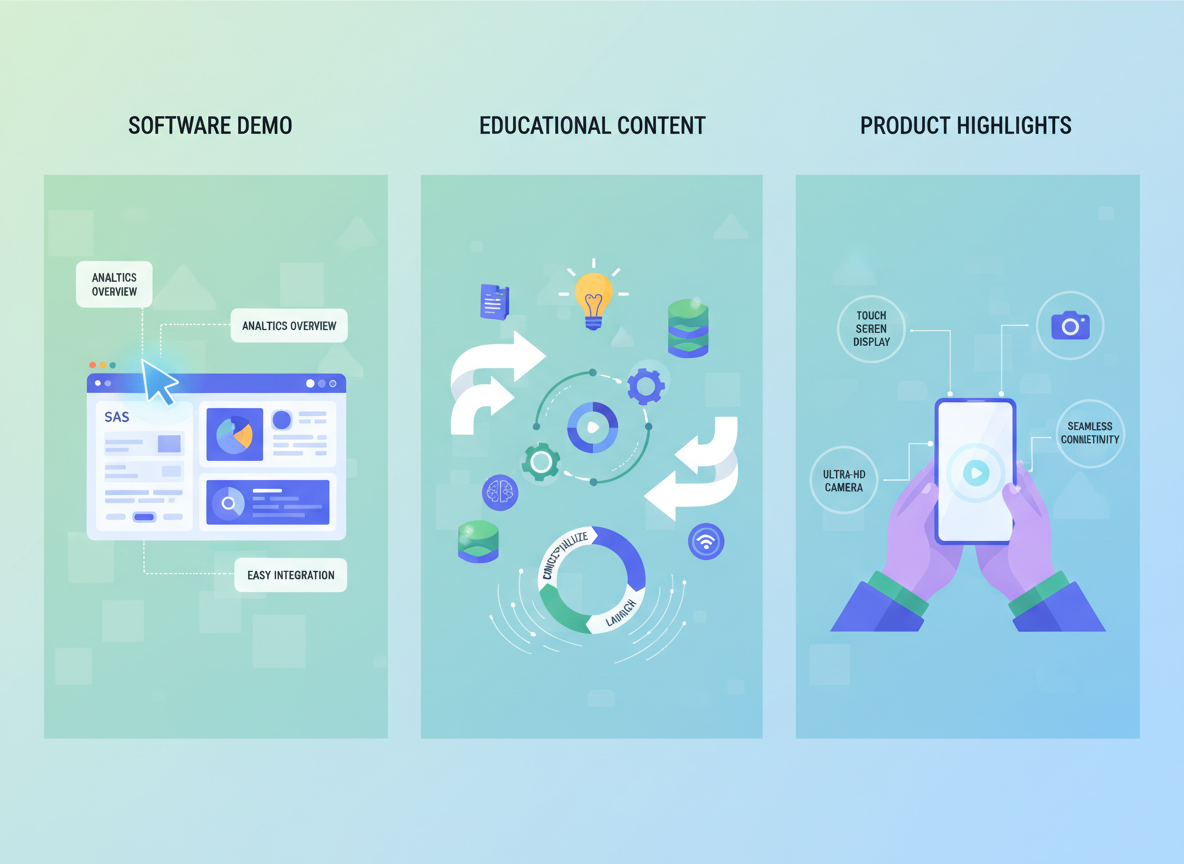
SaaS Explainer Script (90 seconds)
[0:00-0:05] Hook with problem
“Spending hours creating content that barely gets seen? You’re not alone.”
[0:06-0:25] Agitate the pain
“Most marketers waste 15+ hours weekly writing blog posts, social media updates, and video scripts from scratch. Meanwhile, your competitors are publishing daily.”
[0:26-0:50] Introduce solution – Screen recording: Dashboard overview
“[Product Name] generates publication-ready content in minutes. Watch as I create a week’s worth of social posts with three clicks.”
[0:51-1:15] Feature walkthrough – Screen recording: Creating content
“Choose your topic, select your platform, and customize the tone. Our AI handles research, writing, and formatting while you grab coffee.”
[1:16-1:30] Social proof and CTA
“Join 10,000+ creators who’ve reclaimed their time. Start your free trial—no credit card needed.”
—
Educational Explainer Script (3 minutes)
[0:00-0:20] Set the stage
“Ever wonder why some videos go viral while others flop? Let’s break down the psychology behind shareable content.”
[0:21-0:45] Concept introduction – Animation: Brain lighting up
“Your brain releases dopamine when you discover something worth sharing. That’s the chemical we’re targeting.”
[0:46-1:30] Main teaching point 1 – Animation: Pattern interrupt examples
“First, pattern interrupts. Notice how this unexpected visual grabbed your attention? That’s your reticular activating system at work. It filters millions of stimuli but flags anything unusual.”
[1:31-2:15] Main teaching point 2 – Animation: Emotional arc graph
“Second, emotional resonance. Content that makes viewers feel something—joy, surprise, even anger—gets shared 3x more than neutral content. Here’s why…”
[2:16-2:45] Practical application – Screen recording: Real examples
“Let’s see this in action. Watch how this creator combines both techniques in the first five seconds.”
[2:46-3:00] Summary and next steps
“Pattern interrupts plus emotion equals shares. Try implementing one technique in your next video and track the results.”
—
Product Demo Script (2 minutes)
[0:00-0:10] Problem statement
“Managing client projects across five different tools? There’s a better way.”
[0:11-0:30] Product overview – Visual: Product interface tour
“Here’s [Product Name]—your all-in-one project management hub. Let me show you what makes it different.”
[0:31-0:55] Feature 1 demonstration – Visual: Drag-and-drop in action
“Drag tasks between team members instantly. No more endless email chains asking who’s handling what. Everything updates in real-time.”
[0:56-1:25] Feature 2 demonstration – Visual: Client portal view
“Clients get their own portal to check progress without messaging you constantly. They see exactly what they need, nothing more.”
[1:26-1:45] Feature 3 demonstration – Visual: Automated reports
“End-of-week reports generate automatically. You’ll spend Fridays celebrating wins instead of compiling spreadsheets.”
[1:46-2:00] Close with offer
“Ready to simplify your workflow? Get 30% off your first three months when you sign up today.”
—
Service Explainer Script (60 seconds)
[0:00-0:08] Customer pain point
“Your website loads slowly, and you’re losing customers every second.”
[0:09-0:18] Journey begins
“Sarah faced the same issue. Her bounce rate hit 68% before she contacted us.”
[0:19-0:35] The solution process
“We ran a comprehensive speed audit, identified 12 critical bottlenecks, and optimized her entire site infrastructure within 48 hours.”
[0:36-0:50] The transformation
“Her site now loads in 1.2 seconds. Bounce rate dropped to 22%. Sales increased 47% in the first month.”
[0:51-1:00] CTA
“Want similar results? Book your free speed audit today. Limited slots available this month.”
—
App Explainer Script (45 seconds)
[0:00-0:05] Hook with benefit – UI: App icon animation
“Track your spending without thinking about it.”
[0:06-0:15] Key benefit 1 – UI: Auto-categorization demo
“[App Name] automatically categorizes every purchase the moment you make it.”
[0:16-0:25] Key benefit 2 – UI: Insights dashboard
“Get instant insights on where your money actually goes—coffee, subscriptions, groceries, all broken down visually.”
[0:26-0:35] Key benefit 3 – UI: Savings goals feature
“Set savings goals and watch your progress in real-time. The app even suggests where you can cut back.”
[0:36-0:45] Download CTA – UI: App store buttons
“Download free on iOS and Android. Start understanding your money today.”
—
When to Use Each Type:
Choose SaaS explainers for complex software solutions when your audience understands their problem but hasn’t found the right tool.
Use educational explainers to establish authority and nurture cold audiences who need to understand a concept before they’ll consider solutions.
Go with product demos when features sell themselves—your audience knows what they need and wants to see how yours works.
Pick service explainers to showcase transformations through customer stories, especially for intangible services.
Select app explainers for mobile-first audiences who need quick clarity on benefits before downloading.
Match your script length to complexity. Simple apps need 30-45 seconds. Enterprise SaaS might require 2-3 minutes to properly explain value.
3 Customer Testimonial Video Script Examples (Interview & Solo Formats)
Script #1: 60-Second Teleprompter Testimonial
[On-screen: Sarah Chen, Marketing Director]
“Six months ago, my team was drowning in content creation. We’d spend 12 hours producing a single video that barely got views.
Then we found [Product Name]. Now? We create five videos in the time it used to take us to make one.
Last month alone, our engagement jumped 247%. Our client roster doubled. And honestly, I finally have time to focus on strategy instead of editing until midnight.
If you’re stuck in the content grind like I was, this changes everything. Not in a ‘nice to have’ way—in a ‘how did I function without this’ way.”
Script #2: 90-Second Interview-Style Testimonial
Interviewer: “What made you look for a solution?”
Customer: “We were losing clients because we couldn’t keep up with their content demands. Three different tools, zero consistency.”
Interviewer: “Walk me through what changed.”
Customer: “Within two weeks, we streamlined everything. One platform. Our turnaround time went from five days to eight hours. Clients noticed immediately.”
Interviewer: “What’s been the biggest impact?”
Customer: “Revenue’s up 68% this quarter. But what really matters? My team actually enjoys content creation now.”
B-roll suggestions: Team collaborating at workspace, product dashboard showing analytics, before/after engagement graphs, client testimonial emails.
4 Product Launch Video Script Examples (Announcement to Pre-Order)
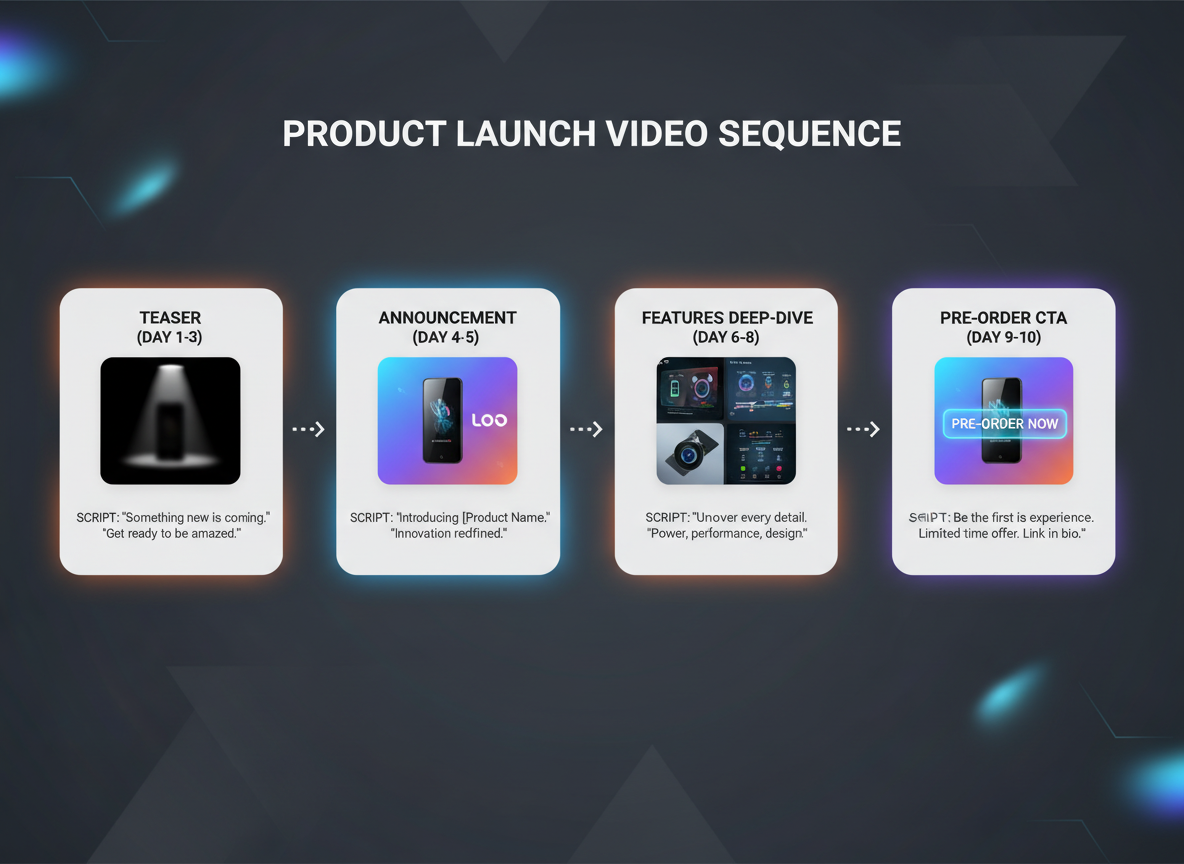
A product launch isn’t a single video—it’s a sequence that builds momentum. Here are four scripts that’ll move your audience from “what’s this?” to “I need this now.”
Example 1: 30-Second Teaser Script (Mystery Build)
“`
[VISUAL: Close-ups of product in shadow, partial reveals]
NARRATOR: “We’ve been working on something that’ll change how you create content forever.”
[VISUAL: Quick cuts of excited team members, blurred product shots]“72 beta testers. 14 months of development. One problem solved.”
[VISUAL: Countdown timer appears]“June 15th. Everything changes. Stay tuned.”
[END CARD: Sign up for early access at [yoursite.com]] “`Example 2: 2-Minute Full Announcement Script
“`
[VISUAL: Founder on camera, energetic setting]
FOUNDER: “Here’s what nobody tells you about [problem]: it doesn’t have to be this complicated.”
“I’m [Name], and after watching thousands of creators struggle with [specific pain point], we built something different.”
[VISUAL: Product reveal, slow 360-degree rotation]“Meet [Product Name]—the first [category] that actually [unique benefit].”
[VISUAL: Feature demonstrations]“Three things make this different:
One: [Feature] means you’ll [specific outcome] in half the time.
Two: [Feature] works even if you’re [common obstacle].
Three: [Feature] that [competitors] charge extra for? Built right in.”
[VISUAL: Real user footage]“Sarah from Portland used this to [achievement] in just two weeks. Mark’s agency doubled their output without hiring anyone new.”
“This launches Friday. Want in?”
[CTA: Link in description] “`Example 3: 90-Second Pre-Order Script (Urgency Focus)
“`
[VISUAL: On-screen countdown timer, bold graphics]
NARRATOR: “Here’s what happens in the next 48 hours.”
[VISUAL: Product in action]“500 early-bird slots. 40% off launch pricing. Plus [exclusive bonus] you won’t get anywhere else.”
“Why the rush? We’re capping this first batch at 500 units because [legitimate reason—quality control, personalization, limited materials].”
[VISUAL: Social proof—testimonials scrolling]“Beta users are already seeing [specific results]. Amanda hit [milestone] in week one. Three agencies signed on as case studies.”
[VISUAL: Timer emphasizes urgency]“272 spots left as of this recording.”
“Pre-order now at [link]. If you’re not happy, full refund within 30 days. Zero risk.”
[VISUAL: Strong CTA with timer]“Link below. Clock’s ticking.”
“`
Example 4: 3-Minute Behind-the-Scenes Script
“`
[VISUAL: Casual founder setting, authentic vibe]
FOUNDER: “Let me show you where this actually started.”
[VISUAL: Old notebook, early sketches]“Two years ago, I was spending four hours a day on [task]. I knew there had to be a better way.”
[VISUAL: Development montage]“First prototype? Complete disaster. Crashed every 10 minutes. Back to the drawing board.”
“Version two got closer, but our beta testers said [specific feedback]. So we rebuilt the entire [component].”
[VISUAL: Team working, candid moments]“My developer Maria stayed up three nights straight solving [technical challenge]. That’s the kind of team behind this.”
[VISUAL: Product evolution timeline]“We tested 47 different versions. Threw out features that seemed cool but didn’t actually help. Added things users begged for.”
[VISUAL: Final product reveal]“What you’re seeing now? This is version 2.8. It does [key benefit] better than anything we’ve tested.”
“Launches next week. The story continues with you.”
[CTA: Join the launch list] “`Structuring Launch Scripts for Funnel Stages
Match your script to where people are in their journey:
Awareness stage (teaser videos): Create curiosity without revealing everything. Focus on the problem, hint at the solution. Keep it under 45 seconds.
Consideration stage (announcement videos): Show what makes you different. Compare features, demonstrate value, address objections. Two to three minutes works best.
Conversion stage (pre-order videos): Remove friction, add urgency, stack value. Testimonials, guarantees, and bonuses belong here. 60-90 seconds of pure persuasion.
FOMO and Social Proof Integration
Scarcity works when it’s real. “Limited beta access” beats “act now” every time. Use specific numbers: “127 spots left” instead of “limited availability.”
Social proof hits harder with details. Replace “customers love this” with “Jenny from Austin increased her output by 340% in 12 days.” Real names, real locations, real numbers.
Countdown timers aren’t just graphics—they’re script elements. Reference them: “That timer you’re seeing? It’s real. When it hits zero, pricing goes up 50%.”
Stack these elements naturally throughout your script. One piece of social proof every 20-30 seconds keeps momentum building without sounding desperate.
3 How-To Tutorial Video Script Examples (Beginner to Advanced)
Tutorial videos perform best when they’re structured for different skill levels. Here are three complete scripts you can adapt.
Beginner Tutorial Script (5 minutes):
“If you’ve never edited a podcast before, you’re in the right spot. I’m breaking this down into five simple steps—no fancy tools required.
[Screen recording: Open Audacity] Step one: Open your audio file. Click File, then Import, then Audio. See how my waveform appears here? [Pause point: 0:45] Take a second to do this now. I’ll wait.Step two: Remove background noise. Highlight a silent section—right here—and go to Effect, then Noise Reduction…”
Intermediate Tutorial Script (8 minutes):
“Your podcast sounds muffled, right? That’s usually one of three things. Let’s troubleshoot each.
Problem one: Your microphone’s gain is too low. Here’s how you’ll know… [Chapter marker: 0:00]
If that’s not it, check your EQ settings… [Chapter marker: 2:30]
Still having issues? It’s probably your room acoustics… [Chapter marker: 5:15]
Comment below which fix worked for you.”
Advanced Tutorial Script (10 minutes):
“I’ll show you the exact workflow I use to edit 40 podcast episodes monthly in half the time.
[Timestamp 0:00] Batch processing setup[Timestamp 3:20] Advanced noise gate techniques
[Timestamp 6:45] Automation shortcuts that save 15 minutes per episode
Each section builds on the last, so don’t skip ahead.”
Successful tutorial scripts include progress markers (“we’re halfway through”), pattern interrupts (questions, viewer challenges), and clear chapter divisions. Much like the proven templates for written content, your video scripts need strategic structure to keep viewers watching until the end.
2 Brand Story Video Script Examples (Origin Story & Mission-Driven)

Origin Story Script (3 minutes)
[Opening shot: Founder at desk, frustrated]
“Three years ago, I was exactly where you might be right now—drowning in content deadlines, spending 14-hour days writing, and watching my personal life disappear.”
[Archive footage: Late nights, coffee cups piling up]
“I’d built a decent freelance business, but I’d become a prisoner to my own success. Then my daughter asked why I missed another soccer game.”
[Music shift: Hopeful]
“That’s when everything changed. I asked myself: What if content creation didn’t have to consume your life? Six months of testing, failing, and rebuilding later, Testing CG was born.”
[Product demo clips]
“Now, thousands of creators produce professional content in minutes, not hours. They’re at those soccer games. They’re building the business they dreamed about.”
Mission-Driven Script (2 minutes)
[Opening: Creator testimonials montage]
“We believe content creation should amplify your voice, not steal your time. Every feature we build starts with one question: Does this give creators their life back?”
[Visual: Team brainstorming, customer feedback]
“Our mission isn’t just faster content—it’s about empowering you to focus on what matters. Strategy. Growth. That thing you actually started your business for.”
Industry-Specific Video Script Templates (SaaS, eCommerce, Education, Services)
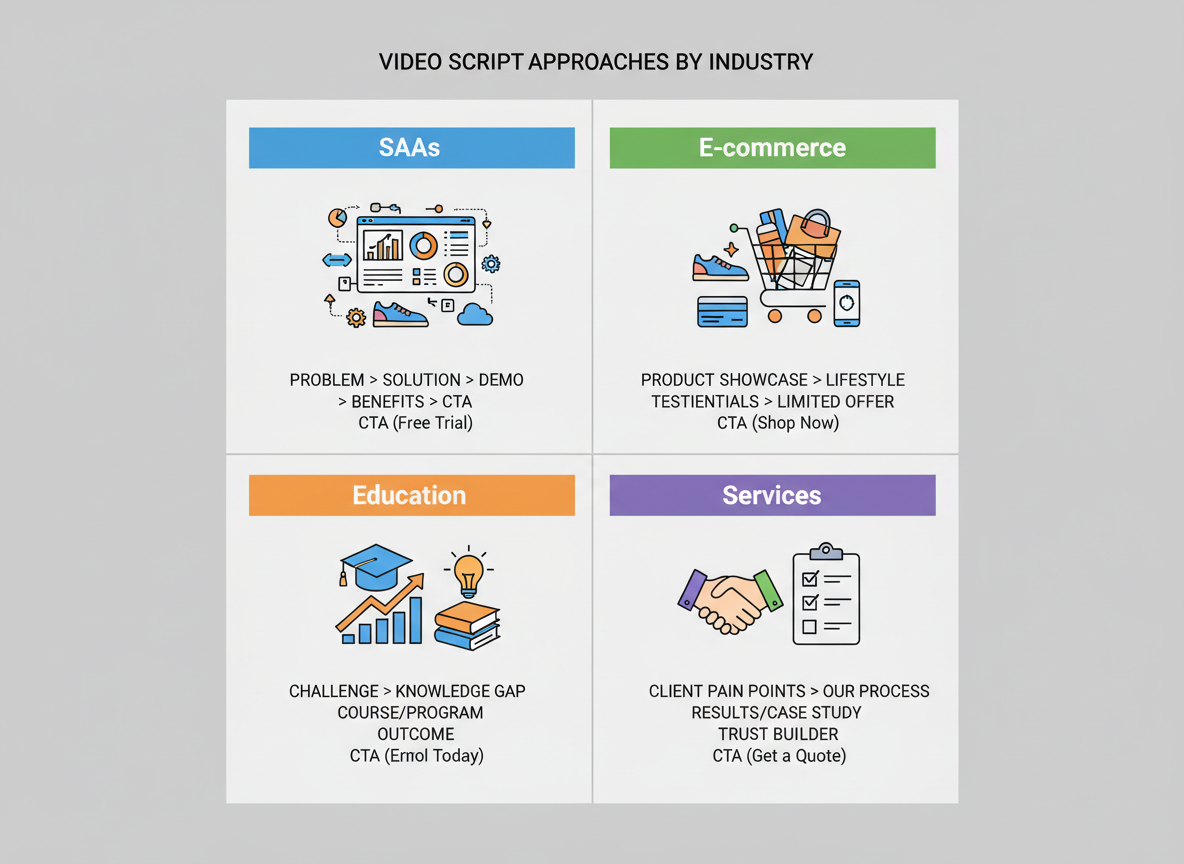
Different industries need different approaches. Here’s how to customize your video scripts for maximum impact.
SaaS Video Script Template:
Hook: “Still spending 4 hours a day on [manual task]?”
Problem: Detail the workflow nightmare
Solution: “Our platform cuts that to 15 minutes”
ROI Focus: Show exact time/money saved with numbers
Integration Proof: “Works seamlessly with [tools they already use]”
CTA: Free trial with immediate access
eCommerce Video Script Template:
Hook: Show the product solving a problem immediately
Benefits: Focus on transformation, not features
Social Proof: “Join 10,000+ customers who…”
Urgency: Limited stock or time-sensitive offer
Guarantee: Remove purchase risk
CTA: Direct purchase link
When creating product videos, tools like an AI product description generator can help you craft compelling benefit-focused copy that converts.
Online Education Video Script Template:
Hook: “Where will you be in 90 days?”
Transformation: Paint the before/after picture
Curriculum Preview: Quick module breakdown
Success Stories: Real student results with specifics
Objection Handling: Address time, cost, experience level
CTA: Enrollment deadline
Service-Based Business Template:
Hook: Client’s biggest pain point
Process: “Here’s exactly how we work together”
Trust Builders: Years in business, certifications, guarantees
Results: Case study with measurable outcomes
Next Steps: Book consultation
Adapt these frameworks by swapping industry-specific pain points, terminology, and proof elements that resonate with your market.
Video Script Length Guidelines by Platform (Data-Backed Optimal Durations)
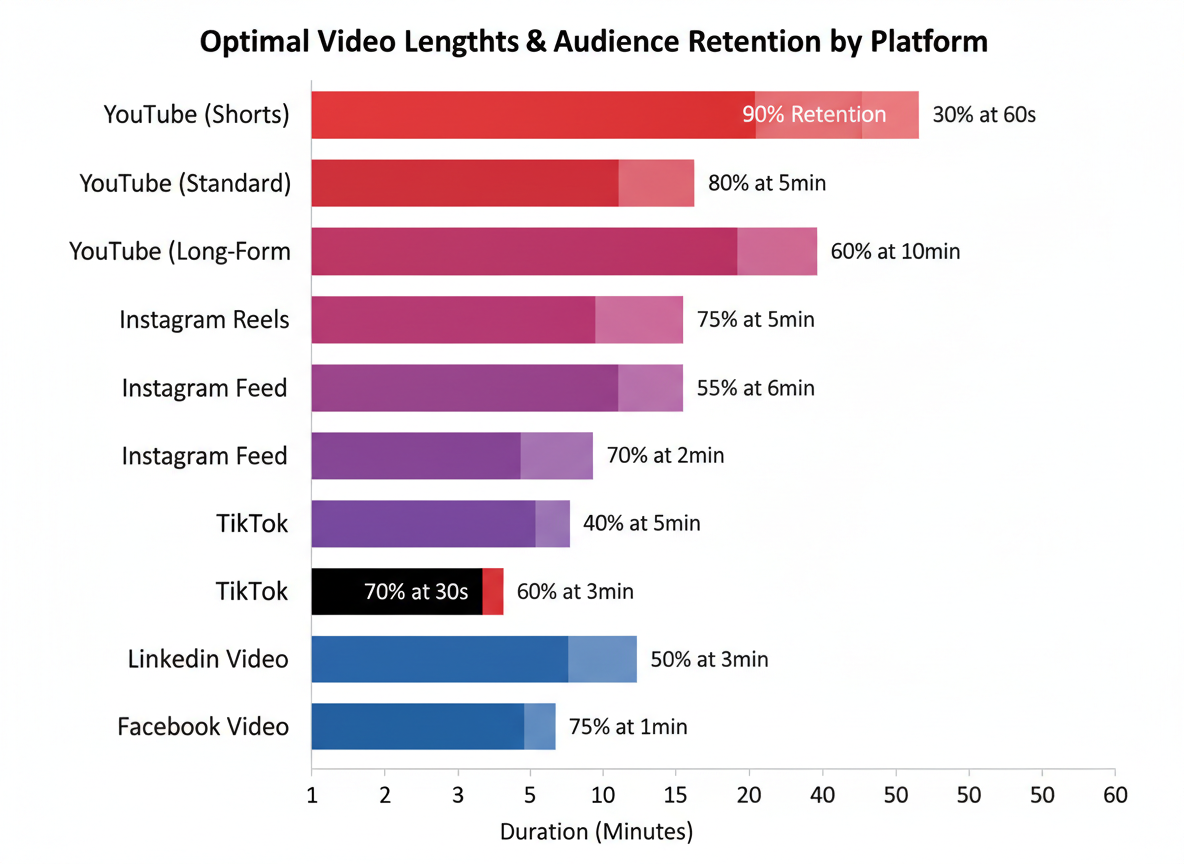
Here’s the truth about video length: every platform has a sweet spot where engagement peaks, and ignoring these benchmarks can tank your performance.
YouTube performs best when you match content type to duration. Shorts need 30-60 seconds max—any longer and completion rates drop by 40%. Standard videos hit their stride at 8-12 minutes, which triggers mid-roll ads and keeps retention above 50%. Long-form content (15-20 minutes) works brilliantly for tutorials and deep dives, maintaining 60%+ retention if you front-load value.
Instagram Reels dominate at 30-45 seconds, with the algorithm favoring completion rates over watch time. Feed videos should stay under 90 seconds, while IGTV pieces perform best between 5-10 minutes for engaged audiences.
TikTok’s algorithm loves specific durations: 21 seconds, 34 seconds, and 58 seconds show the highest completion rates. Videos under 15 seconds often feel rushed, while anything over a minute rarely gets watched through.
LinkedIn audiences want substance. Thought leadership videos perform at 90-120 seconds, while quick company updates should hit 45-60 seconds before professional attention wanders.
Facebook native videos peak at 2-3 minutes, though live videos can extend to 15-20 minutes with active engagement.
Calculate your script length using 125-150 words per minute as your baseline. A 60-second video needs roughly 125 words—tight, purposeful writing without fluff.
Before & After: Transforming Weak Scripts into High-Performing Ones
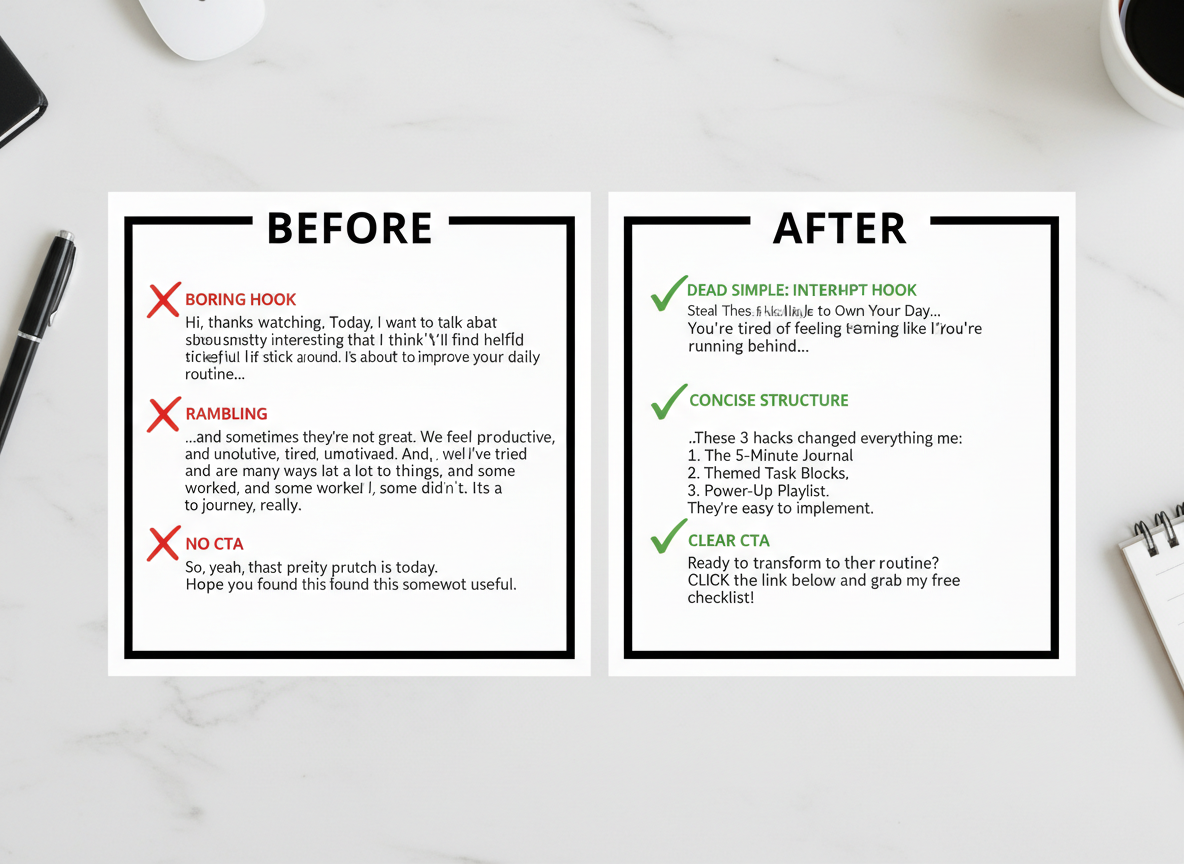
Let’s look at real transformations that’ll show you exactly what separates scroll-stopping scripts from skip-worthy ones.
Example 1: Hook Comparison
Weak: “Hey guys, today I’m going to show you how to use email marketing.”
Strong: “I sent one email last Tuesday that made $4,700 while I slept. Here’s the exact template.”
Example 2: Vague vs Specific Value
Weak: “This product helps you manage your time better and get more organized.”
Strong: “Cut your admin work from 3 hours to 47 minutes daily using these three automation tricks.”
Example 3: Tutorial Structure
Rambling: Long intro, wandering explanations, no clear steps.
Structured: “0:15 – Problem overview, 0:45 – Step 1, 1:30 – Step 2, 2:15 – Results you’ll see”
Example 4: CTA Transformation
Generic: “If you enjoyed this, subscribe for more content!”
Compelling: “Grab the free checklist below before I take it down Friday—217 people downloaded it this morning alone.”
Common script killers you’re probably making: Reading feature lists instead of showing outcomes, opening with “In this video, I’ll…” (nobody cares about your intentions), burying your best stuff after the 30-second mark, and using filler phrases like “basically” or “kind of.”
Remember the 5-second rule: viewers decide whether to stay or bounce almost instantly. Your opening line either hooks them or loses them forever.
Advanced Scriptwriting Techniques (Pacing, Tone, Pattern Interrupts)
Here’s where your scripts transform from good to magnetic.
Pacing keeps viewers hooked. Mix short punchy sentences with longer, flowing ones. Strategic pauses create anticipation—think of them as breath marks in your script. When you’ve made a bold claim, add [PAUSE] to let it sink in. Then hit them with your evidence.
Tone calibration matters more than you think. A finance channel explaining retirement planning needs authority and calm confidence. A fitness channel? High energy and motivation. Match your voice to what your audience expects, or deliberately break that expectation to stand out.
Pattern interrupts stop the scroll. Drop an unexpected question mid-script: “But what if everything you know about this is wrong?” Shocking stats work brilliantly: “87% of people fail at this—here’s why you won’t.” Visual surprises (sudden zoom, costume change, location shift) should be noted in your script.
Open loops are your secret weapon. Tease information early: “I’ll show you the three-step method in a minute, but first…” Now they’re committed to watching.
The rule of three sticks. Three benefits, three steps, three examples—our brains love patterns of three. Use it deliberately, and your scripts become unforgettable.
Adding Production Notes to Your Scripts (Shot Descriptions, B-Roll, Graphics)
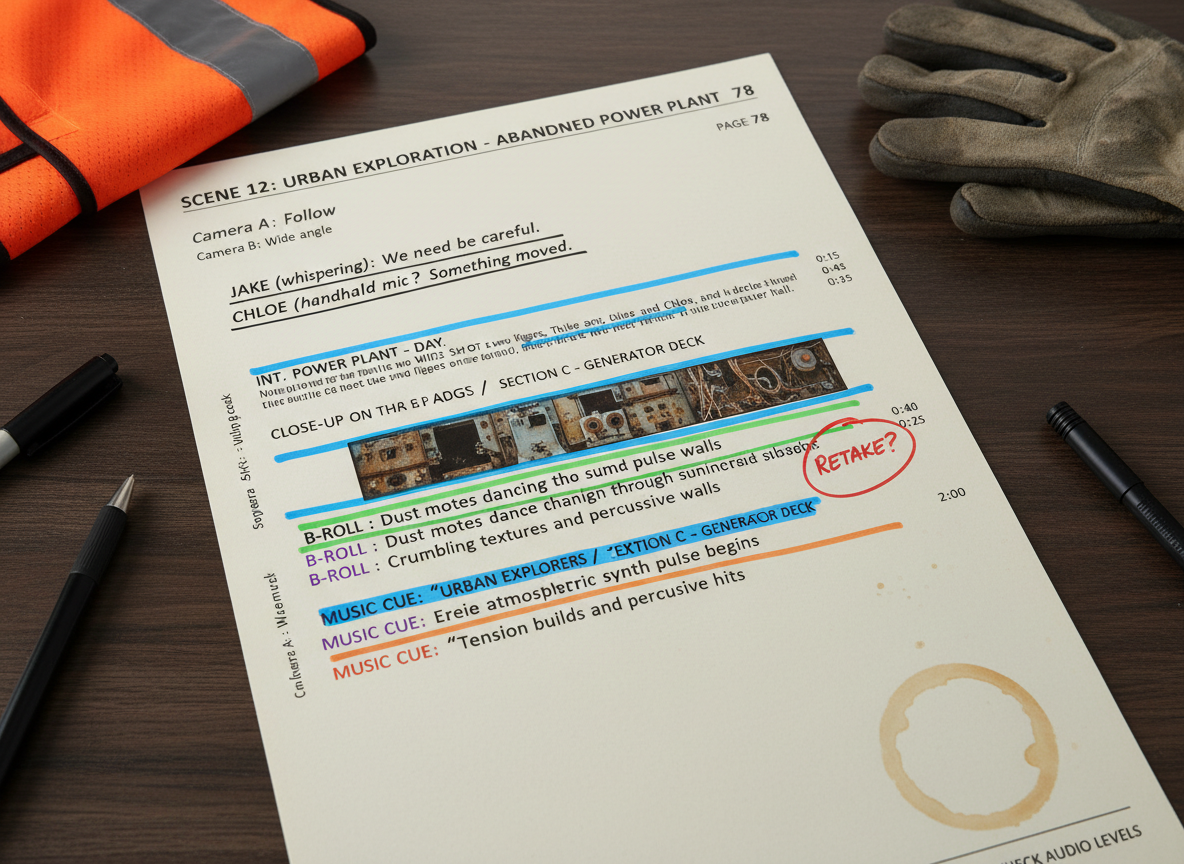
A well-written script goes beyond dialogue—it’s a blueprint for your entire production. Start by indicating camera angles in brackets: [WIDE SHOT], [MEDIUM SHOT], or [CLOSE-UP] depending on the emotional weight of each moment. Close-ups create intimacy, while wide shots establish context.
Mark B-roll opportunities in your script with clear labels like [B-ROLL: presenter typing on laptop] or [SHOW: product demonstration]. This keeps your editor from guessing what footage fills those gaps.
For on-screen graphics, use ALL CAPS to distinguish them: [TEXT ON SCREEN: “47% increase in engagement”]. Lower thirds and callout boxes should appear exactly where they’ll support your message, not distract from it.
Add music cues with mood descriptors: [MUSIC: upbeat, energetic] or [SFX: notification ping]. These notes guide your editing even if you’re working solo.
Transition notes matter too. Write [HARD CUT] for dramatic shifts, [FADE] for contemplative moments, or [JUMP CUT] to maintain energy in tutorial content.
The beauty? Whether you’re shooting with a professional crew or your smartphone, these production notes keep everyone (including future you) aligned on the vision.
Adapting Scripts for Different Buyer Journey Stages
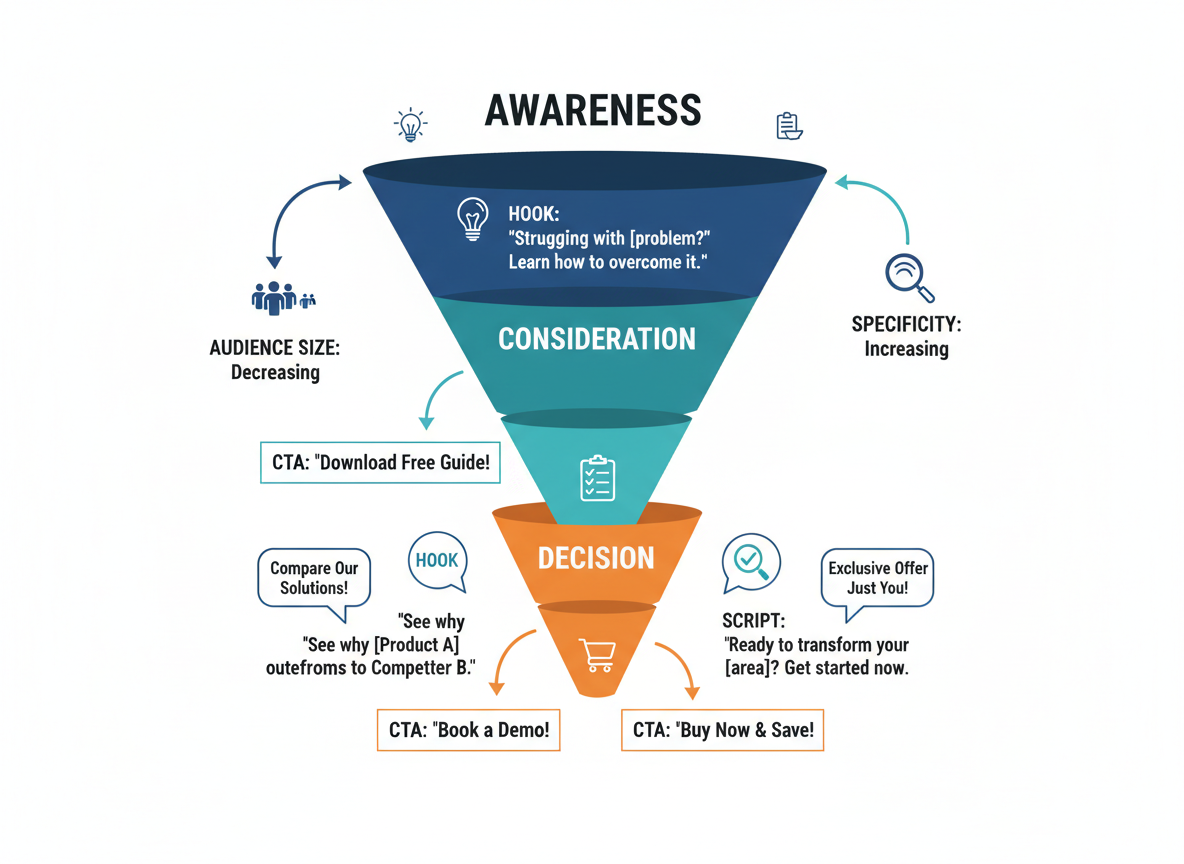
Your script needs to match where your viewer is mentally. Someone who’s never heard of you before won’t respond to the same message as someone who’s been following you for weeks.
Awareness stage scripts focus on the problem. Start with “Still editing videos for hours when you should be creating content?” You’re not selling yet—you’re validating their frustration and offering education.
Consideration stage scripts compare solutions. “You’ve probably tried hiring editors or using basic tools. Here’s why automated systems work better…” Address objections head-on and highlight specific benefits.
Decision stage scripts drive action with urgency. “Get lifetime access today for 67% off—this pricing expires Friday.” Include risk reversal like money-back guarantees.
Here’s how to identify which stage they’re in: Check your traffic source. YouTube search viewers are usually in awareness. Email subscribers are consideration or decision. Website visitors who abandoned checkout? They’re decision-stage prospects who need that final push.
For retargeting, acknowledge the previous interaction: “You watched our tutorial last week. Ready to actually implement this?” Move them forward without restarting from scratch.
Create three script versions: cold traffic gets educational content, warm traffic gets comparison-focused messaging, and hot traffic gets direct offers with deadlines.
Video Script Tools Comparison (AI Tools, Templates, Traditional Methods)
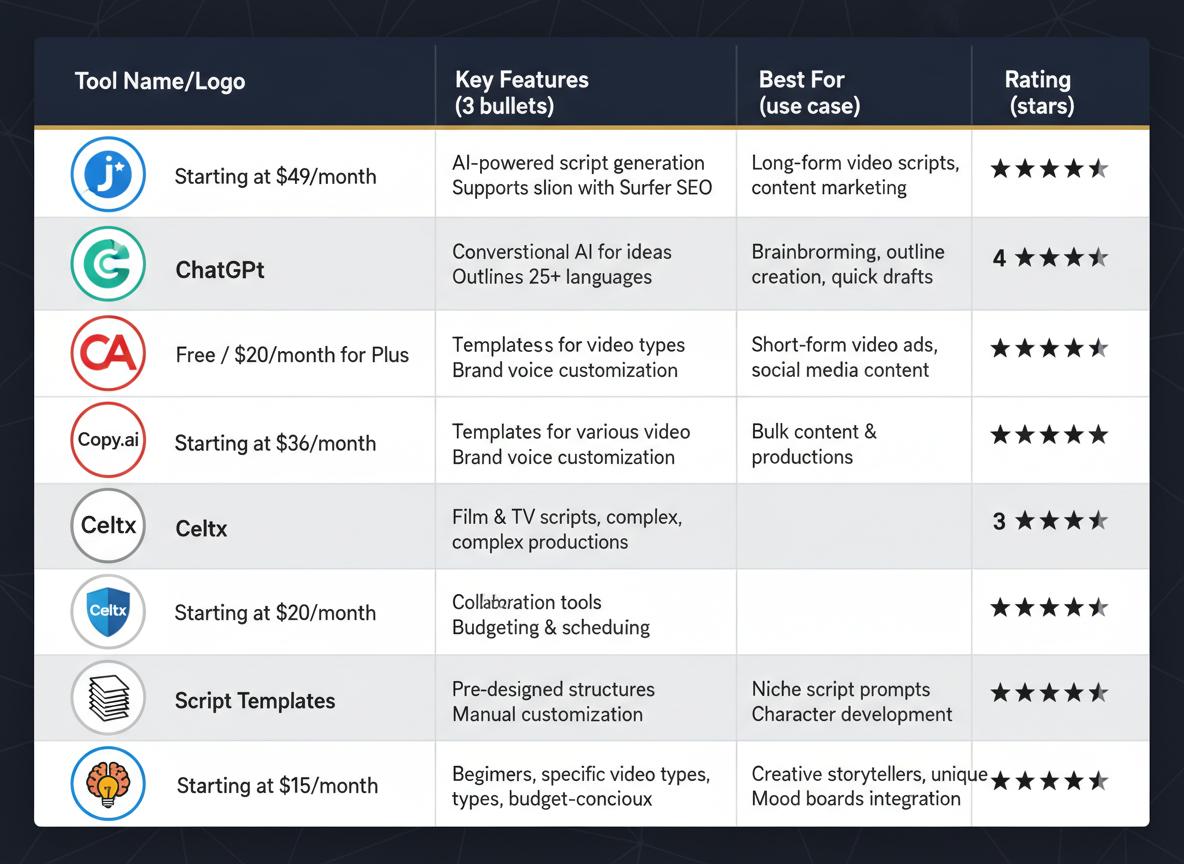
Finding the right tool can make or break your video script workflow. Let’s break down what actually works.
AI Script Generators
ChatGPT leads the pack for customization—just feed it your example of a video script and ask for variations. The free version handles basic scripts well, while ChatGPT Plus ($20/month) delivers faster results with better context retention.
Jasper ($49+/month) offers pre-built templates for different video formats, though you’re paying a premium for frameworks you could build yourself. Copy.ai ($49+/month) excels at short-form scripts, while Writesonic ($19+/month) sits in the middle ground with decent quality at a lower price point.
Template Platforms
Canva’s free video script templates get you started quickly. HubSpot offers solid marketing-focused templates at no cost. Google Docs templates work perfectly fine—you don’t need anything fancy.
Professional Software
Celtx (free basic, $15+/month pro) handles collaboration well. Final Draft ($250 one-time) remains the industry standard for long-form productions. WriterDuet ($12/month) balances features with affordability.
Quick Comparison
Free tools work great for most content creators. Paid AI tools save time but can sound generic. Professional software matters only for scripted shows or client work.
Here’s the real win: use AI to generate first drafts, then edit with your voice. Once your video’s published, Content Gorilla’s AI transforms those scripts into SEO-optimized blog posts in three clicks. No rewriting needed—just repurpose what you’ve already created.
How to Test and Improve Your Video Scripts (Performance Metrics That Matter)
Your script’s success isn’t measured by how clever it sounds—it’s proven by what viewers actually do.
Start by tracking watch time percentage and your audience retention graph. If 60% of viewers bail before the halfway point, your hook probably isn’t strong enough. YouTube Analytics shows exactly where people click away, revealing weak spots in your script structure.
Test different script variations head-to-head. Try three different hooks on similar videos and compare their first 30-second retention rates. Switch up your CTAs, video lengths, and pacing to see what resonates.
Click-through rates tell you whether your CTAs work. Below 5%? Your call-to-action needs rewriting.
Read every comment that asks “what do you mean by…” or “I don’t understand…” These signal script clarity problems, not engagement wins.
Before filming, read your script aloud. Does it sound like you? Can you say each line comfortably in one breath? Time yourself—scripts that look short on paper often run long on camera.
Build a swipe file of your best-performing script elements: winning hooks, smooth transitions, and CTAs that convert. When a video crushes it, analyze why. Then steal those patterns for your next script.
Ready-to-Use Script Templates and Next Steps
You’ve got 17 script examples at your fingertips. Now what?
Start by matching your immediate goal to the right template. Launching a product? Grab the sales script. Building authority? Use the educational format. Each template works as a fill-in-the-blank framework—just swap in your specific offers, stories, and brand personality.
Before filming, run through this quick customization checklist: Does the opening hook reflect your audience’s pain points? Have you replaced generic examples with your unique value propositions? Does the script sound like you (not some corporate robot)?
Here’s your workflow: Choose template → Customize with your details → Film within 48 hours → Publish and track performance. Batch-create four to six scripts at once to fill your content calendar for the month.
The real magic happens when you repurpose these videos strategically. Similar to how blog writing samples can be adapted across platforms, your video scripts can become podcasts, social posts, and email campaigns.
Want to maximize each video’s reach? Try Content Gorilla to automatically convert your video content into optimized blog posts and auto-publish across multiple platforms—turning one script into dozens of content pieces.
Frequently Asked Questions
How long should a video script be?
It depends on your platform. YouTube videos typically run 8-12 minutes, which means 1,200-1,800 words (most people speak around 150 words per minute). TikTok and Instagram Reels need 100-200 words max for those punchy 60-second clips. LinkedIn videos perform best at 2-3 minutes, so aim for 300-450 words. Don’t forget to time yourself reading out loud—you’ll always speak slower than you think.
Do I need to write out every word in a video script?
Not necessarily. If you’re comfortable on camera, bullet points work great. They keep you on track without sounding robotic. But if you’re new to video or need precise messaging (like product demos or ads), write everything out. You can always use a teleprompter or memorize key sections. Most experienced creators land somewhere in the middle—scripted intros and outros with bullet points for the body.
What’s the difference between a video script and a storyboard?
Your script is what you’ll say. Your storyboard is what viewers will see. Think of the script as your audio track and the storyboard as your visual guide—sketches, shot lists, camera angles, and scene transitions. You need both for polished videos, though simple talking-head content can skip the storyboard.
Can I use the same script for different platforms?
You can reuse the core message, but you’ll need to adapt the format. A 10-minute YouTube script won’t work on TikTok. Pull the hook and one key point for a 30-second Reel. Expand that same concept into a detailed YouTube tutorial. If you’re looking for platform-specific hooks that grab attention immediately, check out these 15 YouTube Script Templates That Hook Viewers in 3 Seconds. Same value proposition, different packaging.
How do I make my video script sound natural and not like I’m reading?
Write like you talk. Use contractions, ask questions, and throw in the occasional “look” or “here’s the thing.” Read your script out loud before filming—if it sounds stiff, it is. Practice until you’re familiar enough that you’re not glued to every word. Record yourself having a conversation about your topic, then transcribe it. You’ll find your natural rhythm and phrases you’d actually use.
What should I include in a video script besides the words?
Add production notes in brackets: [B-roll of product demo], [cut to screen recording], [display graphic with stats]. Include timing markers for longer videos. Note where music should fade in or out. Mark pauses for emphasis. These details save time during editing and help your editor (even if that’s you) understand your vision.
How can I write video scripts faster?
Templates are your best friend. Start with a proven structure and customize it—you’re not reinventing storytelling every time. Batch your scriptwriting sessions; write five scripts in one sitting instead of spreading them across five days. Tools like ChatGPT can draft outlines or first versions you can polish. Testing CG’s AI features can help you generate scripts quickly while maintaining quality, especially when you’re managing multiple clients or channels.
Should I hire a scriptwriter or use AI tools?
It depends on your budget and volume. If you’re creating 1-2 videos monthly and budget allows, a skilled scriptwriter brings creativity and strategy. For daily or weekly content, AI tools offer speed and consistency—just plan to edit for brand voice. Many creators use a hybrid approach: AI generates the first draft, they polish it, and occasionally hire a writer for flagship content or campaigns. If you’re just starting out or testing concepts, AI tools let you move fast without breaking the bank.
I am a full-time online marketer, for over a decade now. Helped over 100,000+ people & generated well over $12M in online sales.