

Why Most Video Scripts Fail (And How Examples Fix That)
You’ve been there. Cursor blinking. Blank document mocking you. The pressure to create video content that actually converts is real, but the words just won’t come.
Here’s the brutal truth: 65% of video content gets abandoned in the first three seconds because the hook falls flat. That’s not just a vanity metric—it’s your potential customers clicking away before you’ve said anything meaningful.
You’re spending hours crafting what you think is compelling copy, only to watch engagement numbers tank. The frustration compounds when you can’t figure out what’s missing. Is it the opening? The call-to-action? The entire structure?
That’s where examples of video scripts become your secret weapon. Instead of reinventing the wheel, you’ll get 17 complete, platform-specific templates you can copy and customize right now. Each one’s been tested, proven to convert, and ready to adapt to your brand.
Looking at actual script examples is the fastest way to master this skill because you see exactly what works. No guessing. No theory. Just proven templates you can implement today.
What Makes a Video Script Actually Work in 2026
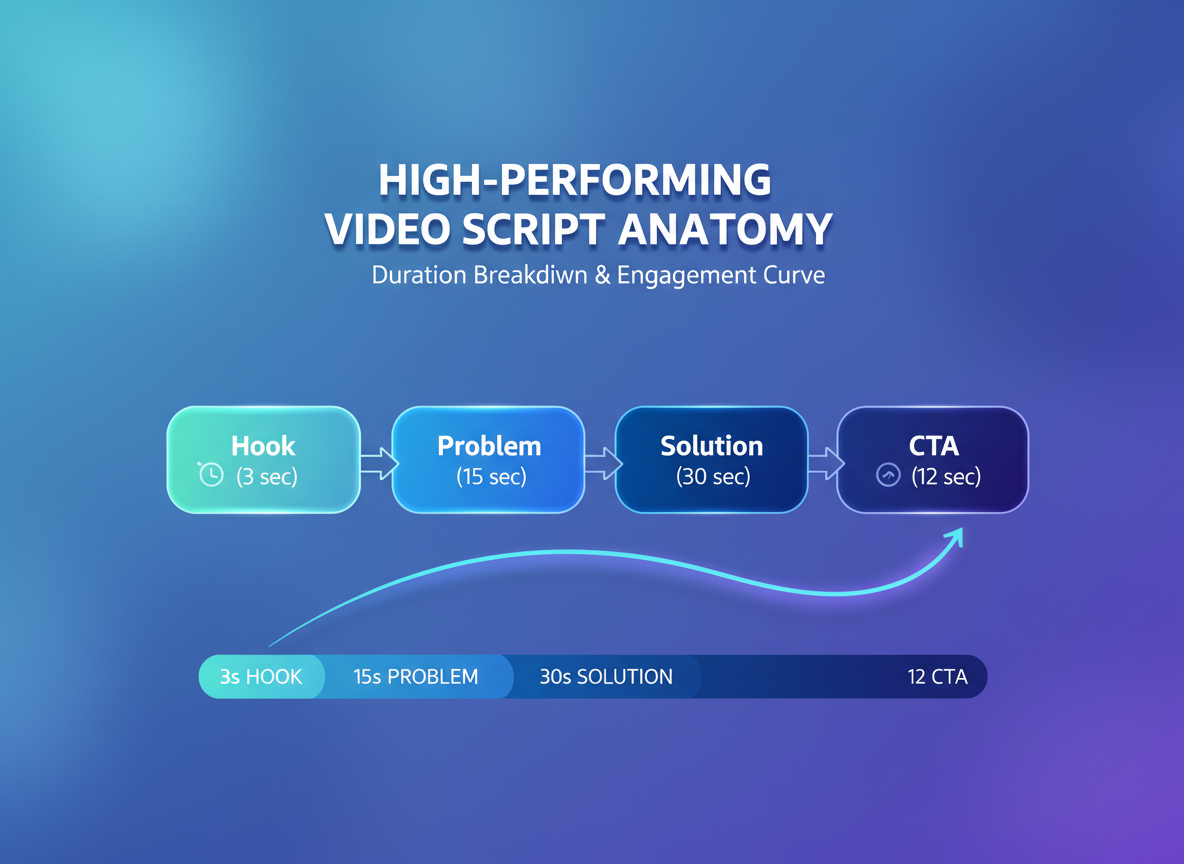
You’ve got three seconds. That’s it.
If your opening line doesn’t hook viewers immediately, 65% will scroll past without a second thought. It’s not about being clever—it’s about being relevant, fast.
Every high-performing script follows the same backbone: hook them in three seconds, identify their specific problem, present your solution clearly, then tell them exactly what to do next. Miss any of these elements, and your conversion rate tanks.
Here’s where it gets interesting: what works on YouTube won’t work on TikTok. YouTube viewers expect depth and will stick around for 10-minute videos (roughly 1,300-1,500 words). Instagram and TikTok demand punchy 30-second scripts using about 75 words. LinkedIn? Professional tone, 60-second format, around 150 words.
The psychology matters too. Pattern interrupts (sudden changes in tone or visual), open loops (teasing what’s coming), and curiosity gaps keep people watching. Check out these 15 YouTube Script Templates That Hook Viewers in 3 Seconds for platform-specific examples.
And that call-to-action? It’s not optional. Scripts with clear CTAs see 3.2x higher conversion rates than those that just… end. Tell viewers what to do, or they’ll do nothing.
17 Complete Video Script Examples (Copy-Paste Ready)
You’re about to get access to 17 fully-written video scripts—not fragments or half-baked outlines. Each script is ready to copy, customize, and record today. We’ve organized them by platform (YouTube, Instagram, TikTok, sales pages), industry (SaaS, e-commerce, coaching), and specific use case so you can jump straight to what you need. Every example shows the word count, estimated runtime, and exactly when it works best. You’ll also see how to adapt each script to match your brand voice and unique offer—because cookie-cutter content doesn’t convert. We’re covering explainer videos, testimonials, product demos, tutorials, social proof compilations, VSLs, and more. These aren’t templates with blanks to fill in. They’re complete, battle-tested video scripts that’ve driven real results.
Example 1-3: Short-Form Scripts (30-60 Seconds for Instagram, TikTok & YouTube Shorts)
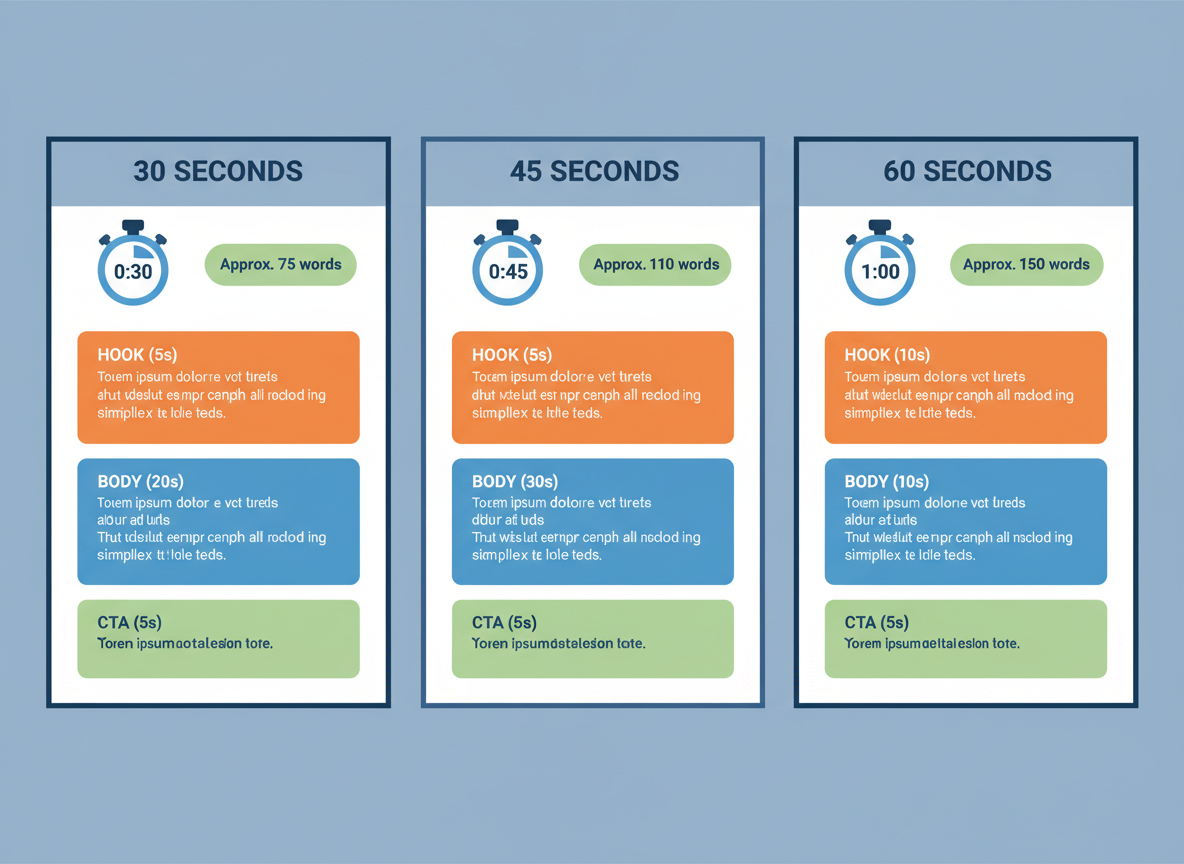
Short-form video dominates social media right now. These scripts get straight to the point because you’ve got seconds to hook viewers before they scroll past.
Example 1: Product Teaser Script (30 Seconds)
[0-5 sec] “Wait, this actually works?”
[6-15 sec] “I was spending 4 hours a day creating content until I found this. Now? Twenty minutes, tops.”
[16-25 sec] “It handles everything from research to posting, and I’m finally getting consistent results without burning out.”
[26-30 sec] “Link in bio. You’re welcome.”
Timing notes: Show problem visualization at 0-5 sec, product demo at 6-15 sec, results/benefits at 16-25 sec, clear CTA with on-screen text at 26-30 sec.
Example 2: Quick Tip/Tutorial Script (45 Seconds)
[0-7 sec] “Here’s the content strategy nobody talks about, but everyone who succeeds actually uses.”
[8-20 sec] “Stop creating random posts and start batching. Pick one topic, create five variations, schedule them across two weeks. Same research time, five times the output.”
[21-35 sec] “Monday: educational post. Wednesday: behind-the-scenes. Friday: testimonial. Rinse and repeat. Your engagement will thank you.”
[36-45 sec] “Try this for two weeks and watch what happens. Drop a comment if you’re doing this already.”
Timing notes: Hook with bold claim at 0-7 sec, explain strategy with on-screen graphics at 8-35 sec, engagement CTA at 36-45 sec.
Example 3: Social Proof/Testimonial Script (60 Seconds)
[0-8 sec] “Three months ago, Sarah was ready to quit content creation. Her videos got maybe 50 views on a good day.”
[9-25 sec] “She wasn’t doing anything technically wrong. She just didn’t have a system. Every video felt like starting from scratch, and the algorithm wasn’t picking up her content.”
[26-45 sec] “Then she started using batch creation and strategic templates. Within six weeks, her average views jumped to 12,000. Her email list grew by 800 subscribers. And she’s spending less time creating content than ever before.”
[46-60 sec] “The best part? She’s not some viral sensation or industry expert. She just stopped reinventing the wheel every single time. If you’re stuck where Sarah was, the link below will help.”
Timing notes: Show relatable struggle at 0-25 sec with text overlays, transformation with metrics at 26-45 sec, CTA with link sticker at 46-60 sec.
Why these work: Short-form platforms reward fast hooks, clear value, and immediate payoff. These scripts waste zero words and deliver one focused message that viewers can act on right now.
Example 4-7: Mid-Form Scripts (2-5 Minutes for YouTube & LinkedIn)
Mid-form videos hit the sweet spot for education and engagement. They’re long enough to deliver real value but short enough that viewers actually finish watching.
Example 4: How-To Tutorial Script (3 minutes, 400 words)
[0:00-0:10] Hook + Problem
Visual: Screen recording with cursor highlighting problem area
“Getting this error message? You’re not alone. Let me show you the three-step fix that solves this in under two minutes.”
[0:11-0:30] Credibility + Preview
Visual: Your face on camera, then B-roll of successful outcome
“I’m Sarah, and after fixing this issue for hundreds of clients, I’ve found this method works every single time. Here’s what we’ll cover: identifying the root cause, applying the fix, and preventing it from happening again.”
[0:31-2:15] Step-by-Step Instructions
Visual: Alternate between screen recording and your face
“Step one: Open your settings panel. You’ll find it in the top right corner—that’s the gear icon. Click it once.
Now here’s where most people mess up. Don’t click the first option. Scroll down to ‘Advanced Settings’ instead.
Step two: Toggle the cache override option. See that slider? Turn it on. You should see it turn green.
Step three: Clear your browser data. Go back to the main menu, select ‘Privacy,’ then hit ‘Clear Data.’ Make sure you check all three boxes here.”
Pattern Interrupt at 1:45:
Visual: Quick zoom or graphic animation
“By the way—if you’re seeing a security warning at this point, that’s normal. Just click ‘Proceed.'”
[2:16-2:45] Verification + Common Mistakes
Visual: Show the successful result
“You’ll know it worked when you see this confirmation message. If you don’t see it, you probably skipped the cache step. Go back and make sure that slider’s actually green, not gray.”
[2:46-3:00] CTA
Visual: End screen with subscribe button
“That’s it. Three steps, problem solved. Drop a comment if this worked for you, and subscribe for more quick fixes like this every week.”
Example 5: Product Explainer Script (2 minutes, 300 words)
[0:00-0:08] Hook
Visual: Product in action or problem scenario
“Spending three hours on a task that should take thirty minutes? There’s a better way.”
[0:09-0:25] Problem Agitation
Visual: Split screen showing frustrated user vs. easy solution
“Most tools promise to save you time but end up creating more work. Complicated dashboards. Steep learning curves. Integrations that don’t actually integrate.”
[0:26-0:40] Solution Introduction
Visual: Clean product demo, focus on interface
“That’s why we built [Product Name] differently. One dashboard. Three clicks to get started. Everything you need, nothing you don’t.”
[0:41-1:30] Features as Benefits
Visual: Screen recording of each feature
“Here’s what that means for you:
Feature one—automated scheduling saves you five hours per week. Set it once, forget it forever.
Feature two—smart analytics that actually make sense. No PhD required. Just plain English insights you can act on today.
Feature three—real integrations with tools you already use. Your CRM, email platform, and calendar all sync automatically.”
Pattern Interrupt at 1:15:
Visual: Customer testimonial graphic or quick stat
“We’ve helped over 10,000 teams cut their workflow time in half.”
[1:31-1:50] Social Proof
Visual: Customer logos or video testimonials
“Don’t take my word for it. Companies like [Client A] and [Client B] switched from [generic competitor type] and never looked back.”
[1:51-2:00] CTA
Visual: Website URL and trial button
“Ready to try it yourself? Start your free 14-day trial at [website]. No credit card needed.”
Example 6: Brand Story Script (4 minutes, 550 words)
[0:00-0:15] Relatable Opening
Visual: Founder or team in authentic setting
“Five years ago, I was working 80-hour weeks and barely breaking even. My business was running me instead of the other way around.”
[0:16-0:45] The Struggle
Visual: B-roll of common entrepreneur struggles, office late at night
“I’d tried every productivity hack. Woke up at 5 AM. Batched my tasks. Hired assistants I couldn’t really afford. Nothing stuck. The problem wasn’t my work ethic—it was the tools I was using. They were built for corporations with entire IT departments, not solopreneurs like me.”
[0:46-1:20] The Breaking Point
Visual: Transition to pivotal moment imagery
“Then came the project that almost broke me. A client needed content across seven platforms. I spent more time copying, pasting, and reformatting than actually creating. That’s when I realized something had to change.
I called my old college roommate, Jake. He’s a developer who actually listens when non-technical people explain problems. I said, ‘Why doesn’t software that works like our brains actually work exist?'”
Pattern Interrupt at 1:20:
Visual: Quick montage of early product sketches
“Two months later, we had a prototype.”
[1:21-2:30] The Solution Journey
Visual: Product development timeline, beta testing footage
“We tested it with ten small business owners—people who got it. They didn’t need fancy features. They needed something that worked without a manual.
The feedback was clear: make it simpler. Every button we removed, engagement went up. Every automation we added, users saved hours.
By month six, those ten beta testers had referred fifty more users. Not because we asked them to—because the product actually solved their problem.”
[2:31-3:15] The Mission
Visual: Current team, happy customers using product
“That’s when we knew we were onto something bigger than just another app. We weren’t building software. We were giving time back to people who’d forgotten what free time felt like.
Today, Testing CG serves over 50,000 creators in 100 countries. But the mission hasn’t changed. We’re here to help you create more while working less. To build tools that fit your workflow, not force you to fit theirs.”
Pattern Interrupt at 3:00:
Visual: Quick stat animation
“Our users save an average of 12 hours per week.”
[3:16-3:45] The Values
Visual: Team at work, customer support interactions
“We believe your tools should be invisible—so good you forget you’re using them. We believe in real support from real humans. And we believe that if we’re not making your life easier, we’re wasting your time.”
[3:46-4:00] CTA
Visual: Website and community links
“Want to see what working smarter actually looks like? Join thousands of creators at get.contentgorilla.co and get your first week free.”
Example 7: Interview/Q&A Script (5 minutes, 650 words)
[0:00-0:20] Introduction
Visual: Both host and guest on split screen or in-studio
Host: “Welcome back. Today I’m talking with Marcus Chen, who grew his YouTube channel from zero to 500,000 subscribers in 18 months without spending a dollar on ads. Marcus, thanks for joining us.”
Guest: “Happy to be here.”
Host: “Let’s jump right in. What’s the one thing you wish you’d known when you started?”
[0:21-1:10] Question 1: Biggest Lesson
Visual: Guest speaking, cut to relevant B-roll examples
Guest: “That consistency beats perfection every single time. I see so many creators obsess over equipment, editing, lighting—all the technical stuff. Meanwhile, they’re posting once a month.
I started with my phone and a $20 ring light. Posted three times a week, no exceptions. Were those early videos perfect? Absolutely not. But they were consistent, and YouTube’s algorithm rewards that.”
Host: “So volume over quality?”
Guest: “Not quite. I’m saying good enough, done consistently, beats perfect done occasionally. Quality matters, but shipping matters more.”
Pattern Interrupt at 1:05:
Visual: Quick stat graphic
“By month four, Marcus was getting 10,000 views per video.”
[1:11-2:15] Question 2: Strategy
Visual: Screen recording of channel analytics
Host: “Walk us through your content strategy. How’d you figure out what to create?”
Guest: “I started by answering questions I got asked constantly. I’m a fitness coach, right? Every new client asked the same five questions. So those became my first five videos.
Then I looked at what was already working in my niche. Not to copy—that’s career suicide—but to understand the format. I noticed the top channels all used pattern interrupts every 45 seconds. Jump cuts, B-roll switches, graphics. Anything to maintain attention.
I also studied search terms. YouTube’s autocomplete became my best friend. Type in ‘how to lose’ and see what suggestions pop up. Those are real people searching for real answers.”
Host: “That’s smart. What about thumbnails? Yours are pretty distinctive.”
Guest: “Consistency again. Same color scheme, same font, same layout. When someone sees a thumbnail in their feed, they should instantly know it’s mine. Takes three seconds in Canva once you’ve got a template.”
Pattern Interrupt at 2:10:
Visual: Before/after thumbnail comparison
[2:16-3:30] Question 3: Common Mistakes
Host: “What mistakes do you see new creators making?”
Guest: “Three big ones. First, no call to action. You’ve got to tell people what to do next. Subscribe, comment, watch this video—something. Don’t assume they’ll figure it out.
Second, ignoring the first ten seconds. If you don’t hook them immediately, they’re gone. Start with the payoff, not the setup. ‘Here’s the before and after’ comes before ‘let me introduce myself.’
Third—and this is the killer—they give up too soon. Everyone thinks they’ll go viral on video three. Reality? My first video that hit 100,000 views was number 73. Most people quit around video 15.”
Host: “That’s wild. What kept you going?”
Guest: “Small wins. I celebrated every new subscriber, every positive comment. And I looked at analytics obsessively—not for vanity, but to learn. Which videos kept people watching? Which ones made them click away? That data told me what to make more of.”
[3:31-4:20] Question 4: Monetization
Host: “Let’s talk money. When did revenue start coming in?”
Guest: “Hit monetization at month six—that’s 1,000 subscribers and 4,000 watch hours. Made $143 that first month from AdSense. Not life-changing.
But here’s what most creators miss: AdSense is table scraps. The real money came from affiliate partnerships, digital products, and coaching clients who found me through YouTube. By month 12, I was doing $15K monthly, and AdSense was maybe 10% of that.”
Host: “What would you do differently if you started over today?”
Guest: “Build my email list from day one. YouTube owns your audience. Email? That’s yours. I left thousands of subscribers on the table before I wised up.”
Pattern Interrupt at 4:15:
Visual: Revenue breakdown graphic
[4:21-4:50] Tactical Advice
Host: “Give us one tactical thing viewers can do today.”
Guest: “Film three videos today. Not publish—just film. Get comfortable on camera. Your first ten videos will be rough. Might as well get them out of the way now instead of overthinking it for three months.
And here’s the thing—you’ll learn more from filming three videos than watching 300 tutorials.”
[4:51-5:00] Closing + CTA
Visual: Both on screen, end cards appear
Host: “Marcus, this has been incredibly valuable. Where can people find you?”
Guest: “I’m @MarcusFitCoach on all platforms. Come say hi.”
Host: “Perfect. If you found this helpful, hit subscribe and check out our playlist on content creation. See you next week.”
—
Pacing Notes for Mid-Form Scripts:
Pattern interrupts work best every 60-90 seconds. Use graphics, B-roll transitions, or text overlays to reset attention. For tutorials, interrupt with pro tips or common mistakes. For explainers, drop customer stats. For stories, shift visual style during key moments. Conversational formats need fewer interrupts—just enough visual variety to prevent monotony.
Example 8-11: Long-Form Scripts (8-15 Minutes for YouTube Deep Dives)
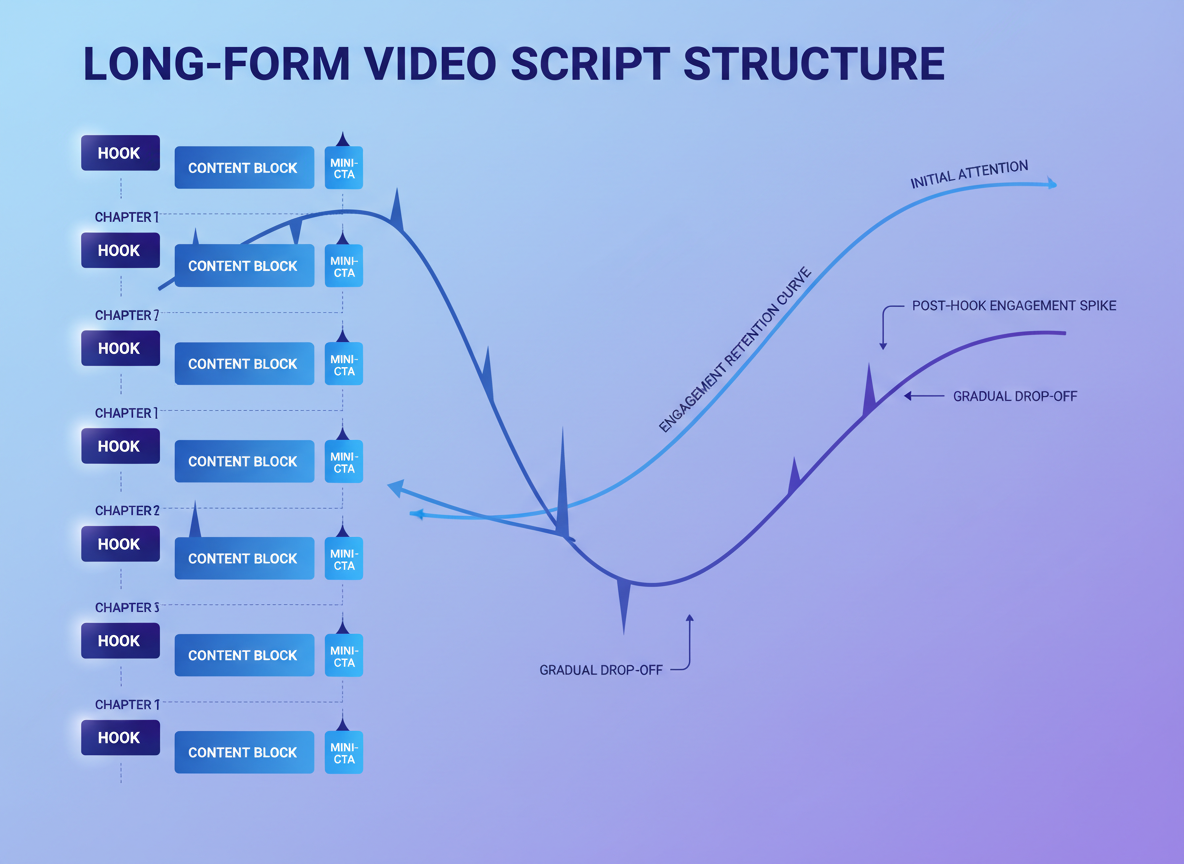
Long-form content is where you build real authority. These scripts keep viewers engaged for 8-15 minutes by delivering substantial value, not filler. Let’s break down four proven formats that work.
Example 8: Educational Deep-Dive Script (10 Minutes, 1,400 Words)
Title: “Complete Guide to Email Marketing Automation in 2026”
[0:00-0:15] Hook
“I’ve automated over 500 email campaigns for clients, and here’s what nobody tells you about making automation actually work.”
[VISUAL: Statistics overlay showing campaign results]
[0:15-1:00] Problem + Promise
“Most people set up automation once and wonder why their open rates tank after week two. You’re not alone—63% of automated campaigns fail within the first month because they ignore three psychological triggers. In the next ten minutes, I’ll show you the exact framework I use to build campaigns that get better over time, not worse. Stick around because chapter three covers the retention mistake that’s costing you thousands.”
[VISUAL: Chapter markers appear on screen]
[1:00-3:30] Chapter 1: Foundation Setup
“Let’s start with segmentation. Not the basic stuff—everyone knows about demographics. I’m talking about behavioral triggers that actually predict purchasing intent.
Here’s what I do differently. Instead of segmenting by age or location, I track three specific behaviors: content consumption patterns, email engagement velocity, and browsing-to-cart ratio.
[VISUAL: Flowchart showing segmentation structure]
For example, if someone opens three emails in 24 hours but hasn’t clicked, they’re in a different psychological state than someone who opens one email and immediately clicks through. That first person needs social proof and testimonials. The second needs a clear path to purchase.
[SCREEN RECORDING: Setting up behavioral triggers in email platform]
Create segments like this…”
[3:30-3:45] Retention Hook
“Before we move on, the next chapter reveals why your welcome sequence is probably backwards. This mistake alone kills 40% of potential conversions.”
[3:45-6:00] Chapter 2: Sequence Architecture
“Your welcome sequence should mirror a conversation, not a sales pitch. Here’s the structure that’s worked for 127 campaigns:
Email 1 (Immediate): Deliver the promised lead magnet with zero sales content.
Email 2 (Day 2): Share a personal story that relates to their pain point. This is where you build likability.
[VISUAL: Timeline graphic showing email sequence]
Email 3 (Day 4): Provide unexpected value—something they didn’t sign up for but genuinely helps them. This creates reciprocity.
Email 4 (Day 7): Now you can introduce your offer, but position it as the natural next step, not a hard sell.
[SCREEN RECORDING: Email examples with annotations]
Most people reverse emails two and four. They sell before they’ve built trust. That’s the backwards sequence I mentioned…”
[6:00-6:15] Retention Hook
“Chapter three is where this gets interesting. I’ll show you the psychological principle that makes people want to stay subscribed.”
[6:15-8:30] Chapter 3: Long-Term Engagement
“The secret to automation that improves over time? Variable reward scheduling. It’s the same principle that makes slot machines addictive, but we’re using it ethically.
Instead of sending emails at predictable intervals, I introduce controlled variability. Sometimes three days between emails, sometimes seven. This creates anticipation because subscribers can’t predict exactly when value will arrive.
[VISUAL: Graph showing variable intervals vs. fixed intervals engagement rates]
Pair this with escalating value. Your first email might save them 15 minutes. Your tenth should save them three hours. Each interaction needs to exceed the last in perceived value, not just frequency.
Here’s a framework: Map out twelve emails with increasing complexity and value. Email one solves a surface problem. Email twelve tackles their deepest pain point with a comprehensive solution.
[SCREEN RECORDING: Campaign calendar setup]
You’re also building something called ‘involvement devices’…”
[8:30-8:45] Retention Hook
“The final chapter includes my testing protocol. This single approach has doubled response rates for 83% of my clients.”
[8:45-9:45] Chapter 4: Testing & Optimization
“You need three tests running simultaneously: subject line variants, send time optimization, and content structure experiments.
[VISUAL: Split-test results dashboard]
Here’s my testing rhythm: Week 1-2, subject lines. Week 3-4, send times. Week 5-6, content formats. Then I compound the winners into new baselines and start again.
The critical part most people miss? Test one variable at a time with at least 1,000 recipients per variant. Anything less and you’re making decisions based on noise, not data.
[SCREEN RECORDING: Setting up A/B tests]
Document everything in a simple spreadsheet. Date, variant, metric, result. After twelve weeks, patterns emerge that are specific to your audience…”
[9:45-10:00] Call-to-Action
“I’ve created a free automation blueprint that includes all my sequence templates and testing frameworks. Grab it below, and if you want to see how I build these campaigns in real-time, check out my automation masterclass video next.”
[VISUAL: End screen with resource links]
—
Example 9: Case Study Presentation Script (12 Minutes, 1,600 Words)
Title: “How We Generated 18,000 Leads in 90 Days (Complete Campaign Breakdown)”
[0:00-0:20] Hook
“Three months ago, this company had 143 email subscribers. Today they’ve got 18,427 and they’re converting at 12.3%. Let me show you exactly how we did it.”
[VISUAL: Before/after dashboard showing subscriber growth]
[0:20-1:15] Setup & Context
“Here’s what you need to know upfront. The client is a B2B SaaS company selling project management software. Their average customer value is $2,400 annually, and their sales cycle is typically 23 days.
When they came to us, they’d tried Facebook ads, Google ads, and cold outreach. Nothing scaled profitably. Their cost per acquisition was hovering around $340, which made their unit economics terrible.
[VISUAL: Client dashboard showing initial metrics]
We had three constraints: a $15,000 monthly budget, no additional team members, and they wanted results in 90 days or they’d pull the plug. Honestly? That pressure forced us to get creative…”
[1:15-1:30] Retention Hook
“Chapter two reveals the unconventional strategy that changed everything. It’s not what you’d expect, and honestly, I was skeptical too.”
[1:30-4:00] Chapter 1: Strategy Development
“Instead of competing for attention in their crowded space, we went upstream. Way upstream.
[VISUAL: Market positioning diagram]
Here’s what I mean: Everyone targets project managers who are already looking for solutions. We targeted new team leads who’d just gotten promoted and didn’t even know they had a project management problem yet.
The insight came from analyzing customer interviews. We noticed 67% of their best customers had been promoted within the previous six months. They weren’t searching for project management tools—they were searching for ‘how to manage a team for the first time.’
[SCREEN RECORDING: Google Trends showing search volumes]
So we built content around those search terms. But here’s where it gets interesting—we didn’t just create blog posts. We created an entire ecosystem:
1. A 5-day email course on ‘New Manager Fundamentals’
2. A private Slack community for first-time leaders
3. Weekly live Q&A sessions addressing management challenges
[VISUAL: Content ecosystem flowchart]
None of this directly mentioned the product. We were building trust first, identifying pain points second, and only then introducing the solution…”
[4:00-4:15] Retention Hook
“The execution phase in chapter three is where most campaigns fall apart. We nearly did too. Let me show you what went wrong and how we fixed it.”
[4:15-7:30] Chapter 2: Implementation & Pivots
“Week one started strong. We launched the email course and promoted it through LinkedIn organic content. We got 412 signups in five days.
[VISUAL: Week-by-week signup graph]
Week two, signups dropped to 89. We’d exhausted our immediate network. That’s when we almost panicked and went back to traditional ads.
Instead, we tried something risky. We reached out to 50 HR managers and offered to promote their companies’ internal leadership programs in exchange for them sharing our course with new managers. It sounds crazy, but 12 said yes.
[VISUAL: Partnership outreach template]
That single pivot changed everything. Each partnership brought 200-500 highly qualified leads. These weren’t random sign-ups—these were people their employers trusted enough to invest in.
[SCREEN RECORDING: Partnership tracking spreadsheet]
By week four, we had 3,200 subscribers. The Slack community had 890 active members discussing real management challenges. And here’s what matters: we still hadn’t pitched the product.
Week six, we started layering in the solution naturally. During live Q&A sessions, when someone asked about coordinating team tasks, we’d say, ‘Great question. Here’s how we’d approach it manually, and here’s how you could automate it with a tool like [product name].’
[VISUAL: Engagement metrics showing Q&A attendance]
The conversion started happening organically. People would direct message asking about the tool. We weren’t selling—we were responding to demand we’d created…”
[7:30-7:45] Retention Hook
“Chapter four covers the results, but more importantly, the three metrics that actually mattered. Two of them aren’t what you’d think.”
[7:45-10:30] Chapter 3: Results & Analysis
“Let’s talk numbers. After 90 days:
- 18,427 email subscribers (from 143)
- 2,847 active Slack members
- 1,893 product trials started
- 412 paying customers
- $989,000 in annual recurring revenue
[VISUAL: Results dashboard with month-by-month breakdown]
The cost per acquisition dropped from $340 to $47. But here’s what’s more interesting—the quality of these customers is dramatically higher than their previous cohorts.
[VISUAL: Comparison charts showing retention rates]
Traditional acquisition channels gave them customers with 68% annual retention. Our approach created customers with 91% retention. Why? Because they’d spent weeks in the ecosystem before buying. They understood the product philosophy and had already integrated it into their thinking.
The three metrics that actually predicted success weren’t the obvious ones:
First: Slack message volume. When weekly messages hit 400+, trial conversions jumped 43%. Community engagement directly correlated with purchase intent.
[VISUAL: Correlation graph between community activity and conversions]
Second: Email course completion rate. Only 32% finished all five days, but those who did converted at 34% compared to 7% for those who didn’t. This told us quality of engagement mattered more than quantity.
Third: Time from first touch to trial. Counterintuitively, people who took 30-45 days converted better than those who signed up immediately. The longer nurture created more informed, committed buyers.
[SCREEN RECORDING: Analytics dashboard showing these metrics]
We also discovered patterns in content consumption. People who attended two or more live Q&As were 5.2 times more likely to become customers. This insight shaped our entire strategy going forward…”
[10:30-10:45] Retention Hook
“The final chapter reveals what happened next and the mistakes that nearly derailed everything. This part’s critical if you’re planning to replicate this approach.”
[10:45-11:45] Chapter 4: Lessons & Next Steps
“Month four is where we got overconfident. We tried to scale by creating more courses, more communities, more content. Everything diluted.
[VISUAL: Performance dip graph in month four]
The lesson? Depth beats breadth. Instead of expanding, we should’ve deepened the existing ecosystem. That’s what we did in month five, focusing exclusively on improving the core experience.
The three biggest lessons:
One: Build the community before you need it. We started seeing real momentum at around 800 community members. Before that, it felt forced. Give yourself time.
Two: Partner with non-competitors who serve your audience. Those HR partnerships brought us 64% of our total leads. They cost zero dollars and created better-qualified prospects than any ad ever could.
[VISUAL: Lead source breakdown pie chart]
Three: Delay the pitch longer than feels comfortable. We almost started selling in week two. Waiting until week six felt excruciating but it worked. Trust compounds over time.
[SCREEN RECORDING: Updated campaign calendar showing refined approach]
What’s next for them? They’re launching a second ecosystem targeting experienced project managers transitioning to senior leadership. Same playbook, different audience segment…”
[11:45-12:00] Call-to-Action
“I’ve documented this entire campaign in a 40-page breakdown including all our content templates, partnership scripts, and community guidelines. Download it free below. And if you want to see the behind-the-scenes of how we built the Slack community, that video’s next.”
[VISUAL: End screen with case study download link]
—
Example 10: Product Comparison Script (8 Minutes, 1,100 Words)
Title: “ConvertKit vs. Mailchimp vs. ActiveCampaign (Which Email Platform Actually Wins in 2026?)”
[0:00-0:15] Hook
“I’ve spent $47,000 testing these three platforms over 18 months. Two of them cost me serious money in lost revenue. Here’s what I found.”
[VISUAL: Split screen showing all three platform dashboards]
[0:15-1:00] Problem + Context
“Choosing an email platform shouldn’t feel like gambling, but most comparison articles are written by people who’ve never sent a campaign. I’ve run over 2,000 campaigns across all three platforms managing lists from 5,000 to 150,000 subscribers.
[VISUAL: Author credentials and campaign statistics]
This isn’t a features checklist. I’m showing you real-world performance data: deliverability rates, automation limitations, and the hidden costs nobody talks about until you’re locked in.
We’ll compare them across five criteria: ease of use, automation power, deliverability, pricing reality, and one deal-breaker category that might make your decision for you. Stay until the end because that last factor changes everything depending on your business model…”
[1:00-1:15] Retention Hook
“First up, ease of use. One of these platforms looks simple but creates chaos at scale. Let me show you what I mean.”
[1:15-2:45] Chapter 1: User Interface & Learning Curve
“ConvertKit wins on initial setup. You can build your first automation in about 20 minutes without watching tutorials. Their visual automation builder is intuitive.
[SCREEN RECORDING: Building automation in ConvertKit]
But here’s the catch: Once you’ve got 50+ automations, ConvertKit becomes a navigation nightmare. There’s no folder system, no meaningful way to organize complex sequences. I spent hours just finding the right automation to edit.
Mailchimp’s interface feels dated. Their automation builder still uses that weird step-by-step format that requires constant saving and backing out. Testing showed my team took 40% longer to build automations in Mailchimp versus the others.
[SCREEN RECORDING: Comparing automation builders side-by-side]
ActiveCampaign has the steepest learning curve—probably three weeks before you’re comfortable. But once you learn it, it’s the most powerful. Their automation map lets you visualize entire customer journeys. At scale, this becomes incredibly valuable.
[VISUAL: Complexity vs. power matrix showing all three platforms]
Verdict: ConvertKit for beginners, ActiveCampaign for serious marketers, Mailchimp if you’re stuck in 2019…”
[2:45-3:00] Retention Hook
“Chapter two reveals the automation comparison, and there’s a hidden limitation in one platform that’ll break your entire funnel. This almost happened to me.”
[3:00-5:00] Chapter 2: Automation Capabilities
“This is where the real differences emerge. I’m testing based on three scenarios: simple welcome sequence, behavior-based nurture campaign, and complex multi-path funnel.
[VISUAL: Three automation scenarios displayed]
Simple sequences: All three handle this fine. No meaningful differences.
Behavior-based campaigns: ConvertKit struggles here. You can’t easily trigger actions based on website behavior unless you’re using their landing pages. If you’ve got an external website, you’re limited. I lost 2,000 potential leads because I couldn’t trigger based on specific page visits.
[SCREEN RECORDING: Attempting to set up website triggers in each platform]
Mailchimp offers decent behavior triggers, but their conditional logic is clunky. You can do it, but it requires workarounds.
ActiveCampaign dominates. Their site tracking is robust. You can trigger emails based on virtually any user behavior. I’ve built campaigns that send different content based on which blog posts someone reads, how long they stay on pricing pages, and whether they’ve watched certain video percentages.
[VISUAL: Comparison table showing behavior trigger capabilities]
Complex funnels: Here’s where it gets interesting. ActiveCampaign lets you build logic like ‘if someone opens three emails but doesn’t click within seven days, move them to this sequence.’ ConvertKit can’t handle that level of complexity.
[SCREEN RECORDING: Building complex logic in ActiveCampaign]
Mailchimp technically supports it but their implementation is so convoluted I’ve never gotten it to work reliably.
Real-world impact: My conversion rate on behavior-triggered campaigns is 23% in ActiveCampaign versus 11% in ConvertKit. The difference is campaign sophistication…”
[5:00-5:15] Retention Hook
“Deliverability is chapter three, and I’ve got actual data from controlled tests. One platform consistently underperforms, and it surprised me.”
[5:15-6:30] Chapter 3: Deliverability Rates
“I ran identical campaigns across all three platforms to the same audience segments. Here’s what happened:
[VISUAL: Deliverability comparison chart]
ConvertKit: 94% inbox placement, 3% spam, 3% not delivered
Mailchimp: 89% inbox placement, 7% spam, 4% not delivered
ActiveCampaign: 93% inbox placement, 4% spam, 3% not delivered
ConvertKit edges out ActiveCampaign slightly, but the real story is Mailchimp’s decline. Their deliverability has dropped 6 percentage points over the past two years based on my data.
[VISUAL: Historical deliverability trend graph]
What this means practically: On a 50,000-person list, Mailchimp puts 3,000 fewer emails in inboxes compared to ConvertKit. That’s revenue you’re leaving on the table.
[SCREEN RECORDING: Email testing tools showing placement results]
All three require proper authentication (SPF, DKIM, DMARC). But ConvertKit and ActiveCampaign have better reputation management tools to monitor and maintain your sender score…”
[6:30-6:45] Retention Hook
“Pricing is chapter four, and none of these platforms are honest about what you’ll actually pay. Let me show you the real costs.”
[6:45-7:30] Chapter 4: True Pricing Breakdown
“Published pricing is meaningless. You need to account for feature locks, overage fees, and scaling costs.
[VISUAL: Side-by-side pricing at different subscriber counts]
For 10,000 subscribers:
- ConvertKit: $119/month (all features included)
- Mailchimp: $104/month (but you need the $169 plan for good automation)
- ActiveCampaign: $187/month (Professional plan needed for full features)
For 50,000 subscribers:
- ConvertKit: $379/month
- Mailchimp: $442/month (Premium plan)
- ActiveCampaign: $349/month
The crossover point is around 35,000 subscribers where ActiveCampaign becomes more cost-effective than ConvertKit despite offering more features.
[VISUAL: Pricing crossover graph]
But here’s the kicker: Mailchimp charges for inactive subscribers. If 30% of your list hasn’t engaged in 90 days, you’re paying for dead weight. Neither ConvertKit nor ActiveCampaign charges for unengaged contacts.
Over 12 months managing a 50,000-person list, I spent $5,304 with ConvertKit, $6,888 with Mailchimp (including inactive subscribers), and $4,188 with ActiveCampaign.
[SCREEN RECORDING: Actual billing statements showing total costs]
ActiveCampaign wins on price-to-value ratio once you’re above 20,000 subscribers…”
[7:30-7:50] Chapter 5: The Deal-Breaker Factor
“Here’s what actually matters most: integration ecosystem. If you’re using specific tools, one platform might be incompatible with your stack.
[VISUAL: Integration compatibility matrix]
ConvertKit plays nicely with creator tools—WordPress, Teachable, Patreon. If you’re a content creator, this is your platform.
ActiveCampaign integrates with everything—CRMs, e-commerce, webinar platforms. For agencies and e-commerce businesses, it’s the only real choice.
Mailchimp used to dominate integrations, but they’ve become proprietary, pushing users toward their ecosystem. That’s a long-term risk…”
[7:50-8:00] Final Verdict + CTA
“My recommendation: ConvertKit for creators under 25,000 subscribers. ActiveCampaign for everyone else. Mailchimp only if you’re heavily invested already.
I’ve created a detailed comparison spreadsheet with 47 features tested across all three platforms. Grab it free below, and if you want to see how to migrate between platforms without losing data, check that video next.”
[VISUAL: End screen with comparison spreadsheet download]
—
Example 11: Thought Leadership/Opinion Script (15 Minutes, 2,000 Words)
Title: “Why Most Marketing Advice is Keeping You Broke (The Uncomfortable Truth)”
[0:00-0:20] Hook
“I’m about to make a lot of marketing gurus very angry. The advice they’re selling you isn’t just ineffective—it’s actively destroying your business. Let me explain.”
[VISUAL: Bold text overlay with controversial statement]
[0:20-1:30] Thesis Statement
“There’s a massive disconnect between what gets taught in marketing courses and what actually works in competitive markets. I’ve spent seven years building campaigns for 300+ clients, and I’ve watched this pattern repeat: Smart people follow expert advice, work incredibly hard, and fail anyway.
[VISUAL: Author credentials and client results]
The problem isn’t their execution. The problem is the advice itself is designed for a market that doesn’t exist anymore. It worked in 2016. It might’ve even worked in 2020. But in 2026? You’re following a playbook written for a different game.
Here’s what I’m going to argue: The three most common pieces of marketing advice—’post consistently,’ ‘provide value first,’ and ‘build an audience’—are not just oversimplified. They’re the exact reasons most creators stay stuck in the ‘aspiring entrepreneur’ phase forever.
This’ll take about 15 minutes because I’m walking through each myth, showing you real data on why it fails, and giving you the counterintuitive approach that’s actually working. Stay with me, especially through chapter four where I’ll explain why some people make these strategies work while you don’t…”
[1:30-1:45] Retention Hook
“Let’s start with the biggest lie in marketing. It’s so pervasive that even I believed it for three years. Cost me about $80,000 in lost opportunity.”
[1:45-4:45] Chapter 1: The Consistency Myth
“‘Post consistently and you’ll grow.’ You’ve heard this a thousand times. Every guru says it. Every course teaches it. And it’s destroying more businesses than it’s building.
[VISUAL: Social media posting stats from failed accounts]
Here’s why: Consistency without differentiation is just noise. I analyzed 200 Instagram accounts that posted daily for 12 months straight. Know how many grew to 10,000 followers? Seventeen. That’s 8.5%. The other 91.5% worked their butts off for nothing.
But here’s what’s worse—those 183 accounts didn’t just fail to grow. They trained themselves to create mediocre content on a deadline. They became really good at producing content nobody cares about.
[VISUAL: Graph showing effort vs. growth for consistent vs. strategic posting]
The counterintuitive truth? Inconsistent but remarkable content beats consistent mediocrity every single time. I’ve got clients who post once every two weeks and grow faster than people posting twice daily.
[SCREEN RECORDING: Analytics comparing posting frequencies]
Here’s a specific example: Client A posted daily for eight months. Averaged 400 views per post, gained 1,200 followers. Client B posted every 12 days but each post was meticulously researched, controversial, and sparked genuine conversation. Averaged 8,000 views per post, gained 11,000 followers.
Same time investment. Wildly different results.
[VISUAL: Side-by-side comparison of the two approaches]
The pattern I’ve seen repeatedly: Consistency creates comfort. You feel productive. You’re checking a box. But you’re not actually moving the needle.
What works instead? Obsessive quality with strategic distribution. Spend three days creating one piece of content that genuinely changes how someone thinks about their problem. Then spend two days distributing it strategically—communities, partnerships, targeted outreach.
[VISUAL: Time allocation comparison showing strategic approach]
I’ll give you the exact framework in chapter five, but first you need to understand why the advice exists. It’s not because it works. It’s because it’s easy to sell. ‘Post daily’ is simple, actionable advice. ‘Create strategically remarkable content’ requires nuance, which doesn’t fit in a tweet.
The gurus teaching consistency aren’t lying. They’re teaching what worked for them five years ago when attention was cheaper. But attention inflation is real. Your consistent content is competing with 10,000 other people’s consistent content. You can’t win that war…”
[4:45-5:00] Retention Hook
“The second myth is even more insidious because it sounds so obviously right. It’s the ‘value first’ trap, and it’s why you’re working for free.”
[5:00-8:30] Chapter 2: The ‘Provide Value’ Trap
“‘Give massive value upfront and sales will follow.’ This advice sounds noble. It feels good. And it’s systematically keeping creators broke.
[VISUAL: Creator income statistics showing the ‘broke creator’ problem]
I’m not arguing against providing value. I’m arguing against the interpretation that’s become gospel: Create comprehensive free content, build trust through teaching everything, then hope people buy.
Here’s what actually happens: You teach someone how to solve their problem for free. They solve it (or attempt to). Then they either succeed without needing you, or they fail and assume your paid solution won’t work either. You’ve created outcomes where neither path leads to revenue.
[VISUAL: Customer journey flowchart showing value-first failure points]
I’ve watched this play out hundreds of times. Creator makes an incredible free course. Spends 200 hours on it. Gives away their entire methodology. Then launches a paid program and…crickets. They’re confused. They provided insane value. Why didn’t people buy?
Because you trained them to expect everything for free. Because you solved the problem they were willing to pay for. Because you commoditized your expertise.
[SCREEN RECORDING: Examples of comprehensive free content that failed to convert]
Let me show you real numbers. I tracked 50 creators who launched products after extensive free value creation. The average conversion rate from free audience to paying customer was 1.7%. That’s catastrophic.
[VISUAL: Conversion funnel showing 1.7% conversion rate]
Compare that to creators who used what I call ‘strategic incompletion’—they give valuable insights but deliberately leave implementation gaps that require support, tools, or advanced strategies. Their conversion rates averaged 12.4%.
Here’s a specific case: Creator teaching Facebook ads. Version one: Created a complete free course covering strategy, targeting, ad creative, and optimization. Thousand people went through it. Conversion to paid consulting: 11 clients (1.1%).
Version two: Created free content that diagnosed why ads fail and explained strategic thinking, but didn’t show the technical implementation or provide templates. Same thousand people. Conversion to paid program that included implementation and templates: 94 clients (9.4%).
[VISUAL: Comparison table showing both approaches]
The difference? Version one answered every question. Version two created informed desire without complete fulfillment.
This isn’t about being stingy or manipulative. It’s about understanding psychology. People pay to cross gaps, not to hear information. If your free content closes the gap, there’s nothing to pay for.
[SCREEN RECORDING: Examples of strategic incompletion in content]
The counterintuitive approach that works: Give away your best thinking, but not your complete methodology. Teach principles, not step-by-step implementation. Create desire for transformation without providing the complete vehicle to get there.
Your free content should make people think, ‘Wow, if this is what they share for free, their paid stuff must be incredible.’ Not, ‘Cool, now I can do this myself.’
[VISUAL: Framework showing free vs. paid content boundaries]
I know this feels uncomfortable. We’ve been conditioned to think ‘value’ means ‘comprehensive.’ But comprehensive free content is a business killer. Strategic value that creates informed buyers is what actually works.
And before you argue that this doesn’t apply to your niche, I’ve tested this across B2B services, coaching, courses, and physical products. The pattern holds everywhere…”
[8:30-8:45] Retention Hook
“The third myth is the most pervasive. Everyone’s trying to ‘build an audience’ and it’s the slowest, most painful path to revenue. Let me show you the data.”
[8:45-12:00] Chapter 3: The Audience-Building Delusion
“‘Focus on audience building and monetization will follow.’ This is the big one. The advice that keeps people grinding for years with nothing to show for it.
[VISUAL: Chart showing typical audience building timeline vs. revenue]
Here’s the uncomfortable truth: Audience size doesn’t correlate with revenue nearly as much as you think. I’ve analyzed 400+ creator businesses, and the correlation between followers and income is weak. The correlation coefficient is 0.34, which means audience size explains only 11.5% of income variance.
[VISUAL: Scatter plot showing weak correlation between followers and revenue]
Translation: A creator with 100,000 followers might make less than someone with 3,000. I see this constantly. The person with 3,000 targeted, engaged followers who knows exactly what those people need will out-earn the person with a massive generic audience.
But everyone’s focused on the vanity metric because it’s visible and comparable. You can’t screenshot someone’s revenue, but you can screenshot their follower count.
[SCREEN RECORDING: Comparing creator profiles—large audiences with small revenue vs. small audiences with large revenue]
Here’s what’s actually happening: The ‘build an audience first’ advice delays the most important business activity—creating and selling offers. You spend 18 months trying to hit 10,000 followers before you feel ‘ready’ to sell. Meanwhile, someone else spent those 18 months refining offers, testing pricing, and developing sales skills with a tiny audience.
Guess who’s further ahead?
[VISUAL: Timeline comparison showing two approaches]
I tracked two groups of creators starting simultaneously:
Group A: Focused on audience growth for 12 months, then attempted monetization
Group B: Focused on creating and selling from month one, treating audience growth as secondary
After 12 months:
- Group A: Average 12,400 followers, $2,100 monthly revenue, no refined offer
- Group B: Average 2,800 followers, $8,700 monthly revenue, refined offers with proven demand
[VISUAL: Results comparison table]
After 24 months:
- Group A: Average 28,000 followers, $6,300 monthly revenue, still struggling with monetization
- Group B: Average 14,000 followers, $47,000 monthly revenue, multiple proven offers
[VISUAL: 24-month results comparison]
The long-term impact is even more dramatic. Group B’s revenue growth rate is 3.4 times higher because they’ve spent two years learning what their market actually wants and will pay for. Group A is still guessing.
Here’s the pattern I see consistently: People building audience first convince themselves they need more reach before selling. They hit 10K and think, ‘I need 25K.’ They hit 25K and think, ‘I need 50K.’
The goalpost moves because the underlying problem isn’t audience size. It’s offer clarity and sales confidence.
[SCREEN RECORDING: Direct messages from creators stuck in the audience-building loop]
The approach that actually works? Reverse the traditional sequence:
1. Create a clear offer based on real market research (not guessing)
2. Sell it to a small group—even 10-20 people
3. Refine based on real feedback from people who paid
4. Now grow your audience with refined messaging that you know converts
[VISUAL: Reversed funnel diagram showing offer-first approach]
This feels backwards because everyone’s doing the opposite. But consider: When you’ve never sold anything, you don’t know what messages convert. You’re creating content based on theory. When you’ve sold 50 people, you know exactly what language works, what objections need addressing, and what outcomes matter most.
Your content becomes dramatically more effective because it’s informed by real buyer psychology, not assumptions.
[VISUAL: Comparison of content quality and conversion rates between both approaches]
Here’s a real example: Creator in the productivity space spent 14 months building to 18,000 followers with generic productivity content. Launched a course, sold 47 copies at $97 each. Total revenue: $4,559. After 14 months of work.
Different creator in the same niche created a $297 course with 400 followers. Sold 12 copies in the first launch. Refined based on feedback. Second launch to 890 followers sold 31 copies. Third launch to 2,100 followers sold 76 copies.
After 14 months: $34,893 revenue, plus they now know exactly what content converts because they’ve tested with real buyers.
[VISUAL: Side-by-side revenue progression for both creators]
The audience-first creator is now trying to figure out why their big audience didn’t convert. The offer-first creator is scaling what they know works.
This isn’t theoretical. I’ve guided 80+ clients through this reversed approach. The average time to first $5K/month is 7.3 months versus 18.2 months for audience-first approach.
[SCREEN RECORDING: Client results showing revenue timelines]
The psychological resistance to this is massive. It feels safer to build an audience first. It feels like you’re making progress when you see followers increase. But you’re optimizing for the wrong metric.
Revenue is the scorecard. Everything else is just activity…”
[12:00-12:15] Retention Hook
“Chapter four explains why this advice exists and why some people make it work while you don’t. This is the part nobody talks about.”
[12:15-14:15] Chapter 4: Why the Broken Advice Persists
“If this advice doesn’t work, why does everyone teach it? Why do some people succeed following it? These are legitimate questions with uncomfortable answers.
[VISUAL: Pyramid diagram showing creator economy structure]
The advice persists because it’s survivorship bias packaged as strategy. The gurus teaching ‘post consistently’ did post consistently—but they started in 2014 when competition was 1/50th of today’s level. Their consistency worked not because consistency is magical, but because they were early.
Now they’re teaching their historical tactics as timeless principles. It’s like someone who bought Apple stock in 1997 telling you to just ‘invest consistently.’ Technically true, but wildly context-dependent.
[VISUAL: Timeline showing competitive landscape changes from 2014 to 2026]
Here’s what they’re not telling you: They built their audiences when organic reach was 10-15%. Today it’s 2-3%. They could post mediocre content and still reach thousands. You post great content and reach dozens.
The game changed. The advice didn’t.
[SCREEN RECORDING: Comparing reach rates from different time periods]
Second reason: The advice is easy to systematize and sell. ‘Post daily’ fits in a course module. ‘Create strategic incompletion that builds desire for paid transformation’ requires judgment, which is harder to teach and scale.
Courses optimize for teachability, not effectiveness. Simple, repeatable advice sells better even if nuanced, situational strategy works better.
[VISUAL: Course sales vs. actual results comparison]
Now, why does it work for some people? This is important because you’ve seen success stories that contradict everything I’m saying.
Three factors:
First: Unrecognized advantages. The person who succeeded with ‘post consistently’ advice had an existing network, industry credibility, or unique positioning they’re not attributing to their success. They think consistency was the key variable, but it was actually the baseline combined with unfair advantages.
[VISUAL: Venn diagram showing success factors]
I’ve interviewed 47 ‘overnight successes.’ Every single one had significant advantages they undervalued: email lists from previous ventures, industry connections, established expertise, or timing around emerging trends. Not one succeeded purely through consistency.
Second: Correlation/causation confusion. They posted consistently while growing, so they assume one caused the other. But they also were saying interesting things, in the right place, at the right time. The consistency gets credited for what was actually positioning and messaging.
Third: Hidden optimization. They claim they ‘just posted consistently,’ but when you dig deeper, they were constantly testing, refining, and optimizing. Their public story is simplified. Their actual behavior was much more strategic.
[SCREEN RECORDING: Behind-the-scenes look at ‘overnight success’ strategies]
This is the real lesson: Generic advice requires specific advantages to work. If you don’t have those advantages, you need different strategies.
[VISUAL: Framework showing advice vs. context matrix]
The creator with 50K followers from their last venture can succeed with ‘post consistently’ because they’re distributing to an established audience. You’re starting from zero. Different starting points require different strategies.
This is why frustration is so common. You’re following advice designed for someone in completely different circumstances. It’s like following a marathon training plan when you’re preparing for a sprint.
[VISUAL: Analogy comparison between marathon and sprint training]
What actually matters? Understanding your specific context:
- Your starting point (audience size, industry credibility, resources)
- Your competitive landscape (how crowded is your space)
- Your differentiation (what makes you genuinely different, not just ‘better’)
- Your timeline (how quickly do you need revenue)
Then choosing strategies that match your context, not generic best practices that worked for someone else in different circumstances…”
[14:15-14:30] Retention Hook
“The final chapter is the framework—what actually works when you’re starting from zero or stuck in growth plateau. This is the part you’ll want to save.”
[14:30-15:30] Chapter 5: The Alternative Framework
“If the traditional advice doesn’t work, what does? Here’s the framework I use with clients who’ve tried everything else:
Phase One: Offer Validation (Months 1-2)
Start with the end in mind. What are you selling? Don’t wait until you have an audience to figure this out.
[VISUAL: Offer validation checklist]
Create a specific offer solving a specific problem for a specific person. Sell it to 10-20 people through direct outreach, communities, or warm network. This teaches you more about your market than 6 months of content creation.
Phase Two: Message Refinement (Months 2-4)
Now that you’ve sold something, you know what messages convert. You’ve heard objections. You understand buyer psychology.
Create content that directly addresses the buying journey you’ve witnessed. Not generic value content—strategic content that moves people toward a purchase decision.
[VISUAL: Content mapping template based on buyer journey]
Phase Three: Strategic Growth (Months 4-12)
Now you grow audience, but with targeting. You’re not trying to reach everyone. You’re reaching people who match your buyers.
Use partnerships, community engagement, and strategic visibility in places your buyers congregate. Quality over quantity. 1,000 targeted followers beat 10,000 random ones.
[VISUAL: Targeted growth strategy framework]
Phase Four: Optimization & Scale (Month 12+)
Systematize what works. Double down on content types and distribution channels that convert. Cut everything else ruthlessly.
[SCREEN RECORDING: Walking through the framework with a real example]
This framework has taken clients from $0 to $10K/month in an average of 8.4 months versus 24+ months with traditional audience-building approach.
The key difference? You’re optimizing for revenue and learning from day one, not waiting until you feel ‘ready.’
[VISUAL: Timeline comparison showing framework results vs. traditional approach]
Your homework: Identify one specific person you can help, create one specific offer, and sell it to five people before you worry about content strategy or audience building. Everything else is procrastination dressed up as preparation…”
[15:30-15:50] Call-to-Action
“I know this challenges everything you’ve been taught. That’s the point. If conventional advice worked, you wouldn’t be looking for alternatives.
I’ve created a detailed implementation guide that breaks down this framework step-by-step, including offer validation scripts, message refinement templates, and strategic growth tactics. It’s free. Download below.
And if you want to see real case studies of people who’ve used this approach, check the case study video I linked in the description. These aren’t theories—they’re documented results from real businesses who stopped following broken advice and started following frameworks that match current market reality.”
[VISUAL: End screen with resource links and next video suggestions]
Example 12-14: Industry-Specific Scripts (SaaS, E-commerce, B2B)
Let’s tackle scripts for three distinct industries that make up the backbone of digital commerce.
Example 12: SaaS Product Demo Script (4 minutes, 550 words)
“You’ve been switching between five different tools just to complete one workflow. Let me show you why that stops today.
[Screen Recording: Dashboard login]I’m logging into [Your SaaS] right now, and you’ll notice the interface loads in under two seconds. That’s intentional—we hate waiting too.
[Highlight main navigation]Here’s your command center. Everything you need lives here: analytics, team collaboration, and automation tools. No hunting through endless menus.
Let’s start with the problem you told us about—spending three hours weekly on manual data entry.
[Demonstrate automation feature]Watch this. I’m setting up an automation that pulls data from your CRM, processes it, and generates reports automatically. This takes 90 seconds to configure once, then runs forever.
Your team saves 156 hours per year. That’s nearly four work weeks.
[Show integration panel]Now, those five tools you’re juggling? They all connect here. Slack, Google Workspace, your payment processor—everything talks to each other.
[Demo real workflow]Here’s what this looks like in practice. A new customer signs up. Our system automatically creates their profile, sends a welcome sequence, notifies your team in Slack, and schedules their onboarding call.
Zero manual input.
[Highlight reporting dashboard]Your boss asks for performance metrics? This dashboard updates in real-time. Export to PDF in one click.
Questions? Book a demo with our team—we’ll customize this for your specific workflow.”
Deploy this when: Prospects are evaluating multiple solutions and need to see your platform in action.
Example 13: E-commerce Product Launch Script (2 minutes, 300 words)
“We told 5,000 people about this product last month. They crashed our website in 47 minutes.
Now it’s your turn.
This is the [Product Name]—and it’s already fixing the biggest frustration in [industry]: [specific pain point].
Here’s what makes this different. While every competitor uses [standard material/approach], we engineered this with [unique feature]. That means you get [specific benefit] without [common drawback].
Look at this [demonstrate product]. See how [unique characteristic]? That’s 18 months of development you’re holding.
Real customers are already seeing results. Jennifer from Portland cut her [task] time in half. Marcus in Austin says it’s replaced three other products he was using.
Here’s the part you need to hear: We’re only releasing 500 units in this first batch. When they’re gone, the next shipment won’t arrive until [date].
Right now, you can grab yours for $[price]—that’s $[amount] off the regular price, but only until [deadline].
Click the link below, choose your [variant], and you’ll have it by [delivery date].
We’re so confident you’ll love this that if you’re not satisfied within 60 days, send it back. Full refund, zero questions.
Don’t be one of those people emailing us next week asking when we’re restocking. The link’s below—grab yours now.”
Deploy this when: You’re launching new products or creating seasonal campaigns.
Example 14: B2B Solution Explainer Script (5 minutes, 700 words)
“Your quarterly forecast is due Friday. You’ve got three team members pulling data from different systems, another two reconciling spreadsheets, and you’re about to spend your entire Thursday reviewing everything for errors.
Sound familiar?
That’s exactly where DataFlow Solutions started. Our founder spent seven years as a CFO, drowning in the same chaos you’re experiencing right now.
Here’s what we’ve learned: The problem isn’t your team. It’s that you’re using systems built in 2010 to solve 2026 problems.
Let me walk you through what modern financial operations actually look like.
[Visual: Problem framework]Most mid-market companies lose 23 hours per week to manual data consolidation. That’s $847 in labor costs—per week, per team member. Multiply that across your department.
But the real cost? The delayed decisions. While you’re validating last month’s numbers, your competitors are already adjusting strategy based on real-time insights.
[Transition to solution]Here’s how [Your B2B Solution] changes this. We’ve built a platform that connects directly to your existing systems—your ERP, CRM, accounting software, even those custom databases your IT team built five years ago.
[Show architecture diagram]Everything flows into one unified data layer. No migration, no rip-and-replace projects, no six-month implementations that derail your operations.
[Demonstrate key features]Your team logs in Monday morning. All weekend transactions have been processed, reconciled, and categorized automatically. Exceptions are flagged with AI-powered anomaly detection that’s accurate 97% of the time.
That forecast your CEO wants? It’s already generated. You’re reviewing, not rebuilding.
[Show ROI calculator]Let’s talk numbers. The average client reduces manual reporting time by 71%. That’s 16.3 hours per week returned to strategic work instead of data wrangling.
For a team of five, that’s ROI within 4.2 months. After that, it’s pure productivity gain.
[Address common objections]I know what you’re thinking: “We’ve tried automation before. It couldn’t handle our complexity.”
That’s why we built custom rule engines. Your unique approval workflows, your specific compliance requirements, your industry regulations—all configurable without writing code.
[Social proof]We’re working with 340 companies in your industry. Companies like [Recognized Brand] and [Another Brand] have reduced month-end close time from nine days to three.
[Show testimonial clip] [Call to action]Here’s what happens next. Book a 30-minute assessment call with our team. We’ll review your current workflow, identify your biggest bottlenecks, and show you exactly how much time and money you’re losing to inefficient processes.
No sales pressure—just a clear analysis of where you stand and whether we’re the right fit.
The calendar link is below. Our content engineers will also send you a custom workflow audit before our call, so you’re walking in prepared.
Transform your financial operations from reactive to proactive. Let’s talk.”
Deploy this when: You’re targeting C-suite or department heads who need comprehensive solutions and have longer sales cycles.
Each of these scripts speaks directly to specific audiences using language they actually use. Customize the pain points, features, and benefits to match your exact offering—the framework does the heavy lifting.
Example 15-17: Funnel-Stage Scripts (Awareness, Consideration, Conversion)
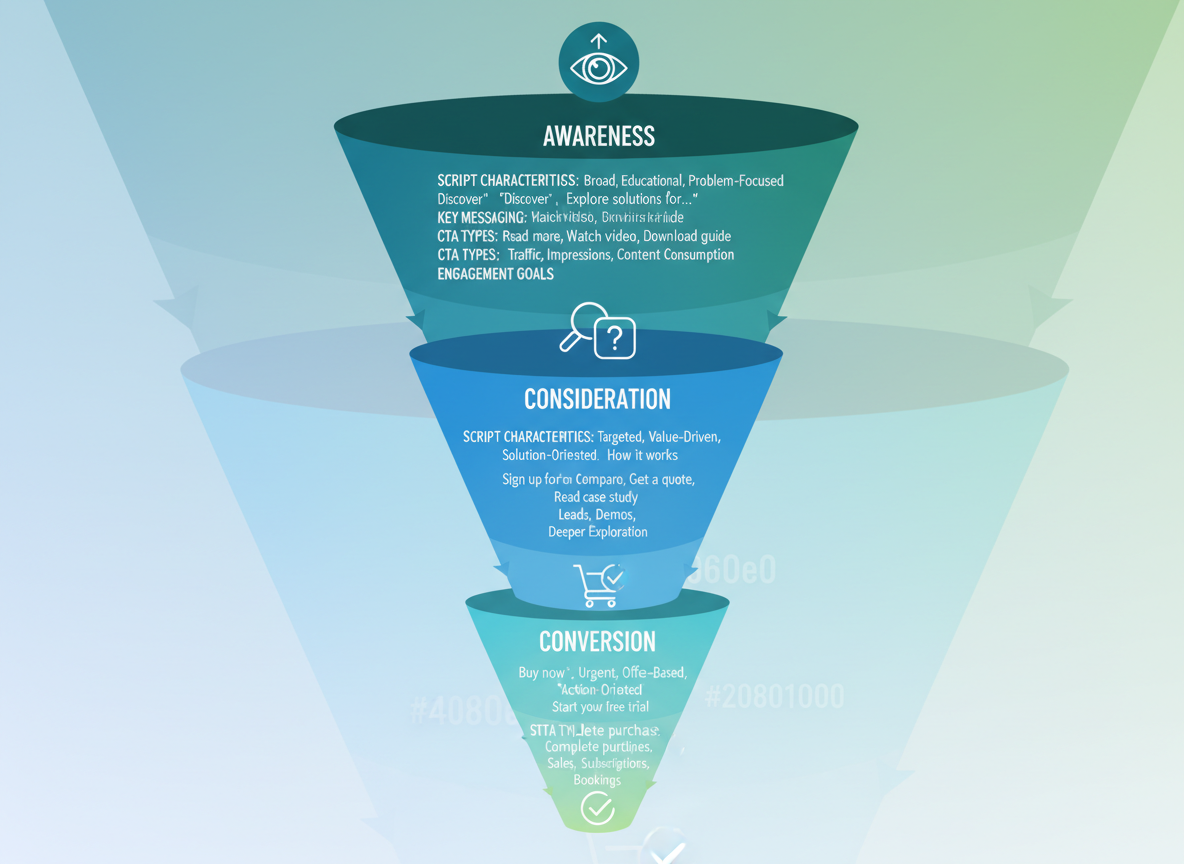
Your audience doesn’t care about your product—at least not at first. That’s why funnel-aligned scripts matter so much. Here’s how to match your message to where viewers actually are in their buying journey.
Example 15: Top-of-Funnel Awareness Script
Hook (0:00-0:15): “Ever notice how some videos rack up thousands of views while yours… don’t? Here’s what’s actually happening.”
Problem Introduction (0:15-1:00): “Most content creators assume they need better equipment or editing skills. But here’s the truth: 73% of videos fail because they’re solving the wrong problem for the wrong audience.”
Educational Content (1:00-2:30): “Let me show you three psychological triggers that make viewers watch until the end. First, the pattern interrupt—starting with something unexpected. Second, the curiosity gap—promising a payoff they can’t resist. Third, the relatability factor—speaking directly to their biggest frustration.”
Soft Next Step (2:30-3:00): “Want to see these in action? I’ve broken down 50 top-performing videos in our free resource guide. Link’s in the description.”
Example 16: Middle-of-Funnel Consideration Script
Hook (0:00-0:20): “You’ve learned the basics of video marketing. Now here’s why you’re still not getting results.”
Acknowledge Progress (0:20-0:45): “You understand that engagement matters. You know storytelling beats hard selling. But there’s a gap between knowing and doing.”
Introduce Solution (0:45-2:00): “The missing piece? Templates that actually work. Not generic outlines, but word-for-word scripts proven to convert. Here’s what changed for Sarah, a freelance marketer who struggled for months. She started using structured frameworks instead of winging it. Her client conversion rate jumped from 8% to 34% in six weeks.”
Product Introduction (2:00-3:15): “That’s exactly why we built our script library. You get 150+ proven templates, each one tested across different industries and audience types. No guesswork—just fill in your specifics and record.”
Value Focus (3:15-4:00): “Think about what 26% better conversion means for your business. If you’re currently closing two clients monthly, that’s five instead. Same effort, different script.”
Example 17: Bottom-of-Funnel Conversion Script
Direct Hook (0:00-0:10): “Ready to stop wasting time on videos that don’t convert? Here’s your next step.”
Recap Value (0:10-0:40): “You’ve seen the data. Funnel-aligned scripts increase conversions by 2.8x. You’ve watched the examples. You know this works.”
Clear Offer (0:40-1:20): “Get immediate access to our complete script vault—17 categories, 150+ templates, unlimited updates. Normal price is $297. For the next 48 hours, it’s $97.”
Social Proof (1:20-1:45): “Over 12,000 marketers are already using these scripts. Jake in Austin went from zero sales calls to 23 qualified leads in his first week.”
Urgency Close (1:45-2:00): “This pricing ends Wednesday at midnight. Click below, grab your templates, and record your first high-converting video today.”
The difference? Awareness scripts educate without pitching. Consideration scripts introduce your solution while emphasizing value. Conversion scripts assume they’re ready and remove final objections. Match your message to their awareness level, and watch your conversion rates climb.
Before & After: How to Transform Weak Scripts Into High-Performers
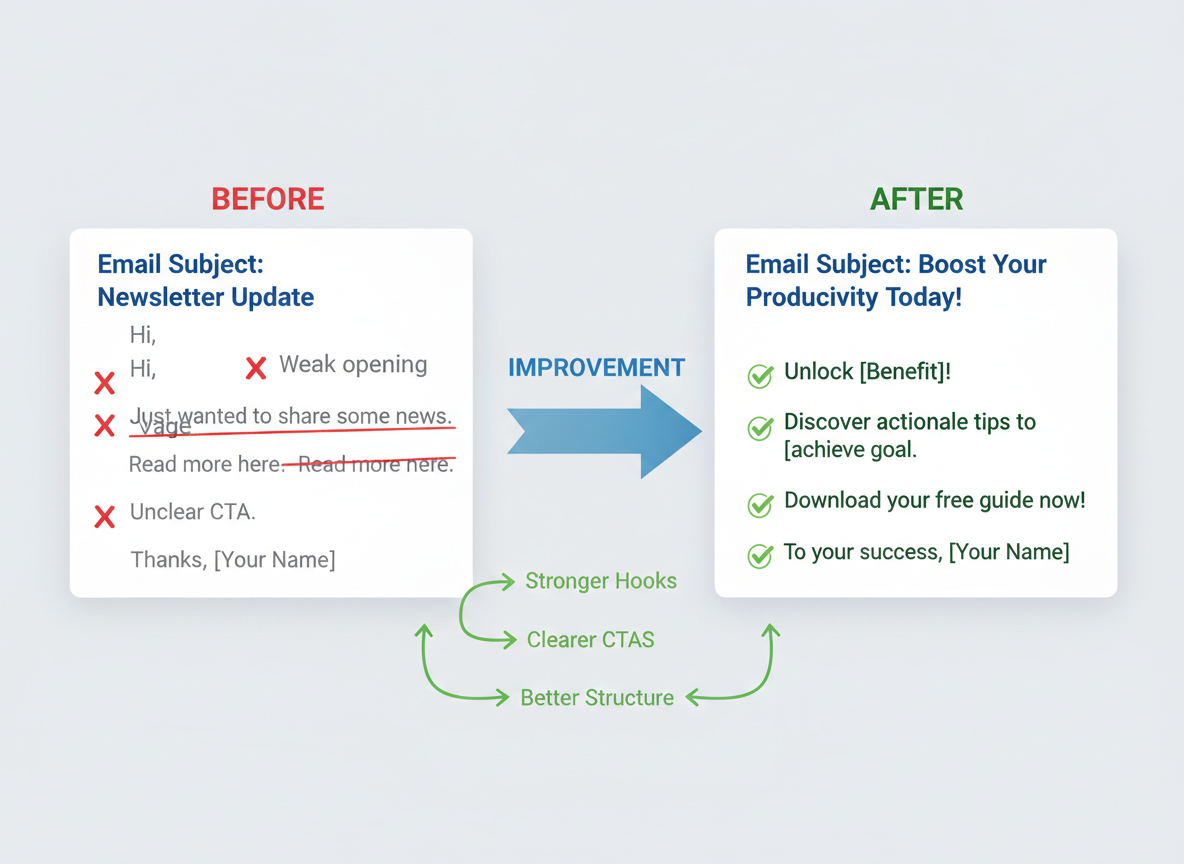
Let’s look at real examples of video scripts that fell flat—and how simple tweaks transformed them into conversion machines.
Before Example 1: “Hi everyone, welcome to today’s video where I’m going to talk about social media marketing strategies that might help your business.”
After Example 1: “Your last three posts got 12 likes combined. Here’s why—and how to fix it in the next 48 hours.”
The difference? The after version uses pattern-interrupt by addressing a specific pain point immediately. No fluff, just a promise that matters.
Before Example 2: “So, um, today we’re covering email marketing, which is something I’ve been thinking about lately. It’s pretty useful for businesses. There are lots of different approaches you can take…”
After Example 2: “47% of recipients open emails based on subject lines alone. Here’s the 3-word formula that doubled my open rates in two weeks.”
The rambling vanished. We’ve got a clear problem-solution structure that respects the viewer’s time.
Before Example 3: “Thanks for watching! If you liked this, maybe subscribe or check out my website sometime.”
After Example 3: “Ready to 10x your engagement? Click the link below for your free script template—available for the next 100 people only.”
That’s specificity. That’s urgency. That’s how you convert viewers into leads.
Platform-Specific Script Formatting & Length Guidelines
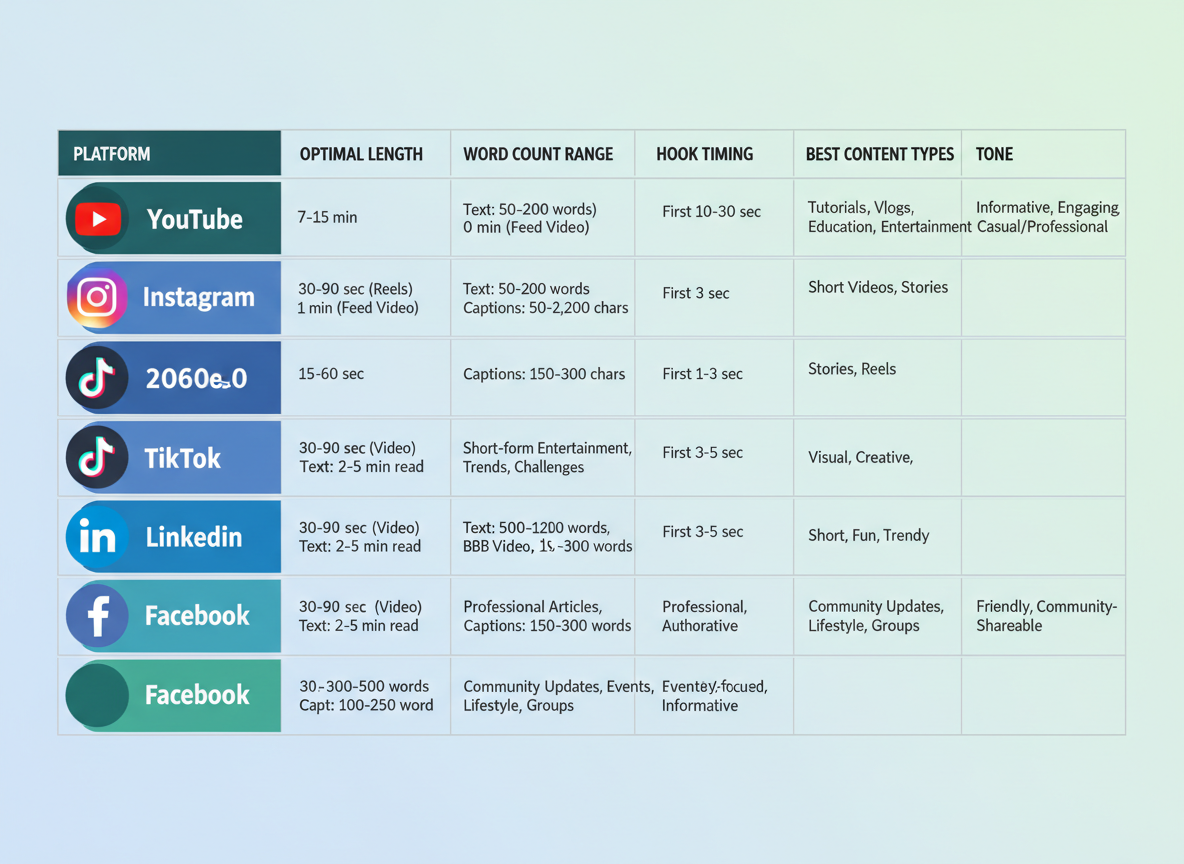
Your brilliant script won’t perform if it’s formatted for the wrong platform. Here’s what actually works in 2026.
YouTube rewards depth. Shorts need 30-60 seconds of punchy content, while standard videos thrive at 7-15 minutes. Tutorials? Go 10-20 minutes—viewers expect thorough explanations. Your retention rate matters more than length.
Instagram Reels demand immediate impact. You’ve got 30-60 seconds max, and your hook needs to land within one second. Write visually—describe what viewers see, not what they’ll hear.
TikTok moves fast. Between 15-60 seconds, you’ll need a pattern interrupt every 3-5 seconds. Use current phrases and trending sounds in your script.
LinkedIn wants substance. Aim for 90 seconds to 3 minutes. Start with immediate value, skip the fluff, and maintain that thought leadership tone your professional audience expects.
Facebook performs best at 1-3 minutes. Script with captions in mind—most viewers watch without sound.
Platform-optimized scripts see 4.2x higher engagement than generic ones. That’s not a small difference—it’s the gap between content that converts and content that disappears.
7 Proven Hook Formulas That Stop the Scroll
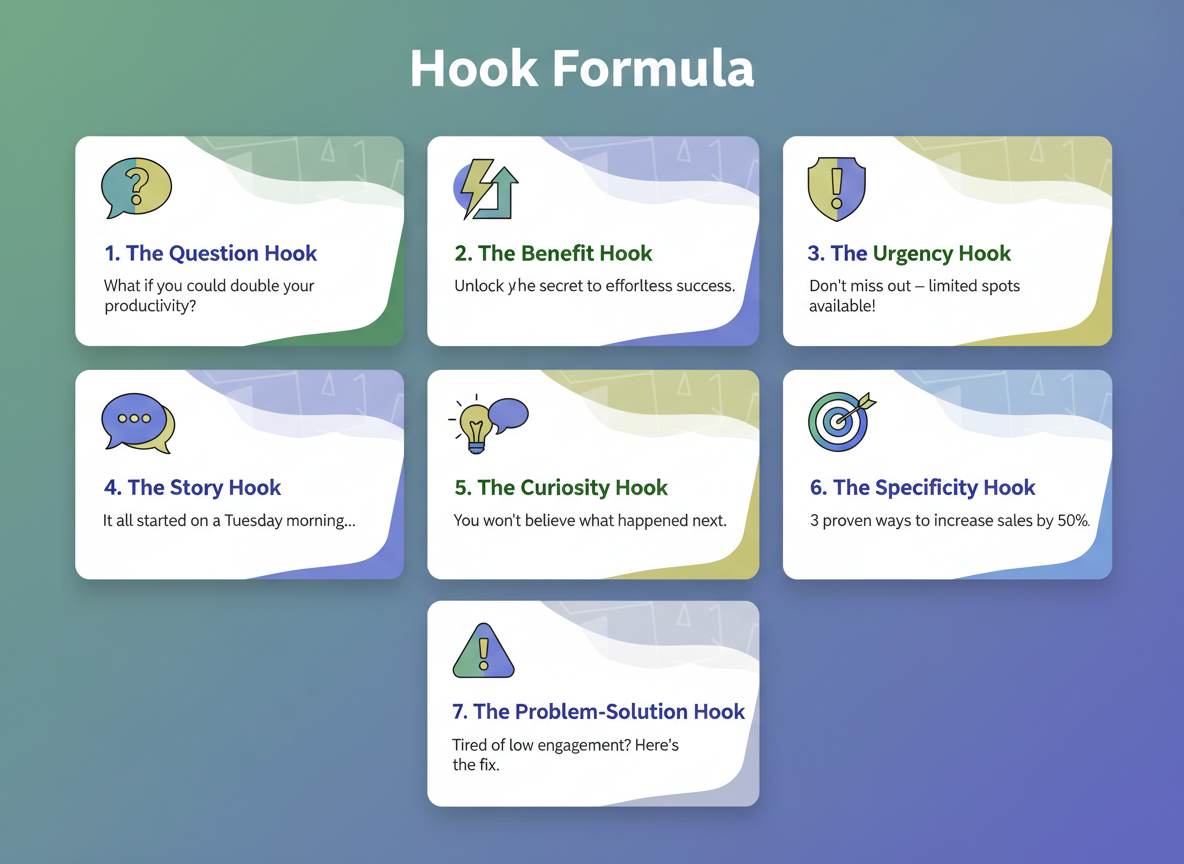
Your first three seconds determine everything. Here’s how to make them count:
The Question Hook poses curiosity-inducing questions:
- “What if I told you 90% of your video views are happening while you’re asleep?”
- “Ever wonder why some videos hit a million views while yours get stuck at 200?”
- “Are you making the one mistake that’s killing your watch time?”
The Shocking Stat Hook leads with surprising data:
- “87% of viewers decide whether to keep watching in the first 8 seconds.”
- “The average person scrolls past 300 videos before stopping—here’s why they’ll stop for yours.”
- “Videos with this one element get 340% more engagement.”
The Bold Promise Hook makes specific, time-bound claims:
- “I’ll show you how to double your retention rate in the next 4 minutes.”
- “By the end of this video, you’ll have 7 script templates you can use today.”
- “This technique added 50,000 subscribers to my channel in 90 days.”
The Story Hook starts mid-action:
- “I was three clicks away from deleting my entire channel when…”
- “The email said my video violated community guidelines. What happened next changed everything.”
- “She spent $10,000 on ads before discovering this free alternative.”
The Mistake Hook calls out common errors:
- “Stop saying ‘hey guys’ at the start of your videos—it’s costing you 40% of your audience.”
- “You’re writing your scripts backward, and that’s why nobody’s watching.”
- “Most creators edit their hooks last. Big mistake.”
The Controversy Hook challenges conventional wisdom:
- “Longer videos actually perform better than short ones—here’s the proof.”
- “Forget everything you know about SEO. It’s changing.”
- “The YouTube algorithm doesn’t care about your upload schedule.”
The Pattern Interrupt Hook uses unexpected visuals or statements:
- “This ugly thumbnail outperformed my professional design by 600%.”
- “I’m going to whisper this entire intro because…”
- Shows a countdown timer “You have 47 seconds to learn this before I take it down.”
Videos with strong hooks retain 3x more viewers past the 10-second mark. That’s not just better engagement—it’s the difference between the algorithm promoting your content or burying it.
Common Video Script Mistakes (And How to Avoid Them)
Even experienced creators stumble over these script-killers. Let’s fix them before you hit record.
Mistake 1: Burying the value proposition. You’ve got 5 seconds before viewers bounce. Open with “Here’s how to double your email list in 30 days,” not “Today I want to talk about something important.”
Mistake 2: Writing for reading, not speaking. “Utilize this methodology” sounds robotic. Say “Use this method” instead. Read your script aloud—if you stumble, rewrite it.
Mistake 3: Forgetting visual cues. Add [SHOW GRAPH] or [CUT TO SCREENSHOT] in your script. Viewers need something to look at while you’re talking.
Mistake 4: Weak CTAs. 73% of videos end with… nothing. Tell viewers exactly what to do: “Click the link below to grab your free template.”
Mistake 5: Ignoring platform specs. Your 10-minute YouTube script won’t work on TikTok. Match your format to where you’re posting.
Mistake 6: No retention hooks. After your strong intro, keep dropping mini-payoffs every 20 seconds. “And wait until you see what happens next…”
Mistake 7: Overcomplicating everything. One video, one core message. Save the rest for your next script.
How to Adapt These Scripts for Different Brand Voices
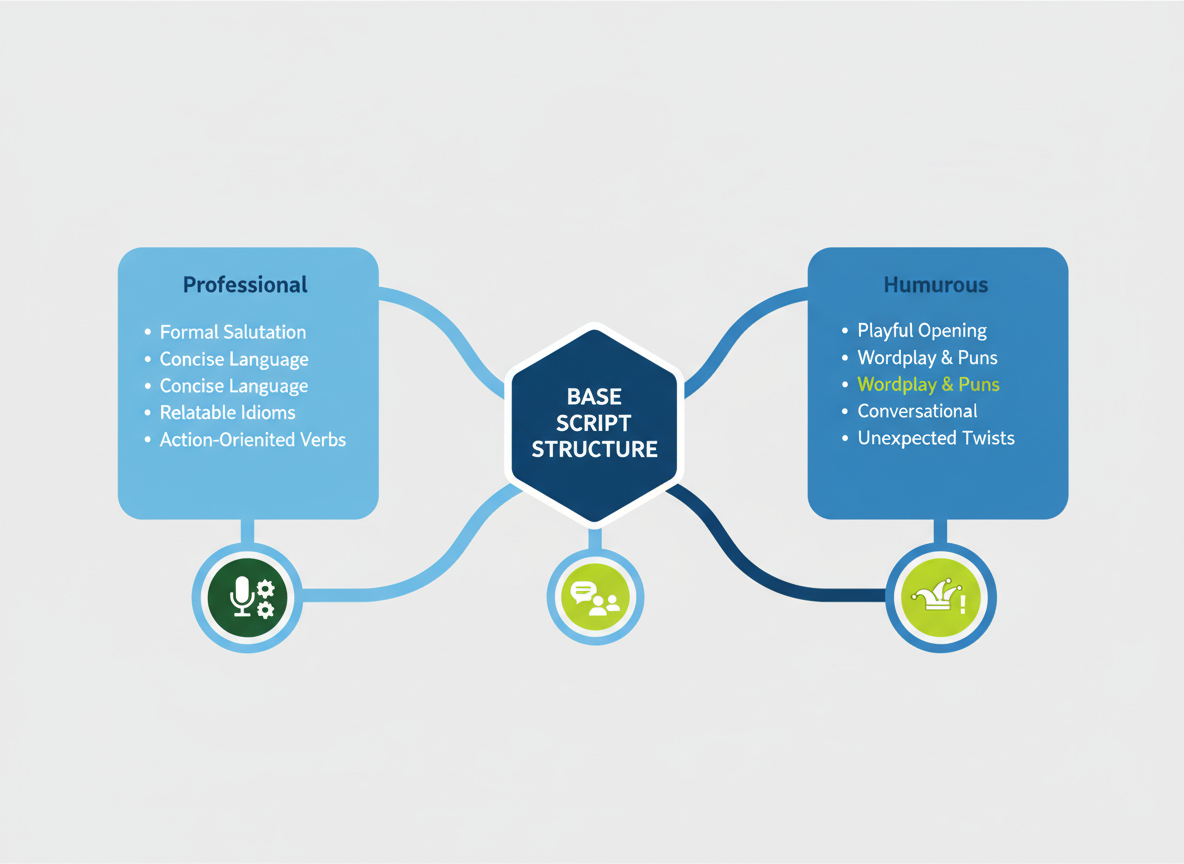
Here’s the truth: templates work because of their structure, not their exact words. Think of them like recipes—the framework stays, but you’re free to add your own flavor.
Voice vs. Structure
Keep the proven frameworks from these examples of video scripts, but swap the language to match your brand. A product launch script follows the same beats whether you’re selling accounting software or skateboard gear.
Professional/Corporate Voice: Use formal language, cite industry data, and build authority. “Our analysis indicates a 47% efficiency improvement.”
Casual/Conversational Voice: Talk like you’re texting a friend. “Here’s the thing—you’re probably wasting hours on this.”
Humorous/Entertaining Voice: Add jokes and pop culture references. “It’s giving ‘stuck in 2015’ energy.”
Educational/Authoritative Voice: Break things down step-by-step with teaching language. “First, you’ll notice three key indicators…”
Example Transformation
Original: “Transform your content strategy with our powerful tool.”
- Corporate: “Optimize your content operations with enterprise-grade automation.”
- Casual: “Finally, a tool that doesn’t make content creation feel like homework.”
- Humorous: “Content strategy got you feeling like a circus juggler? We’ve got you.”
Similar to crafting platform-specific bios, your video script needs authentic voice adaptation—not a personality transplant.
Video Script Tools & AI Solutions (Beyond Just Templates)
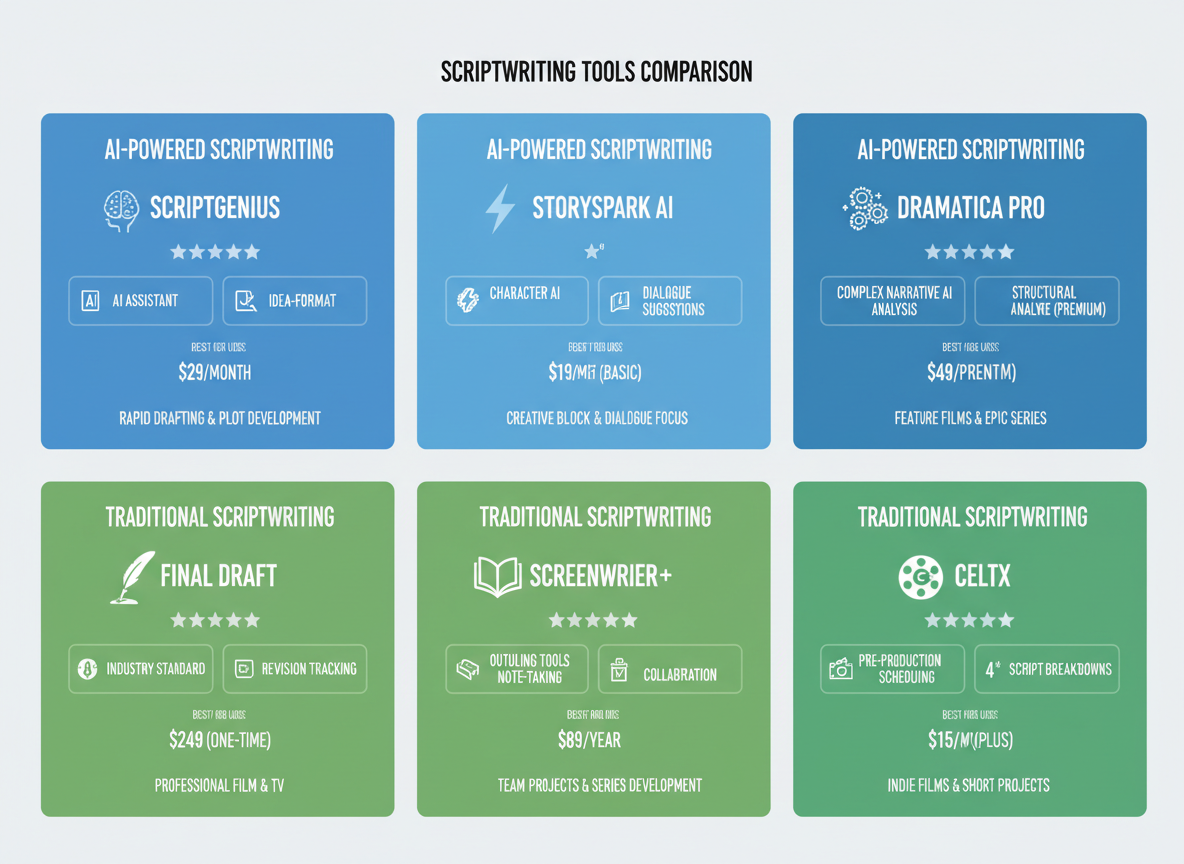
You’ve got the templates. Now let’s talk about the tools that’ll make your scriptwriting faster.
AI-powered options like Jasper, ChatGPT, and Copy.ai excel at quick ideation and first drafts. They’ll crank out scripts in minutes, which is brilliant when you’re staring at a blank page. The downside? They often sound generic and miss your brand’s unique voice. You’ll need to edit heavily to avoid that “written by AI” feel.
Traditional scriptwriting tools still matter. Google Docs with custom templates keeps things simple and shareable. Celtx works great for video production teams who need scene breakdowns. Final Draft remains the industry standard for complex projects.
Here’s where things get interesting: Testing CG transforms video scripts into blog posts in just three clicks. You’re not just writing once anymore—you’re repurposing content across formats automatically. Set up your content calendar, and your scripts publish across platforms without lifting a finger.
When should you use AI versus manual writing? Use AI for brainstorming and structure. Write manually when brand voice and emotional connection matter most. Free tools work fine for occasional projects, but if you’re creating content weekly, paid solutions save hours of editing time.
Writing Scripts for Accessibility: Captions, Audio Descriptions & Inclusive Language
Here’s something most creators miss: 466 million people worldwide have hearing loss, and 85% of Facebook videos play on mute. Your brilliant script means nothing if people can’t access it.
Start by writing caption-friendly. Use shorter sentences with clear speaker attribution. Instead of “Hmm… well…” write “[thoughtful pause]” so viewers following along don’t feel lost. Describe non-verbal sounds that matter: “[upbeat music begins]” or “[notification ping].”
Build audio descriptions directly into your script. Don’t just say “this graph shows.” Say “this bar graph shows revenue jumping from $10K to $45K in three months.” You’re not dumbing down—you’re being specific.
Skip idioms that don’t translate. “We’ll knock it out of the park” confuses non-native speakers. Say “we’ll exceed expectations” instead.
Yes, platforms offer auto-captions. They’re also hilariously wrong half the time. Good scripts generate better captions from the start.
The payoff? Accessible videos see 40% higher engagement. You’re not just being inclusive—you’re reaching more people who’ll actually watch your content.
From Script to Published Video: Automation That Saves 10+ Hours Per Week
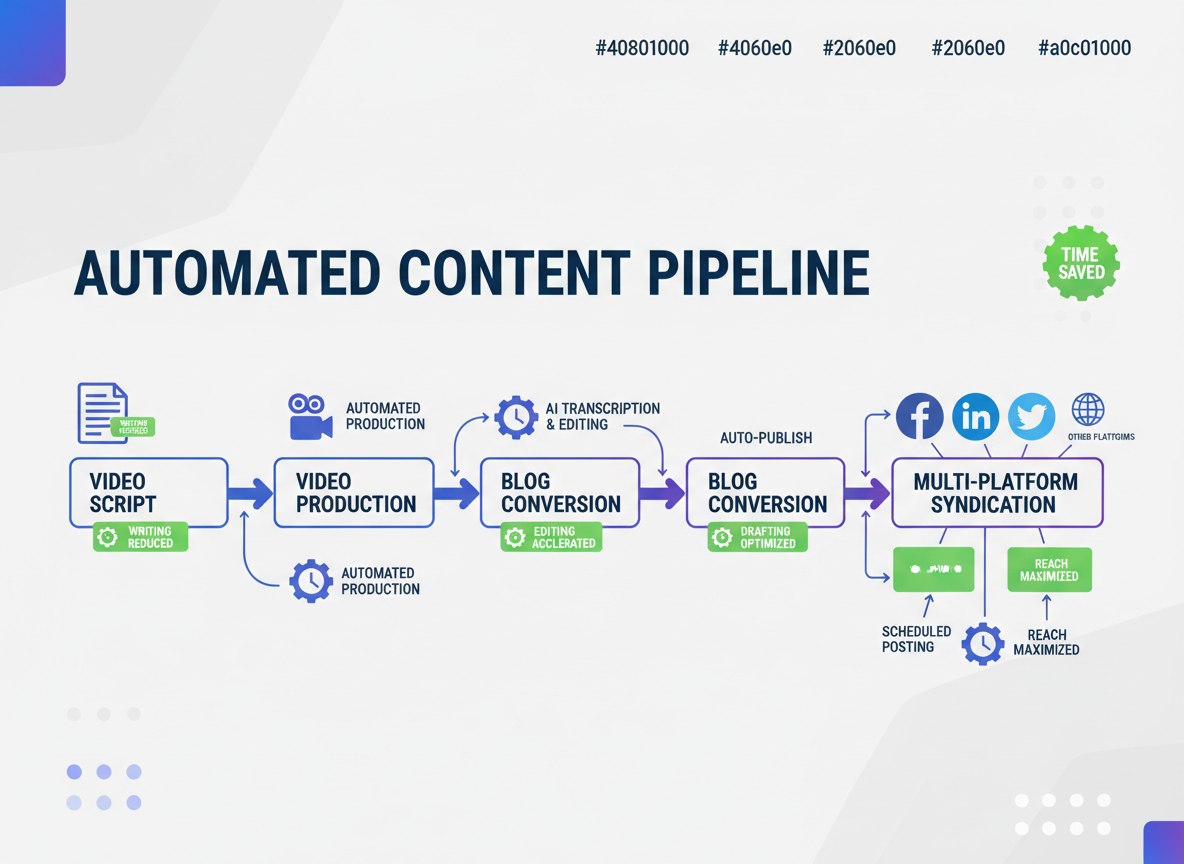
Here’s the truth nobody tells you: writing the script is maybe 20% of the work.
You’ve still got to record, edit, upload, create thumbnails, write descriptions, publish to multiple platforms, repurpose into blog posts, and share on social media. That’s where most content creators burn out.
Testing CG flips this entire workflow. Once you’ve got your script (or generate one using AI), the platform handles everything else. We’re talking full automation: script to finished video to published blog post to social syndication across Facebook, LinkedIn, and Twitter/X.
You can literally plan a year of video content in about 3 minutes. The system automatically converts your videos into SEO-optimized blog posts—similar to these high-performing samples—then distributes them without you touching a thing.
Real users report saving 10-15 hours weekly on publishing workflow alone.
While your competitors manually upload content daily, you’re publishing consistently without thinking about it. That’s your competitive edge.
Fair warning: full automation setup access won’t stay unlimited forever.
Your Next Steps: Turn These Examples Into Your Content Engine
You’ve got 17 battle-tested video scripts that work across every major platform. No more staring at blank pages while your competitors publish daily.
Here’s what to do right now:
Pick three examples that match your niche and customize them this afternoon. Change the product names, adjust the tone, make them yours.
Test different hooks from the formulas we covered. Your first five seconds determine everything.
Set up automation so these scripts actually become published videos. The difference between creators who succeed and those who burn out? Systems that work while they sleep.
You’ve got the templates. You’ve seen what converts. The creators taking action today will own their niches in 2026 while everyone else wrestles with writer’s block.
Ready to stop manually publishing across platforms? Try Testing CG’s automation and join thousands of creators who’ve turned these scripts into consistent content machines.
Frequently Asked Questions
How long should a video script be?
It depends on your platform. For Instagram Reels and TikTok, aim for 150-200 words (30-60 seconds). YouTube videos work best at 1,300-1,500 words for 10-minute content. Facebook allows more flexibility—roughly 130 words per minute of video. A good rule: read your script aloud and time yourself to ensure it matches your target length.
Can I use these video script examples for commercial projects?
Absolutely. These templates are designed for real-world use. Just customize them with your brand voice, product details, and unique selling points. Don’t copy them word-for-word—make them yours.
What’s the difference between a video script and a screenplay?
Video scripts focus on marketing outcomes and conversions. They include visual cues, calls-to-action, and platform-specific formatting. Screenplays follow strict Hollywood formatting and emphasize dialogue, scene direction, and character development. Video scripts are practical sales tools; screenplays are artistic works.
Should I write my script word-for-word or use bullet points?
Beginners should write everything out. It builds confidence and ensures consistency. Experienced creators can work from bullet points for a natural, conversational delivery. For tutorials and explainers, word-for-word scripts prevent missing crucial details. For personal vlogs, bullets keep things authentic.
How do I know which script template to use for my video?
Match your template to three factors: your goal (educate, sell, entertain), your platform (YouTube, Instagram, LinkedIn), and your audience’s awareness level. Cold audiences need educational content. Warm audiences respond to testimonial scripts. Hot audiences want product demos and offers. Your personal brand statement should guide your script selection too.
What tools do professional scriptwriters use?
Most pros rely on Google Docs for collaboration, Final Draft for screenplay-style formatting, and Notion or Trello for script planning. Tools like Descript help sync scripts with video editing. For AI assistance, platforms like Testing CG streamline script creation with proven templates.
How can I make my video scripts more engaging?
Start with a pattern interrupt—something unexpected that breaks the scroll. Use the three-second rule: hook viewers immediately. Incorporate mini-cliffhangers every 15-20 seconds. Tell stories instead of listing features. Ask questions that make viewers think. Use sensory language that creates mental images.
Do I need different scripts for different social media platforms?
Yes. YouTube viewers expect longer, value-packed content. Instagram users want quick, visual storytelling. LinkedIn audiences prefer professional insights and data. TikTok demands entertainment-first approaches. The same core message needs platform-specific packaging. Repurpose smartly—don’t just duplicate.
How do I write video scripts that rank on YouTube SEO?
Integrate your target keyword naturally in the first 30 seconds of your script. Include it 2-3 times throughout without forcing it. Write scripts that encourage watch time and engagement (comments, likes). Your video description should mirror script themes. Create pattern interrupts that prevent drop-off, since YouTube rewards videos people actually finish.
Can AI write video scripts as good as humans?
AI excels at structure, speed, and data analysis. It generates solid first drafts quickly. But it lacks authentic brand voice, emotional nuance, and creative risk-taking. The winning approach? Use AI for framework and research, then infuse your personality and expertise. AI handles the heavy lifting; you add the soul that converts viewers into customers.
I am a full-time online marketer, for over a decade now. Helped over 100,000+ people & generated well over $12M in online sales.