

Why 87% of New YouTubers Quit Before Video 10 (And How Scripts Fix This)
Here’s something most people don’t talk about: nearly 9 out of 10 new YouTube creators abandon their channels before reaching their tenth video. That’s not because they lack talent or good ideas. They quit because every video feels like starting from scratch.
You’ve been there. Staring at that blank screen, wondering what to say first. Recording the same intro six times because it sounds awkward. Rambling for 12 minutes when you only needed 5. Then watching your analytics plummet as viewers click away in the first 15 seconds.
The problem isn’t you. It’s the absence of a system.
Professional YouTubers who consistently hit millions of views aren’t winging it. They’re following proven YouTube script templates that do the heavy lifting before the camera turns on. These templates eliminate the guesswork, cut filming time in half, and keep viewers glued to the screen.
In this guide, you’ll get 15 battle-tested templates you can literally copy and paste for any content type—whether you’re teaching, reviewing products, telling stories, or building a personal brand. No more blank page panic. No more wasted afternoons filming content that goes nowhere.
The data’s clear: channels using structured scripts grow 3x faster and maintain 40% better audience retention than those improvising. That’s the difference between building a real audience and talking to an empty room.
You’re about to transform from struggling creator to systematic content machine. The right content creation tools combined with these templates will help you ship videos faster, hook viewers instantly, and finally build the momentum that keeps you going past video 10, 20, and beyond.
The YouTube Script Formula That Keeps Viewers Watching Past 30 Seconds
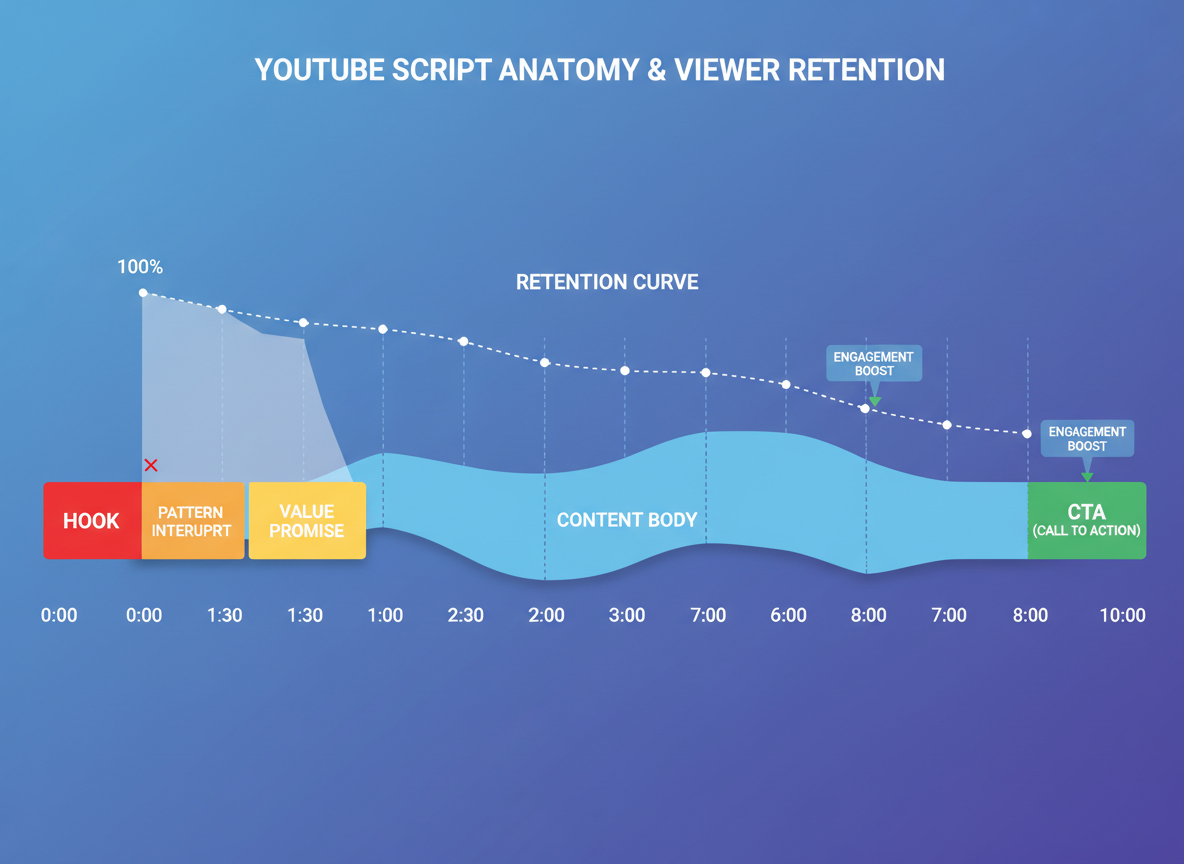
YouTube’s algorithm doesn’t care about your production quality or creative vision. It cares about one thing: keeping people on the platform. Videos that retain viewers past 30 seconds get exponentially more reach than those that don’t.
Here’s what most creators miss—you’ve got three critical windows where viewers decide to bail:
The 3-second hook determines if someone stops scrolling. Lead with a specific outcome, shocking statement, or open loop. “I tested 47 thumbnails and one got 12x more clicks” beats “Today I’ll talk about thumbnails” every single time.
The 30-second pattern interrupt re-engages viewers who made it past your hook. Change your camera angle, show B-roll, or tease what’s coming. Something like “Wait until you see what happened next” works because it creates a psychological loop your brain needs to close.
The 60-second value delivery proves you’re worth their time. Give them one actionable takeaway they can use immediately.
Data from Testing CG’s content analysis shows scripted videos maintain 47% better retention rates than improvised content. That’s not surprising—scripts let you engineer these moments instead of hoping they happen naturally.
Traditional video scripts focus on information delivery. YouTube scripts focus on retention engineering. Every line serves one purpose: preventing the click away. Your video content strategy should include specific timing markers at 0:03, 0:30, 1:00, and every 60 seconds after that.
Template #1: The Listicle Script (Top 10s, How-Tos, Roundups)
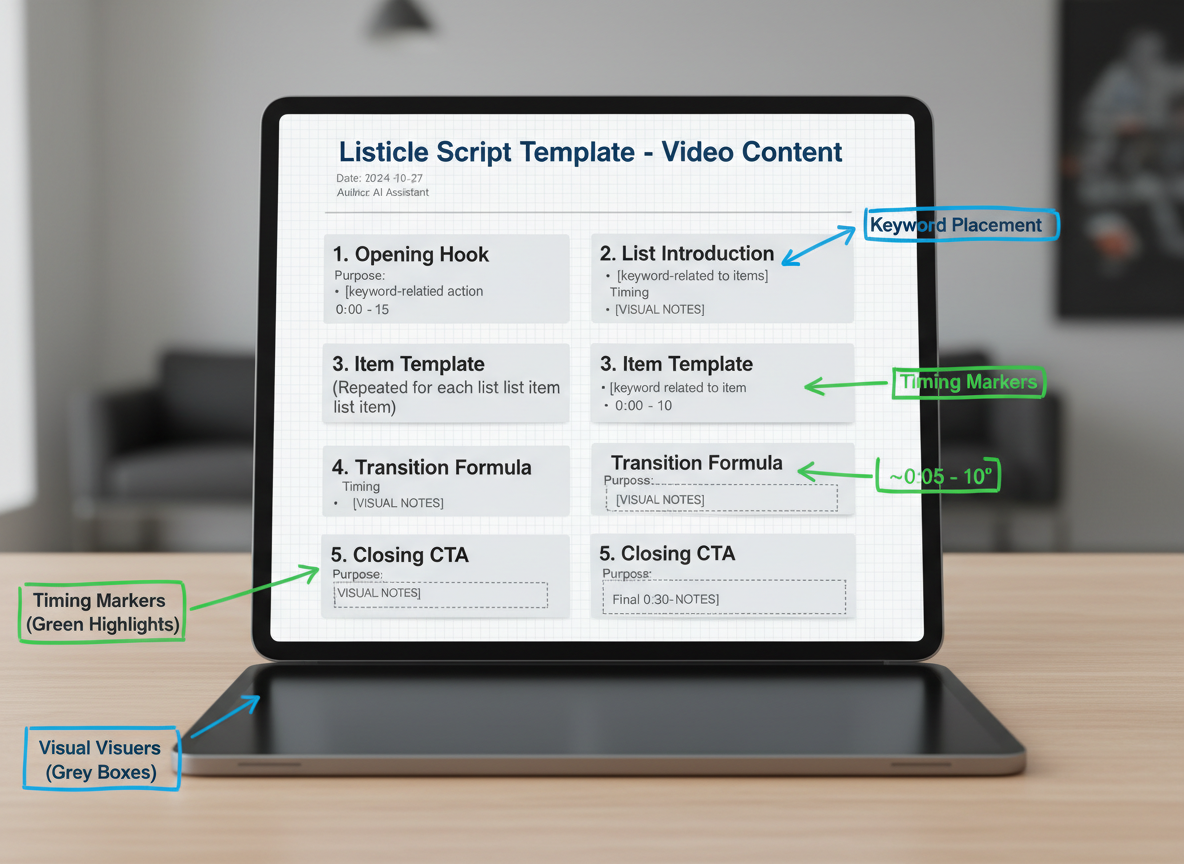
Listicle videos dominate YouTube because they promise quick value. Here’s your template:
THE LISTICLE TEMPLATE:
“`
[HOOK – 3 seconds]
“[Number] [outcome viewers want] that [solve specific problem]”
“Now, this next one’s interesting because…”
“You’re gonna love this one…” [OUTRO] “[#1 item] changed everything for me. Which one are you trying first?”
“`
COMPLETED EXAMPLE (Top 5 Thumbnail Mistakes):
“Five thumbnail mistakes killing your views. Number three cost me 40,000 clicks last month. I analyzed 500 viral videos to find these patterns. Here’s what actually works.
Five: Using more than three words. Your thumbnail loads in 0.8 seconds on mobile. Test it yourself—open YouTube on your phone right now…”
Spend 2-3 minutes per item. Place your target keyword in items 1, 3, and your outro for optimal SEO without sounding robotic.
Template #2: The Tutorial/Educational Script (Step-by-Step Guides)
Tutorials live or die by clarity and pacing. Here’s your blueprint:
Opening Hook (0-10 seconds):
Show the finished result immediately. “In 90 seconds, you’ll create this automated email sequence that converts 31% better.”
Script Structure:
[On-screen: “Step 1” graphic]
“First, open your dashboard and click…”
[B-roll: Screen recording of exact clicks]
Use checkpoint phrases every 2-3 steps: “You’re crushing it—halfway there” or “If you see this screen, you’re on track.”
Complete Example:
“Today you’re building a contact form that captures 3x more leads. [Show final form] Step one: Copy this code snippet. [Highlight code on screen] Step two: Paste it into your header section. [Show cursor placement] Notice how the formatting adjusts automatically? That’s what you want.”
Pacing Guidelines:
- Simple tutorials: 30-45 seconds per step
- Complex processes: 60-90 seconds with micro-explanations
- Always script B-roll callouts in brackets
Want to scale this content creation process? Check out AI content automation to generate tutorial outlines 10x faster.
Template #3: The Product Review Script (Honest, Engaging, Conversion-Focused)
Opening (0-10 seconds):
“I’ve spent 47 hours testing [Product Name] so you don’t have to. Here’s what nobody’s telling you.”
Credibility Builder (10-25 seconds):
“I’ve reviewed [X number] of [product category] over the past [timeframe], and I bought this with my own money. Full transparency: there’s an affiliate link below, but I’m giving you my honest take.”
The Framework:
Start with what impressed you most, then transition to limitations. “The [specific feature] genuinely surprised me—[demonstrate on camera]. But here’s where it falls short…”
Pros Section: Show three specific benefits with visual proof. Point to the product, zoom in on details, and demonstrate real usage.
Cons Section: Address two honest drawbacks. This builds trust and makes your recommendation credible.
Comparison (if applicable): “Compared to [competitor], this wins on [aspect] but loses on [aspect].”
CTA (natural placement): “If this fits your needs, I’ve got the best current price linked below—plus a discount code that expires Friday.”
Template #4: The Story/Vlog Script (Structured Storytelling)
Here’s the thing about vlogs: spontaneity sells, but structure keeps viewers watching. This template gives you a narrative backbone without killing your authentic vibe.
The Framework:
Hook (0-3 sec): Start mid-action or mid-emotion
“I can’t believe this just happened…”
Setup (3-30 sec): Context + emotional stake
“So today was supposed to be simple—just filming content at the coffee shop. But what I discovered changed everything about how I approach…”
Rising Action (30 sec-3 min): Build tension with emotional beat markers
- [FRUSTRATION] “Three hours in, nothing worked”
- [SURPRISE] “Then this stranger said something wild”
- [REALIZATION] “That’s when it clicked”
Climax (Middle third): The turning point or biggest moment
Resolution (Final third): Payoff + lesson learned
Callback (Last 10 sec): Reference your intro or an earlier video
“Remember last week when I said I’d never try this? Well…”
Example beats for “Day in My Life”:
- Morning struggle (relatable)
- Unexpected challenge (tension)
- Creative solution (transformation)
- Evening reflection (wisdom)
This structure lets you riff naturally while ensuring emotional momentum that keeps viewers glued.
Template #5: The Commentary/Opinion Script (Hot Takes That Engage)
Want to spark conversation? This template turns trending topics into engagement magnets.
Hook Formula:
“Everyone’s saying [popular opinion], but here’s what they’re missing…”
Opening (0-10 seconds):
State your take clearly. No hedging—viewers want to know where you stand.
Body Structure:
- Present the mainstream view (15 seconds)
- Share 2-3 specific reasons for your perspective (60-90 seconds)
- [Fact-check marker: Verify claim with source X]
- Acknowledge valid counterarguments (30 seconds)
- Reinforce your position with examples (45 seconds)
Engagement Prompts:
“Drop your take in the comments—I’m reading every single one.”
“Tell me where I’m wrong. Seriously.”
For Sensitive Topics:
“Disclaimer: This reflects my research and perspective. I encourage you to form your own opinion.“
Closing:
“Let’s keep this respectful. We can disagree and still learn from each other.”
This youtube script template balances conviction with openness, turning viewers into active participants.
Template #6: The Comparison Script (X vs Y Deep Dives)
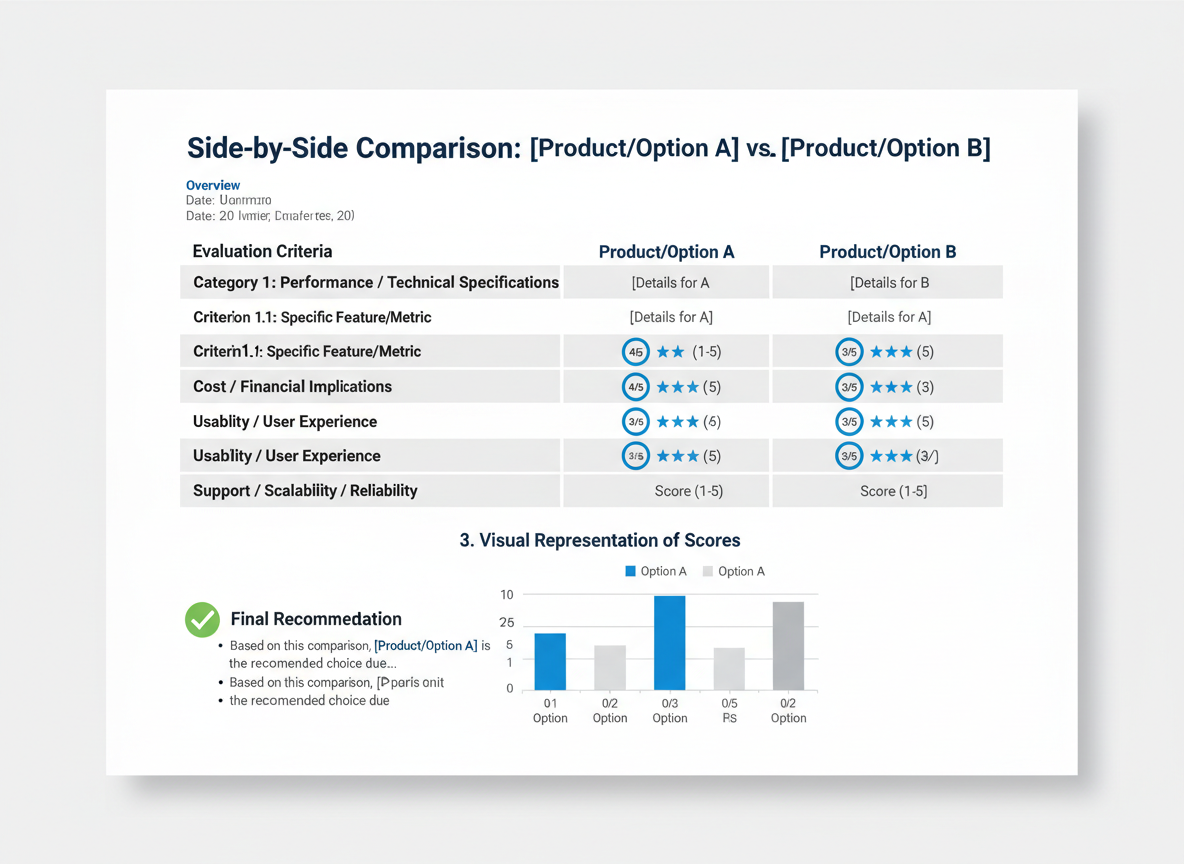
Hook (0-3s): “Notion or ClickUp? I spent $2,000 testing both so you don’t have to.”
Criteria Setup (3-20s): Introduce 4-5 evaluation factors that matter most. “We’re comparing these on price, ease of use, collaboration features, mobile experience, and integration options.”
Feature Breakdown (20s-3min): Go point-by-point with split-screen visuals. “For price, Notion starts at $8 per user, while ClickUp offers… [INSERT VISUAL CUE: Price comparison graphic]. Winner: ClickUp by 15%.”
Scoring System (3-4min): Tally points transparently. “That’s 3 points for ClickUp, 2 for Notion so far.”
Final Recommendation (4-5min): Match tools to specific users. “Choose Notion if you’re a solo creator who loves clean design. Go ClickUp if you’re managing a team with complex workflows.”
This template works because viewers get actionable answers, not vague opinions.
Template #7: YouTube Shorts Script (15-60 Second Hooks)
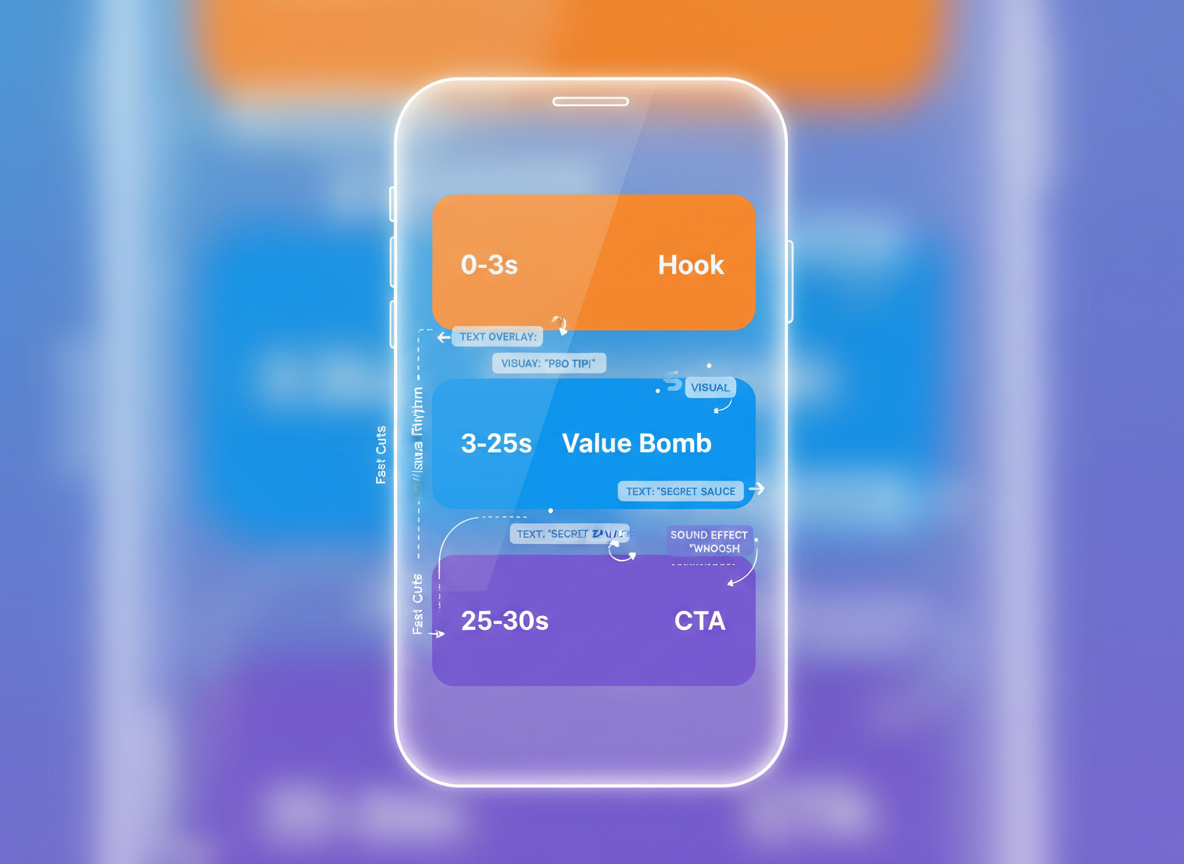
Shorts demand lightning-fast impact. Here’s your battle-tested framework:
The Shorts Formula:
- 0-3 seconds: Visual hook + bold claim (“I made $3,000 in 48 hours”)
- 3-20 seconds: Rapid-fire value delivery (3 quick tips, no fluff)
- 20-25 seconds: Loop element (“But here’s what changed everything…”)
- 25-30 seconds: Strong CTA (“Follow for part 2 tomorrow”)
15-Second Version:
“This headline got 47,000 clicks. [PAUSE] It uses curiosity, urgency, and specificity. Watch me break it down. [Quick visual] Follow for more conversion tips.”
30-Second Version:
“Stop writing boring emails. [Visual example] Here’s the 3-sentence framework that tripled my open rates: Sentence 1 asks a question. Sentence 2 answers it. Sentence 3 creates urgency. Comment ‘EMAIL’ for the full template.”
60-Second Version:
You’ve got room for context. Add a mini-story or show before/after results. Include two value points instead of one, then tease your long-form content.
The Rewatch Trick: Hide a small detail viewers notice on loop #2. They’ll watch again—and the algorithm loves it.
Template #8: The Interview/Podcast Script (Guest Content Framework)
Opening (0:00-0:30)
“Today I’m sitting down with [Guest Name], who [specific achievement that matters to your audience]. We’re breaking down [specific topic] that helped them [quantifiable result].”
Guest Introduction (0:30-1:00)
Let your guest establish credibility: “Tell us how you went from [starting point] to [current achievement].”
Core Question Framework
- Main question with context
- Follow-up branch A: If they mention strategy → “Walk us through your exact process”
- Follow-up branch B: If they mention mistakes → “What would you do differently?”
Timing Markers
- Questions 1-3: Minutes 2-8
- Deep-dive segment: Minutes 9-15
- Actionable advice: Minutes 16-20
Transition Script
“That’s gold. Now let’s shift to [next segment]…”
Closing Question Template (18:00)
“If someone’s watching this and wants to start today, what’s their first step?”
Dual CTA (19:30)
“Check out [Guest]’s channel linked below, and subscribe here for more expert interviews like this.”
Template #9: The Challenge/Experiment Script (Journey Documentation)
Challenge videos let viewers experience transformation alongside you. Here’s your structure:
Opening (0-15 seconds):
“I’m [doing X] for [Y days], and here’s what I’m hoping happens: [hypothesis]. Let’s see if I’m right.”
Phase Updates:
- Day 1-3: Initial reactions and surprising difficulties
- Mid-point: Honest setbacks (“Here’s what nobody tells you about…”)
- Final stretch: Breakthrough moments
Script Progress Authentically:
“Day 12, and I’ll be honest—this isn’t going how I expected. [Share specific struggle]. But here’s what I learned…”
Results Reveal:
“The data’s in. I tracked [specific metrics], and [concrete results]. Here’s what shocked me most…”
Conclusion Framework:
Extract three lessons: What worked, what failed, and what you’d do differently. Then invite participation: “Want to try this yourself? Here’s exactly how to start, and I’ll be checking the comments to answer your questions.”
This template turns your experiments into viewer engagement opportunities.
Template #10: The Channel Update/Behind-the-Scenes Script
Opening Hook: “I need to be honest with you about something that’s been happening behind the scenes…”
The Framework:
Start with genuine vulnerability. Share what’s actually going on—whether it’s a content pivot, production challenges, or personal growth that’s affecting your uploads.
Transparency Script: “Here’s what changed: [specific challenge]. Here’s why: [honest reason]. Here’s what it means for you: [direct impact].”
Future Content Tease: Present 2-3 upcoming video ideas and ask subscribers to vote in the comments. This transforms your update into actual engagement.
Gratitude Expression: Skip the generic “thanks for watching.” Instead, spotlight a specific comment or story from your community that moved you. Name real subscribers when possible.
Milestone Celebration: Don’t just announce numbers. Share what that milestone enables you to create next—new equipment, better research, longer videos.
Input Request: “I’m creating this channel FOR you. Tell me below: what topic would help you most right now?”
How to Customize Any Template for Your Unique Channel Voice
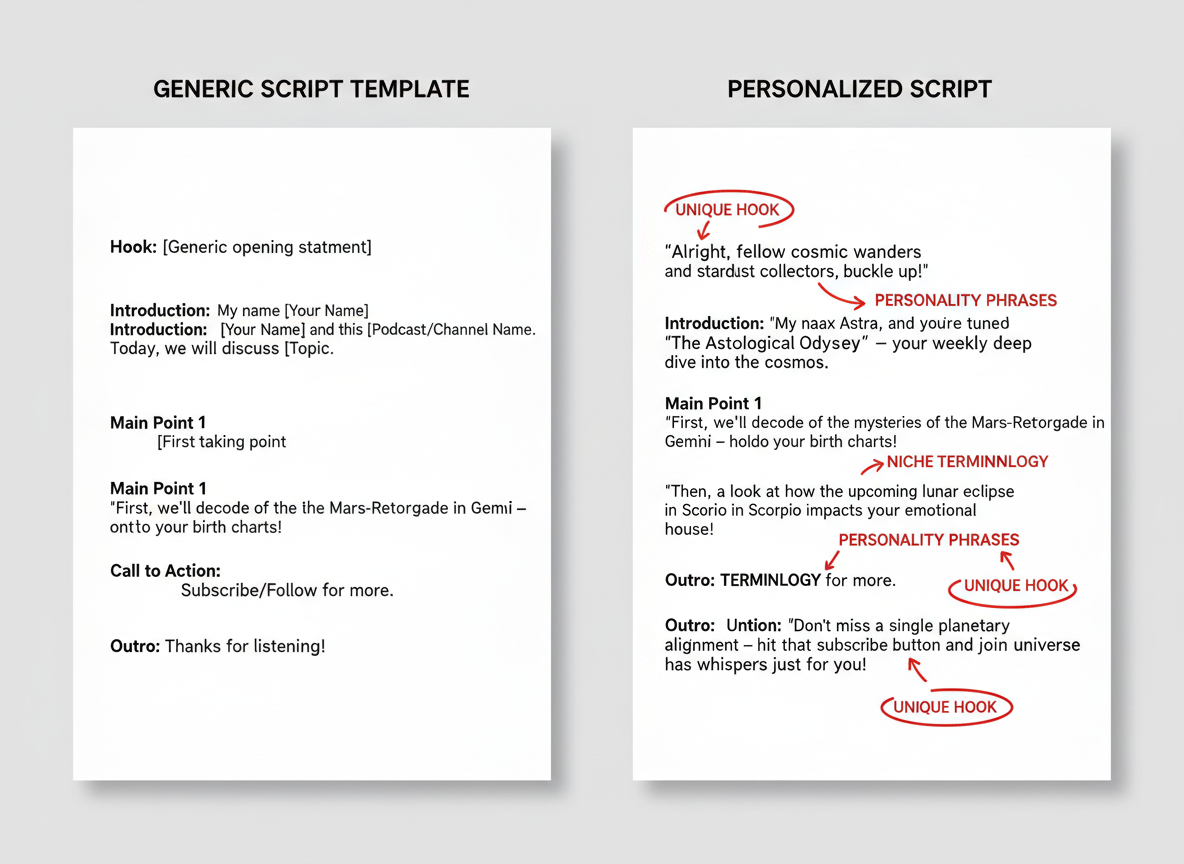
Here’s the truth: YouTube script templates are frameworks, not scripts you read word-for-word. Think of them like recipe guidelines—you adjust ingredients based on what’s in your kitchen.
Start by recording yourself explaining your topic naturally. Notice your quirks, favorite phrases, and rhythm. That’s your voice. Now, inject it into the template’s structure.
Niche-specific customization matters:
- Gaming channels: Add more exclamations, quick cuts, and reactive language
- Finance creators: Keep templates data-heavy but conversational (“Let’s break down the numbers”)
- Beauty influencers: Weave in personal experiences and relatable struggles
- Tech reviewers: Balance specs with plain-English explanations
To sound human, not robotic, read your script aloud during editing. If you stumble or it sounds stiff, rewrite it. Use content creation tools that help you spot awkward phrasing.
For rehearsal, don’t memorize—internalize. Read it 3-4 times, then practice from bullet points. This keeps you natural on camera.
Teleprompter vs. bullets? Teleprompters work for news-style content; bullets suit conversational videos better. As your channel grows, you’ll naturally drift from templates toward your own proven formulas.
The 3-Minute Script Preparation System (From Template to Camera-Ready)
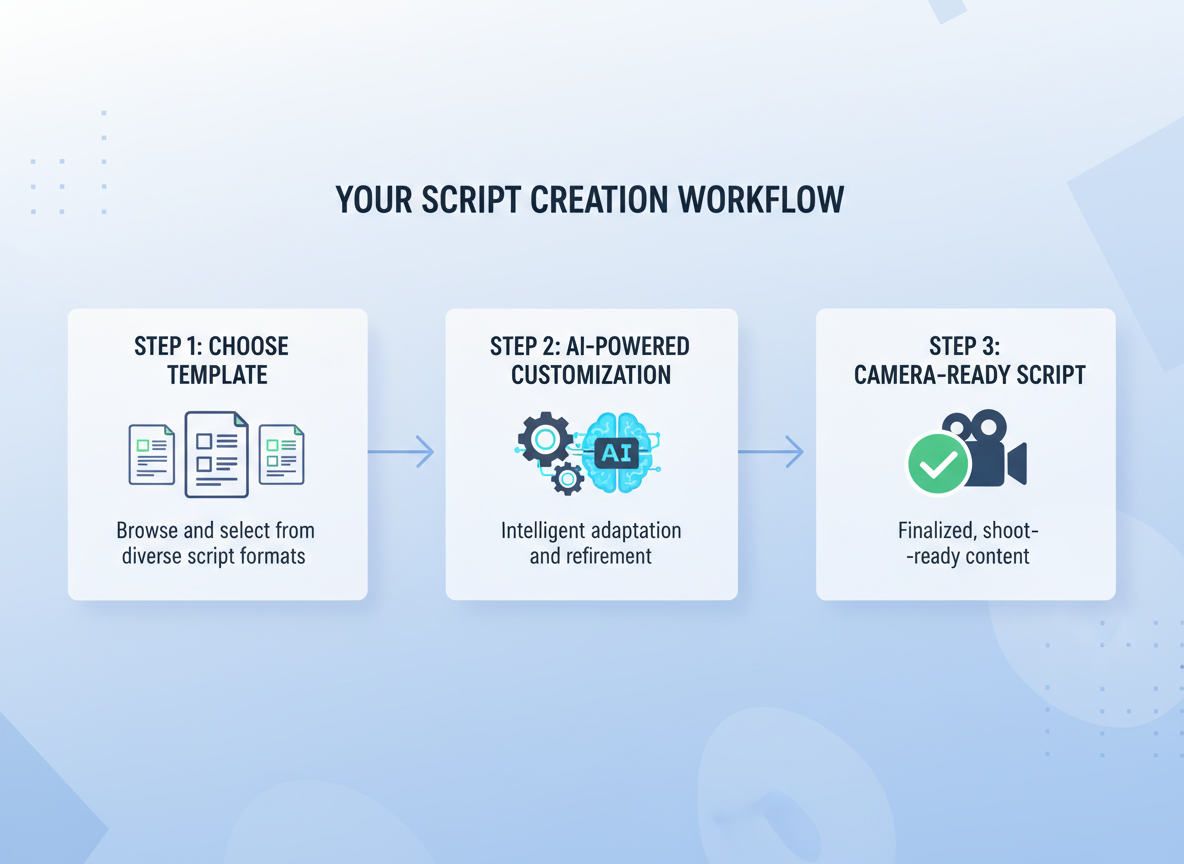
Here’s the reality: you don’t need hours to prep a killer YouTube script. With the right system, you’ll go from blank template to camera-ready in three minutes flat.
Start by choosing your template based on video type. Drop it into your favorite text editor, then use AI-powered content creation tools to populate those bracketed sections. Tools like ChatGPT or Claude can generate your hook, talking points, and CTAs in seconds when you feed them your topic and target audience.
For research shortcuts, bookmark Google’s “People Also Ask” boxes and YouTube’s auto-suggest. They’ll give you actual questions people are searching, ensuring your content hits real pain points.
Here’s your timing hack: the average person speaks 130-150 words per minute. Multiply your target video length by 140, and you’ve got your ideal word count. A 5-minute video? Aim for 700 words.
Before recording, sketch three thumbnail concepts and write five potential titles. This forces you to think visually about your script’s hook.
Want to supercharge this? Testing CG’s platform turns these three minutes into even faster turnarounds. Batch-create scripts for your entire week on Sunday night. You’ll never scramble for content again.
Script Timing Guide: Matching Template to Video Length and Retention Goals
Here’s the conversion chart you need: 150 words equals roughly one minute of speaking at a conversational pace. For YouTube explainers, aim for 140-160 words per minute. Fast-paced content like tech reviews? Push it to 170-180 words per minute. Educational deep-dives work better at 130-150 words per minute.
Want 40%+ retention in your first minute? Front-load your value statement within the first 120 words (around 45 seconds). That’s your retention anchor.
Quick breakdown by video type:
- 5-minute videos: 700-800 words
- 10-minute videos: 1,400-1,600 words
- 15-minute videos: 2,000-2,300 words
Add strategic markers in your youtube script templates like [PAUSE 2s] or [BREATH] to control pacing during recording. Use [CUT?] notation where you can trim fluff during editing if the video runs long.
Check your analytics weekly. If viewers drop at the 2-minute mark, review those exact script lines. Pattern recognition beats guessing—your retention graphs tell you exactly where your script needs tightening.
Free Tools and Resources to Supercharge Your YouTube Scripts
You’ve got the templates. Now let’s talk about the tools that’ll make them shine.
Script Formatting & Teleprompter Apps:
- PromptSmart (iOS/Android) – auto-scrolling teleprompter
- BigVu – free tier includes basic teleprompter features
- Google Docs – simple, cloud-based script formatting
Keyword Research for SEO-Optimized Scripts:
- VidIQ (free version) – shows search volume and competition
- TubeBuddy – keyword explorer with trending topics
- Google Trends – spot rising search queries
Free Stock Footage & Music:
- Pexels Videos – high-quality B-roll footage
- Pixabay – royalty-free music and sound effects
- Artlist.io (free trial) – professional music library
Analytics & Performance Tools:
- YouTube Studio – built-in analytics tracking
- Social Blade – channel growth monitoring
Want to scale beyond manual scripting? Testing CG’s automated publishing transforms your scripts into full blog posts, repurposing your YouTube content across platforms.
Join creator communities on Reddit’s r/YouTubers for script feedback, or grab our downloadable template bundle to hit the ground running.
Stop Staring at Blank Pages: Your Complete YouTube Script System Awaits
You’ve got the templates. Now comes the fun part: actually using them.
Remember where you started? Staring at that blank page, wondering what to say, how to say it, and whether anyone would even watch past the first five seconds. That version of you is gone.
The difference between hobbyists and professionals isn’t talent—it’s systems. Scripted creators consistently outperform those who wing it. Channels like MrBeast and Ali Abdaal? Every video is meticulously scripted.
Here’s your challenge: pick ONE template this week. Script your next video today. Feel the difference when you’re not scrambling for words on camera.
Scripts don’t kill authenticity—they amplify it. You’re still you, just clearer and more confident.
Once you’ve mastered scripting, amplify your results with Testing CG’s content automation platform. Great scripts deserve consistent publishing. Automate the distribution, keep creating the content that converts viewers into subscribers.
Your first scripted video starts now.
Frequently Asked Questions
Do professional YouTubers use scripts or improvise?
Most successful YouTubers use some form of scripting—whether that’s full word-for-word scripts, detailed bullet points, or structured outlines. MrBeast famously scripts everything down to the second. It’s not about killing spontaneity; it’s about respecting your audience’s time.
How long should a YouTube script be for a 10-minute video?
Aim for 1,300-1,500 words. Most people speak around 130-150 words per minute on camera. Write slightly more than you need—you’ll naturally trim during filming.
Should I memorize my script or use a teleprompter?
Use a teleprompter, but don’t read robotically. Break your script into short phrases, maintain eye contact with the camera, and let your personality shine through. Nobody will know you’re reading if you practice enough.
How do I make my scripted videos sound natural?
Write how you actually talk, not how you write emails. Use contractions, throw in the occasional “um” or pause, and record yourself speaking freely first—then script around that natural rhythm.
What’s the difference between YouTube scripts and TikTok/Instagram scripts?
YouTube allows more depth and storytelling. TikTok and Instagram demand immediate hooks (within 0.5 seconds) and punchier delivery. Your youtube script templates need more context; short-form needs pure dopamine hits.
Can I use the same script template for every video?
You can use the same structure, but customize the hook and content. Your template is the skeleton—each video needs fresh meat on those bones.
How do I script YouTube Shorts for maximum retention?
Start with a visual hook in the first frame, use jump cuts every 2-3 seconds, and end with a cliffhanger or call-to-action. Shorts scripts should be 100-150 words maximum.
Should I script my intro and outro or keep them consistent?
Script a flexible framework but customize based on each video’s topic. Consistent outros work well for branding, but intros should feel fresh every time.
How can AI tools help write YouTube scripts faster?
AI can generate outlines, suggest hooks, and help with research. But you’ll still need to inject your personality and ensure accuracy. Think of AI as your writing assistant, not your replacement.
Where should I place keywords in my YouTube script for SEO?
Naturally mention your main keyword in the first 30 seconds of your video, once in the middle, and again near the end. YouTube’s algorithm transcribes everything, so organic placement beats keyword stuffing.
I am a full-time online marketer, for over a decade now. Helped over 100,000+ people & generated well over $12M in online sales.