

Introduction: Why Great Video Scripts Make or Break Your Content
You know that sinking feeling when you’re staring at a blank document, cursor blinking, deadline looming? You need to create a video, but the words just won’t come.
Here’s the reality: most creators wing it. They hit record and ramble, hoping something coherent emerges. The result? Videos that lose viewers in the first 10 seconds, engagement that tanks, and hours wasted in editing trying to salvage the mess.
The difference between a video that converts and one that flops isn’t fancy equipment or editing skills. It’s the script.
But here’s what you won’t find elsewhere: theory without examples. You’re not here for another “why scripts matter” lecture. You need actual, complete examples you can reference, adapt, and use right now.
That’s exactly what you’re getting. We’ve compiled 15+ full video scripts across different platforms and purposes, complete with formatting, timing notes, and real-world context. You’ll see exactly how successful scripts are structured, what they say, and why they work.
No more blank page paralysis. Let’s transform how you create video content.
What Makes a Video Script Effective? (Core Elements Explained)
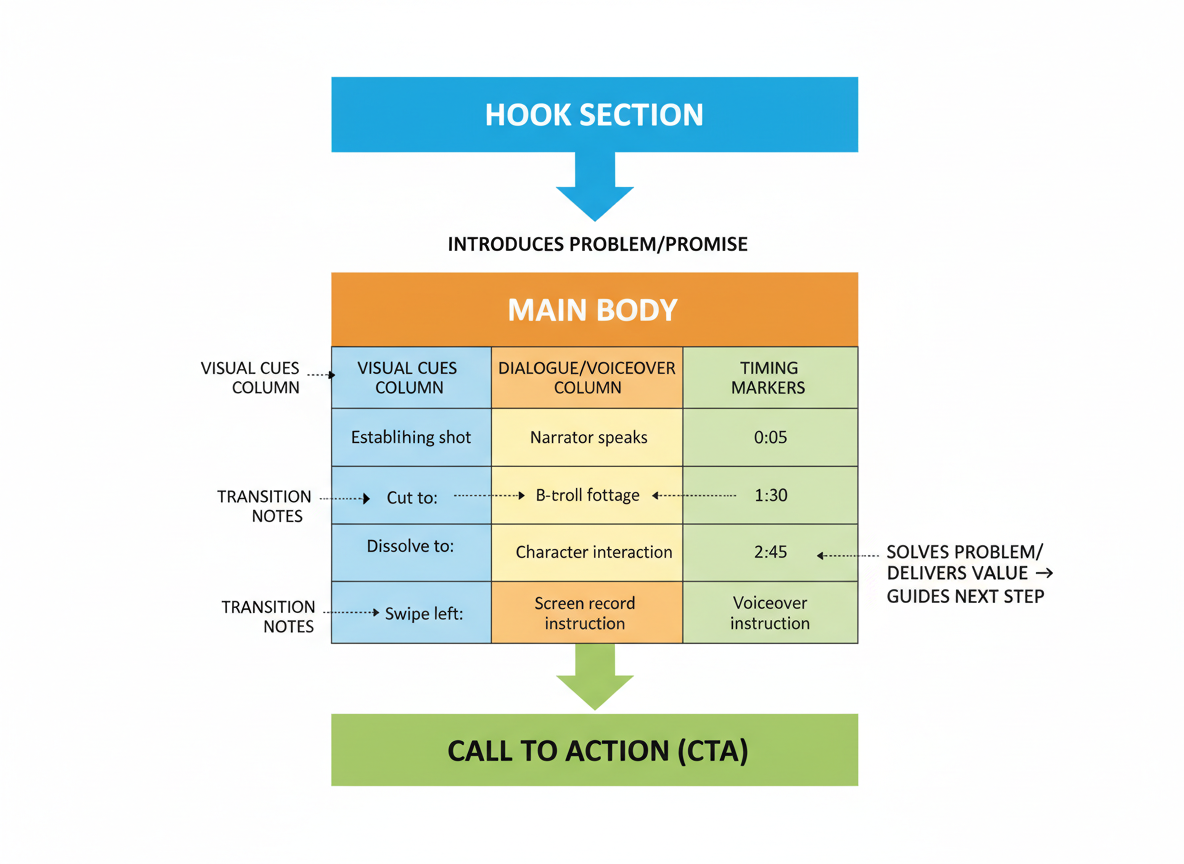
Think of a video script as your content’s blueprint—it’s the written foundation that transforms scattered ideas into cohesive, watchable videos. Without one, you’re basically hoping your improvisation lands, and that’s risky when you’re trying to connect with an audience.
A solid script starts with a hook that grabs attention in the first 5-10 seconds. Then your body delivers the core message with clear structure, followed by a call-to-action that tells viewers exactly what to do next. But here’s what separates amateur scripts from professional ones: visual cues and audio directions that guide your production team. Notes like “Show product demo” or “Lower music volume” make filming smoother and prevent costly reshoots.
Formatting matters more than you’d think. Two-column formats work best for corporate videos, with visuals on the left and audio on the right. Screenplay formats suit narrative content with dialogue and scene descriptions. Choose based on your video type, not personal preference.
Timing depends on platform—TikTok scripts need punchy 15-second rhythms, while YouTube explainers can breathe at 5-10 minutes. Count on roughly 150 words per minute of speaking.
You’ll also encounter three main script types: voiceover scripts (one narrator), dialogue scripts (multiple speakers), and presentation scripts (on-camera talent with bullet points).
Don’t forget accessibility. Write short, clear sentences that work well as captions, and include audio descriptions for visual elements when necessary.
Video Script Formatting Standards & Best Practices
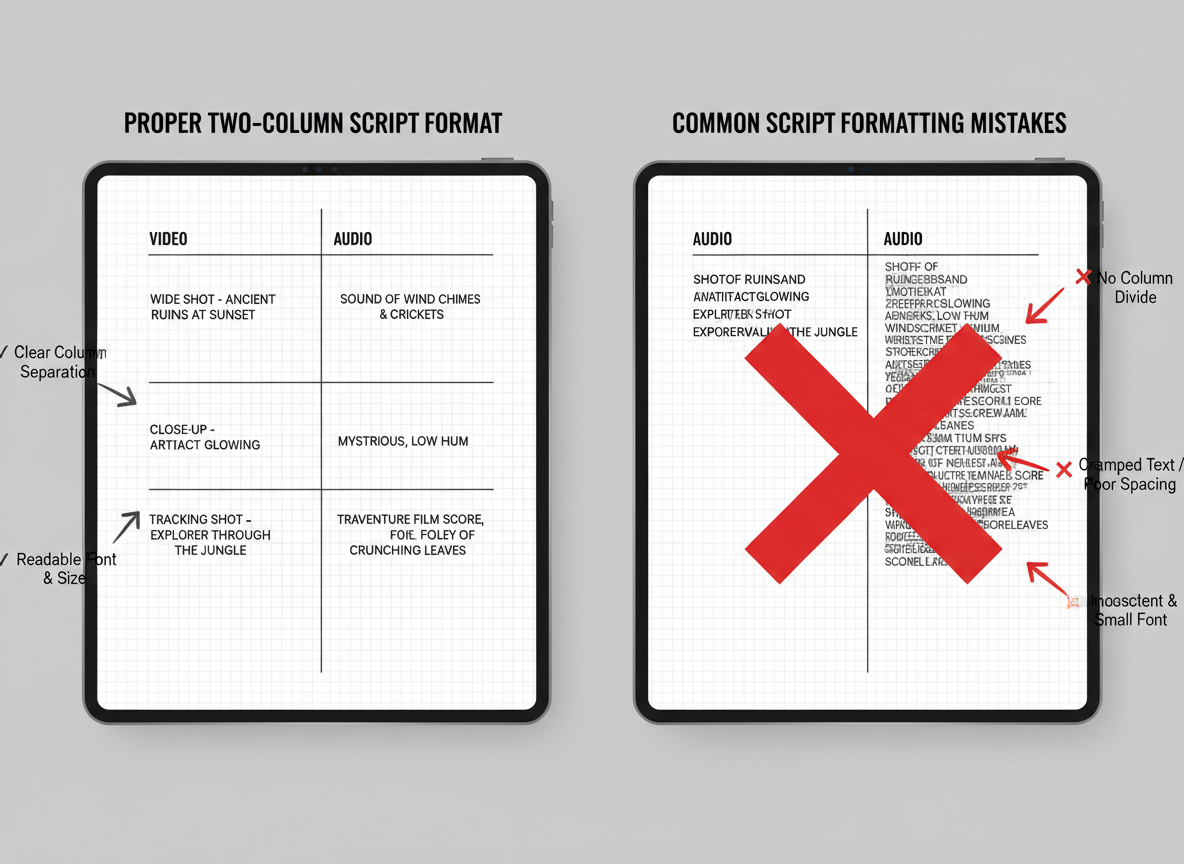
Here’s what separates amateur scripts from professional ones: proper formatting makes collaboration smoother and production faster.
The industry-standard two-column format places your Video/Visual column on the left and your Audio/Dialogue on the right. This layout lets directors, editors, and voice talent instantly see what’s happening on-screen alongside what viewers hear.
Scene headings typically appear in ALL CAPS with timing markers (e.g., “0:00-0:05 – INTRO”). Shot descriptions go in the visual column using clear, directive language: “MEDIUM SHOT: Host standing in bright kitchen” or “B-ROLL: Coffee beans pouring into grinder.”
Standard formatting conventions include:
-
12-point Arial or Courier font
-
Single spacing within columns
-
Double spacing between scenes
-
1-inch margins on all sides
Indicate graphics, text overlays, and transitions in brackets within the visual column: [GRAPHIC: Product features list] or [TRANSITION: Fade to black].
For collaborative editing, Google Docs templates work brilliantly for simple projects, while dedicated scriptwriting software like Celtx or StudioBinder handles version control automatically. They’ll track changes, manage multiple contributors, and ensure everyone’s working from the latest draft—saving you from the dreaded “Final_FINAL_v3” filename chaos.
Platform-Specific Script Length Guidelines
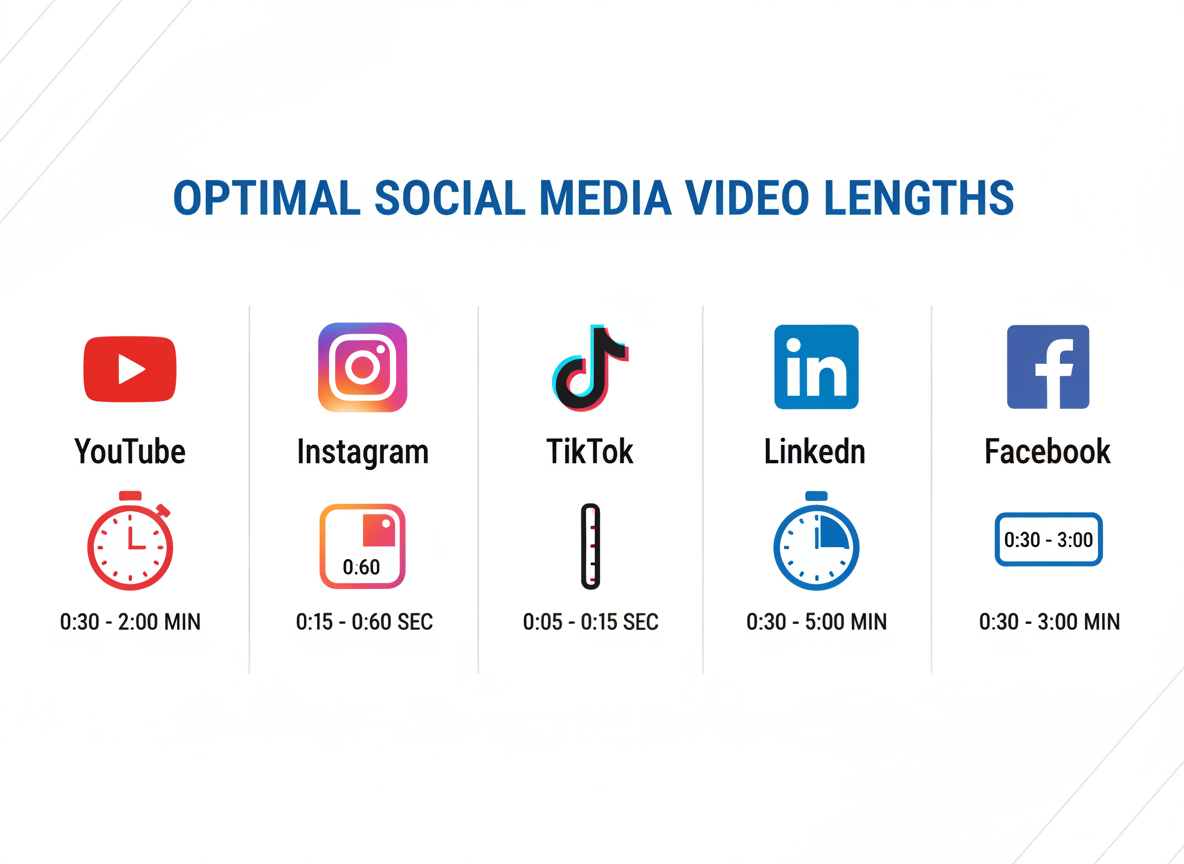
Getting your script length right matters more than you’d think. Here’s what works on each platform:
YouTube thrives on variety. Ads perform best at 60-90 seconds, tutorials hit their stride between 8-12 minutes, and deep dives can run 15-20+ minutes if you’ve got the substance to back it up.
Instagram Reels and TikTok demand brevity. You’re working with 15-60 seconds, which means every word counts. Hook them in three seconds or lose them forever.
LinkedIn viewers expect professionalism without fluff. Aim for 1-3 minutes that respect their time while delivering real value.
Facebook scripts work best at 1-2 minutes. People scroll quickly here, so grab attention fast and deliver your message before they move on.
Twitter/X requires ultra-short clips of 30-45 seconds. Think punchy, memorable, shareable.
Here’s your conversion cheat sheet: plan for roughly 150 words per minute of voiceover. A 2-minute video needs about 300 words. This pacing feels natural without rushing or dragging. Adjust slightly based on your speaking style, but this baseline keeps you on track.
15+ Complete Video Script Examples (Full Text Included)
Below, you’ll find over 15 ready-to-use video script examples organized by industry and purpose. Each template comes with complete dialogue, visual cues, scene descriptions, and timing markers—everything you need to start production immediately. We’ve formatted these scripts to mirror real-world production standards, so you can see exactly how professionals structure their work. You’re free to copy, download, and adapt any template to match your brand’s voice and specific goals. Simply swap in your details, adjust the messaging, and you’ve got a production-ready script in minutes instead of hours.
Example 1: Product Explainer Video Script (SaaS)
Here’s a complete 90-second explainer script for a fictional B2B productivity tool. Notice how the two-column format keeps visual and audio elements perfectly aligned.
| VISUAL | AUDIO | |————|———–| | [0:00-0:05]Quick cuts of frustrated office workers staring at screens, multiple browser tabs open | Ever feel like you’re drowning in tasks while your to-do list keeps growing? | | [0:06-0:15]Screen recording showing chaotic email inbox and scattered project management tools | Between emails, Slack messages, and three different project apps, your team’s productivity is scattered everywhere. | | [0:16-0:25]Logo reveal with smooth animation
Clean dashboard interface fades in | Meet FlowSync—the workspace that brings everything together in one intelligent platform. | | [0:26-0:40]Screen recording: Drag task from email directly into project board
Show automated workflow triggering | Capture tasks from any source, automate repetitive workflows, and watch your team’s efficiency soar. No more context switching. No more missed deadlines. | | [0:41-0:55]Split screen: Team collaboration features, real-time updates, analytics dashboard | Real-time collaboration keeps everyone aligned, while smart analytics show you exactly where time goes. | | [0:56-1:15]Customer testimonial clips (3-4 seconds each)
ROI statistics appearing on screen | Teams using FlowSync report 40% faster project completion and save an average of 12 hours per week. That’s time back for what actually matters. | | [1:16-1:30]CTA screen with prominent button
Website URL displayed | Ready to transform how your team works? Start your free 14-day trial—no credit card required. Visit flowsync.com today. |
This format works beautifully for B2B software demos. The problem-solution framework hooks viewers immediately, while the two-column layout ensures your production team knows exactly what happens when. Similar to how AI-powered blog content automation streamlines written content creation, this script structure removes guesswork from video production.
Example 2: Customer Testimonial Video Script
Nothing sells like a happy customer’s story. This 60-second testimonial script turns authentic experiences into trust-building content that converts.
[0-5s] Opening Hook VISUAL: Customer at home/workplace “I used to spend hours creating content that just… disappeared into the void.”
[6-20s] The Problem VISUAL: B-roll of frustrated work sessions “Between managing posts, tracking analytics, and trying to stay consistent, I was burning out fast.”
[21-40s] The Solution VISUAL: Product interface + customer using it “That’s when I found [Product Name]. Suddenly, I could automate my workflow without losing that personal touch.”
[41-50s] Emotional Peak VISUAL: Close-up of customer “Now I’m publishing 10x more content in half the time. It’s completely transformed my business.”
[51-60s] Endorsement VISUAL: Product logo + TEXT OVERLAY: “Try it free” “If you’re struggling with content, you need this in your life.”
Notice how the script guides both what’s said and what’s shown—that’s what makes testimonials feel professional rather than rushed.
Example 3: How-To Tutorial Video Script (YouTube)
This 8-minute YouTube tutorial script walks viewers through a specific skill step-by-step. Notice how it hooks attention immediately, then breaks the process into digestible chunks.
What makes this format work:
The script opens with a results-focused hook—showing the finished product before explaining how to get there. Chapter markers appear throughout (0:00, 1:45, 3:20, etc.) so viewers can jump to specific sections. Each step includes demonstration shot directions like “[SCREEN: Zoom into toolbar]” and on-screen text callouts that reinforce key points.
You’ll also see strategic placement of tips and warnings. These aren’t random—they anticipate where viewers typically get stuck or make mistakes. The script wraps with a quick recap that reinforces the main steps without re-teaching everything.
Content creators teaching anything from software tutorials to cooking techniques can adapt this structure. The timestamp planning ensures your editing stays organized, while the callout notes remind you which graphics or text overlays to create. This format respects your viewer’s time while building your authority as an instructor.
Example 4: Brand Story Video Script
A brand story video connects emotionally with viewers by sharing your company’s journey. This 2-minute script example follows a proven storytelling arc: origin, challenge, transformation, and mission.
Sample Brand Story Script:
“` [FADE IN: Soft piano music]
[Close-up: Founder’s hands sketching at a desk]
VOICEOVER (warm, reflective): “Five years ago, I was drowning in spreadsheets…”
[VISUAL: Calendar pages flipping, clock ticking]
“…watching competitors move faster while I struggled to keep up.”
[MUSIC SWELLS]
[VISUAL: Team collaboration, lightbulb moment]
“That’s when everything changed. We built the solution we desperately needed.”
[VISUAL: Customers smiling, products in action]
“Today, we help 10,000+ businesses tell their stories without the struggle.”
[FADE OUT] “`
Notice the minimal on-screen text and strong visual directions. This format works beautifully for company About pages or social media awareness campaigns where you’re building trust before selling anything.
Example 5: Product Launch Video Script
Duration: 90 seconds Tone: High-energy, exciting Platform: Website, social media, email campaigns
“` [VISUAL: Black screen, clock ticking sound effect]
VOICEOVER (whispering): “Three… two… one…”
[VISUAL: Explosive reveal with product logo animation]
VOICEOVER (energetic): “It’s here! The tool over 10,000 marketers have been waiting for.”
[VISUAL: Quick cuts of product interface, fast-paced music]
VOICEOVER: “Meet [Product Name] – content creation that finally keeps up with YOU.”
[VISUAL: Feature callouts appearing on screen]
-
AI-powered templates (0.5 sec hold)
-
100+ language support (0.5 sec hold)
-
Real-time collaboration (0.5 sec hold)
VOICEOVER: “Sarah from Denver cut her content time by 70%. Marcus in London? He’s scaling three clients effortlessly.”
[VISUAL: Customer testimonial quotes flash on screen]
[EDIT NOTE: Speed ramp here – slow motion on CTA button]
VOICEOVER: “Launch special ends Friday. Grab your spot now.”
[VISUAL: CTA button pulses, countdown timer appears]
[END CARD: Logo, website URL, “Limited spots available”] “`
Example 6: Instagram Reel/TikTok Script (30 seconds)
Short-form vertical videos demand precision. Every second counts when you’ve got just 30 to capture attention and deliver value.
VISUAL: Close-up, energetic opener
[0-2 sec] Text overlay: “Your IG Reels SUCK and here’s why…” Jump cut to face, intense eye contact.
[3-10 sec] You’re burying the hook. Stop with the 8-second intros—nobody’s waiting around. Pattern interrupt: snap fingers
[11-20 sec] Hook first. Value second. CTA third. That’s it. Quick B-roll montage showing examples
[21-27 sec] Your best content deserves better formatting. Learn the framework that got me 2.3M views last month.
[28-30 sec] Text overlay: “Link in bio” Smirk and point up.
ON-SCREEN TEXT NOTES: Use trending audio. Add captions for 85% of viewers who watch muted. Three jump cuts minimum.
Example 7: LinkedIn Thought Leadership Video Script
LinkedIn audiences crave authentic expertise, not sales pitches. This 2-minute script positions you as an industry voice while building genuine credibility.
Script Structure:
OPENING (0:00-0:15) “Here’s what nobody tells you about [industry challenge]…”
MAIN INSIGHT (0:15-1:30) Share one counterintuitive perspective backed by real experience. Use “I’ve noticed” rather than “Studies show” to keep it personal. Break down complex ideas into three digestible points.
CALL TO REFLECTION (1:30-2:00) “Think about your own situation. Does this resonate?”
Format Notes:
-
Direct-to-camera from a professional setting
-
Minimal graphics—maybe one key stat overlaid
-
Conversational pacing with natural pauses
-
No background music needed
This format works because B2B decision-makers want substance over flash. They’re evaluating whether you understand their world, not whether you can entertain them.
Example 8: Animated Explainer Video Script
Animated explainer videos transform abstract ideas into clear, memorable stories. This 90-second script shows how to break down complex concepts for your animation team.
The secret? Think in scenes, not just words. Each section of your script should specify what viewers see alongside what they hear. Include character actions, transitions, and visual metaphors that bring your message to life.
Here’s the structure: Start with a relatable problem (Scene 1: Character struggling at desk), introduce your solution (Scene 2: Light bulb moment with product reveal), demonstrate how it works (Scenes 3-5: Step-by-step visual walkthrough), and close with the transformation (Scene 6: Character celebrating success).
Your visual descriptions matter just as much as dialogue. Instead of “Sarah uses the software,” write “Sarah taps tablet screen. Icons fly from device into cloud above her head, organizing into neat rows.”
Keep language simple and punchy. Animation handles the complexity—your script provides clarity and direction that makes the animator’s job easier while keeping viewers engaged from frame one to final call-to-action.
Example 9: Educational Series Episode Script
Educational series need structure that viewers can rely on. This example shows how consistency builds loyal audiences.
Opening (0:00-0:30): Start with your signature intro—same music, same greeting, same brief recap of the series theme. “Welcome back to Marketing Fundamentals. I’m Sarah, and this is episode four.”
Hook (0:30-1:00): Preview today’s specific lesson. “Today, we’re breaking down email subject lines that actually get opened.”
Main Teaching (1:00-4:00): Present your core concept with three practical examples. Walk through each one, showing why it works. “Notice how this subject line creates curiosity without being clickbait.”
Application (4:00-4:30): Give viewers a simple action step they can take immediately.
Closing (4:30-5:00): Tease next week’s topic to keep them coming back. “Next episode, we’ll tackle the body copy that converts.”
This format works beautifully for content creators building educational channels or course material. The predictable structure lets viewers focus on learning, not figuring out your format.
Example 10: E-commerce Product Showcase Script
E-commerce videos need to sell fast. This 45-second script balances product features with lifestyle appeal, perfect for social media ads or your product pages.
[0-8 seconds] Hook with the problem or desire: “Tired of bulky water bottles that leak in your bag?” Show the frustration visually.
[9-20 seconds] Introduce your product with key features: “Meet the SlimFlow—the ultra-thin insulated bottle that keeps drinks cold for 24 hours.” Demonstrate its slim profile fitting into bags.
[21-35 seconds] Show multiple use cases: gym, office desk, hiking trail. Connect features to benefits: “Double-wall insulation means no condensation on your desk. The leak-proof cap? Tested to survive a tumbling backpack.”
[36-42 seconds] Price and offer: “Just $29.95 with free shipping this week.”
[43-45 seconds] Clear CTA: “Shop now—link in bio.” The feature-benefit structure keeps viewers engaged while building genuine desire for your product.
Additional Script Templates by Industry & Funnel Stage
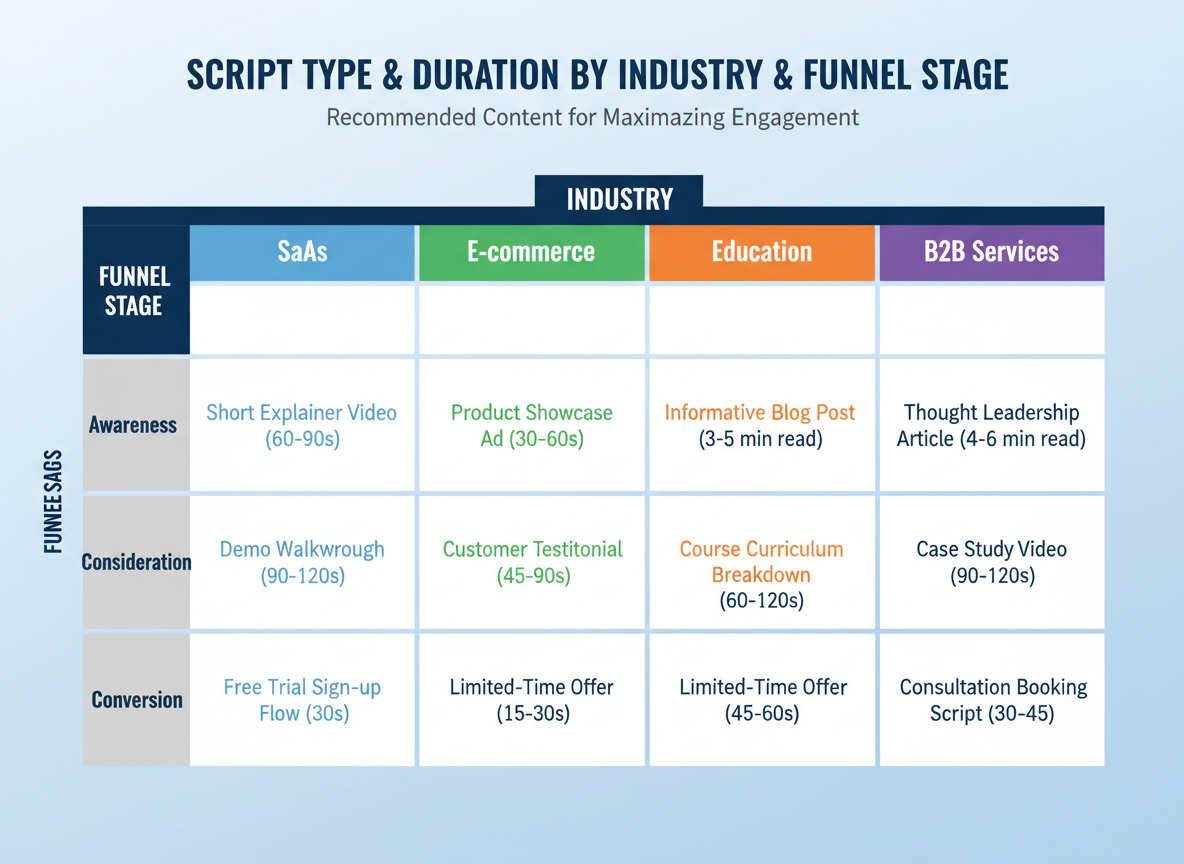
Here’s how different industries and funnel stages shape your script approach:
B2B Services (SaaS, Consulting): Lead with ROI and efficiency. “Your sales team spends 14 hours weekly on manual data entry. Here’s how automation saves you $84K annually.”
Education/Coaching: Focus on transformation stories. “Meet Sarah, who went from struggling freelancer to six-figure business owner in 18 months using this exact framework.”
Non-Profit: Emotion-first, impact-second. “This is Marcus. Three months ago, he didn’t know where his next meal would come from. Your $20 donation changed everything.”
Real Estate: Visual-driven with urgency. “This three-bedroom just dropped $50K. Let me show you why it won’t last through the weekend.”
Healthcare: Trust-building with credibility markers. “Dr. Chen has performed over 2,000 successful procedures. Here’s what makes her approach different.”
Funnel-Specific Approaches:
-
Awareness: Problem-agitation. “Struggling with low engagement? You’re not alone—78% of creators face this.”
-
Consideration: Feature comparison. “Unlike traditional methods, this approach delivers results in half the time.”
-
Conversion: Clear CTA with urgency. “Join 5,000+ marketers. Offer ends Friday.”
Match your template to where viewers are in their journey.
Before & After: Transforming Weak Scripts Into High-Performers
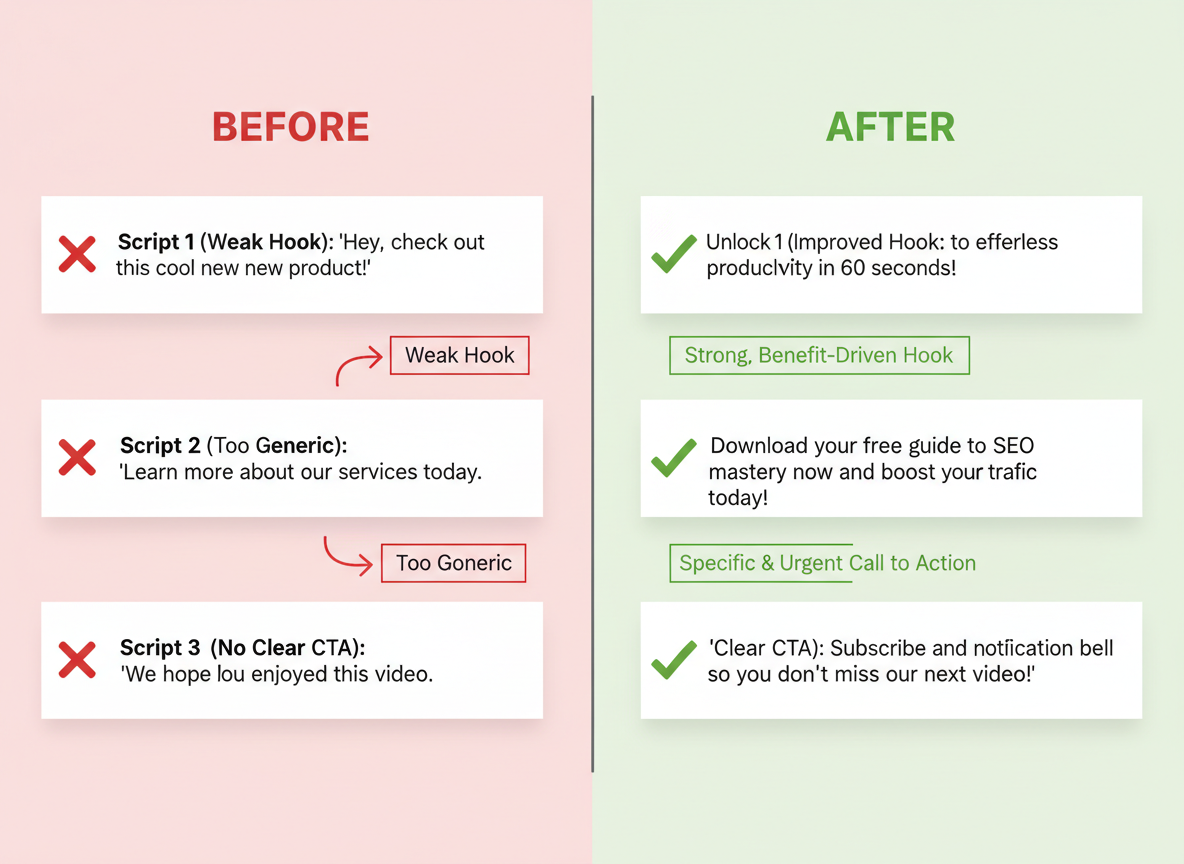
Let’s look at three real transformations that turned underperforming scripts into engagement machines.
Example 1: The Hook
Before: “In this video, we’re going to talk about email marketing tips.”
After: “Your emails are getting ignored. Here’s why—and how to fix it in the next 60 seconds.”
What changed: We ditched the announcement and created a pattern interrupt that addresses pain immediately. Specificity (“60 seconds”) triggers curiosity.
Example 2: The Body
Before: “Our software has advanced automation features, detailed analytics, and integrations.”
After: “Remember spending three hours manually sending follow-ups? You’ll never do that again. One click schedules your entire sequence while you sleep.”
What changed: We swapped features for emotional benefits. The storytelling creates a clear before/after in the viewer’s mind.
Example 3: The CTA
Before: “Click the link below to learn more.”
After: “Start your free trial now—no credit card needed. Your first campaign goes live in 5 minutes.”
What changed: We added urgency, removed friction, and painted a specific outcome. The CTA became an invitation, not homework.
Writing for Different Brand Voices & Tones
Your brand voice shapes how viewers connect with your content. Let’s look at how the same product announcement script transforms across three distinct tones:
Professional/Corporate: “We’re pleased to introduce our enhanced analytics dashboard, designed to streamline your reporting workflows and deliver actionable insights.”
Casual/Friendly: “Hey! We just launched something you’re gonna love—a redesigned analytics dashboard that makes reporting actually enjoyable.”
Bold/Edgy: “Tired of clunky analytics? We torched the old dashboard and built something that doesn’t suck.”
Each version maintains the core message while speaking to different audiences. Professional scripts lean on industry terminology and measured phrasing. Casual approaches use contractions, direct address, and everyday language. Bold tones break conventions with provocative questions and punchy declarations.
Here’s the balance: stay true to your brand while respecting platform expectations. A playful TikTok brand might dial down the humor slightly for LinkedIn without losing personality entirely. The structure remains consistent—your voice provides the flavor.
Tools & Resources for Video Scriptwriting
You don’t need fancy software to write great scripts. Google Docs works perfectly for most creators—it’s free, collaborative, and you probably already know how to use it. If you’re organizing multiple projects, Notion offers flexible templates that let you track scripts, production notes, and approval stages in one place.
That said, specialized tools can speed things up. AI writing assistants help generate first drafts and refine dialogue when you’re stuck. They won’t replace your creative voice, but they’ll save hours on structure and formatting. Look for tools that let you export in industry-standard formats.
When you’re working with a team, collaboration platforms become essential. Real-time editing, comment threads, and version control prevent the nightmare of “final_final_v3_FINAL.docx” scattered across email chains.
For scaled production, Content Gorilla handles the heavy lifting. It creates complete video scripts and content automatically, similar to how it powers AI-powered blog content automation. You’ll spend less time formatting and more time refining your message.
Download free templates whenever possible—they’re great starting points that you can customize to match your brand’s voice and workflow.
Common Video Scriptwriting Mistakes to Avoid
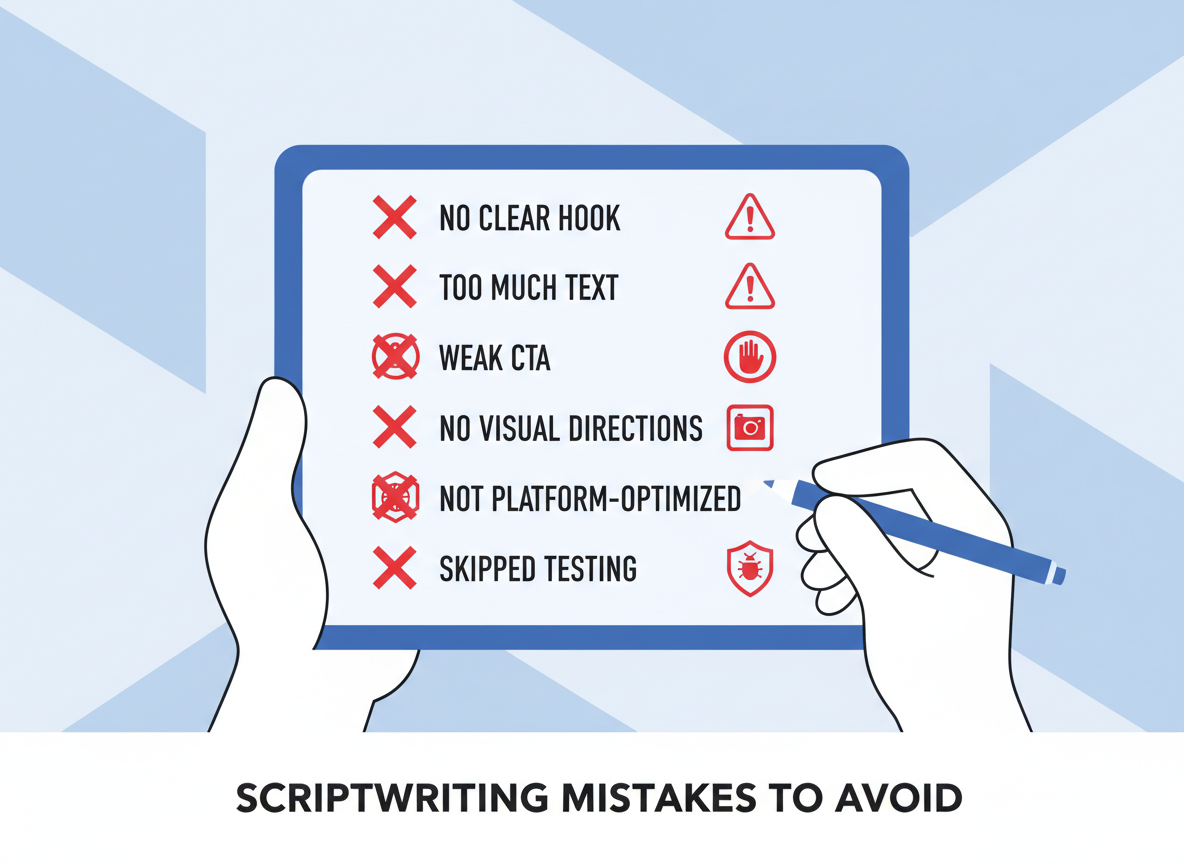
Even experienced creators stumble into these traps. Starting without defining your objective and audience is like driving without a destination—you’ll wander aimlessly. Know who you’re talking to and what you want them to do.
Pacing problems kill otherwise solid scripts. If you’re cramming 500 words into a 60-second video, your narrator will sound like an auctioneer. Read your script aloud and time it. You need about 130-150 words per minute for natural delivery.
Don’t bury your hook. Those first five seconds determine whether viewers stick around or scroll past. Your value proposition belongs upfront, not halfway through.
Write for the ear, not the eye. Formal, written language sounds robotic when spoken. Use contractions. Break up complex sentences. If you wouldn’t say it in conversation, rewrite it.
Many scripts neglect visual directions entirely, leaving editors guessing. Your script should include B-roll suggestions, on-screen text, and transitions—not just dialogue.
Finally, skipping the read-aloud test is a rookie mistake. What looks perfect on paper often sounds clunky when spoken. Record yourself reading it. You’ll catch awkward phrasing and breathing issues immediately.
And don’t forget your call-to-action. Viewers won’t take the next step unless you tell them what it is.
Writing Scripts for Accessibility & Inclusion
Your script needs to work for everyone, not just viewers who can see and hear perfectly. Start by avoiding wordplay or idioms that won’t make sense in captions—phrases like “seeing eye to eye” create barriers for screen readers and translators.
Build in descriptive audio cues right from the start. Instead of “Click here,” write “Select the blue Subscribe button in the lower right corner.” This helps visually impaired viewers follow along without missing key actions.
Use clear, straightforward language that serves different comprehension levels. Break complex ideas into digestible chunks, and include real-world examples that represent diverse perspectives and experiences.
On the technical side, format your captions with proper punctuation and speaker labels. Plan for audio description tracks in your timeline, leaving brief pauses where descriptions can fit naturally.
Most regions require accessibility compliance for business content—but even when it’s optional, inclusive scripts expand your reach and show your audience you’re thinking about their needs.
Script Collaboration & Approval Workflows
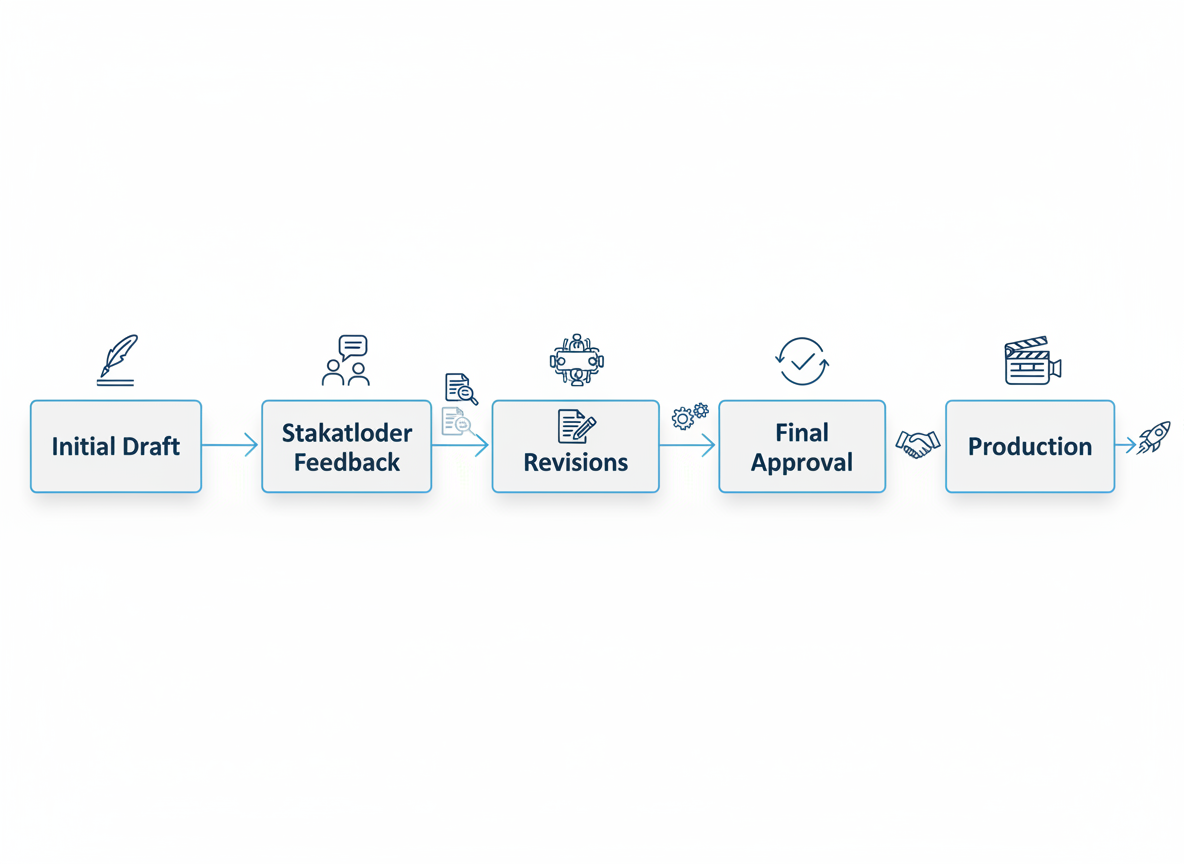
Your script’s only as good as the approval process it survives. Here’s what works: move through four clear stages—draft, internal review, stakeholder approval, and final production version. Google Docs excels for real-time collaboration, while tools like Frame.io handle video-specific annotations. The secret? Never let too many voices edit simultaneously. Instead, designate one script owner who filters feedback and prevents the “too many cooks” disaster.
Version numbering saves headaches. Use formats like “ProductLaunch_v1.2_March15” so everyone knows which draft they’re reviewing. Document what changed between versions in a simple changelog at the top of your script.
Set approval deadlines upfront—stakeholders who know they have 48 hours respond faster than those with open-ended timelines. Create a feedback template that asks reviewers to mark changes as “must fix” or “nice to have.” This prevents your script from drowning in conflicting opinions about comma placement when launch day’s approaching.
Measuring Video Script Performance & Iteration
Your script’s real test happens after you hit publish. Watch time tells you if people actually stick around, while drop-off points reveal exactly where they bail. If 60% of viewers disappear at the two-minute mark, something’s broken there—maybe your middle section drags or loses focus.
Track engagement rate (likes, shares, comments) and conversion rate to see if viewers take action. Analytics tools show these patterns clearly, but don’t ignore the comments section. Sometimes a viewer’s offhand remark explains more than a dozen charts.
A/B test different hooks with the same content, or try various CTA placements. You’ll discover that what works on YouTube might flop on LinkedIn. Save your winners in a script library—categorize by platform, objective, and performance. Over time, you’ll spot trends. Short-form scripts might crush on TikTok while longer storytelling formats dominate YouTube.
The data doesn’t lie, but it needs your interpretation. When a script performs well, reverse-engineer why. That’s how you build a repeatable system.
Legal Considerations for Video Scripts
Before you hit publish, there’s some housekeeping to handle. If you’re creating sponsored content or including affiliate links, you’ll need clear disclosures—usually within the first few seconds of your video. The FTC doesn’t mess around with this stuff.
Copyright gets tricky fast. That trending song you love? You’ll need proper licensing. Referencing someone else’s content requires fair use consideration or permission. When making product claims or featuring testimonials, you’d better have the data to back them up.
Platform-specific rules matter too. YouTube has different requirements than TikTok or Instagram. If you’re featuring customers or employees, you’ll need their consent in writing. Trademark usage follows specific guidelines—don’t slap a brand’s logo in your thumbnail without permission.
Here’s the mandatory disclaimer: this isn’t legal advice. Every situation’s different, and regulations vary by country and industry. When in doubt, consult an actual attorney who specializes in digital media. It’ll save you headaches later.
From Script to Published Video: Next Steps
You’ve now got access to 15+ proven script examples across every major video format. That’s powerful. But here’s what separates creators who succeed from those who stay stuck: they pick 2-3 templates that match their immediate goals and actually use them.
Don’t chase perfection. Your first script won’t be your best—and that’s completely fine. Testing beats theorizing every time. Yes, crafting quality scripts takes time upfront, but each one becomes easier as you develop your own rhythm and voice.
Here’s where things get interesting. Once you’ve nailed your scripts, Content Gorilla handles the heavy lifting. We’re talking 3-click conversion from script to published video, with autopilot publishing across YouTube, TikTok, Instagram, and more platforms simultaneously. No more manual uploads or reformatting headaches.
Ready to scale your video strategy without burning out? Download our full template collection and start your free trial to see how multi-platform publishing transforms scattered effort into systematic growth. Your scripts deserve an audience—let’s get them seen.
Frequently Asked Questions
How long should a video script be?
It depends on your platform. For YouTube, aim for 130-150 words per minute of video. Instagram Reels and TikTok work best at 60-90 seconds (roughly 150-200 words). LinkedIn videos perform well at 1-3 minutes (200-450 words). Facebook tolerates longer content, but engagement drops after 2 minutes.
What’s the difference between a two-column script and a screenplay format?
Two-column scripts separate audio and visual elements side-by-side—perfect for tutorials, ads, and corporate videos where production teams need clear direction. Screenplay format flows like a story, ideal for narratives, vlogs, and presentations where you’re primarily focused on what you’ll say.
Do I need a script for short social media videos?
For 15-30 second clips, bullet points usually work fine if you’re experienced. But if you’re testing hooks or need precise messaging for ads, write it out. Scripts prevent rambling and help you nail your call-to-action.
How can I make my video script more engaging?
Start with a pattern interrupt—ask a provocative question, share a surprising stat, or address a pain point directly. Vary your pacing (short punchy sentences, then longer explanatory ones). Use the “hero’s journey” structure even in short videos: problem → solution → transformation.
What tools can help me write video scripts faster?
Templates save hours. Start with proven frameworks, then customize. You’ll find specific structures for different video types already work—no need to reinvent the wheel each time.
Should I write word-for-word scripts or bullet points?
New presenters benefit from full scripts. They build confidence and ensure nothing’s forgotten. Experienced hosts often prefer bullets for authenticity. Match your approach to your comfort level and video type—ads need precision, vlogs thrive on spontaneity.
How do I write scripts for videos in multiple languages?
Translation isn’t just word-swapping. Cultural references, humor, and idioms need adaptation. Work with native speakers who understand your target market. Keep sentences shorter in your original script—they’re easier to translate accurately.
Can I use these script examples for commercial purposes?
Absolutely. These templates exist to adapt, not copy verbatim. Make them yours by adding your voice, examples, and brand personality. The structure’s the starting point; your unique perspective makes it valuable.
How often should I update my video scripts?
Evergreen content stays relevant for years with minor tweaks. Timely content expires fast—refresh quarterly or when stats/examples become outdated. If a video still drives results, leave it alone.

I am a full-time online marketer, for over a decade now. Helped over 100,000+ people & generated well over $12M in online sales.